Swiipe
Ubivox
Sync Data
Automatically sync Audiences to Ubivox so your lists are always up to date. This guide walks you through setting up the integration and syncing your Audiences.
Clerk never pushes new email addresses to Ubivox. We update existing contacts and lists, based on email addresses already in the platform.
Get authentication details #
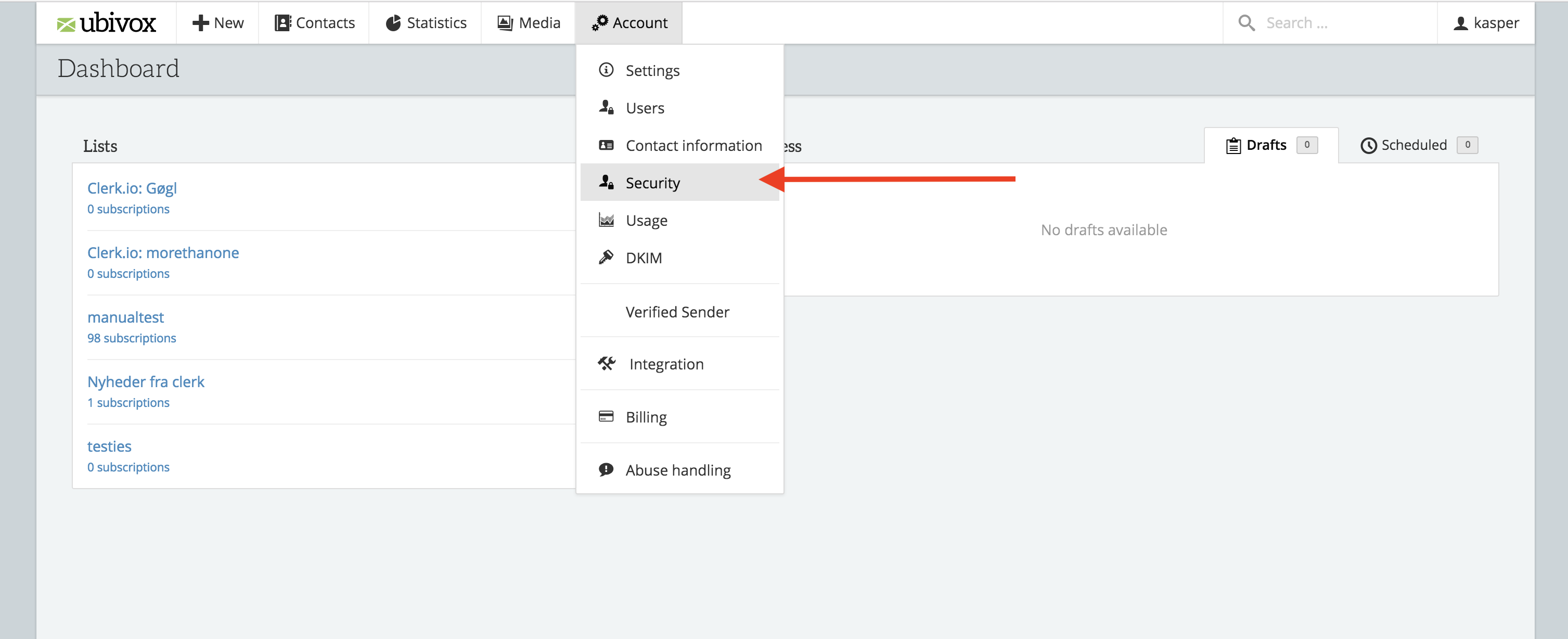
- In the Ubivox backend start by going to Account -> Security

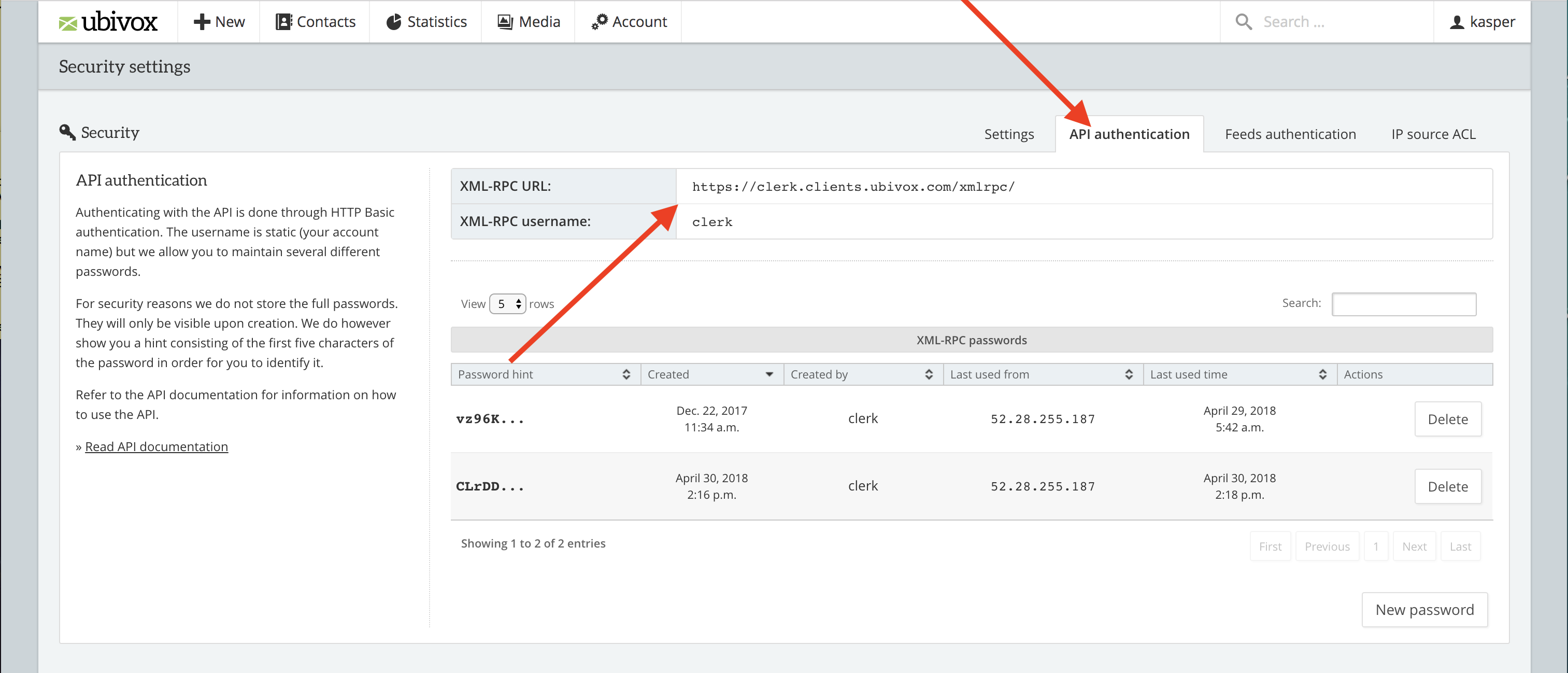
- Click API Authentication to see the first two necessary fields.

Copy the details to a text file or as a note. You will need them later.
...
Umbraco
Woocommerce
Filters

Filter interface #
Filters can be used for each Content to narrow down results based on your product-attributes.
You will locate this option in each Content you create for Recommendations, Search or Email, under Content type > Product filters.
Each part of the filter consists of the following:
- An attribute to filter by
- A comparison deciding how the attribute should be compared to the value
- A value deciding what the attribute should be compared to
You can create filters based on any product attributes you send to Clerk. The available comparison operators depend on the type of attribute you filter by.
...DanDomain
DanDomain Classic
Glossary
Clerk.io has a lot of moving parts. This glossary covers the core concepts across the platform — from data objects to design templates to tracking mechanics — so you always know what you are working with.
Terms are sorted alphabetically. Each entry links to the full article where you can go deeper.
| Term | Description | Learn more |
|---|---|---|
| Accessories | A feature for declaring which items belong together, used to steer the AI toward specific complementary pairings. | Recommendations |
| Actionable Searches | A Search Analytics section surfacing Non-Converting and No Results queries with suggested fixes like adding synonyms or pinning products. | Search Analytics |
| AI Chat | Clerk.io’s conversational assistant that answers customer questions using your storefront data, product catalogue, and content. | Chat |
| AI layer | The second of four processing layers, where Clerk.io’s AI uses connections across synced data to predict result rankings for each endpoint. | Data Foundation |
| AI Modifier | A Modifier created by describing the desired data transformation in plain language; Clerk.io generates a read-only Python rule from the description. | Modifiers |
| Anonymous session | A short-lived visitor identifier derived from a hashed combination of IP address, user agent, and a rotating store salt — no cookie required. | Cookieless Solution |
| Ask Clerk.io | An in-dashboard AI agent that reads your store’s configuration and can propose changes you review and approve before they are applied. | Ask Clerk.io |
| Attribute Search Relevance | A Search Configuration section that defines which product attributes are included in the search index and how much weight each carries in ranking. | Search Configuration |
| Audience | Clerk.io’s customer segmentation product that predicts purchase intent, lifecycle stage, and value from order and behaviour data. | Audience |
| Best Alternative Products | Recommendation logic surfacing the most similar substitute products for the item a visitor is currently viewing. | Product Logics |
| Best Cross-Sell Products | Recommendation logic suggesting complementary items based on patterns of what other customers bought alongside a given product. | Product Logics |
| Best Sellers | Recommendation logic ranking products by total order volume over time. | Product Logics |
| Categories Search | The search/categories endpoint returning category matches ordered by popularity, used in Instant Search and Omnisearch results. | Search Logics |
| Category | A data object that groups products together. Categories are required by Alternatives logics and all category-based recommendation strategies. | Data Foundation |
| Clerk-influenced order | An order where at least one purchased product was clicked via a Clerk.io element during the same session. Used to measure attribution. | Measuring Impact |
| Clerk.js | Clerk.io’s frontend JavaScript library that renders elements, handles visitor tracking, and powers the UI kit for search and recommendations. | Clerk.js |
| Code Design | A Design edited directly as HTML, CSS, and Liquid rather than exclusively through the visual Design Editor. | Designs |
| Component | A reusable sub-design referenced inside a parent Design. Components cannot be selected directly as an Element’s design. | Designs |
| Content Recommendations | Recommendation logics that surface products related to a blog or article page, and content pages related to a product or category. | Content Recommendations |
| Cookieless mode | Clerk.io’s default privacy approach, which identifies visitors through anonymized session hashing rather than browser cookies. | Cookieless Solution |
| CRUD API | REST-style endpoints for creating, reading, updating, and deleting synced objects such as products, orders, and customers on demand. | API |
| Custom dictionary | A list of terms — such as brand acronyms or stylized product names — that Clerk.io treats as single tokens instead of splitting them during indexing. | Search Configuration |
| Customer | An optional data object (id or email plus attributes) that enables Audience segmentation and CDP-style features. | Data Foundation |
| Customization Settings | Per-store feature toggles in my.clerk.io for enabling or disabling capabilities like Rules, Synonyms, Redirects, and Merchandising. | Stores |
| Data feed | A JSON catalogue URL that the Clerk.io importer can consume alongside or instead of live CRUD API calls. | API |
| Data Health | A dashboard of green, yellow, and red checks that surface data quality issues likely to affect search and recommendation performance. | Data Health |
| Data layer | The first of four processing layers, containing raw product, order, and customer attributes before any AI or merchandising processing runs. | Data Foundation |
| Data sync | A scheduled or manual import of products, categories, orders, customers, and pages from the webshop or an external feed. | Data Sync |
| Debug Dashboard | The Developers > Debug tool for building and testing API requests against live store data and inspecting result diagnostics. | Stores |
| Demo Data | A sync method that loads a predefined Clerk.io dataset for testing the dashboard without connecting a live webshop. | Data Sync |
| Design | An HTML, CSS, and Liquid (or visual) template that controls how Clerk.io renders Search, Recommendations, Email, or Omnisearch results. | Designs |
| Design Editor | The visual tool in my.clerk.io for building and editing Designs without writing code directly. | Designs |
| Developer Logs | The Developers > Logs view showing real-time API requests, errors, and warnings for a store. | Stores |
| Dynamic Filters | Embed-code-level filters that resolve at request time using variables from the current storefront context. | Recommendations |
| Early Access | An opt-in programme for trying beta features before they reach general release. | Stores |
| Element | A configurable block that combines a Product Logic, a Design, and an embed code or injection rule to render Clerk.io content on a page. | Website Elements |
| Email Embeds | HTML snippets that pull a Clerk.io Product Logic into third-party ESP newsletters for personalised product recommendations. | |
| Email Triggers | Automated emails sent in response to behavioural events such as an abandoned session, abandoned cart, or completed order. | Email Campaigns |
| Embed code | A <span class="clerk"> snippet with data-* attributes placed in storefront HTML that Clerk.js picks up and renders. | Clerk.js |
| Empty State Logic | The Omnisearch setting that controls which products or content appear before the visitor has typed a query. | Omnisearch |
| Exact Match Behaviour | A Search Configuration option controlling how SKU or EAN-style attributes are matched — for example, single-value exact match with autocorrection disabled. | Search Configuration |
| Expected Additional Revenue | A dashboard block estimating the extra revenue attributable to Clerk.io based on influenced order volume and average order value lift. | Measuring Impact |
| Exporters | Integrations that push Audience segments to external platforms such as Klaviyo, Meta, or Google Ads for use in paid campaigns. | Ask Clerk.io |
| Facets | Attribute-based filters — such as price range, brand, or size — that let visitors narrow search or category results. | Search Facets |
| Filterable attributes | Product attributes configured in Search Settings to appear as facet filter options in search and category results. | Search Configuration |
| Forgetting (GDPR) | The process of removing personal data from a customer profile while anonymizing any retained order records to comply with GDPR right-to-erasure requests. | GDPR |
| Growth Advisor | An expert session booked through the dashboard when a store’s performance falls below benchmark thresholds shown in the Performance Comparison. | Measuring Impact |
| Hot Products | Recommendation logic surfacing products with a recent spike in purchases, often labelled as trending items. | Product Logics |
| Importance | An automatic Audience score that places each customer on a value axis based on their behaviour compared to similar customers in the store. | Audience |
| Injection | A Clerk.js feature that inserts an Element into the DOM using CSS selectors, without requiring a snippet to be added in the storefront template. | Website Elements |
| Instant Search | A live dropdown that appears while a visitor types, blending products, categories, and pages into a single real-time result set. | Search |
| Intelligent Filtering | A Merchandising feature that uses keyword or attribute filters to dynamically include only matching products in a campaign. | Merchandising |
| Knowledge Graph | Clerk.io’s internal data structure connecting products, categories, orders, and optionally customers to power AI predictions. | Cookieless Solution |
| Labels | Strings attached to API calls or embed codes to identify which surface triggered a request, used for analytics and sales attribution. | Sales Tracking |
| Life Cycle | An automatic Audience score that places each customer on a lifecycle axis — from active to slipping away to lost — based on purchase behaviour. | Audience |
| Live-Search | The search/predictive endpoint that powers auto-complete, ranking suggestions by predicted conversion likelihood. | Search Logics |
| log/click | The API endpoint that records a visitor clicking a Clerk.io-served product, used to build the attribution chain toward a sale. | Sales Tracking |
| log/sale | The API endpoint that records a completed order and links it to a Visitor ID and any prior click events for revenue attribution. | Sales Tracking |
| Merchandising | A cross-surface set of tools for influencing result rankings through campaigns, triggers, and position rules. | Merchandising |
| Merchandising campaign | A named configuration combining a schedule, one or more triggers, a product selection, and sorting or pinning rules. | Campaigns |
| Merchandising layer | The third of four processing layers, where active campaigns can boost, bury, or pin products before results are returned. | Data Foundation |
| Modifiers | Post-sync rules that transform product attributes inside Clerk.io without altering the original data feed or webshop data. | Modifiers |
| Most Sold With | Recommendation logic based on direct co-purchase pairs, without the broader prediction used by the cross-sell logic. | Product Logics |
| Newest Products | Recommendation logic ordered by the created_at date of products in the catalogue, surfacing the most recently added items. | Product Logics |
| Newsletters | Scheduled or one-off marketing emails created, sent, and tracked inside Clerk.io Email. | Email Campaigns |
| Omnisearch | A full-screen search overlay that combines live typing results, facets, categories, pages, and query suggestions in one experience. | Omnisearch |
| Order | A data object recording a purchase with id, products, and time. Orders are the primary input for AI ranking, attribution, and Audience predictions. | Data Foundation |
| Page | An optional content entity — such as a blog post or article — that can appear in search results and content recommendations. | Data Foundation |
| Page Context | A Clerk.js call that passes the ID of the currently viewed product, category, or page to improve personalization across elements on that page. | Clerk.js |
| Parcel | A delivery-tracking entity linked to an Order, containing a tracking code, carrier status, status details, and a tracking link. | Data Foundation |
| Performance Comparison | A dashboard table benchmarking a store’s conversion rate, average order value, and basket size against other Clerk.io customers. | Measuring Impact |
| Powerstep | The intermediate step shown after a shopper adds an item to cart — typically a pop-up, side cart, or interstitial page — where cross-sell recommendations are placed. | Recommendations Best Practices |
| Preview mode | A URL flag (clerk_content_mode=preview) that makes preview-only Elements visible on the storefront without affecting live visitors. | Omnisearch |
| Privacy mode: Custom | A privacy setting where you supply your own visitor ID string, for integration with first-party identity or consent management tools. | Cookieless Solution |
| Privacy mode: Default | The standard Clerk.js cookieless mode, using anonymous session hashing for tracking without storing persistent identifiers. | Cookieless Solution |
| Privacy mode: Persistent | A privacy mode that stores a stable clerk-visitor-id in localStorage after visitor consent, enabling longer attribution windows. | Cookieless Solution |
| Privacy mode: Private | A privacy mode that collects no visitor data, disabling all visitor-dependent features and Clerk.io revenue attribution. | Cookieless Solution |
| Product | The core catalogue entity, with mandatory fields including id, name, price, categories, created_at, image, and url. | Data Foundation |
| Product layer | The fourth and final processing layer, where Clerk.io’s API assembles the result list that is returned to the shopper. | Data Foundation |
| Product Logics | Named recommendation or search strategies — such as Best Sellers or Visitor Recommendations — that back each Clerk.io Element. | Product Logics |
| Public / Private API key | A pair of credentials where the public key is used for front-end result requests and the private key is used for data management operations. | API |
| Realtime updates | Incremental syncs applied via CRUD API or platform integrations, so small catalogue changes are reflected without waiting for a full data sync. | Data Sync |
| Recommendations | On-site product suggestions powered by Clerk.io’s AI, displayed in sliders, category page grids, or content banners. | Recommendations |
| Redirects | Rules that map exact or pattern-matching queries to a destination URL, returned in the search API response instead of results. | Redirects |
| Sales tracking | The end-to-end setup that links Labels, click events (log/click), and order events (log/sale) so Clerk.io can attribute revenue to specific elements. | Sales Tracking |
| Scopes | A Merchandising Campaign setting that controls whether a campaign runs on a single store, a defined set of stores, or the entire account. | Merchandising |
| Search | Clerk.io’s AI-powered site search, covering instant search dropdowns, full search pages, and the Omnisearch overlay. | Search |
| Search Insights | The Search Analytics dashboard for monitoring search behaviour, top queries, no-results rates, and actionable improvement opportunities. | Search Analytics |
| Search Page | A full-page search results layout with deeper faceting, sorting controls, and browsing capabilities beyond the instant dropdown. | Search |
| Search Rules | Query-specific overrides that pin, include, or exclude particular result types — products, categories, pages, or suggestions — for chosen queries. | Search Rules |
| Semantic Search | A natural-language fallback that interprets shopper intent and returns relevant results even when the query does not exactly match product text. | Search |
| Sender Domain | DNS records configured in Clerk.io Email so that campaigns are delivered from the merchant’s own domain rather than a shared Clerk.io address. | Email Campaigns |
| Session | A single continuous visit to a store, used to group a visitor’s clicks and browsing activity under one Visitor ID. | Cookieless Solution |
| Sliders | Recommendation carousels embedded on product pages, category pages, homepages, or other storefront locations. | Recommendations |
| Smart Campaigns | Merchandising campaigns that combine scheduling, triggers, and rules to run automatically — no manual intervention required once configured. | Merchandising |
| Snippet | A <span class="clerk"> element with data-* attributes that Clerk.js scans on page load and converts into API calls. | Clerk.js |
| Store | An isolated Clerk.io tenant — typically one per domain — accessed via its own set of API keys and with its own data, settings, and elements. | API |
| Sub-Processor | A third-party service used by Clerk.io that stores or processes merchant data. Active sub-processors are listed per feature in the GDPR Dashboard. | GDPR |
| Subscriber | A contact record with subscribed: true that is eligible to receive Clerk.io email campaigns. | Email Subscribers |
| Subscriber List | A named opt-in list used to segment subscribers for targeted email campaigns in Clerk.io Email. | Email Subscribers |
| Synonyms | Rules that treat different words as equivalent so they return the same search results without affecting ranking logic. | Synonyms |
| Tracked vs Synced orders | The distinction between orders recorded in real time via log/sale on the storefront versus orders imported only through a data sync. | Measuring Impact |
| Trust Center | The public Clerk.io resource at trust.clerk.io covering privacy policies, subprocessors, and data management practices. | GDPR |
| Visitor / Visitor ID | The anonymous identifier that ties a shopper’s browsing session to their click history and eventual purchase for attribution purposes. | Visitor Log |
| Visitor Log | The Data > Visitors interface showing every API call made under a given Visitor ID, including inputs, outputs, labels, and metadata. | Visitor Log |
| Visitor Recommendations | Personalised product suggestions built from the current visitor’s recent browsing and click history within Clerk.io. | Product Logics |
| Website Elements | The section of my.clerk.io for configuring and managing all Search and Recommendation Elements that appear on the storefront. | Website Elements |