Get Clerk up and running on your ScanNet store in just a few steps. This guide walks you through connecting your store, installing tracking scripts, and syncing your data.
Connecting your store
#
After following these steps you will be able to see your Live Demo, which gives you a personal overview of how Clerk will work on your webshop before setting up the rest of the system.
Add store
#
After logging in to
my.clerk.io, the first thing you need to do is add your store:
...Get Clerk up and running on your Shopify store in just a few steps. This guide walks you through connecting your store, installing tracking, and syncing your data.
Connecting your store
#
The first step of installing Clerk is connecting your Store with your Clerk account.
After following these simple steps, you will be able to see your Live Demo Store, which gives you a personal overview of how Clerk will work on your webshop.
...Get Clerk up and running on your Shoporama webshop. This guide walks you through connecting your store, installing tracking scripts, and syncing your data.
For these steps you need to have both your my.clerk.io and your Shoporama accounts open.
Add store
#
After logging in to
my.clerk.io, the first thing you need to do is add your Store:
Write the Name and Domain of your online store.
Choose the Language and Currency, and Choose Shoporama as the Platform.
...
Connecting your Store
#
The first step of installing Clerk.io, is connecting your store with your
Clerk.io account.
The video belows shows you what to do, step-by-step. Use the rest of the guide as a reference :)
After following these simple steps you will be able to see your Live Demo Store, which gives you a personal overview of how
Clerk.io will work on your webshop. Reach out to your Clerk.io contact person to see the Live Demo.
...Get Clerk up and running on your SmartWeb Classic store in just a few steps. This guide walks you through connecting your store, installing tracking scripts, and syncing your data.
Connecting your store
#
The first step of installing Clerk is connecting your store with your Clerk account.
After following these simple steps you will be able to see your Demo Store, which gives you a personal overview of how Clerk will work on your webshop, before setting up the rest of the system.
...Get Clerk up and running on your SmartWeb store in just a few steps. This guide walks you through connecting your store, installing tracking scripts, and syncing your data.
Connecting your store
#
After following these steps you will be able to see your Live Demo, which gives you a personal overview of how Clerk will work on your webshop before setting up the rest of the system.
Add store
#
After logging in to
my.clerk.io, the first thing you need to do is add your store:
...Connecting your Store
#
The first step of installing Clerk.io is connecting your Umbraco store to your
Clerk.io account.
After following these simple steps, you will be able to see your Live Demo Store, which gives you a personal overview of how
Clerk.io will work on your webshop.
1. Add Store
#
Log in to
my.clerk.io. The first time you do this, you will see the Add New Store page.
Enter the Name and Domain of your webshop
...
Connecting your Store
#
The first step of installing Clerk.io, is connecting your store with your Clerk.io account.
After following these simple steps you will be able to see your Demo Store, which gives you a personal overview of how
Clerk.io will work on your webshop, before setting up the rest of the system.
1. Add Store
#
After logging in to
my.clerk.io, the first thing you need to do is add your store:
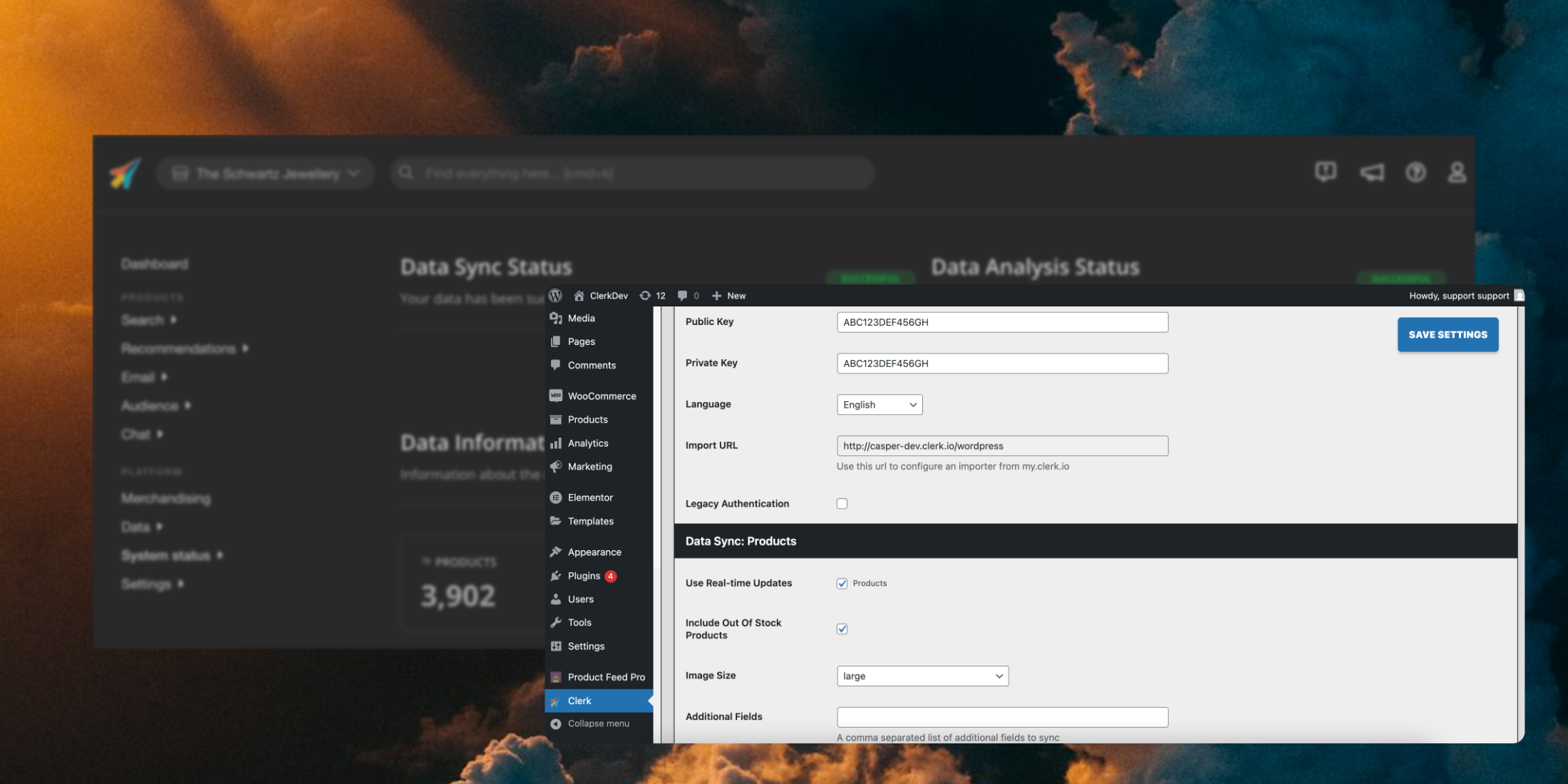
...Get Clerk up and running on your WooCommerce store in just a few steps. This guide walks you through creating your Store, installing the plugin, and syncing your data.
Create store
#
Each Clerk setup is configured on a
Store in my.clerk.io.
This will contain all the data you upload, and allow you to interact with it through its Public API key.
If it is the first time you login in my.clerk.io, you will be prompted to create a New Store.
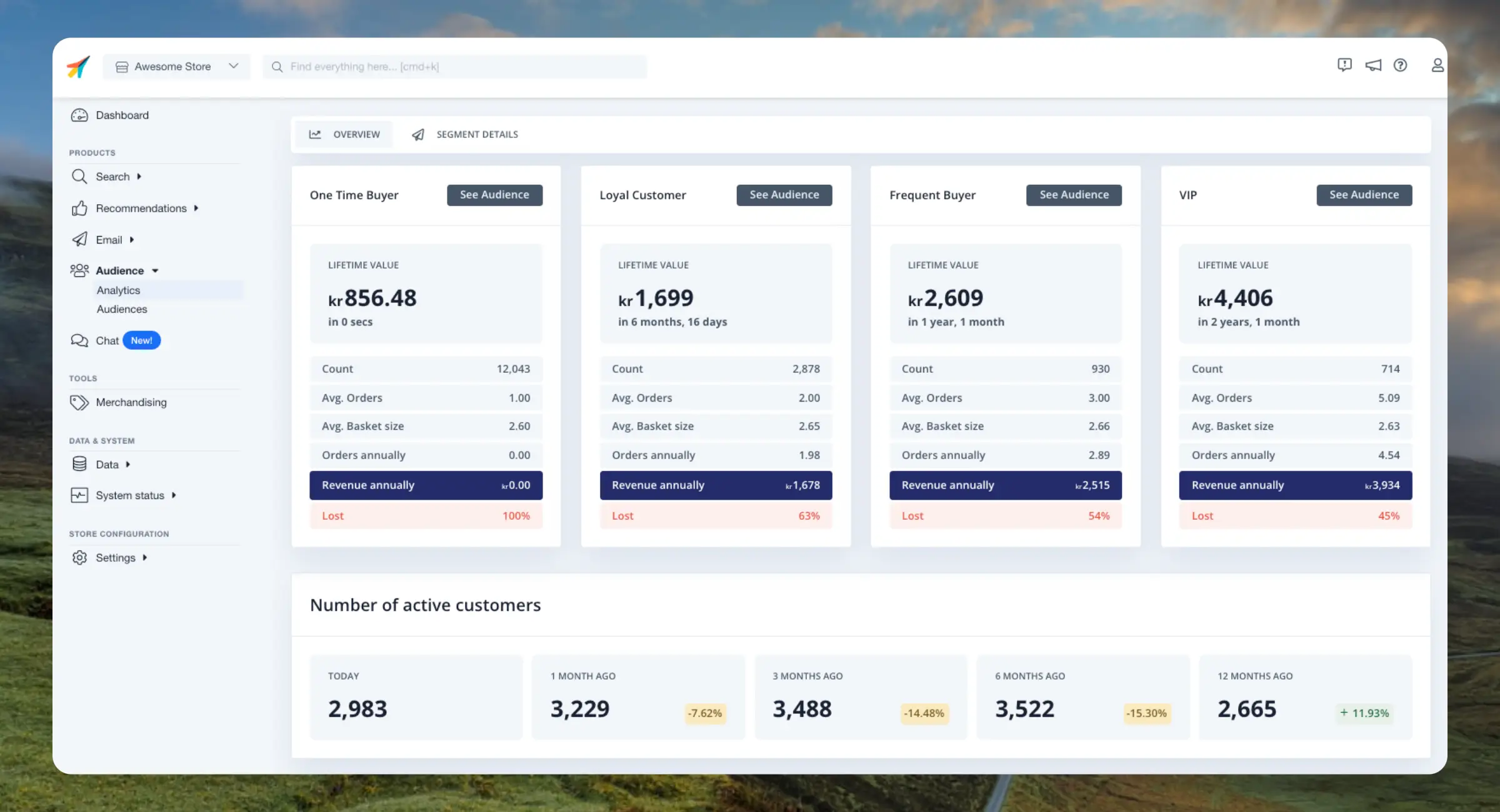
...This dashboard breaks down your customers into groups based on their purchase frequency and life cycle. This helps you identify potential risks of losing customers but also oppurtunities of reactivating customers.
Clerk.io
Main Groups
#
Customers are divided into 4 groups based on their purchase frequency and the revenue they generate.
These groups are dynamic which means they will change as your customer behaviour changes over time. The groups always reflect the current order history that Clerk has access to.
...