Recommendations
Clerk.io bietet mehr als 23 verschiedene Arten von Produktlogiken an, sodass Sie vollkommen automatisierte Produkte auf jeder Seite anzeigen können. Dieser Artikel erklärt, wie Sie beim Einsatz eines Clerk.js-Setups in JTL starten.
Lesen Sie für unsere vollständigen Best Practices diesen Artikel darüber, welche Recommendations Sie verwenden sollten.
Slider-Einrichtung #
Recommendations werden mit Elements erstellt, die ein Design referenzieren. Nachfolgend finden Sie die grundlegende Anleitung zum Einrichten eines Elements.
Wenn Sie die Schritte unter my.clerk.io > Settings > Setup Guides befolgen, werden die Elements für unsere Best Practices automatisch erstellt.
Design erstellen #
Recommendations werden standardmäßig als Slider angezeigt. Dies ermöglicht es Kunden, mehr Produkte mit weniger Klicks zu sehen. Sie können entweder den Design Editor verwenden, um es visuell zu konfigurieren, oder Code Designs nutzen.
Ein Design kann für beliebig viele Recommendations-Elemente wiederverwendet werden, die Sie erstellen.
Sie können den Setup Guide unter Recommendations - Create a design for your recommendations elements nutzen, um schnell ein Design zu erstellen, das das gleiche Farbschema und den selben Stil wie Ihr Webshop hat.
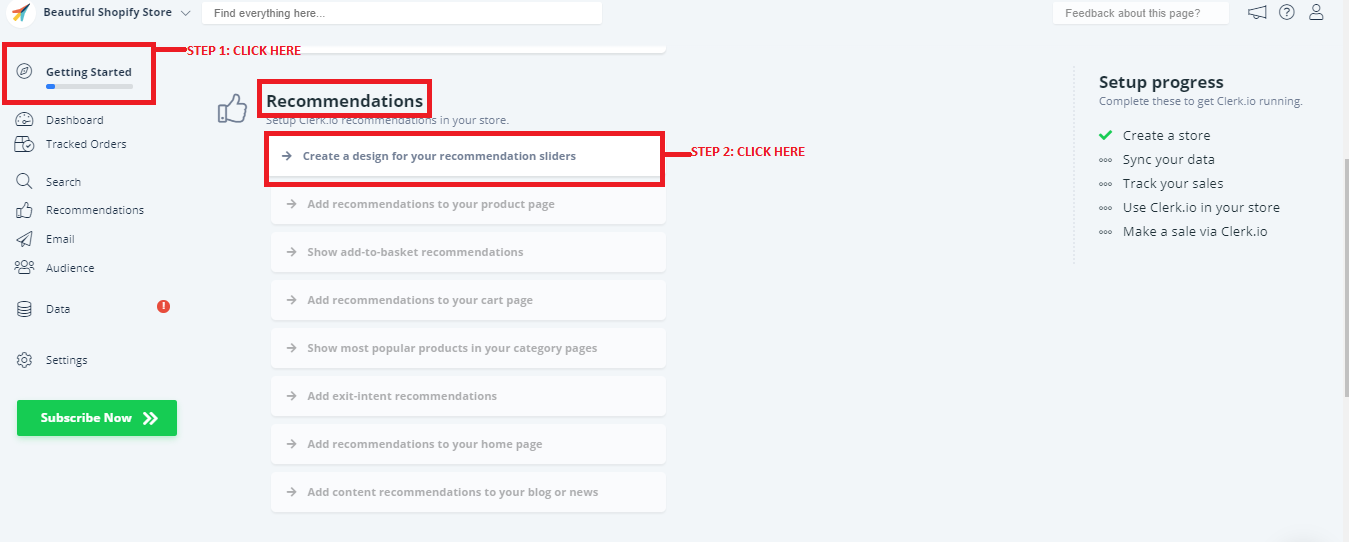
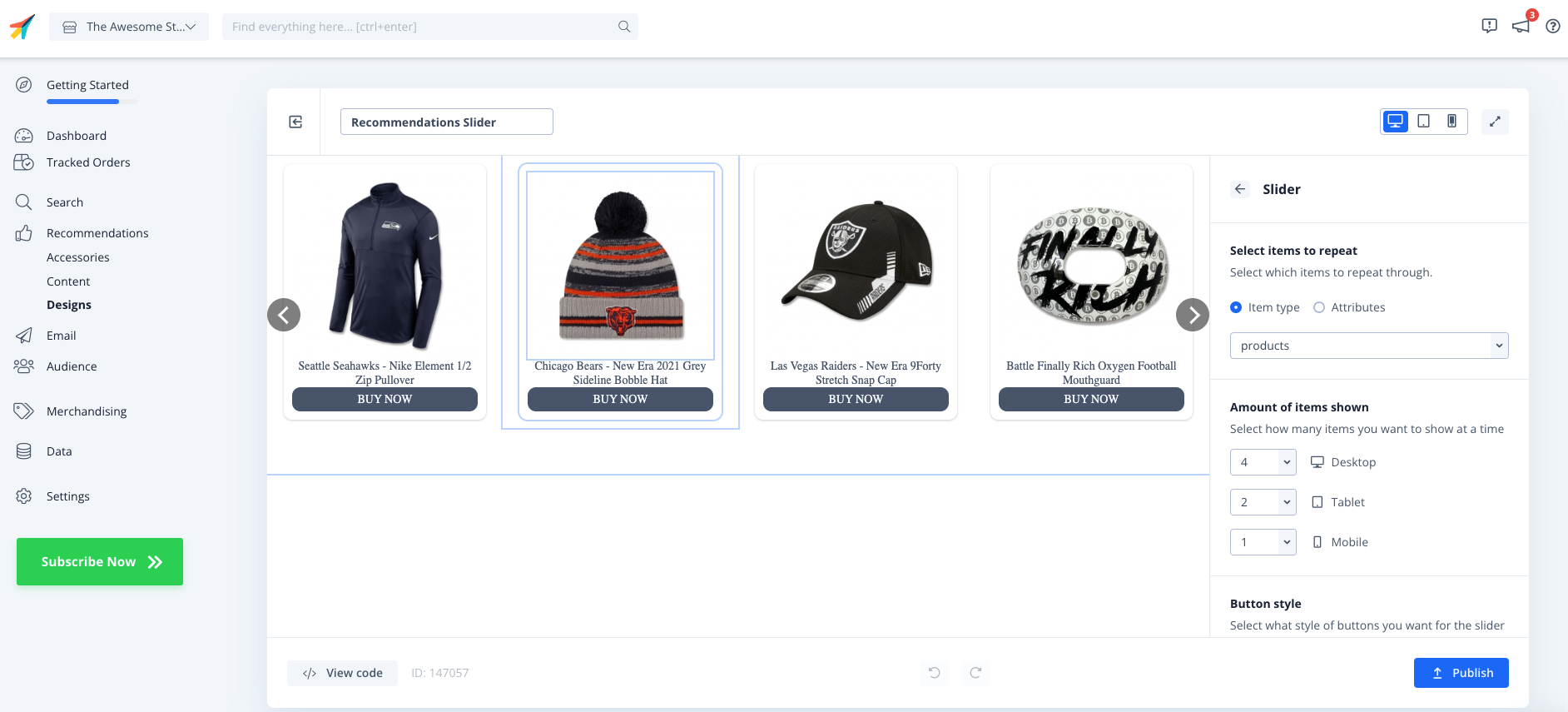
Klicken Sie auf Publish, wenn Sie mit dem Styling zufrieden sind.
Sie können dies später ganz einfach unter Recommendations - Designs im linken Menü ändern. Sie können auch diesen Leitfaden Template Design to use in Clerk für Designvorlagen verwenden.
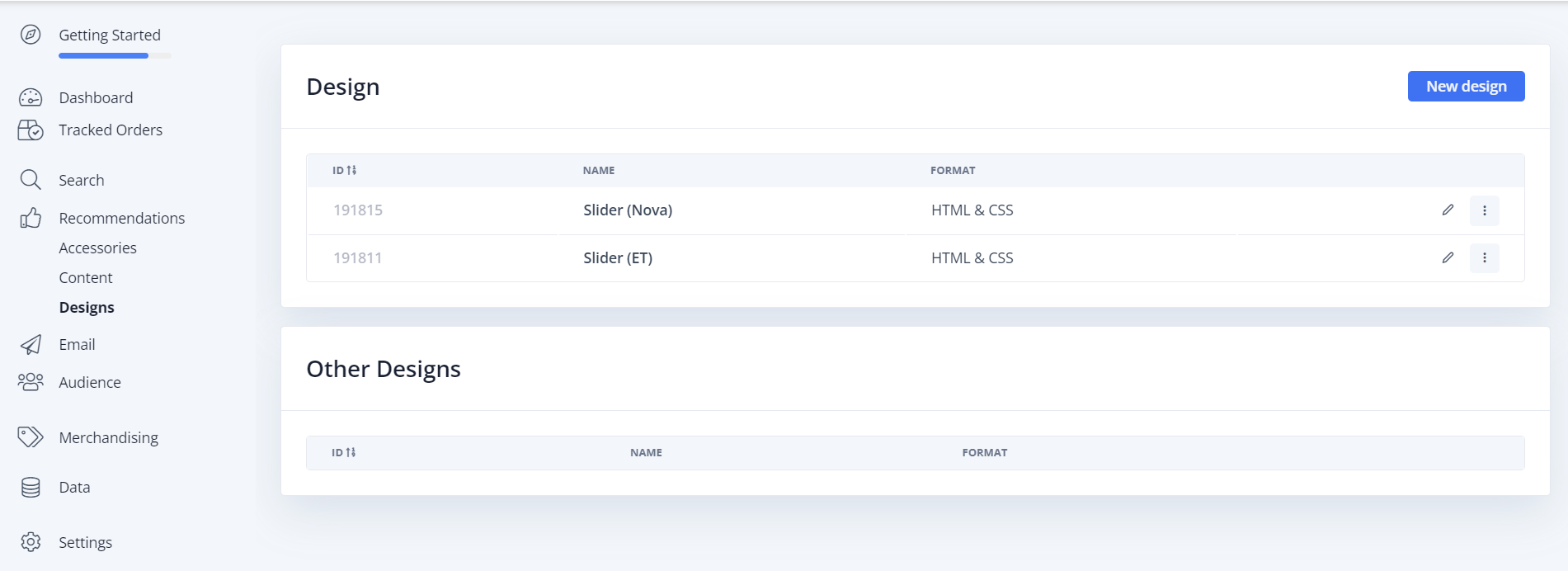
Das Grunddesign kann hier über HTML und CSS angepasst werden.
Wichtig: Der Lieferstatus wird derzeit nur vom EasyTemplate Slider unterstützt.
Element erstellen #
Dieses enthält alle Einstellungen, um die Recommendations anzuzeigen und in Ihre Website einbindbar zu machen. Führen Sie diese Schritte für jedes Recommendations-Banner aus, das Sie erstellen möchten.
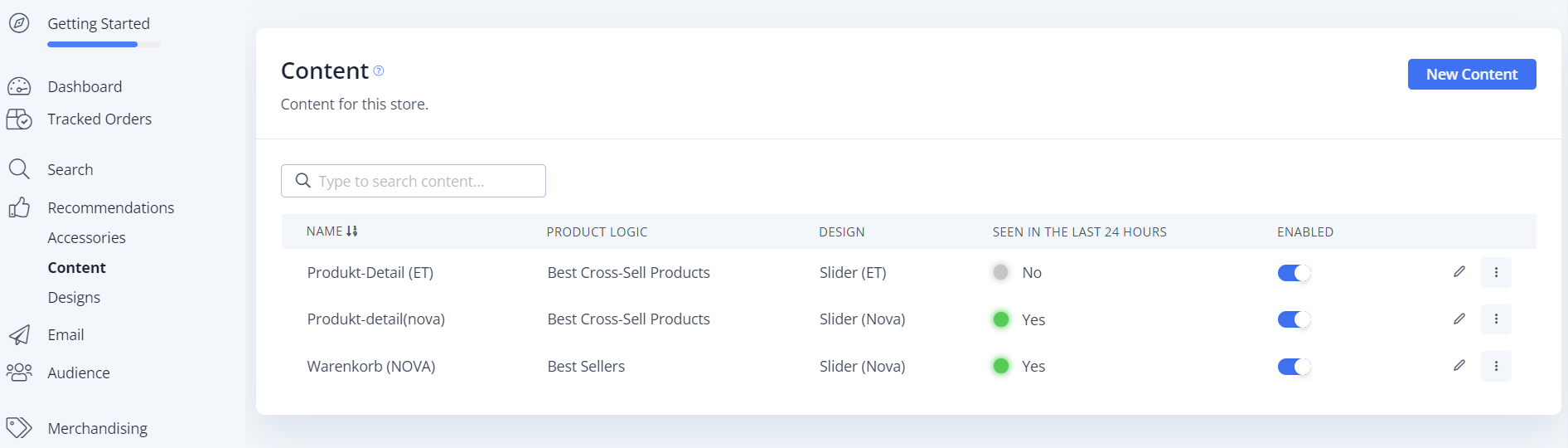
Das Element kann unter Clerk.io → Recommendations → Elements (New Element Button) erstellt werden.
Die folgende Seite enthält 4 wichtige Abschnitte:
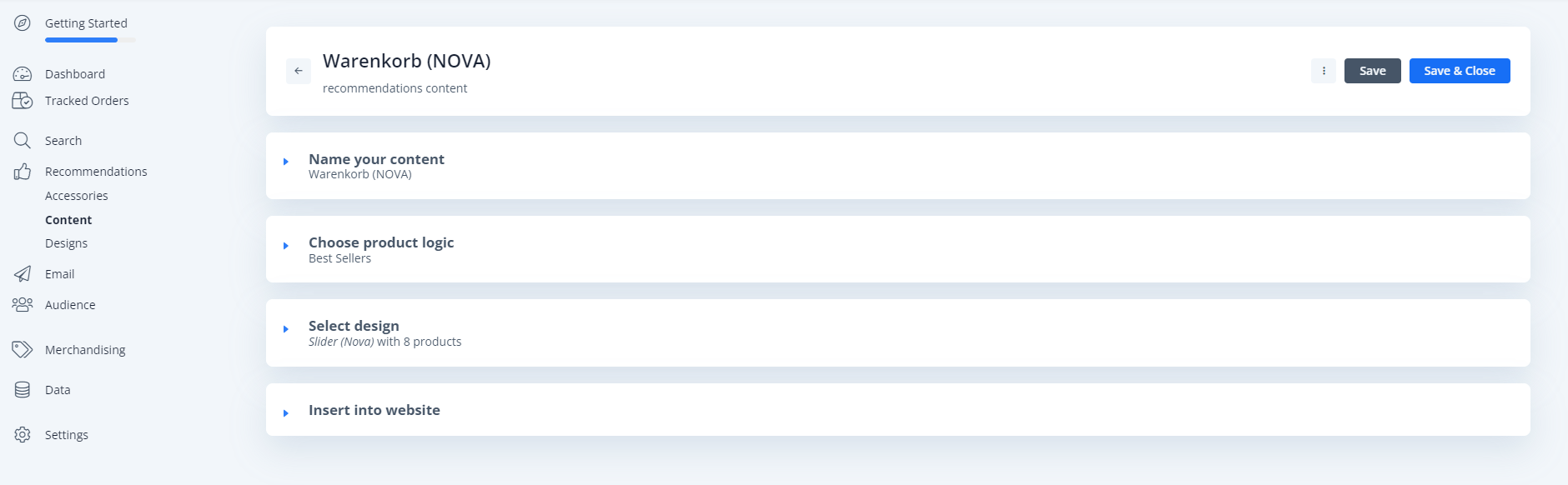
- Name your content → Der Name wird hier angegeben
- Choose product logic → Die Produktlogik kann hier ausgewählt werden, einschließlich „Best Sellers“ / „Hot Products“ und vieles mehr
- Select design → Welches Design verwendet werden soll / was die Überschrift sein soll und wie viele Produkte angezeigt werden sollen (Wichtig: wird durch das Plugin bestimmt, selbst wenn hier eine „Nummer“ angegeben werden kann)
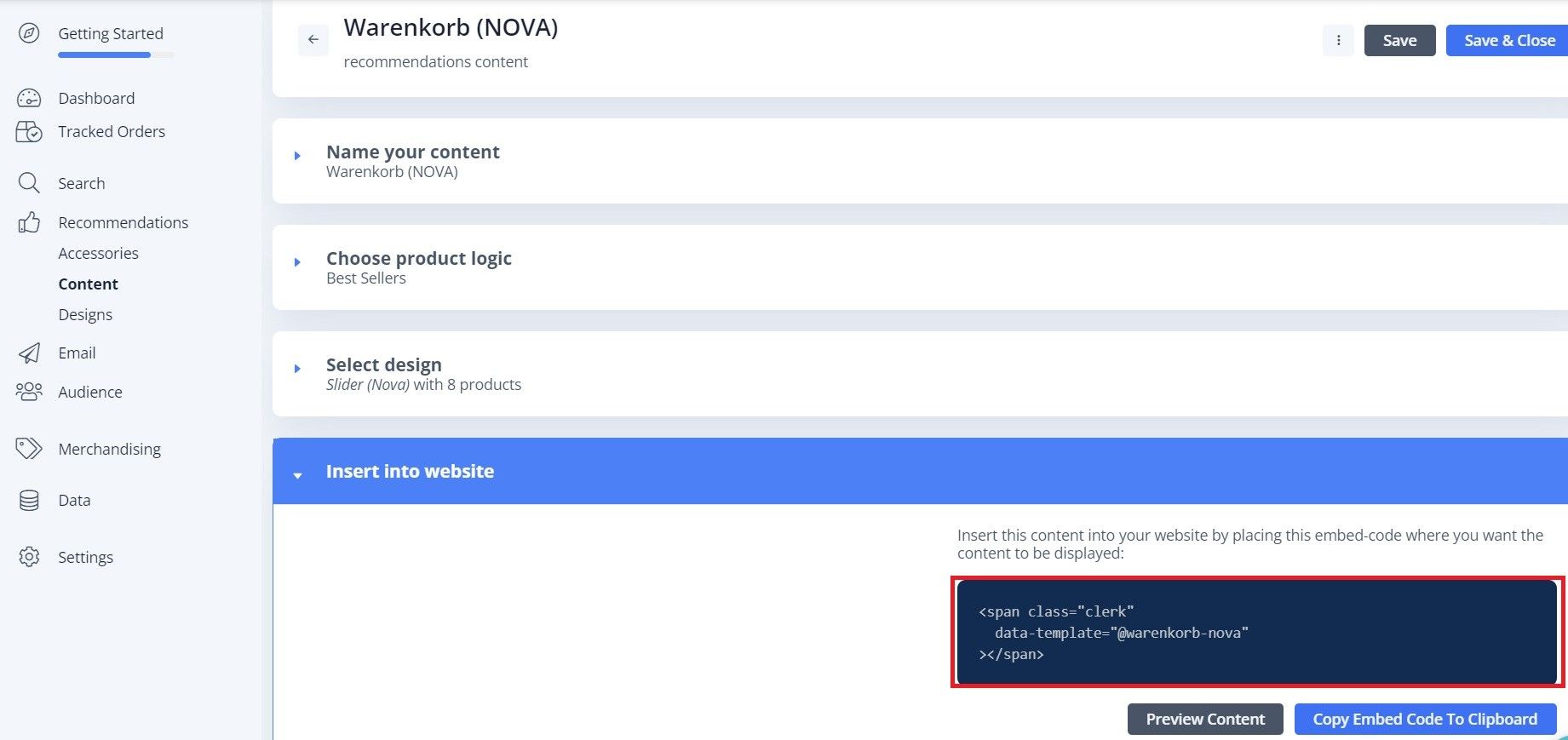
- Insert into website → Der Name, den wir in unser JTL5-Shop-Backend unter Clerk TemplateName eintragen müssen, wird hier ausgegeben
Nachdem alle Einstellungen gesetzt und ausgefüllt wurden, müssen Sie nun in das JTL5-Shop-Backend wechseln und dort den Namen der Komponente (aus Insert into website) hinterlegen.
Zur Website hinzufügen #
Um Clerk Recommendations auf Ihrer Website einzubinden, konfigurieren Sie diese über die JTL-Plugin-Einstellungen.
Plugin-Einstellungen im JTL Backend
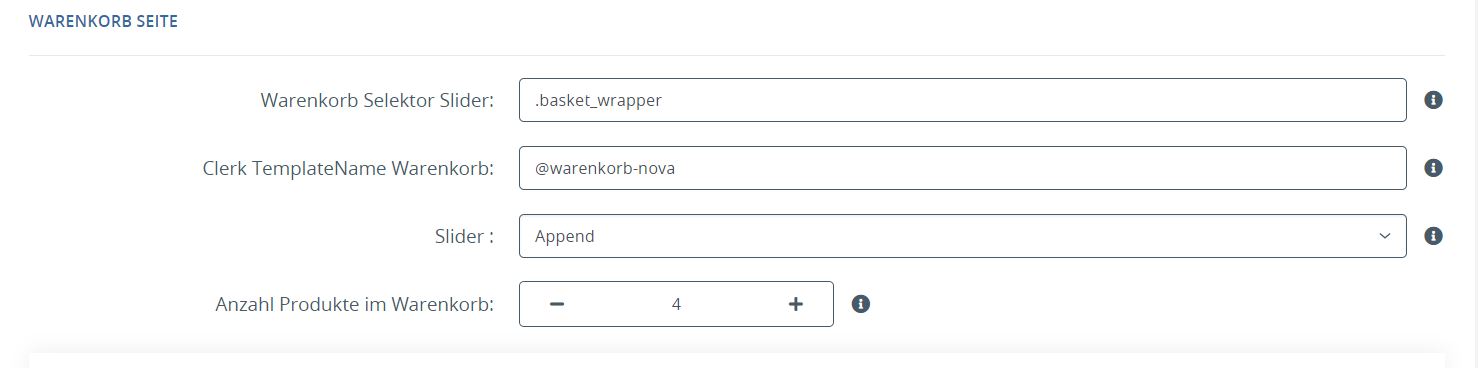
Seiten #
Nachfolgend finden Sie die spezifischen Seiten, auf denen Sie Recommendations einfügen sollten, sowie die Typen, die Sie verwenden sollten, um unsere Best Practices einzuhalten.
Startseite #
- Erstellen Sie in my.clerk.io 3 Elements mit den folgenden Logiken:
- Visitor Recommendations
- Bestsellers
- Hot Products
- Konfigurieren Sie diese im JTL Plugin Backend mit den passenden Selektoren.
Kategorieseite #
- Erstellen Sie in my.clerk.io ein Element mit der Logik Bestsellers In Category.
- Konfigurieren Sie dieses im JTL Plugin Backend mit dem entsprechenden Selektor.
Produktseite #
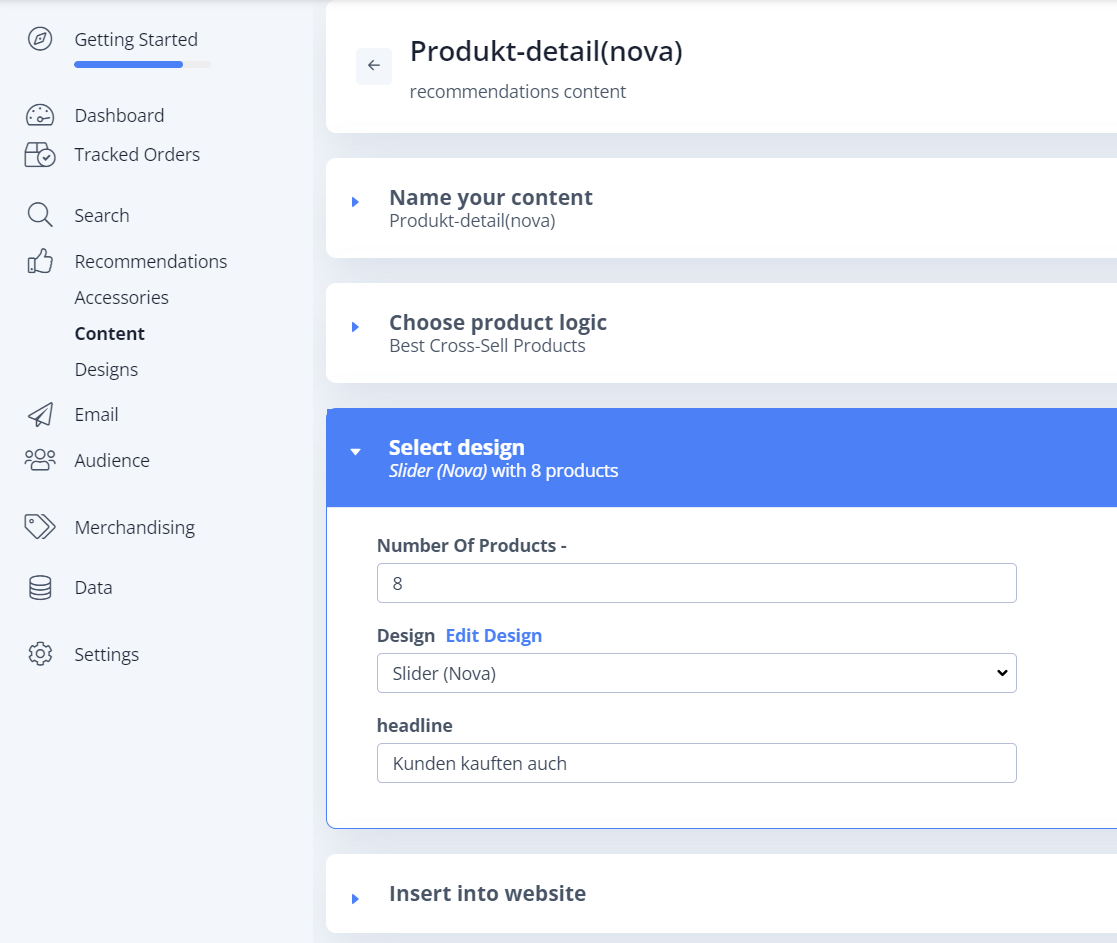
- Erstellen Sie in my.clerk.io 2 Elements mit den folgenden Logiken:
- Best Alternative Products
- Best Cross-Sell Products
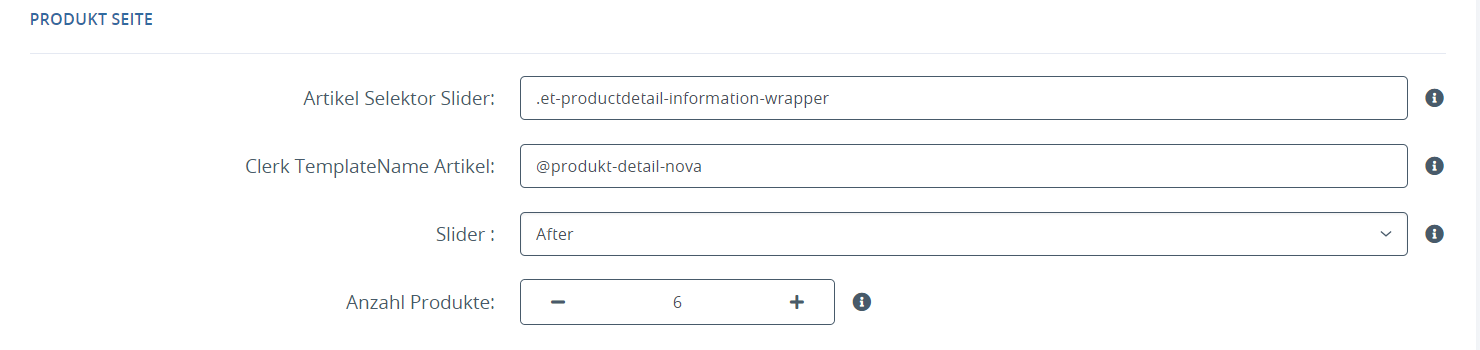
- Konfigurieren Sie diese im JTL Plugin Backend.
Das Hinzufügen des Artikel-Sliders funktioniert wie das Hinzufügen des Warenkorb-Sliders.
Im Standardfall werden dieselben Design-Dateien verwendet (Slider NOVA / Slider ET), nur der Name/Produktlogik wird im Clerk.io Backend geändert und im Plugin Backend ein anderer Selektor ausgewählt.
Add-To-Basket Schritt #
- Erstellen Sie in my.clerk.io ein Element mit der Logik Best Cross-Sell Products.
- Geben Sie ihm den Namen “Add-To-Basket / Others Also Bought”. Dies ist für die korrekte Funktion des Embedcodes wichtig.
- Klicken Sie auf Save oben auf der Seite.
- Gehen Sie zu Settings > Setup Guides und klicken Sie auf Show Add to Basket Recommendations, dann auf Inhalt erstellen. Dieser Schritt erstellt die Elements mit allen erforderlichen Logiken automatisch, allerdings wird ein automatisch generiertes Design verwendet, das Sie je nach Vorliebe möglicherweise anpassen müssen.
- Select design → Welches Design verwendet werden soll / was die Überschrift sein soll und wie viele Produkte angezeigt werden sollen (Wichtig: wird durch das Plugin bestimmt, selbst wenn hier eine „Nummer“ angegeben werden kann)
Nachdem alle Einstellungen gesetzt und ausgefüllt wurden, müssen Sie nun in das JTL5-Shop-Backend wechseln und dort den Namen des Powerstep-Elements im Clerk Plugin hinterlegen.
Plugin-Einstellungen im JTL Backend
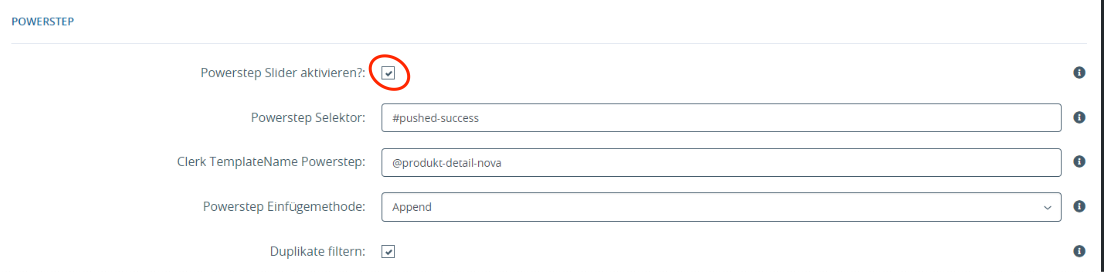
Warenkorbseite #
- Erstellen Sie in my.clerk.io ein Element mit der Logik Best Cross-Sell Products.
- Konfigurieren Sie dieses im JTL Plugin Backend mit dem passenden Selektor für die Warenkorbseite.
Exit Intent #
- Erstellen Sie in my.clerk.io ein Element mit der Logik Visitor Recommendations.
- Gehen Sie zu Settings > Setup Guides und klicken Sie auf Show Add to Basket Recommendations, dann auf Inhalt erstellen. Dieser Schritt erstellt die Elements mit allen erforderlichen Logiken automatisch, allerdings wird ein automatisch generiertes Design verwendet, das Sie je nach Vorliebe möglicherweise anpassen müssen. Für diese Logik empfehlen wir in der Regel visitor recommendation.
- Select design → Welches Design verwendet werden soll / was die Überschrift sein soll und wie viele Produkte angezeigt werden sollen (Wichtig: wird durch das Plugin bestimmt, selbst wenn hier eine „Nummer“ angegeben werden kann).
Nachdem alle Einstellungen gesetzt und ausgefüllt wurden, müssen Sie nun in das JTL5-Shop-Backend wechseln und dort den Namen des Exit Intent-Elements im Clerk Plugin hinterlegen.
Plugin-Einstellungen im JTL Backend

Manuelles Hinzufügen von Elements #
Derzeit sind zwei bekannte Methoden vorhanden, um eigene zusätzliche Elements in JTL über das Clerk Plugin hinzuzufügen:
- EasyTemplate
- OnPage Composer
EasyTemplate #
Sie können Ihre eigenen Elements einfach mit den folgenden Schritten in das EasyTemplate integrieren:
- Erstellung des Designs im Clerk.io Backend (vorhandene Designs können ebenfalls genutzt werden)
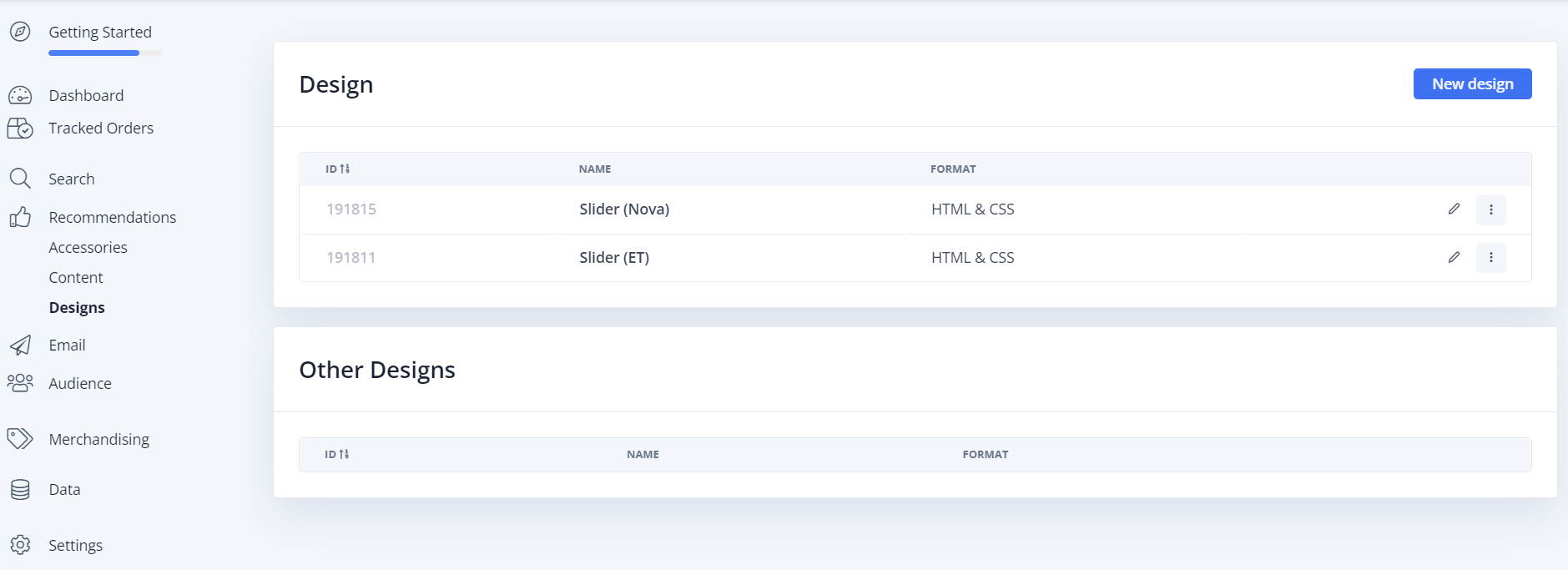
- Erstellung des Contents mit dem jeweiligen Fokus in Clerk.io, Kopieren des benötigten Span-Elements
- Hinzufügen eines HTML-Widgets im EasyTemplate
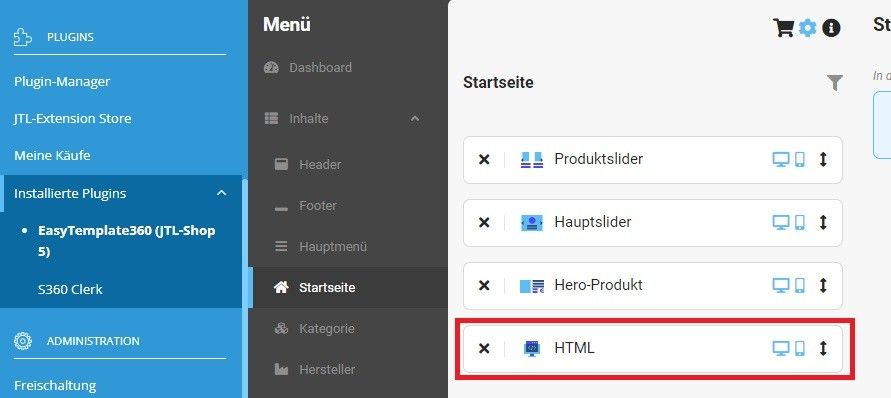
- Fügen Sie das Element in ein HTML-Widget im EasyTemplate ein.
Es ist wichtig, die Zeile data-snippets='{json_encode($s360_clerk_snippets->get())}' in das Clerk HTML-Snippet aus Schritt 2 einzufügen, damit die Sprachvariablen korrekt an Clerk übergeben werden! Außerdem muss das Häkchen bei „Evaluate Smarty“ gesetzt werden.
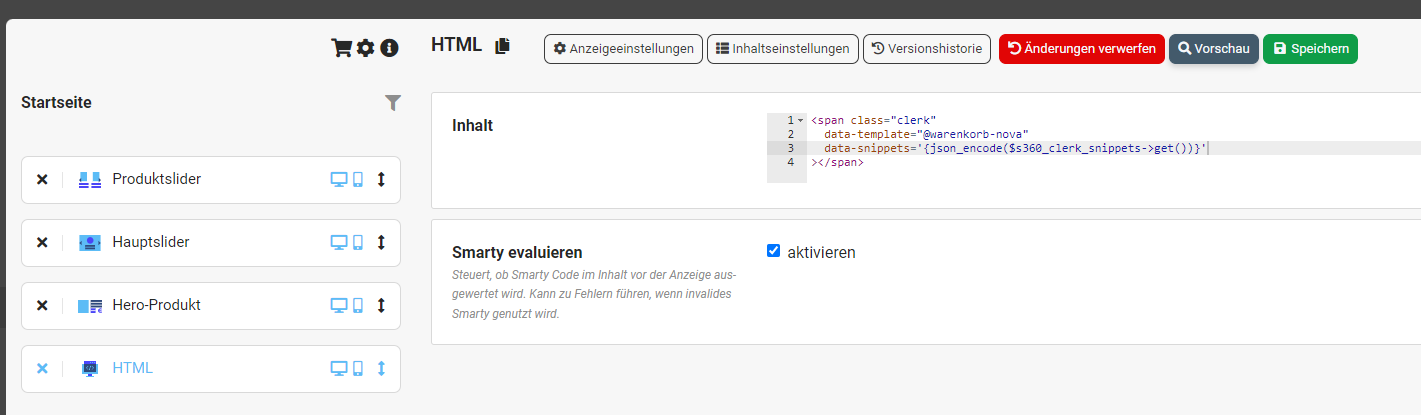
OnPage Composer #
Eigene Elements können mit den folgenden Schritten in den OnPage Composer integriert werden:
- Erstellung des Designs im Clerk.io Backend (vorhandene Designs können ebenfalls genutzt werden)
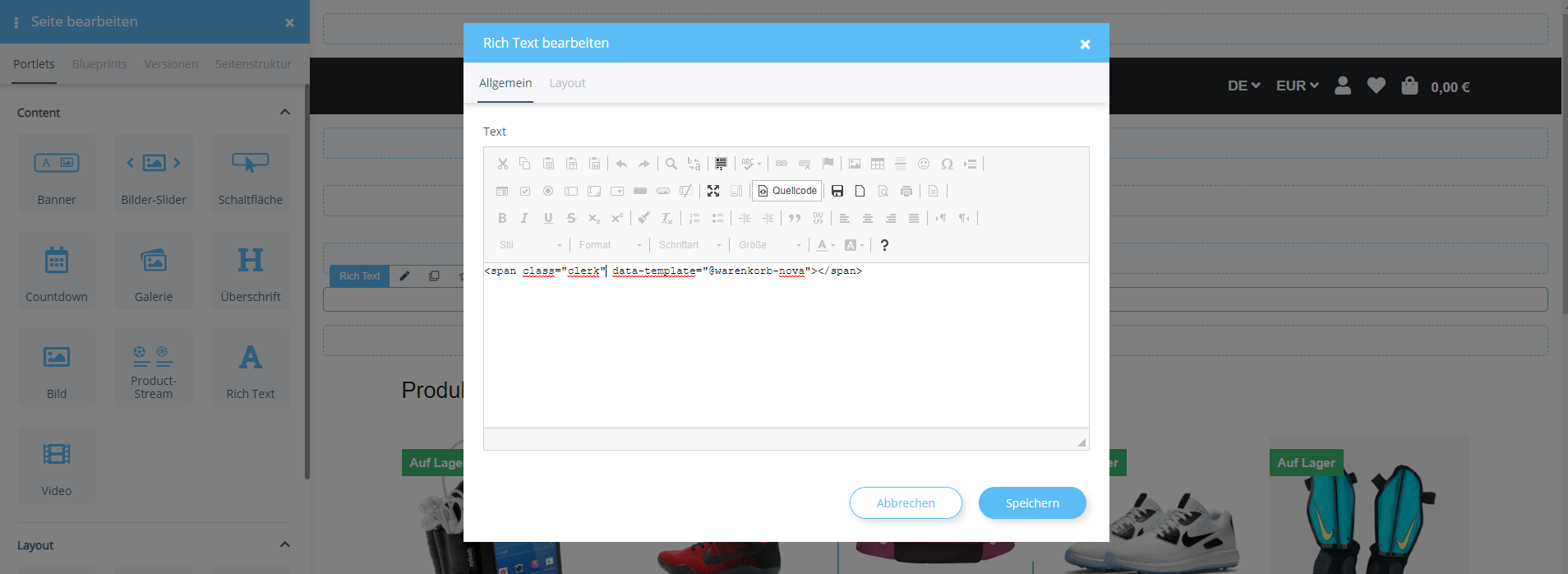
- Erstellung des Contents mit dem jeweiligen Fokus in Clerk.io, Kopieren des benötigten Span-Elements
- Öffnen Sie den OnPage Composer

- Neuer Entwurf im OnPage Composer
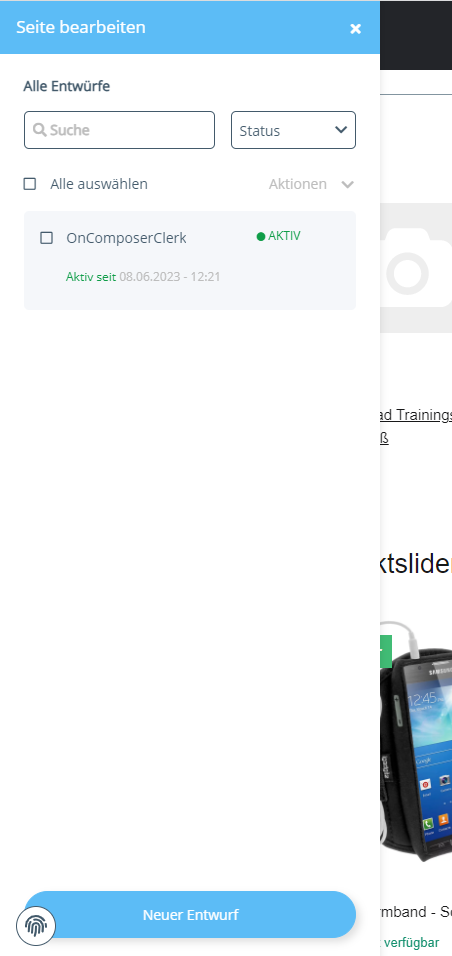
- Ziehen Sie das Rich Text-Element im OnPage Composer an die gewünschte Stelle → Wählen Sie im Menü den Quellcode aus und fügen Sie hier das kopierte Span-Element ein
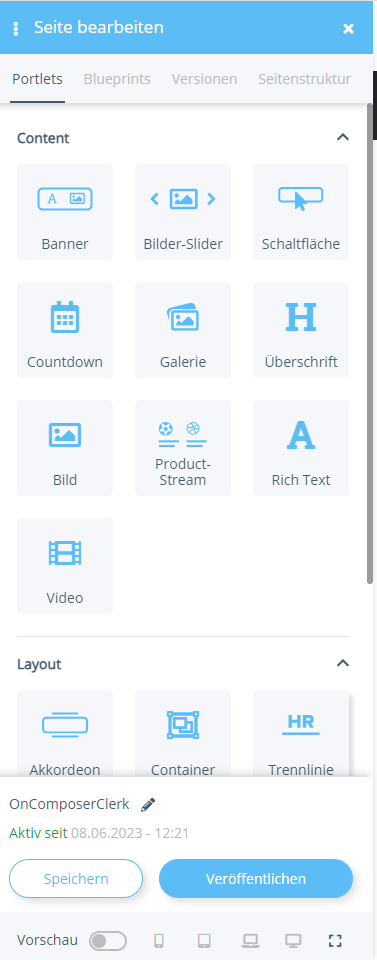
- Speichern → Veröffentlichen mit Zeitraum auswählen
Hinweis: Je nach Position des „eigenen Sliders“ müssen ggf. zusätzliche CSS-Eigenschaften/-Klassen hinzugefügt werden, falls das Standard-Template nicht verwendet wird.
Startvorlagen #
Wenn Sie Code-Designs verwenden möchten, können Ihnen diese Vorlagen den Start erleichtern.
Slider-Code #
Diese Vorlagen stellen Standard-Slider mit verschiedenen Produktinformationen dar, die Sie nach Ihren Bedürfnissen anpassen können.
Warenkorb-Slider (EasyTemplate) #
{% if products.length != 0 %}
<div class="et-widget-clerkslider-headline">
<div class="et-product-slider-headline">
<div class="et-textfield text-align-default et-widget-headline h2">{{ headline }}</div>
</div>
</div>
<div class="et-product-slider-wrapper row">
<div class="col p-0">
<div class="slick-slider-other is-not-opc">
<div id="et-clerk-slider-{{ snippets.settings.slider.id }}" class="et-product-slider-slider et-slider carousel slick-smooth-loading slider-no-preview slick-type-product">
{% for product in products %}
<div class="product-wrapper col">
<div id="result-wrapper_buy_form_{{ product.id }}" data-wrapper="true" class="productbox productbox-show-variations et-item-box productbox-column">
<div class="productbox-inner">
<div class="row">
<div class="col col-12">
<div class="productbox-image">
{% if product.top_article and product.top_article != false %}
<div class="ribbon ribbon-4 productbox-ribbon">
{{ snippets.ribbons.4 }}
</div>
{% endif %}
{% if product.on_sale and product.on_sale != false %}
<div class="ribbon ribbon-2 productbox-ribbon">
{{ snippets.ribbons.2 }}
</div>
{% endif %}
{% if product.in_stock and product.in_stock != false %}
<div class="ribbon ribbon-8 productbox-ribbon">
{{ snippets.ribbons.8 }}
</div>
{% endif %}
{% if product.in_stock and product.in_stock <= 0 %}
<div class="ribbon ribbon-7 productbox-ribbon">
{{ snippets.ribbons.7 }}
</div>
{% endif %}
{% if product.age and product.age <= snippets.settings.newProductmaxDays %}
<div class="ribbon ribbon-3 productbox-ribbon">
{{ snippets.ribbons.3 }}
</div>
{% endif %}
{% if product.average_rating and product.average_rating <= snippets.settings.topProductMinStars %}
<div class="ribbon ribbon-6 productbox-ribbon">
{{ snippets.ribbons.6 }}
</div>
{% endif %}
{% if product.age and product.age < 0 %}
<div class="ribbon ribbon-5 productbox-ribbon">
{{ snippets.ribbons.5 }}
</div>
{% endif %}
{% if product.vorbestellbardate and product.vorbestellbardate > 0 %}
<div class="ribbon ribbon-9 productbox-ribbon">
{{ snippets.ribbons.9 }}
</div>
{% endif %}
{% if product.age and product.age > 0 and product.stock <= 0 %}
<div class="ribbon ribbon-5 productbox-ribbon">
{{ snippets.ribbons.5 }}
</div>
{% endif %}
<div class="productbox-images list-gallery">
<a href="{{ product.url }}" title="{{ product.name }}">
<div class="productbox-image square square-image">
<div class="inner">
<picture>
<img src="{{ product.image }}" class="img-fluid" loading="lazy" alt="{{ product.name }}" />
</picture>
</div>
</div>
</a>
</div>
</div>
</div>
<div class="col col-12">
<div class="productbox-caption">
<div class="et-item-box-manufacturer productbox-manufacturer">
<span>{% if snippets.settings.showBrand %}{{ product.brand }}{% endif %}</span>
</div>
<div class="et-item-box-title productbox-title">
<a href="{{ product.url }}" class="text-clamp-2 link-discreet">
{{ product.name }}
</a>
</div>
<div class="et-item-box-rating productbox-rating">
{% if product.average_rating > 0 %}
<a class="rating" href="{{ product.url }}#tab-votes" title="{{ snippets.productRating }}: {{ product.average_rating }}/5">
{% if product.average_rating >= 5 %}
<i class="{{ snippets.icons.rating }}"></i><i class="{{ snippets.icons.rating }}"></i><i class="{{ snippets.icons.rating }}"></i><i class="{{ snippets.icons.rating }}"></i><i class="{{ snippets.icons.rating }}"></i>
{% else %}
{% if product.average_rating >= 4 %}
<i class="{{ snippets.icons.rating }}"></i><i class="{{ snippets.icons.rating }}"></i><i class="{{ snippets.icons.rating }}"></i><i class="{{ snippets.icons.rating }}"></i>{% if product.average_rating > 4 %}<i class="{{ snippets.icons.ratingHalf }}"></i>{% else %}<i class="{{ snippets.icons.ratingEmpty }}"></i>{% endif %}
{% else %}
{% if product.average_rating >= 3 %}
<i class="{{ snippets.icons.rating }}"></i><i class="{{ snippets.icons.rating }}"></i><i class="{{ snippets.icons.rating }}"></i>{% if product.average_rating > 3 %}<i class="{{ snippets.icons.ratingHalf }}"></i>{% else %}<i class="{{ snippets.icons.ratingEmpty }}"></i>{% endif %}<i class="{{ snippets.icons.ratingEmpty }}"></i>
{% else %}
{% if product.average_rating >= 2 %}
<i class="{{ snippets.icons.rating }}"></i><i class="{{ snippets.icons.rating }}"></i>{% if product.average_rating > 2 %}<i class="{{ snippets.icons.ratingHalf }}"></i>{% else %}<i class="{{ snippets.icons.ratingEmpty }}"></i>{% endif %}<i class="{{ snippets.icons.ratingEmpty }}"></i><i class="{{ snippets.icons.ratingEmpty }}"></i>
{% else %}
{% if product.average_rating >= 1 %}
<i class="{{ snippets.icons.rating }}"></i>{% if product.average_rating > 1 %}<i class="{{ snippets.icons.ratingHalf }}"></i>{% else %}<i class="{{ snippets.icons.ratingEmpty }}"></i>{% endif %}<i class="{{ snippets.icons.ratingEmpty }}"></i><i class="{{ snippets.icons.ratingEmpty }}"></i><i class="{{ snippets.icons.ratingEmpty }}"></i>
{% else %}
{% if product.average_rating > 0 %}
<i class="{{ snippets.icons.ratingHalf }}"></i><i class="{{ snippets.icons.ratingEmpty }}"></i><i class="{{ snippets.icons.ratingEmpty }}"></i><i class="{{ snippets.icons.ratingEmpty }}"></i><i class="{{ snippets.icons.ratingEmpty }}"></i>
{% endif %}
{% endif %}
{% endif %}
{% endif %}
{% endif %}
{% endif %}
</a>
{% endif %}
</div>
{% if product.in_stock %}
{% if product.stock >= snippets.settings.storageLightsGreen%}
<div class="delivery-status">
<ul class="list-unstyled">
<li>
<span class="status status-2">
<span class="{{snippets.settings.storageLightIcon}} status-icon"> </span>
<span class="status-text">{{snippets.settings.storageLightTextGreen}}</span>
</span>
</li>
</ul>
</div>
{% endif %}
{% if product.stock > snippets.settings.storageLightsRed and product.stock < snippets.settings.storageLightsGreen %}
<div class="delivery-status">
<ul class="list-unstyled">
<li>
<span class="status status-1">
<span class="{{snippets.settings.storageLightIcon}} status-icon"> </span>
<span class="status-text">{{snippets.settings.storageLightTextYellow}}</span>
</span>
</li>
</ul>
</div>
{% endif %}
{% if product.stock == snippets.settings.storageLightsRed%}
<div class="delivery-status">
<ul class="list-unstyled">
<li>
<span class="status status-0">
<span class="{{snippets.settings.storageLightIcon}} status-icon"> </span>
<span class="status-text">{{snippets.settings.storageLightTextRed}}</span>
</span>
</li>
</ul>
</div>
{% endif %}
{% endif %}
<div class="et-item-box-price">
<div class="price_wrapper">
{% if product.has_variations or product.bulk_prices != 0 %}
<span class="price_label pricestarting">
{{ snippets.priceStarting }}
</span>
{% endif %}
<div class="price productbox-price {% if product.on_sale %} special-price{% endif %}">
<span>{{ product.price | money }} {{ globals.currency_symbol }} <span class="footnote-reference">*</span></span>
</div>
{% if product.on_sale %}
<div class="price-note et-old-price">
<div class="instead-of old-price">
<small class="text-muted-util">
<del class="value">{{ product.original_price | money }} {{ globals.currency_symbol }}</del>
</small>
</div>
</div>
{% endif %}
{% if product.base_price > 0 %}
<div class="price-note">
<span class="value">{{ product.base_price | money }} {{ globals.currency_symbol }} {{ snippets.vpePer }} {{ product.base_price_unit }}</span>
</div>
{% else %}
<div class="price-note"> </div>
{% endif %}
</div>
</div>
</div>
</div>
</div>
</div>
</div>
</div>
{% endfor %}
</div>
<div class="et-slider-nav" id="clerk-slider-nav-{{ snippets.settings.slider.id }}">
<div class="et-slider-nav-prev enabled slick-arrow slick-hidden" id="clerk-slider-prev-{{ snippets.settings.slider.id }}">
<i class="{{ snippets.icons.sliderPrevious }}"></i>
</div>
<div class="et-slider-nav-next enabled slick-arrow slick-hidden" id="clerk-slider-next-{{ snippets.settings.slider.id }}">
<i class="{{ snippets.icons.sliderNext }}"></i>
</div>
</div>
</div>
</div>
</div>
<script>
$(function() {
$("#et-clerk-slider-{{ snippets.settings.slider.id }}").slick({{ snippets.settings.slider.settings }});
$.evo.popover();
});
</script>
{% endif %}
Warenkorb-Slider (Nova) #
{% if products.length != 0 %}
<div class="slick-slider-other is-not-opc">
<div class="hr-sect h2">
{{ headline }}
</div>
<div id="slick-slider-{{ snippets.settings.slider.id }}" class="carousel-arrows-inside carousel slick-smooth-loading slider-no-preview slick-type-product slick-lazy" data-slick-type="product-slider">
{% for product in products %}
<div class="product-wrapper col">
<div id="result-wrapper_buy_form_{{ product.id }}" data-wrapper="true" class="productbox productbox-column">
<div class="productbox-inner">
<div class="row">
<div class="col col-12">
<div class="productbox-image">
<div class="productbox-images">
<a href="{{ product.url }}" title="{{ product.name }}">
<div class="productbox-image square square-image">
<div class="inner">
<picture>
<img src="{{ product.image }}" class="img-fluid" loading="lazy" alt="{{ product.name }}" />
</picture>
</div>
</div>
{% if product.top_article and product.top_article != false %}
<div class="ribbon ribbon-4 productbox-ribbon">
{{ snippets.ribbons.4 }}
</div>
{% endif %}
{% if product.on_sale and product.on_sale != false %}
<div class="ribbon ribbon-2 productbox-ribbon">
{{ snippets.ribbons.2 }}
</div>
{% endif %}
{% if product.in_stock and product.in_stock != false %}
<div class="ribbon ribbon-8 productbox-ribbon">
{{ snippets.ribbons.8 }}
</div>
{% endif %}
{% if product.in_stock and product.in_stock <= 0 %}
<div class="ribbon ribbon-7 productbox-ribbon">
{{ snippets.ribbons.7 }}
</div>
{% endif %}
{% if product.age and product.age <= snippets.settings.newProductmaxDays %}
<div class="ribbon ribbon-3 productbox-ribbon">
{{ snippets.ribbons.3 }}
</div>
{% endif %}
{% if product.average_rating and product.average_rating <= snippets.settings.topProductMinStars %}
<div class="ribbon ribbon-6 productbox-ribbon">
{{ snippets.ribbons.6 }}
</div>
{% endif %}
{% if product.age and product.age < 0 %}
<div class="ribbon ribbon-5 productbox-ribbon">
{{ snippets.ribbons.5 }}
</div>
{% endif %}
{% if product.vorbestellbardate and product.vorbestellbardate > 0 %}
<div class="ribbon ribbon-9 productbox-ribbon">
{{ snippets.ribbons.9 }}
</div>
{% endif %}
{% if product.age and product.age > 0 and product.stock <= 0 %}
<div class="ribbon ribbon-5 productbox-ribbon">
{{ snippets.ribbons.5 }}
</div>
{% endif %}
</a>
</div>
</div>
</div>
<div class="col col-12">
<div class="productbox-title">
<a href="{{ product.url }}" title="{{ product.name }}" class="text-clamp-2">
{{ product.name }}
</a>
</div>
{% if product.reviews_avg > 0 %}
<a class="rating" href="{{ product.url }}#tab-votes" title="{{ snippets.productRating }}: {{ product.reviews_avg }}/5">
{% if product.reviews_avg >= 5 %}
<i class="{{ snippets.icons.rating }}"></i><i class="{{ snippets.icons.rating }}"></i><i class="{{ snippets.icons.rating }}"></i><i class="{{ snippets.icons.rating }}"></i><i class="{{ snippets.icons.rating }}"></i>
{% else %}
{% if product.reviews_avg >= 4 %}
<i class="{{ snippets.icons.rating }}"></i><i class="{{ snippets.icons.rating }}"></i><i class="{{ snippets.icons.rating }}"></i><i class="{{ snippets.icons.rating }}"></i>{% if product.reviews_avg > 4 %}<i class="{{ snippets.icons.ratingHalf }}"></i>{% else %}<i class="{{ snippets.icons.ratingEmpty }}"></i>{% endif %}
{% else %}
{% if product.reviews_avg >= 3 %}
<i class="{{ snippets.icons.rating }}"></i><i class="{{ snippets.icons.rating }}"></i><i class="{{ snippets.icons.rating }}"></i>{% if product.reviews_avg > 3 %}<i class="{{ snippets.icons.ratingHalf }}"></i>{% else %}<i class="{{ snippets.icons.ratingEmpty }}"></i>{% endif %}<i class="{{ snippets.icons.ratingEmpty }}"></i>
{% else %}
{% if product.reviews_avg >= 2 %}
<i class="{{ snippets.icons.rating }}"></i><i class="{{ snippets.icons.rating }}"></i>{% if product.reviews_avg > 2 %}<i class="{{ snippets.icons.ratingHalf }}"></i>{% else %}<i class="{{ snippets.icons.ratingEmpty }}"></i>{% endif %}<i class="{{ snippets.icons.ratingEmpty }}"></i><i class="{{ snippets.icons.ratingEmpty }}"></i>
{% else %}
{% if product.reviews_avg >= 1 %}
<i class="{{ snippets.icons.rating }}"></i>{% if product.reviews_avg > 1 %}<i class="{{ snippets.icons.ratingHalf }}"></i>{% else %}<i class="{{ snippets.icons.ratingEmpty }}"></i>{% endif %}<i class="{{ snippets.icons.ratingEmpty }}"></i><i class="{{ snippets.icons.ratingEmpty }}"></i><i class="{{ snippets.icons.ratingEmpty }}"></i>
{% else %}
{% if product.reviews_avg > 0 %}
<i class="{{ snippets.icons.ratingHalf }}"></i><i class="{{ snippets.icons.ratingEmpty }}"></i><i class="{{ snippets.icons.ratingEmpty }}"></i><i class="{{ snippets.icons.ratingEmpty }}"></i><i class="{{ snippets.icons.ratingEmpty }}"></i>
{% endif %}
{% endif %}
{% endif %}
{% endif %}
{% endif %}
{% endif %}
</a>
{% else %}
<div class="rating productbox-rating-empty"></div>
{% endif %}
<div>
<div class="price_wrapper">
{% if product.has_variations or product.bulk_prices != 0 %}
<span class="price_label pricestarting">
{{ snippets.priceStarting }}
</span>
{% endif %}
<div class="price productbox-price {% if product.on_sale %} special-price{% endif %}">
<span>{{ product.price | money_eu }} {{ globals.currency_symbol }} <span class="footnote-reference">*</span></span>
</div>
{% if product.on_sale %}
<div class="price-note">
<div class="instead-of old-price">
<small class="text-muted-util">
<del class="value">{{ product.original_price | money_eu }} {{ globals.currency_symbol }}</del>
</small>
</div>
</div>
{% endif %}
{% if product.base_price > 0 %}
<div class="price-note">
<span class="value">{{ product.base_price | money_eu }} {{ globals.currency_symbol }} {{ snippets.vpePer }} {{ product.base_price_unit }}</span>
</div>
{% else %}
<div class="price-note"> </div>
{% endif %}
</div>
</div>
</div>
</div>
</div>
</div>
{% endfor %}
</div>
</div>
<script>
$(function() {
$.evo.generateSlickSlider();
$.evo.popover();
});
</script>
{% endif %}
Diese Seite wurde von einer hilfreichen KI übersetzt, daher kann es zu Sprachfehlern kommen. Vielen Dank für Ihr Verständnis.