Sync Data
Synchronisieren Sie Ihre SmartWeb Classic Produkte und Bestelldaten mit Clerk. Diese Anleitung erklärt, wie Sie einen Datenfeed einrichten, Bestelldaten senden und auswählen, welche Produkte importiert werden sollen.
Sync einrichten #
Um Ihre SmartWeb Classic Shopdaten mit Clerk zu synchronisieren, müssen Sie in SmartWeb Classic einen Prisindeks (Preisindex) erstellen und diesen in Clerk konfigurieren.
Erstellen Sie in SmartWeb Classic einen Prisindeks: Klicken Sie auf Opret Eget Prisindeks und benennen Sie ihn mit “Clerk”.
Öffnen Sie den Preisindex unter Egne und fügen Sie die Codeblöcke in die entsprechenden Templates ein.

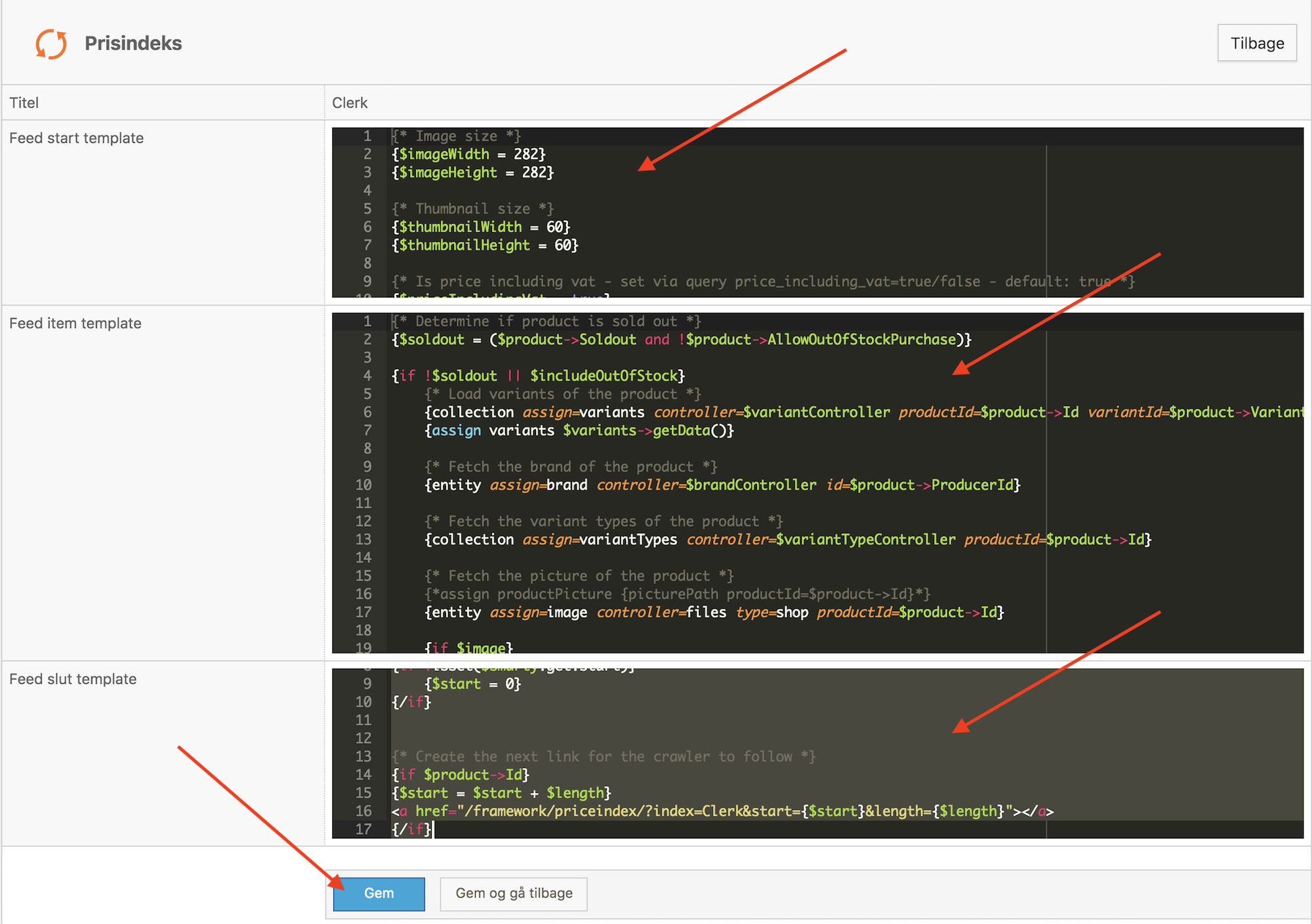
- Klicken Sie auf Gem og gå tilbage und kopieren Sie die Prisindeks-URL.

- Gehen Sie zu my.clerk.io > Data > Configuration und fügen Sie die Prisindeks-URL ein. Wählen Sie bei Bedarf eine Sprache aus und klicken Sie auf Start Sync.
Datenfeed einrichten #
Gehen Sie im SmartWeb Classic Admin zu Kontrolpanel->Prisindeks
Erstellen Sie einen neuen Prisindex, indem Sie oben rechts auf Opret Eget Prisindeks klicken.
Geben Sie ihm den Namen Clerk.
Verwenden Sie den folgenden Code, um den Data Feed zu erstellen. Dies generiert einen Link mit dem Produktfeed, welcher im HTML Annotations Importer bei my.clerk.io genutzt werden kann.
Im Feed Start Template einfügen #
{* Image size *}
{$imageWidth = 293}
{$imageHeight = 293}

{* Thumbnail size *}
{$thumbnailWidth = 60}
{$thumbnailHeight = 60}

{* Is price including vat - set via query price_including_vat=true/false - default: true *}
{$priceIncludingVat = true}

{if isset($smarty.get.price_including_vat)}
    {$priceIncludingVat = ($smarty.get.price_including_vat eq "true")}
{/if}

{* Include out of stock products - set via query include_out_of_stock=true/false - default: false *}
{$includeOutOfStock = (isset($smarty.get.include_out_of_stock) && $smarty.get.include_out_of_stock eq "true")}

{* Instantiate controllers *}
{controller assign=productController type=product}
{controller assign=brandController type=user}
{controller assign=variantController type=productVariant}
{controller assign=priceController type=productPrice}
{controller assign=cartController type=cart}

{$productPageLink = PageController::link($page.productPageId)}

{* Set date variable (now + 1 month in Y-m-d format) *}
{assign date {date('Y-m-d', strtotime("+1 months", strtotime("NOW")))}}

{collection controller=productCategory assign=categories}

{$productLink = {page id=$page.productPageId print=Link}}

{function name=renderCategories}
    {foreach $items->getData() as $item}
        {collection controller=productCategory assign=subCategories parentId=$item->Id}

        <span class="clerk-category-info"
            data-id="{$item->Id}"
            data-name="{$item->Title|unescape:"html"|clearText}"
            data-url="/{$productLink}/{$item->Handle}/"
            data-subcategories="[{if $subCategories}{foreach $subCategories->getData() as $category}{$category->Id}{if not $category@last}, {/if}{/foreach}{/if}]">
        </span>

        {call name=renderCategories items=$subCategories}
    {/foreach}
{/function}

{call renderCategories items=$categories}

{* Pages *}
{controller type=page assign=pagecontroller primary=true}
{collection assign=subPagess controller=page parentId=$page.id  showInMenuCheck=false visibleCheck=false primary=true }

{function name=renderPages}
    {foreach $items->getData() as $Page}
        {collection assign=subPagess2 controller=page parentId=$Page->Id  showInMenuCheck=false visibleCheck=false primary=true }

        {$pageTitle     =     trim($Page->Title)}
        {$link         =     trim($pagecontroller->link($Page->Id))}
        {if $Page->Type == "text" && $Page->Visible == 0 && $Page->ShowInMenu == 0}
        <span class="clerk-pages-info"
            data-id="{$Page->Id}"
            data-type="cms"
            data-url="{$Page->Id}"
            data-title="{$Page->Title|unescape:"html"|clearText}"
            data-text="{$pagecontroller->getText($Page->Id)|unescape:"html"|clearText}">
        </span>
        <br>
        {/if}
        {call name=renderPages items=$subPagess2}
    {/foreach}
{/function}
{call renderPages items=$subPagess}
Im Feed Item Template einfügen #
{* Determine if product is sold out *}
{$soldout = ($product->Soldout and !$product->AllowOutOfStockPurchase)}
{if !$soldout || $includeOutOfStock}
{* Load variants of the product *}
{collection assign=variants controller=$variantController productId=$product->Id variantId=$product->VariantIds}
{assign variants $variants->getData()}
{if $product->Soldout}
{assign stockhtml $productController->getDeliveryTime($product->DeliveryTimeId, false)|escape:'htmlall'}
{else}
{assign stockhtml $productController->getDeliveryTime($product->DeliveryTimeId, true)|escape:'htmlall'}
{/if}
{* Fetch the brand of the product *}
{entity assign=brand controller=$brandController id=$product->ProducerId}
{* Fetch the variant types of the product *}
{collection assign=variantTypes controller=$variantTypeController productId=$product->Id}
{* Fetch the picture of the product *}
{*assign productPicture {picturePath productId=$product->Id}*}
{entity assign=image controller=files type=shop productId=$product->Id}
{if $image}
{$crop = "fill"}
{if !empty($template.settings.DESIGN_IMAGE_BACKGROUND_COLOR)}
{$crop = $template.settings.DESIGN_IMAGE_BACKGROUND_COLOR}
{/if}
{$thumbnailPath = $image->thumbnail($thumbnailWidth, $thumbnailHeight, $crop)}
{$imagePath = $image->thumbnail($imageWidth, $imageHeight, $crop)}
{else}
{placeholdImage assign=placeholder width=$thumbnailWidth height=$thumbnailHeight background=$template.settings.DESIGN_IMAGE_BACKGROUND_COLOR color=$template.settings.FONT_COLOR_PRIMARY text=$text.IMAGE_PLACEHOLDER_TEXT}
{$thumbnailPath = $placeholder->getRelativeFile()}
{placeholdImage assign=placeholder width=$imageWidth height=$imageHeight background=$template.settings.DESIGN_IMAGE_BACKGROUND_COLOR color=$template.settings.FONT_COLOR_PRIMARY text=$text.IMAGE_PLACEHOLDER_TEXT}
{$imagePath = $placeholder->getRelativeFile()}
{/if}
{* Fetch the short description of the product *}
{*{assign productDescription $productController->getDescriptionShort($product->Id)}*}
{* If blank, fetch the list description of the product *}
{* {if empty($productDescription)}
{assign productDescription $productController->getDescriptionList($product->Id)}
{/if}
{* If blank, fetch the long description of the product *}
{*{if empty($productDescription)}
{assign productDescription $productController->getDescription($product->Id)}
{/if}*}
{assign productDescription $productController->getDescription($product->Id)}
{* Trim the description to a max length of 5000 characters *}
{$productDescription = $productDescription|strip_tags|unescape:"html"|trimTo:5000}
{* Trim the description to a max length of 200 characters *}
{$productEmailDescription = $productDescription|strip_tags|unescape:"html"|trimTo:200}
{* Fetch the category path of the product *}
{assign categoryPathTitle {categoryTitlePath product=$product separator=" > "}}
{* Convert product age from seconds to days *}
{$ageInDays = ($product->Age / 60 / 60 / 24)|string_format:"%.1f"}
<span class="clerk-product-info"
{* Title *}
data-name="{$product->Title|escape:'html'|clearText}"
{* Link URI *}
data-url="{itemLink product=$product}"
{* Link URL without domain*}
{assign productSurl {itemLink product=$product}}
data-urls="{$productSurl|replace:'https://www.grejfreak.dk/':'/'}"
{* Product id *}
data-id="{$product->Id}"
{* Description *}
data-description="{$productDescription|clearText}"
{* Description *}
data-shortdescription="{$productEmailDescription|clearText}"
{* Use SEO keywords for extra searchable keywords *}
{*
{assign var="keywords" value="$productController->getTranslation($product->Id, 'seo_keywords')|lower|escape:"htmlall"|clearText"}
{assign var="keyword_list" value=","|explode:$keywords}
data-keywords2 = "{$keyword_list}"*}
data-keywords="{$productController->getTranslation($product->Id, 'seo_keywords')|lower|escape:"htmlall"|clearText}"
{* Image *}
data-image="{$imagePath|solutionPath}"
{* Thumbnail *}
data-thumbnail="{$thumbnailPath|solutionPath}"
{* Item number *}
data-sku="{$product->ItemNumber|toUTF8}"
{collection assign=productCustomDatas controller=productCustomData productId=$product->Id typeId=14}
{if $productCustomDatas gt 0}
{foreach $productCustomDatas->getData() as $productCustomData}
data-prislabel="{$productCustomData->Title}"
{/foreach}
{/if}
{collection assign=productCustomDatas controller=productCustomData productId=$product->Id typeId=15}
{if $productCustomDatas gt 0}
{foreach $productCustomDatas->getData() as $productCustomData}
data-profitlabel="{$productCustomData->Title}"
{/foreach}
{/if}
{collection assign=productCustomDatas controller=productCustomData productId=$product->Id typeId=12}
{if $productCustomDatas gt 0}
{foreach $productCustomDatas->getData() as $productCustomData}
data-customlabel="{$productCustomData->Title|toUTF8}"
{/foreach}
{/if}
{if !empty($product->Ean)}
{* Ean number *}
data-ean="{$product->Ean|toUTF8}"
{/if}
{* Fetch the price line of the product *}
{entity assign=priceLine controller=$priceController productId=$product->Id}
{* Fetch the stock status text of the product *}
{$stockStatusText = {stockStatusText product=$product inStockText='in stock' notInStockText='out of stock'}}
{* checek product is Normal or variant *}
{if $product->Type == "normal"}
{if $product->Soldout}
{$type="normaloutstockstatus"}
{* {$deliveryText = "<span><strong>IKKE PÅ LAGER</strong><br>Levering 3-14 dage</span>"}*}
{$deliveryText = $stockhtml}
{else}
{$type="normalinstockstatus"}
{*$deliveryText = "<span><strong>PÅ LAGER</strong></span> "*}
{$deliveryText = $stockhtml}
{/if}
{/if}
{if $product->Type == "variant"}
{if $product->Soldout}
{$type="variantoutstockstatus"}
{*$deliveryText = "<span><strong>IKKE PÅ LAGER</strong><br>Levering 3-14 dage</span>"*}
{$deliveryText = $stockhtml}
{else}
{$type="variantinstockstatus"}
{*$deliveryText = "<p><strong>LAGERSTATUS</strong>VÆLG VARIANT</p>"*}
{$deliveryText = "<p><strong>{$text.VARIATION_STOCK_BOLD_MESSAGE}</strong>{$text.VARIATION_STOCK_NORMAL_MESSAGE}</p>"}
{/if}
{/if}
data-stock-type ="{$type}"
data-deliveryText ="{$deliveryText}"
{* Prices *}
{assign price $priceLine->PriceMinWithVat}
{if !$priceIncludingVat}
{assign price $priceLine->PriceMinWithoutVat}
{/if}
{* Selling price *}
data-price="{$price}"
{* Selling price - Formatted with language specific currency iso *}
data-pformatted="{$price|formatPrice}"
{if $priceLine->PriceMin !== $priceLine->PriceMax}
data-pricefrom="true"
{/if}
{$onSale = ($priceLine->PriceMinWithVat < $priceLine->FullPriceMinWithVat)}
{* If the product is discounted we set the normal price as list price *}
{if $onSale}
{assign listPrice $priceLine->FullPriceMinWithVat}
{if !$priceIncludingVat}
{assign listPrice $priceLine->FullPriceMinWithoutVat}
{/if}
{* Normal price *}
data-list-price="{$listPrice}"
{* Normal price - Formatted with language specific currency iso *}
data-lpformatted="{$listPrice|formatPrice}"
{*Add text with tilbud *}
data-sale-text="tilbud"
{* Add Procent if on sale *}
{$priceMin = $priceLine->PriceMin}
{$priceFull = $priceLine->FullPriceMin}
{$diffprice = $priceLine-$priceMin}
{$percentChange = (1 - $priceMin / $priceFull) * 100 }
{$percentChange = (int)$percentChange}
data-price-procent="{$percentChange}"
data-price-procent_int="{$percentChange|formatPrice}"
{/if}
data-on-sale="{if $onSale}true{else}false{/if}"
data-in-stock="{if !$soldout}true{else}false{/if}"
data-stock-av="{if $product->Soldout}false{else}true{/if}"
{* Product age *}
data-age="{$ageInDays}"
{* If the product is newer than 30 days, we consider it as new *}
{if $ageInDays lt 90}
data-new="true"
{/if}
{* Brand *}
{if !empty($brand->Title)}
{$brandLink = "{$productPageLink}?brand={$brand->Id}-{$brand->Title|formatLink}"}
data-brand="{$brand->Title|escape:"html"|clearText}"
data-brand-url="{$brandLink}"
data-brand-id="{$brand->Id}"
{/if}
{* If the product has variants *}
{if $variants}
{*data-variants-sku="[
{foreach $variants as $variant}
{if !empty($variant->ItemNumber)}
'{$variant->ItemNumber}'{if !$variant@last},{/if}
{/if}
{/foreach}
]"*}
{*
data-variants-name="[
{foreach $variants as $variant}
'{assign variantTitle {variantTitle productId=$product->Id variantId=$variant->Id}}{$variantTitle|escape:"htmlall"|clearText}'{if !$variant@last},{/if}
{/foreach}
]"*}
data-variants-ean="[
{foreach $variants as $variant}
'{assign variantTitle {variantTitle productId=$product->Id variantId=$variant->Id}}{if !empty($variant->Ean)}{$variant->Ean|escape:"htmlall"}{/if}'{if !$variant@last},{/if}
{/foreach}
]"
{/if}
{collection assign=productCustomDatas controller=productCustomData productId=$product->Id typeId=11}
{if $productCustomDatas gt 0}
{foreach $productCustomDatas->getData() as $productCustomData}
data-splash="{$productCustomData->Title}"
{/foreach}
{/if}
{* Splash array *}
{if $productCustomDatas gt 0}
data-splasharray='[
{foreach $productCustomDatas->getData() as $productCustomData}
"{$productCustomData->Title}"{if !$productCustomData@last},{/if}
{/foreach}
]'
{/if}
{* Splash array ohne Dateityp *}
{if $productCustomDatas gt 0}
data-splasharray-simple='[
{foreach $productCustomDatas->getData() as $productCustomData}
{assign splashSimple {$productCustomData->Title|toUTF8|replace:'.svg':''}}
"{$splashSimple}"{if !$productCustomData@last},{/if}
{/foreach}
]'
{/if}
{* Kategorien *}
data-categories="[
{$product->CategoryId}
{if $product->SecondaryCategoryIds}
{foreach $product->SecondaryCategoryIds as $productCategory}
, {$productCategory}
{/foreach}
{/if}
]">
</span>
{/if}
Im Feed Slut Template einfügen #
{*Add pagination*}
{if !isset($smarty.get.length)}
    {$length = 50}
{else}
    {$length = $smarty.get.length}
{/if}

{if isset($smarty.get.start)}
    {$start = $smarty.get.start + $length}
{else}
    {$start = 0}
{/if}

{* Check if out-of-stock products should be added*}
{if isset($smarty.get.include_out_of_stock)}
    {$stock = $smarty.get.include_out_of_stock}
{else}
    {$stock = "false"}
{/if}

{* Create the next link for the crawler to follow *}
{if $product->Id}
<a href="/framework/priceindex/?index=clerk&start={$start}&length={$length}&include_out_of_stock={$stock}"></a>
{/if}
Speichern Sie den Prisindex.
Anschließend haben Sie einen Link wie diesen zur Verfügung:
https://www.mysmartwebshop.com/framework/priceindex/index=Clerk&include_out_of_stock=false
Gehen Sie zu my.clerk.io -> Data.
Wählen Sie unter Sync Method HTML annotations und fügen Sie Ihren Link ein.
Setzen Sie die Max Requests/Sek auf 1 und wählen Sie die Sprache aus.

Klicken Sie abschließend auf Update Settings und dann auf Start Sync.
Bestelldaten senden #
Da der SmartWeb Classic Prisindeks leider nicht erlaubt, Verkäufe aus SmartWeb Classic einzubinden, muss der Bestellverlauf als CSV-Datei exportiert werden, die dann in das Clerk-Format umgewandelt und hochgeladen wird.
Um diese CSV-Datei herunterzuladen, melden Sie sich zunächst im Backend von SmartWeb Classic an.
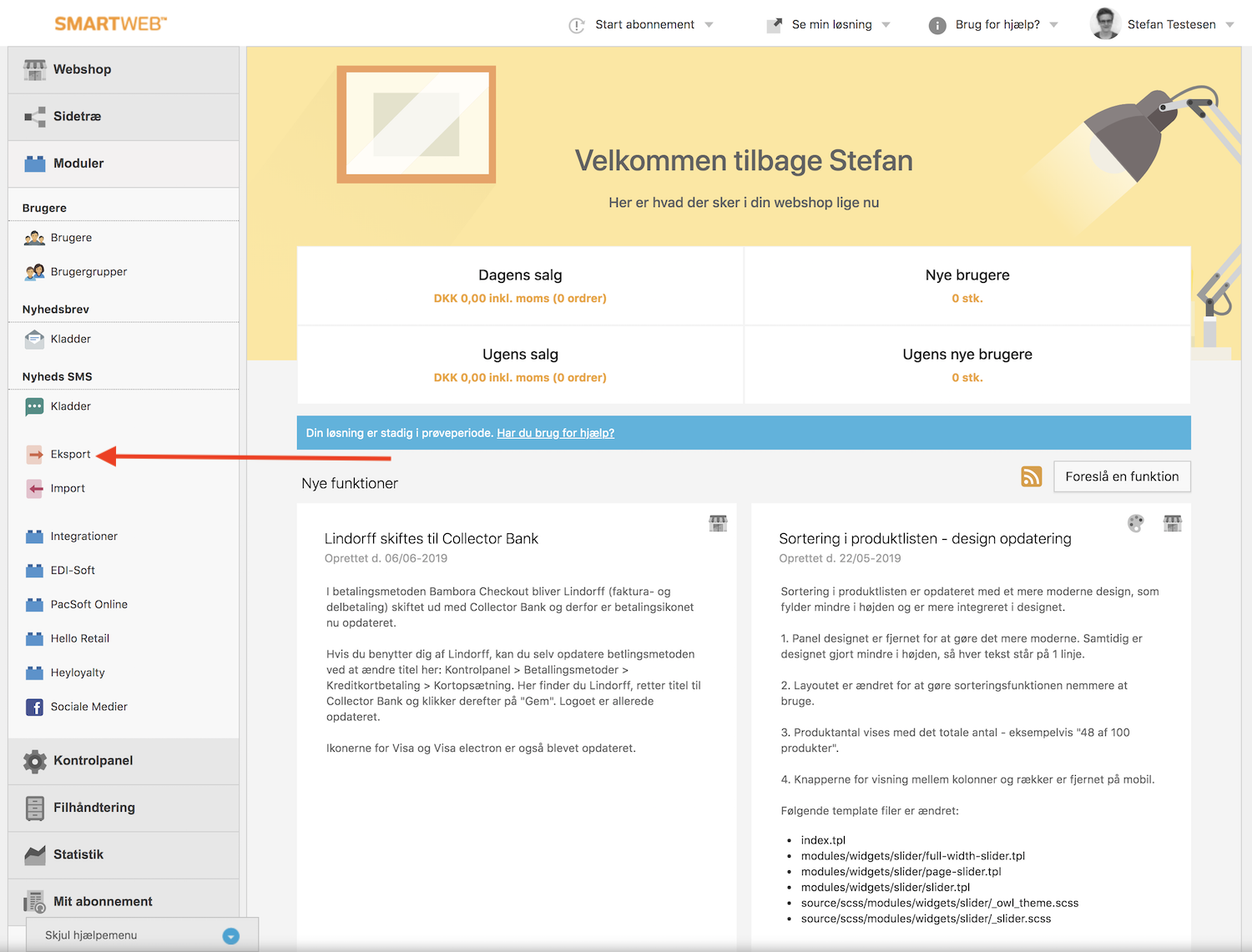
Gehen Sie dann zu Eksport:
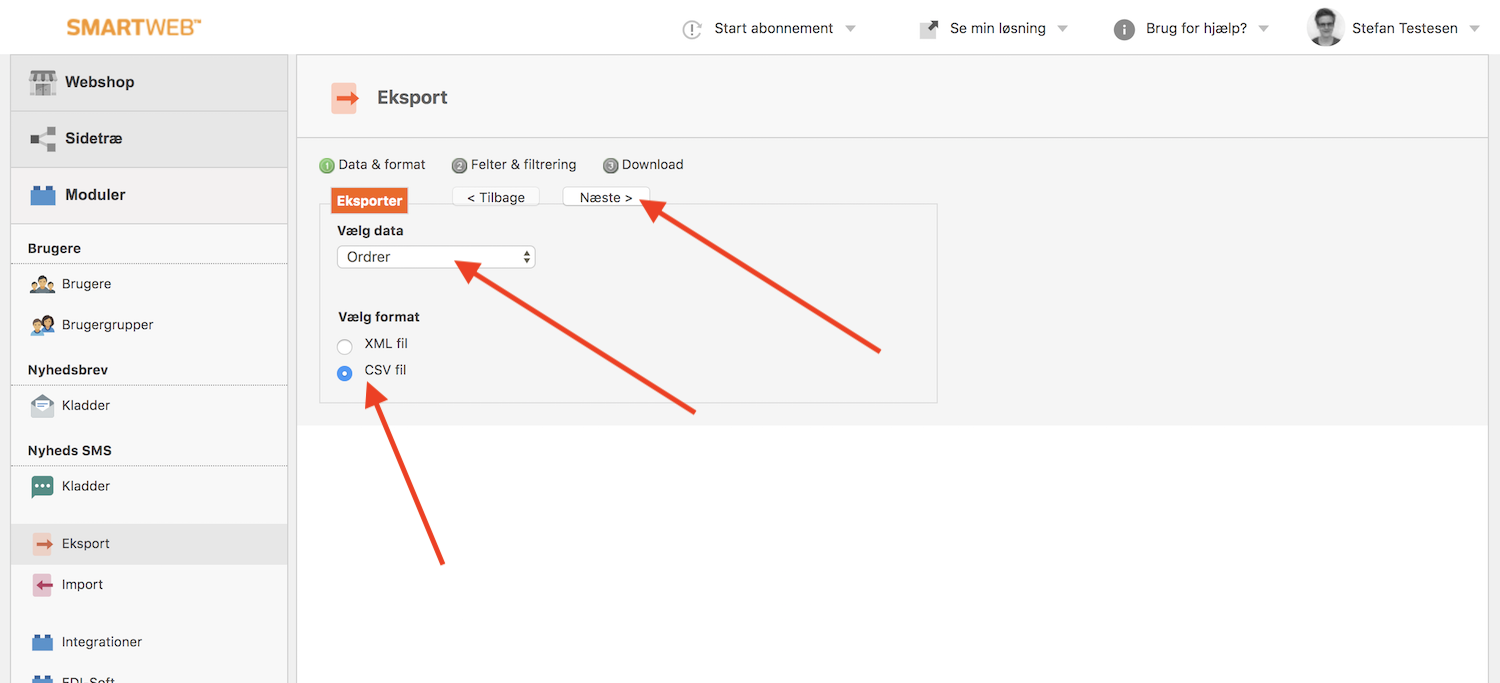
Auf der nächsten Seite wählen Sie unter Vælg Data Ordrer und unter Vælg Format CSV fil, dann auf Næste klicken.
Nun müssen Sie auswählen, welche Daten in die CSV-Datei aufgenommen werden.
Clerk benötigt folgende Daten aus den Bestellungen:
Ordre ID (Standard)
Dato
Produkt ID
Kunde e-mail
Bruger ID
All diese können Sie in den Dropdown-Menüs auswählen:
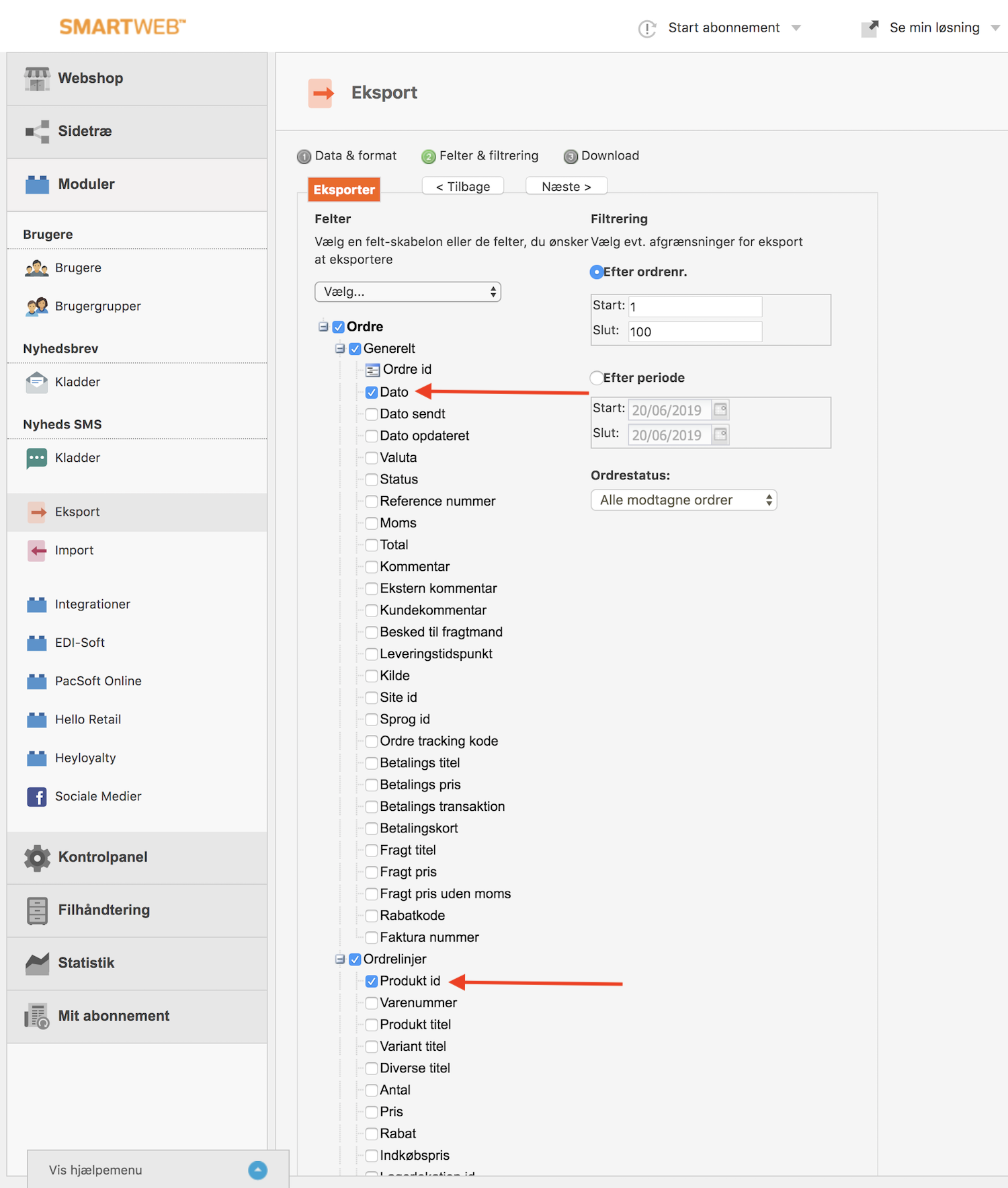
Nachdem Sie die Felder ausgewählt haben, nutzen Sie den Efter Periode Zeitraum-Selektor, um die Verkaufsdaten vom ersten Tag an einzubeziehen, und klicken Sie auf Næste:

Abschließend klicken Sie auf Download, um Ihre CSV-Datei zu erhalten:
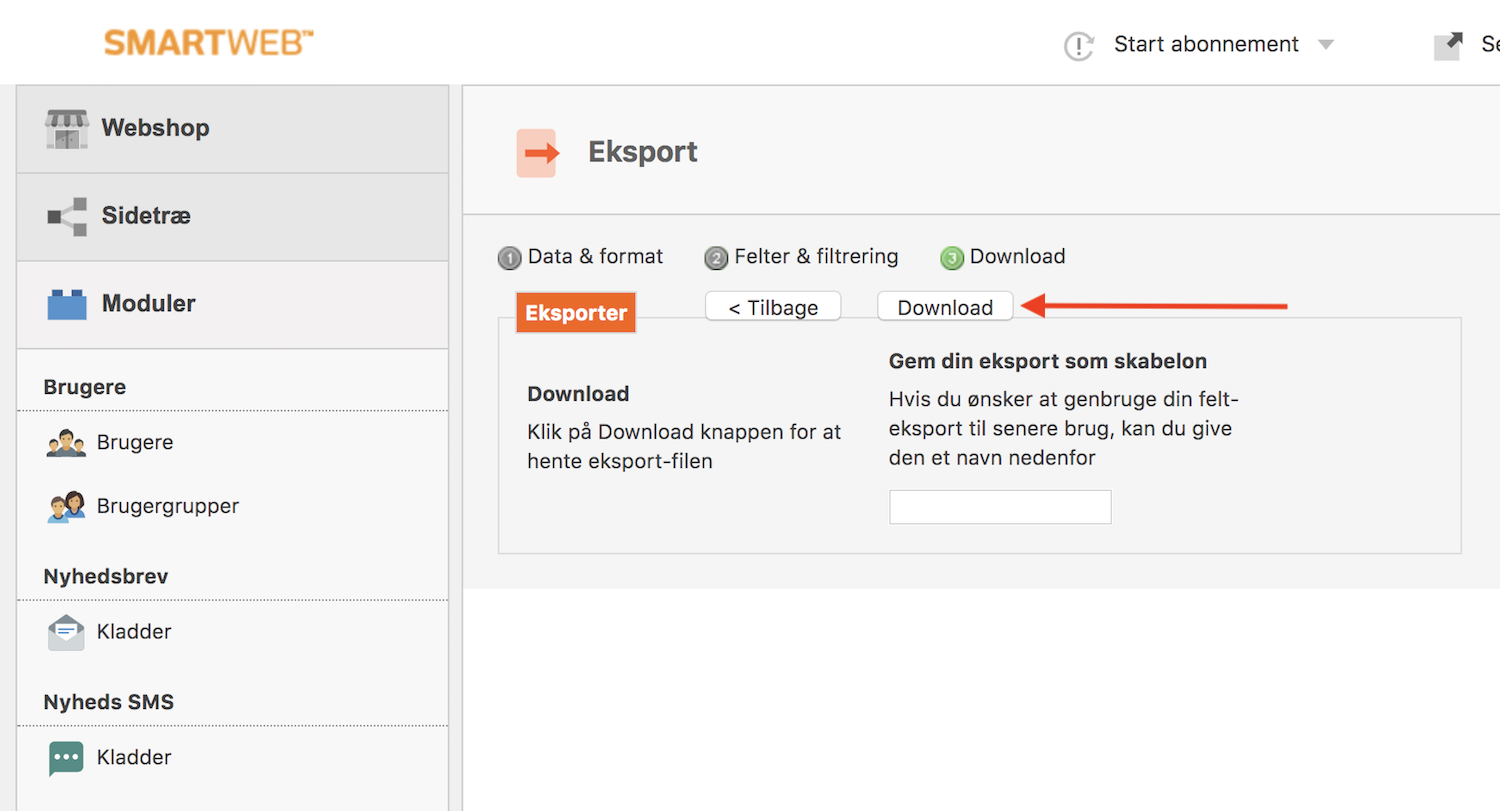
Fertig! Sie haben nun Ihre SmartWeb Classic Verkaufsdaten als CSV-Datei.
Nun müssen Sie sich lediglich an den Clerk Support wenden, um die beste und sicherste Möglichkeit zu finden, die Datei auf Ihr Konto hochzuladen.
Auswahl der zu importierenden Produkte #
Der SmartWeb Classic / Hostedshop Feed ermöglicht es Ihnen, ausverkaufte Produkte ganz einfach herauszufiltern oder einzuschließen, indem Sie einen Teil der Feed-URL ändern.
In my.clerk.io gehen Sie zu Data Sync.
Stellen Sie sicher, dass die URL mit &include_out_of_stock=true endet

Klicken Sie dann auf Update Settings und Start Sync, um alle Ihre Produkte zu Clerk zu laden.
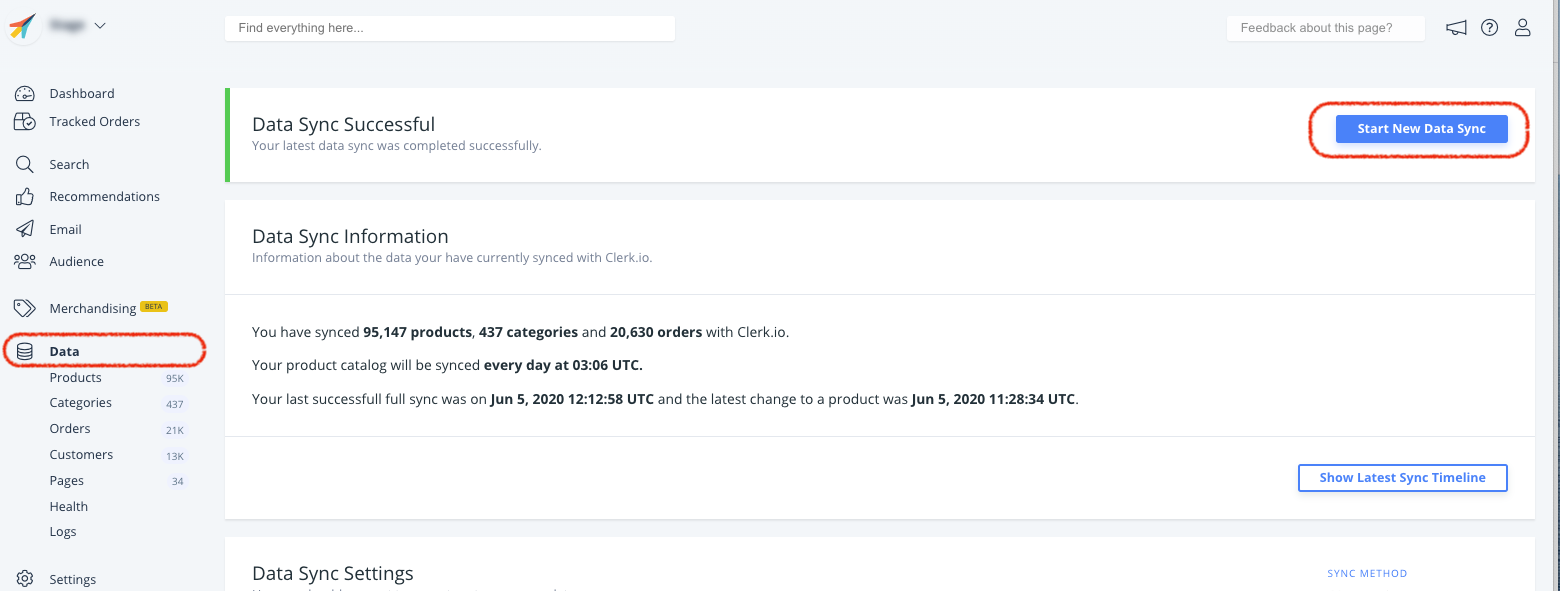
Wenn Sie alle Produkte, einschließlich ausverkaufter, importieren, erhalten Sie für alle Produkte das Attribut in_stock, sodass Sie ein Clerk-Element filtern können, um diese nicht anzuzeigen.
Diese Seite wurde von einer hilfreichen KI übersetzt, daher kann es zu Sprachfehlern kommen. Vielen Dank für Ihr Verständnis.