Get Started
Integrieren Sie Clerk Empfehlungen mit Swiipe Plus-sell, um Produktempfehlungen auf Seiten mit erfolgreicher Bestellung anzuzeigen. Mit Plus-sell können Kunden zusätzliche Produkte direkt zur selben Bestellung hinzufügen.
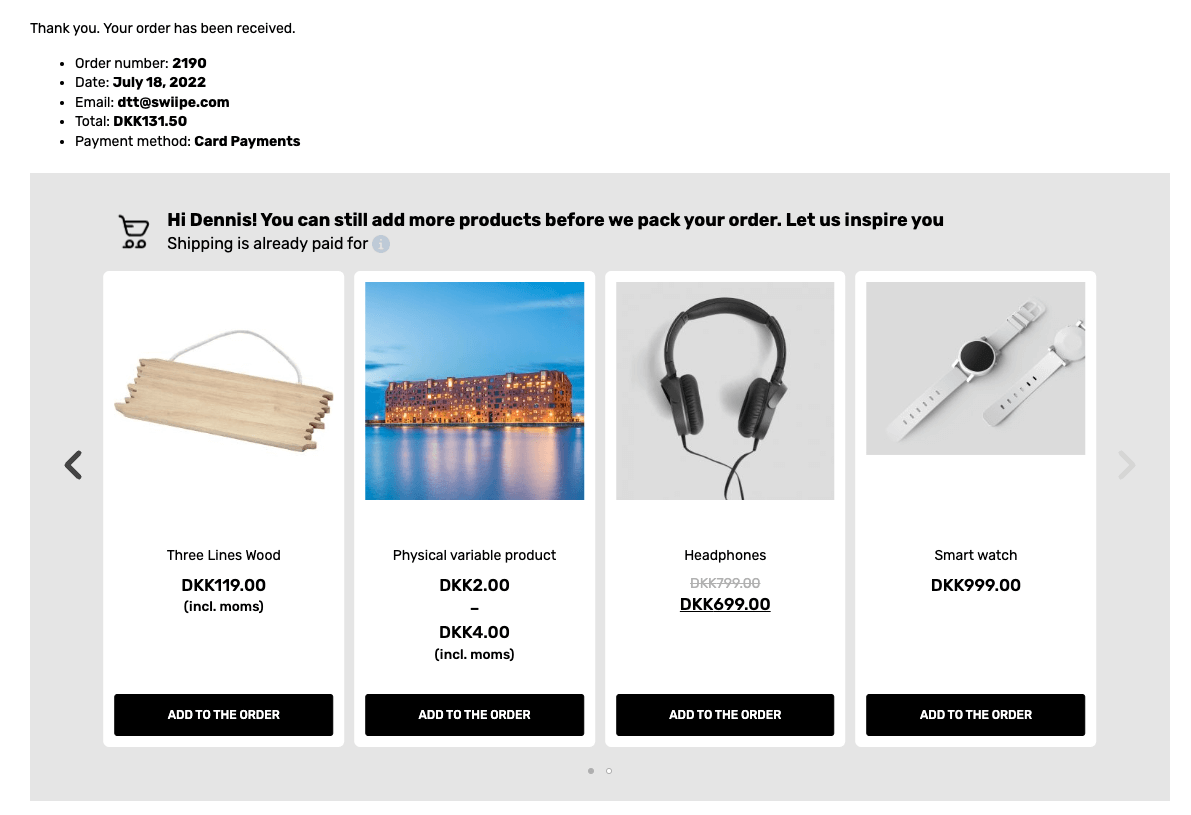
Diese Anleitung zeigt, wie Sie die Empfehlungen von Clerk.io aktivieren und konfigurieren, um mit Plus-Sell zu arbeiten.
Magento 2 #
Plus-sell aktivieren #
Wenn das Clerk.io Plugin installiert ist, kann Swiipe die Konfiguration des API-Schlüssels automatisch abrufen, sodass bekannt ist, welches Geschäft es verwendet.
Gehen Sie im Magento2-Backend zu Stores > Configuration > Swiipe
Klicken Sie auf den Plus-sell Tab.
Plus-sell wird auf Store-Ebene aktiviert. Wählen Sie daher unbedingt einen spezifischen Store im Abschnitt Scope oben links auf der Seite.
Wählen Sie Enable Swiipe Plus-sell
Klicken Sie oben rechts auf Save Config
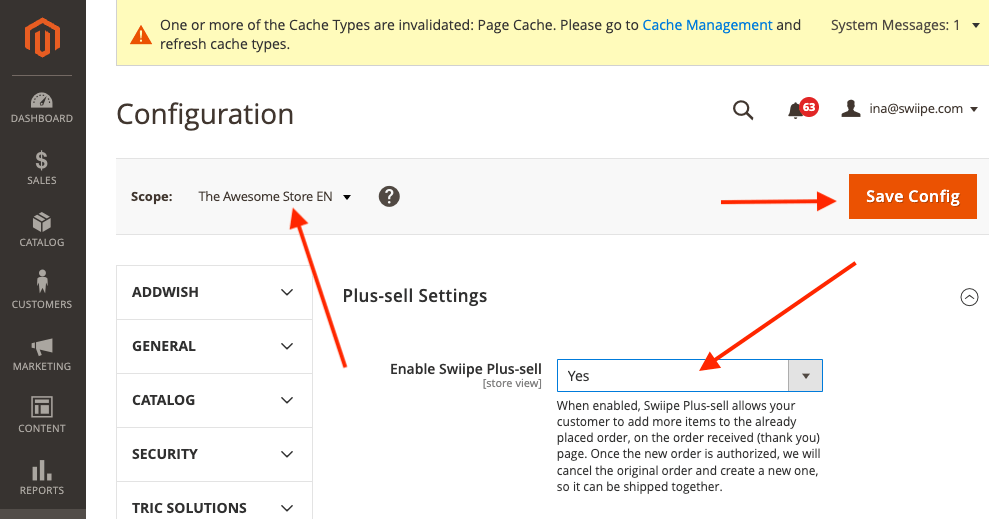
Wenn Sie die integrierten Designs von Swiipe nutzen möchten, wird Plus-sell nun bereits auf der Checkout-Seite angezeigt.
Das Design auswählen #
Das Design von Plus-sell kann auf zwei Arten konfiguriert werden:
Nutzung des integrierten, conversionstarken Designs von Swiipe (empfohlen)
Nutzung von Elements/Designs aus Clerk wie gewohnt
Mit den integrierten Designs von Swiipe #
Dies ist der Standard- und empfohlene Ansatz, da Swiipe Designs entwickelt hat, die äußerst effektiv für die Conversion sind.
Nach der Aktivierung von Plus-sell funktioniert es automatisch, wenn keine weitere Konfiguration vorgenommen wurde.
Die Designs können auf verschiedene Weisen angepasst werden:
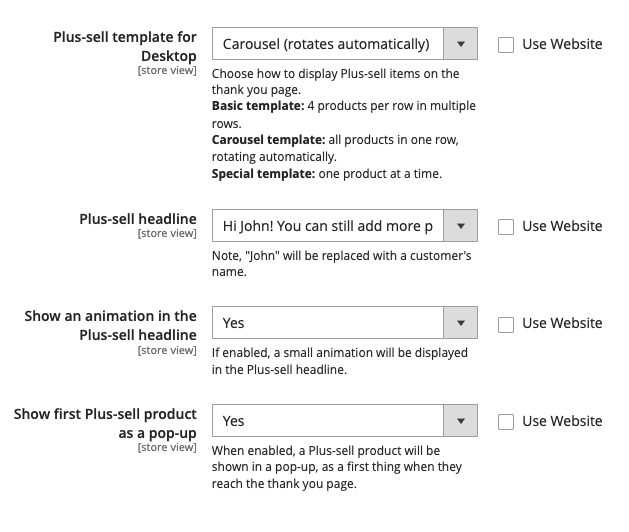
Plus-sell-Vorlage für Desktop
Hier können Sie zwischen Standard-Designs für Recommendations wählen.
Basic (statisch) zeigt einen Slider mit 4 Produkten.
Carousel (dreht sich automatisch) zeigt einen Slider mit 4 Produkten, der sich automatisch dreht.
Special (ein Produkt pro Slide) zeigt jeweils 1 Produkt mit mehr Informationen pro Slide.
Plus-sell-Headline Hier können Sie zwischen 3 Headline-Typen für das Banner wählen.
Animation in der Plus-sell-Headline anzeigen Zeigt ein kleines animiertes Warenkorb-Icon neben der Headline an.
Erstes Plus-sell-Produkt als Pop-up anzeigen Zeigt beim Betreten der Checkout-Seite ein Pop-up mit dem ersten von Clerk empfohlenen Produkt an.
Nutzung von Elements / Designs von Clerk #
Mit dieser Funktion können Sie den Slider in my.clerk.io individuell anpassen.
Scrollen Sie zur Clerk Überschrift
Wählen Sie Use template design from Clerk.io
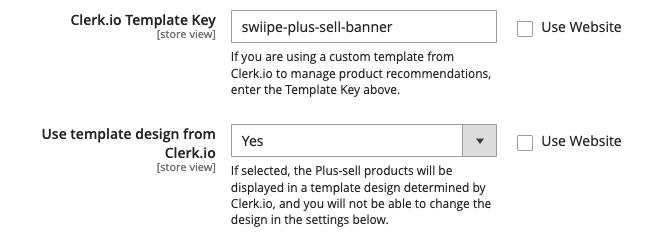
Geben Sie bei Clerk.io Template Key die ID des Element ein, das Sie verwenden möchten.
Es wird empfohlen, ein neues Element mit der Logik Best Cross-Sell products zu erstellen.
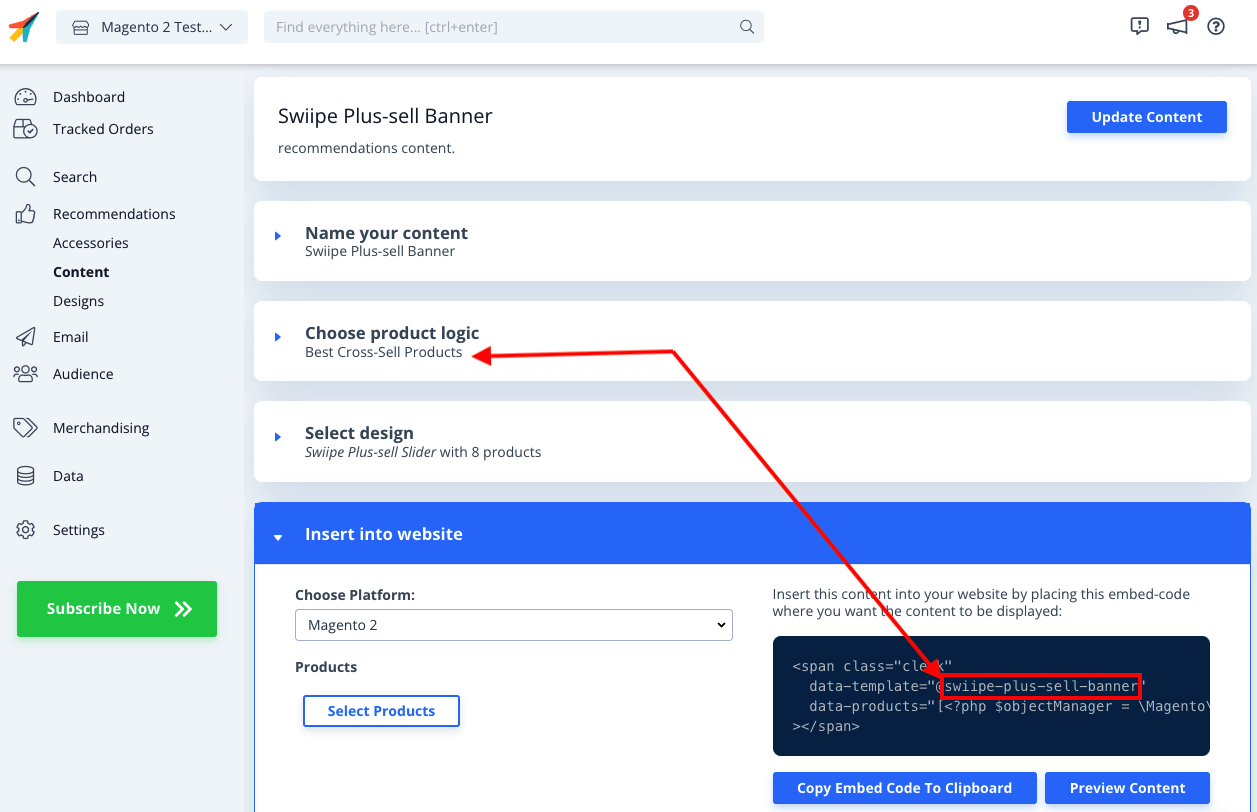
Jetzt müssen Sie das individuelle Design erstellen, das die Plus-sell-Funktionalität des direkten Hinzufügens von Produkten zum Warenkorb beinhaltet.
Gehen Sie in my.clerk.io zu Recommendations > Designs > New Design
Wählen Sie Blank > Code und geben Sie einen Namen ein.
Kopieren Sie die untenstehenden Code-Blöcke in die jeweiligen Bereiche HTML und CSS und klicken Sie auf Update Design
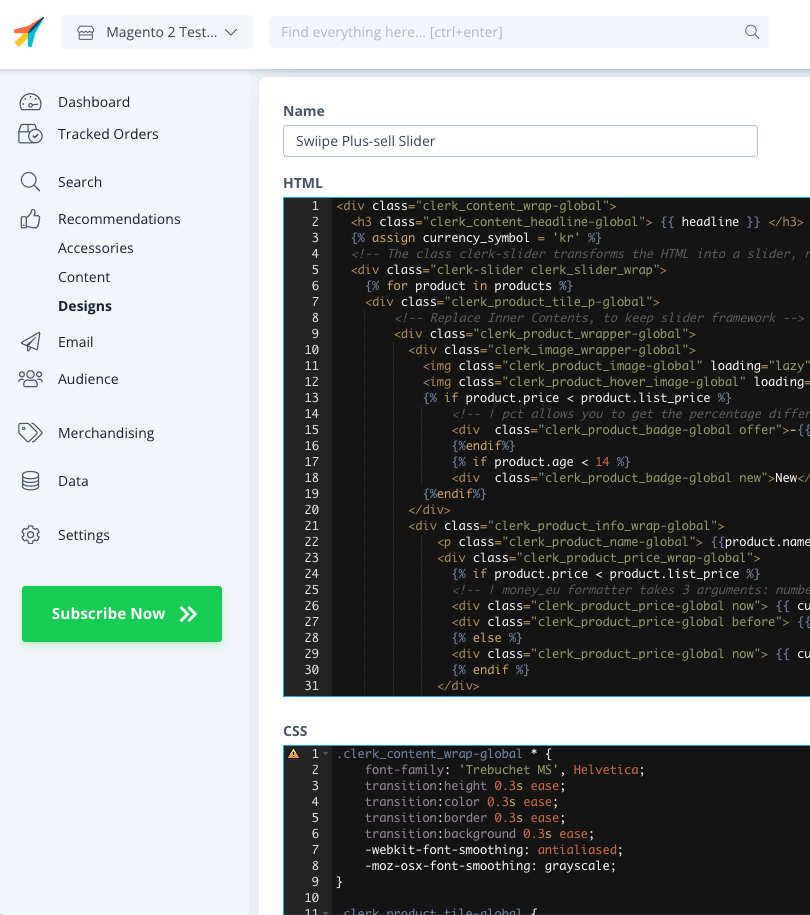
HTML
{% raw %}
<div class="clerk_content_wrap-global">
  <h3 class="clerk_content_headline-global"> {{ headline }} </h3>
  {% assign currency_symbol = '€' %}
  <!-- The class clerk-slider transforms the HTML into a slider, removing this class disables Clerk slider framework -->
  <div class="clerk-slider clerk_slider_wrap">
    {% for product in products %}
    <div class="clerk_product_tile_p-global">
        <!-- Replace Inner Contents, to keep slider framework -->
        <div class="clerk_product_wrapper-global">
          <div class="clerk_image_wrapper-global">
            <img class="clerk_product_image-global" loading="lazy" src="{{ product.image }}" />
            <img class="clerk_product_hover_image-global" loading="lazy" src="{{ product.image }}" />
            {% if product.price < product.list_price %}
                <!-- | pct allows you to get the percentage difference between any 2 numerical values -->
                <div  class="clerk_product_badge-global offer">-{{ product.price | pct product.list_price }}%</div>
                {%endif%}
                {% if product.age < 30 %}
                <div  class="clerk_product_badge-global new">New</div>
            {%endif%}
          </div>
          <div class="clerk_product_info_wrap-global">
              <p class="clerk_product_name-global"> {{product.name}} </p>
              <div class="clerk_product_price_wrap-global">
                {% if product.price < product.list_price %}
                <!-- | money_eu formatter takes 3 arguments: number of decimals, thousand separator, decimal separator. Can also be used with no arguments, will default to 2 decimal places. -->
                <div class="clerk_product_price-global now"> {{ currency_symbol }}{{ product.price | money_eu 2 "." ","  }} </div>
                <div class="clerk_product_price-global before"> {{ currency_symbol }}{{ product.list_price | money_eu 2 "." "," }} </div>
                {% else %}
                <div class="clerk_product_price-global now"> {{ currency_symbol }}{{ product.price | money_eu 2 "." "," }} </div>
                {% endif %}
              </div>
              <div class="clerk_sizes_wrap">
                {% if product.sizes %}
                  {%for str in product.sizes %}
                    <span class="clerk_sizes">{{str}}</span>
                  {%endfor%}
                {% endif %}
              </div>
           </div>
           <div class="clerk_product_cta-global" onclick="clerk_simple_swiipe_buy_now(this, {{product.id}});">Buy now</div>
         </div>
        <!-- Replace Inner Contents, to keep slider framework -->
    </div>
    {% endfor %}
  </div>
</div>
<script>
    function clerk_simple_swiipe_buy_now(el, product_id) {
        var buy_now = el.innerHTML;
        el.innerHTML = "Adding...";
        el.classList.toggle('button--loading');
        _SwiipeApi.plusSell.addProducts([{ id:product_id, qty:1 }]).then((result) => {
            el.classList.toggle('button--loading');
            el.innerHTML = buy_now;
        });
    }
</script>
{% endraw %}
CSS
.clerk_content_wrap-global * {
    font-family: 'Trebuchet MS', Helvetica;
    transition:height 0.3s ease;
    transition:color 0.3s ease;
    transition:border 0.3s ease;
    transition:background 0.3s ease;
    -webkit-font-smoothing: antialiased;
    -moz-osx-font-smoothing: grayscale;
}

.clerk_product_tile-global {
    display: flex !important;
}
.clerk-slider-nav {
    z-index: 1 !important;
    background-image: none !important;
    box-shadow: none !important;
}
.clerk_slider_wrap {
    display: inline-flex;
    align-items: stretch;
    max-width: 100vw;
    width:inherit;
}

@keyframes arrowPop {
    0% {
        width:20%;
    }
    50% {
        width:0%;
    }
    100% {
        width: 20%;
    }
}

.clerk-slider-nav {
    background: #333;
    border-radius:50%;
    display:flex;
    justify-content:center;
    align-items:center;
    font-size:0;
    opacity:0.8;
    filter: drop-shadow(0 0 5px #333);
    transition:0.3s ease;
}

.clerk-slider-nav:hover {
    opacity:1;
    transition:0.3s ease;
}
.clerk-slider-nav:hover:before {
    animation:arrowPop 0.3s ease;
}
.clerk-slider-nav-next {
    flex-direction:row-reverse;
}

.clerk-slider-nav:after {
    content:"";
    display:block;
    height:40%;
    width:40%;
    transform: rotate(45deg);
    border: solid white;
}
.clerk-slider-nav-prev:after {
    border-width: 0px 0px 2px 2px;
}

.clerk-slider-nav-next:after {
    border-width: 2px 2px 0px 0px;
}

.clerk-slider-nav:before {
    content:"";
    width:20%;
}

.clerk_container-global {
    display:block;
    width:100%;
}

.clerk_product_info_wrap-global {

    padding: 5px;
    border-radius:1px;
    display: flex;
    flex-direction: column;
    justify-content: stretch;
    align-items: stretch;
    min-height: 0;
    height: -webkit-fill-available;
    height: -moz-available;
    height: fill-available;
        height: 100%;
        height: auto;
}

.clerk_product_info_wrap-global .clerk_link-global {
    transition:0.3s ease;
    min-height:0;
    height: -webkit-fill-available;
    height: -moz-available;
    height: fill-available;
        height: 100%;
        height: auto;
}

.clerk_product_info_wrap-global > * {
    padding: 0 5px;
}
.clerk_link-global {
    border-bottom:none;
    display:inherit;
    width:100%;
    text-decoration:none;
    color:inherit;
    padding:0;
}

.clerk_link-global:hover {
    filter: contrast(105%);
}

.clerk_content_headline-global{
    max-width: 100%;
    width: 100%;
    font-size: 26px;
    text-align:center;
    color:inherit;
}

.clerk_product_tile_p-global{
    flex-direction: column;
    justify-content: space-between;
    border-radius:0px;
    padding:15px;
    margin:5px;
    box-sizing:border-box;
    min-width:calc(25% - 10px);
    max-width:calc(25% - 10px);
    position:relative;
    overflow:hidden;
    border:1px solid #eee;
    background-color:white;
    text-align:center;
}

.clerk_product_wrapper-global {
    height: 100%;
    display: flex;
    flex-direction: column;
}

.clerk_product_badge-global.offer{
    display:block;
    position:absolute;
    top:0;
    right:0;
    width: 4em;
    height: 4em;
    border-radius:999rem; /* Needed to ensure it never rounds corners more than 50% */
    background: #f9f9f9;
    color:#333;
    font-weight:bold;
    line-height:3.5em;
    border:4px solid #333;
    user-select:none;
    pointer-events:none;
}

.clerk_product_badge-global.new{
    display: block;
    position: absolute;
    top: 0;
    left: 0;
    width: 4em;
    height: 4em;
    border-radius: 999rem;
    background: #f9f9f9;
    color: #333;
    font-weight: bold;
    line-height: 3.5em;
    border: 4px solid #333;
    user-select: none;
    pointer-events: none;
}

.clerk_image_wrapper-global {
    display:block;
    position:relative;
    width:100%;
    height:auto;
}

.clerk_image_wrapper-global:hover .clerk_product_hover_image-global {
    opacity:1;
    transition: 0.3s ease-in;
}

.clerk_image_wrapper-global:hover .clerk_product_image-global {
    opacity:0;
    transition: 0.3s ease-out;
    transition-delay:0.2s;
}

.clerk_image_wrapper-global .clerk_product_hover_image-global {
    position:absolute;
    top:0;
    left:0;
    min-height:auto;
}

.clerk_product_hover_image-global{
    background-size:contain;
    background-position:center center;
    background-repeat:no-repeat;
    object-fit: contain;
    /*Change the max height value below to 100% if the client has consistent image sizes */
    max-height:400px;
    width:100%;
    max-width:100%;
    height: auto;
    opacity:0;
}

.clerk_product_image-global{
    background-size:contain;
    background-position:center center;
    background-repeat:no-repeat;
    object-fit: contain;
    /*Change the max height value below to 100% if the client has consistent image sizes */
    max-height:400px;
    width:100%;
    max-width:100%;
    height: auto;
}

.clerk_product_stock-global {
    display:flex;
    text-align:left;
    justify-content:left;
    align-items:center;
    font-size:80%;
    text-transform: capitalize;
    padding:5px;
    user-select:none;
}

.clerk_product_stock-global:before {
    content:"";
    height: 8px;
    width: 8px;
    margin:0 5px 0 0;
    border-radius:50%;
}

.clerk_product_stock-global.in:before {
    background:#78b904;
}
/*
.clerk_product_stock.low:before {
    background:#eea71e;
}
*/
.clerk_product_stock-global.out:before {
    background:#ee1e31;
}
.clerk_product_name-global{
    overflow:hidden;
    height:auto;
    min-height: 36px;
    margin-bottom:1rem;
    color:inherit;
    text-align:left;
    max-width: 100%;
    padding:0 5px;
    display: -webkit-box;
    -webkit-line-clamp: 3;
    -webkit-box-orient: vertical;
}

.clerk_product_price_wrap-global{
    font-size: 1em;
    min-height: auto;
    flex-direction:row;
    display:flex;
    max-width: 100%;
    justify-content: flex-start;
}

.clerk_product_price-global {
    padding: 0px 5px 0px 0px;
}

.clerk_product_price-global.before{
    opacity: .8;
    flex:1;
    font-weight:normal;
    color:black;
    text-decoration:line-through;
    font-size:inherit;
    text-align:center;
    max-width: fit-content;
    max-width: -moz-fit-content;
}

.clerk_product_price-global.now{
    flex:1;
    font-weight:bold;
    font-size:inherit;
    text-align:center;
    color:inherit;
    max-width: fit-content;
    max-width: -moz-fit-content;
}

.clerk_product_cta-global{
    border-radius:2px;
    cursor:pointer;
    color:#fff;
    padding:5px;
    margin:0;
    display:block;
    white-space:nowrap;
    font-weight:normal;
    border:none;
    background-color:#333;
    border:1px solid #333;
    text-align:center;
    max-width: 100%;
    text-decoration: none;
}

.clerk_product_cta-global:hover {
    color:#333;
    background-color:#fff;
}

.clerk_content_wrap-global{
    box-sizing: border-box;
    margin: 1rem auto;
    width: 100%;
}

@media screen and (max-width: 400px) {
.clerk_content_headline-global{

}

.clerk_product_tile_p-global{
    min-width:calc(100%);
    max-width:calc(100%);
}

.clerk_product_badge-global{

}
.clerk_product_price_wrap-global {

}
}
@media screen and (min-width: 401px) and (max-width: 620px) {
.clerk_content_headline-global{

}
.clerk_product_tile_p-global{
    min-width:calc(50% - 10px);
    max-width:calc(50% - 10px);
}
.clerk_product_badge-global{

}
}
@media screen and (min-width: 621px) and (max-width: 940px) {
.clerk_content_headline-global{

}
.clerk_product_tile_p-global{
    min-width:calc(33.333336% - 10px);
    max-width:calc(33.333336% - 10px);
}
.clerk_product_badge-global{

}
}
@media screen and (min-width: 941px) and (max-width: 1160px) {
.clerk_content_headline-global{

}
.clerk_product_tile_p-global{
    min-width:calc(25% - 10px);
    max-width:calc(25% - 10px);
}
.clerk_product_badge-global{

}
}

.clerk_sizes_wrap{
    display:flex;
    flex-direction:row;
    width:100%;
}
.clerk_sizes{
    padding:5px;
    margin:5px;
    border:1px solid #eee;
    width:50px;
}
- Gehen Sie abschließend zu dem erstellten Element und wählen Sie dieses Design unter Select Design aus. Klicken Sie dann auf Update Element
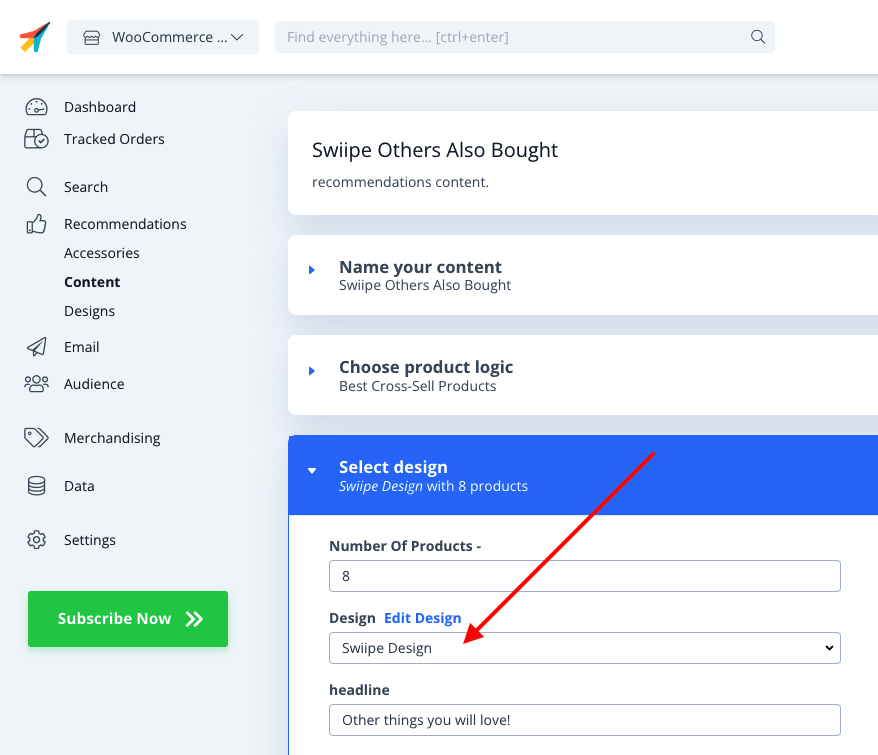
- Swiipe Plus-sell läuft jetzt mit dem Clerk-Design im Checkout.
Magento 1 #
Plus-sell aktivieren #
Wenn das Clerk.io Plugin installiert ist, kann Swiipe die Konfiguration des API-Schlüssels automatisch abrufen, sodass bekannt ist, welches Geschäft es verwendet.
Gehen Sie im Magento-Backend zu System > Configuration > Swiipe
Unter Swiipe im Seitenmenü klicken Sie auf den Tab Payment Settings.
Plus-sell wird auf Store-Ebene aktiviert. Wählen Sie daher unbedingt einen spezifischen Store im Abschnitt Scope oben links auf der Seite.
Wählen Sie Enable Swiipe Plus-sell
Klicken Sie oben rechts auf Save Config
Das Design auswählen #
Nutzung von Elements / Designs von Clerk #
Mit dieser Funktion können Sie den Slider in my.clerk.io individuell anpassen.
Scrollen Sie zur Clerk Überschrift
Wählen Sie Use template design from Clerk.io
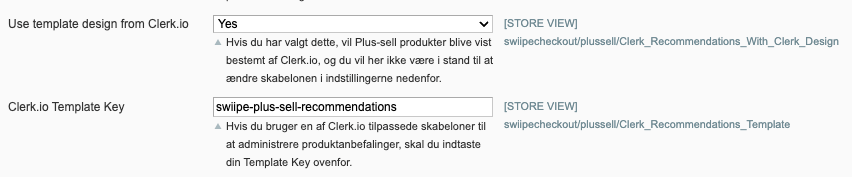
Geben Sie bei Clerk.io Template Key die ID des Element ein, das Sie verwenden möchten.
Es wird empfohlen, ein neues Element mit der Logik Best Cross-Sell products zu erstellen.
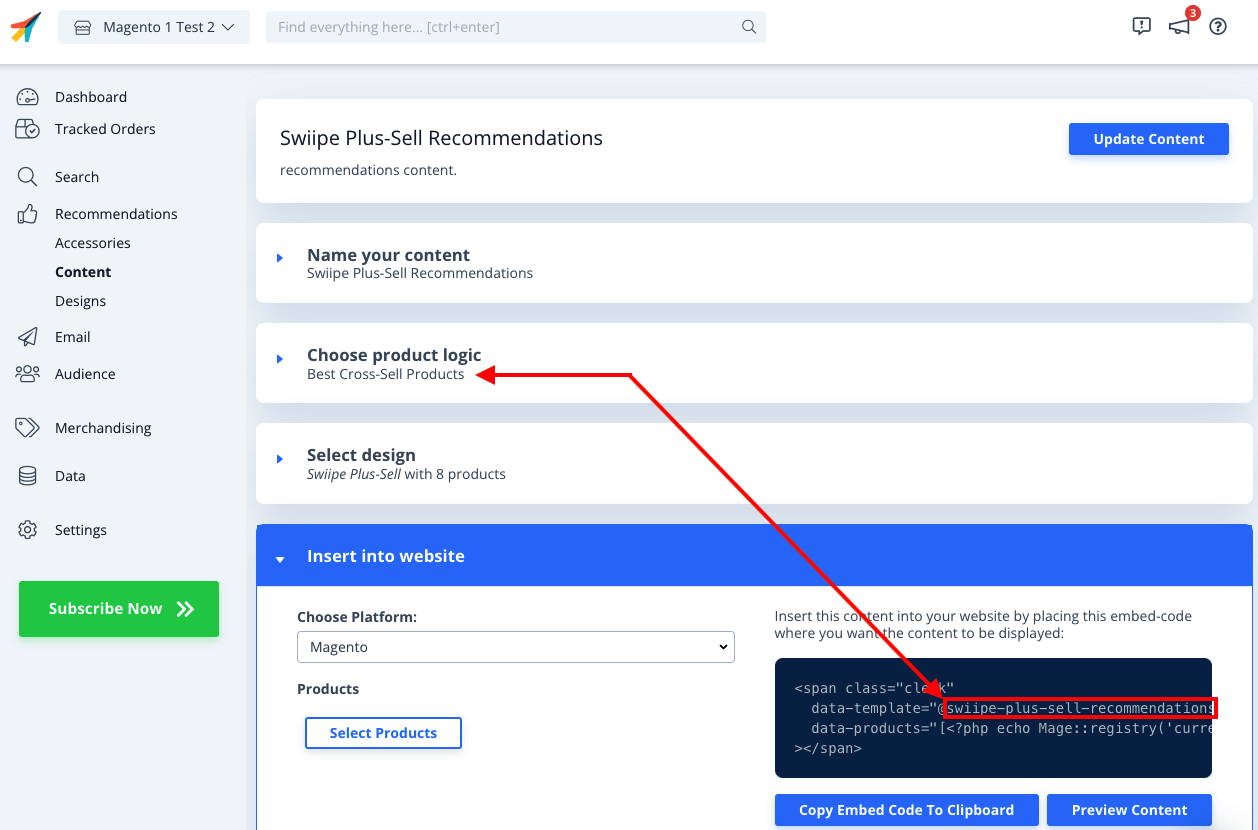
Jetzt müssen Sie das individuelle Design erstellen, das die Plus-sell-Funktionalität des direkten Hinzufügens von Produkten zum Warenkorb beinhaltet.
Gehen Sie in my.clerk.io zu Recommendations > Designs > New Design
Wählen Sie Blank > Code und geben Sie einen Namen ein.
Kopieren Sie die untenstehenden Code-Blöcke in die jeweiligen Bereiche HTML und CSS und klicken Sie auf Update Design
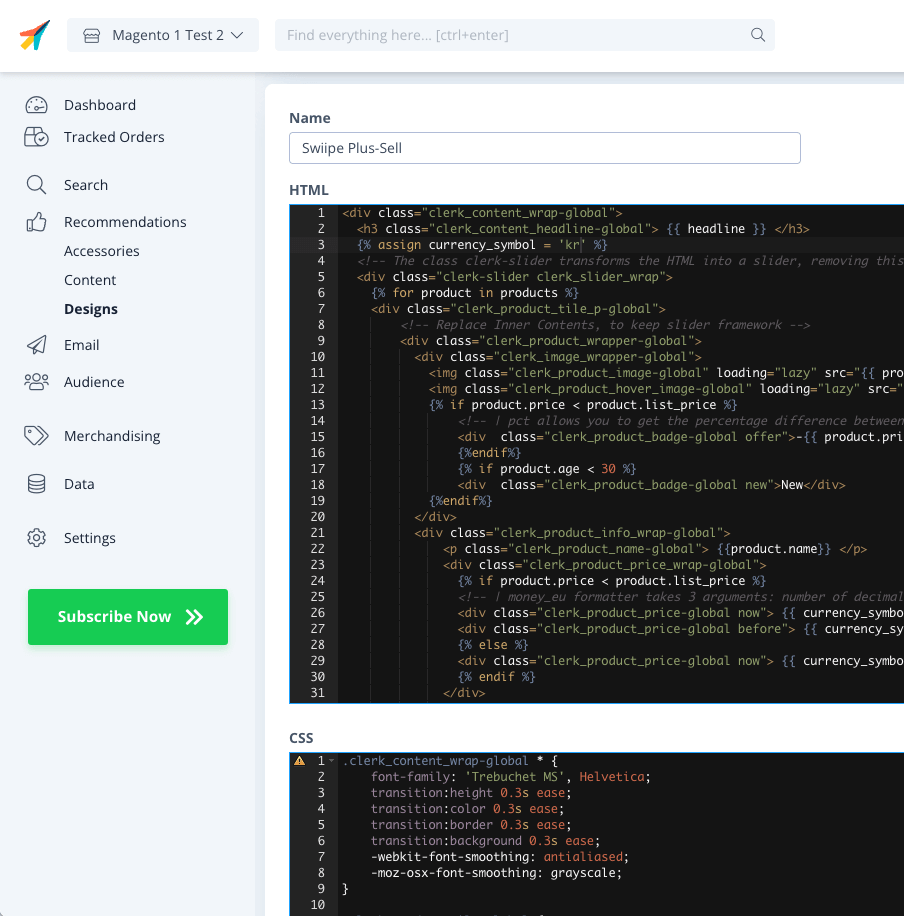
HTML
{% raw %}
<div class="clerk_content_wrap-global">
  <h3 class="clerk_content_headline-global"> {{ headline }} </h3>
  {% assign currency_symbol = '€' %}
  <!-- The class clerk-slider transforms the HTML into a slider, removing this class disables Clerk slider framework -->
  <div class="clerk-slider clerk_slider_wrap">
    {% for product in products %}
    <div class="clerk_product_tile_p-global">
        <!-- Replace Inner Contents, to keep slider framework -->
        <div class="clerk_product_wrapper-global">
          <div class="clerk_image_wrapper-global">
            <img class="clerk_product_image-global" loading="lazy" src="{{ product.image }}" />
            <img class="clerk_product_hover_image-global" loading="lazy" src="{{ product.image }}" />
            {% if product.price < product.list_price %}
                <!-- | pct allows you to get the percentage difference between any 2 numerical values -->
                <div  class="clerk_product_badge-global offer">-{{ product.price | pct product.list_price }}%</div>
                {%endif%}
                {% if product.age < 30 %}
                <div  class="clerk_product_badge-global new">New</div>
            {%endif%}
          </div>
          <div class="clerk_product_info_wrap-global">
              <p class="clerk_product_name-global"> {{product.name}} </p>
              <div class="clerk_product_price_wrap-global">
                {% if product.price < product.list_price %}
                <!-- | money_eu formatter takes 3 arguments: number of decimals, thousand separator, decimal separator. Can also be used with no arguments, will default to 2 decimal places. -->
                <div class="clerk_product_price-global now"> {{ currency_symbol }}{{ product.price | money_eu 2 "." ","  }} </div>
                <div class="clerk_product_price-global before"> {{ currency_symbol }}{{ product.list_price | money_eu 2 "." "," }} </div>
                {% else %}
                <div class="clerk_product_price-global now"> {{ currency_symbol }}{{ product.price | money_eu 2 "." "," }} </div>
                {% endif %}
              </div>
              <div class="clerk_sizes_wrap">
                {% if product.sizes %}
                  {%for str in product.sizes %}
                    <span class="clerk_sizes">{{str}}</span>
                  {%endfor%}
                {% endif %}
              </div>
           </div>
           <div class="clerk_product_cta-global" onclick="clerk_simple_swiipe_buy_now(this, {{product.id}});">Buy now</div>
         </div>
        <!-- Replace Inner Contents, to keep slider framework -->
    </div>
    {% endfor %}
  </div>
</div>
<script>
    function clerk_simple_swiipe_buy_now(el, product_id) {
        var buy_now = el.innerHTML;
        el.innerHTML = "Adding...";
        el.classList.toggle('button--loading');
        _SwiipeApi.plusSell.addProducts([{ id:product_id, qty:1 }]).then((result) => {
            el.classList.toggle('button--loading');
            el.innerHTML = buy_now;
        });
    }
</script>
{% endraw %}
CSS
.clerk_content_wrap-global * {
    font-family: 'Trebuchet MS', Helvetica;
    transition:height 0.3s ease;
    transition:color 0.3s ease;
    transition:border 0.3s ease;
    transition:background 0.3s ease;
    -webkit-font-smoothing: antialiased;
    -moz-osx-font-smoothing: grayscale;
}

.clerk_product_tile-global {
    display: flex !important;
}
.clerk-slider-nav {
    z-index: 1 !important;
    background-image: none !important;
    box-shadow: none !important;
}
.clerk_slider_wrap {
    display: inline-flex;
    align-items: stretch;
    max-width: 100vw;
    width:inherit;
}

@keyframes arrowPop {
    0% {
        width:20%;
    }
    50% {
        width:0%;
    }
    100% {
        width: 20%;
    }
}

.clerk-slider-nav {
    background: #333;
    border-radius:50%;
    display:flex;
    justify-content:center;
    align-items:center;
    font-size:0;
    opacity:0.8;
    filter: drop-shadow(0 0 5px #333);
    transition:0.3s ease;
}

.clerk-slider-nav:hover {
    opacity:1;
    transition:0.3s ease;
}
.clerk-slider-nav:hover:before {
    animation:arrowPop 0.3s ease;
}
.clerk-slider-nav-next {
    flex-direction:row-reverse;
}

.clerk-slider-nav:after {
    content:"";
    display:block;
    height:40%;
    width:40%;
    transform: rotate(45deg);
    border: solid white;
}
.clerk-slider-nav-prev:after {
    border-width: 0px 0px 2px 2px;
}

.clerk-slider-nav-next:after {
    border-width: 2px 2px 0px 0px;
}

.clerk-slider-nav:before {
    content:"";
    width:20%;
}

.clerk_container-global {
    display:block;
    width:100%;
}

.clerk_product_info_wrap-global {

    padding: 5px;
    border-radius:1px;
    display: flex;
    flex-direction: column;
    justify-content: stretch;
    align-items: stretch;
    min-height: 0;
    height: -webkit-fill-available;
    height: -moz-available;
    height: fill-available;
        height: 100%;
        height: auto;
}

.clerk_product_info_wrap-global .clerk_link-global {
    transition:0.3s ease;
    min-height:0;
    height: -webkit-fill-available;
    height: -moz-available;
    height: fill-available;
        height: 100%;
        height: auto;
}

.clerk_product_info_wrap-global > * {
    padding: 0 5px;
}
.clerk_link-global {
    border-bottom:none;
    display:inherit;
    width:100%;
    text-decoration:none;
    color:inherit;
    padding:0;
}

.clerk_link-global:hover {
    filter: contrast(105%);
}

.clerk_content_headline-global{
    max-width: 100%;
    width: 100%;
    font-size: 26px;
    text-align:center;
    color:inherit;
}

.clerk_product_tile_p-global{
    flex-direction: column;
    justify-content: space-between;
    border-radius:0px;
    padding:15px;
    margin:5px;
    box-sizing:border-box;
    min-width:calc(25% - 10px);
    max-width:calc(25% - 10px);
    position:relative;
    overflow:hidden;
    border:1px solid #eee;
    background-color:white;
    text-align:center;
}

.clerk_product_wrapper-global {
    height: 100%;
    display: flex;
    flex-direction: column;
}

.clerk_product_badge-global.offer{
    display:block;
    position:absolute;
    top:0;
    right:0;
    width: 4em;
    height: 4em;
    border-radius:999rem; /* Needed to ensure it never rounds corners more than 50% */
    background: #f9f9f9;
    color:#333;
    font-weight:bold;
    line-height:3.5em;
    border:4px solid #333;
    user-select:none;
    pointer-events:none;
}

.clerk_product_badge-global.new{
    display: block;
    position: absolute;
    top: 0;
    left: 0;
    width: 4em;
    height: 4em;
    border-radius: 999rem;
    background: #f9f9f9;
    color: #333;
    font-weight: bold;
    line-height: 3.5em;
    border: 4px solid #333;
    user-select: none;
    pointer-events: none;
}

.clerk_image_wrapper-global {
    display:block;
    position:relative;
    width:100%;
    height:auto;
}

.clerk_image_wrapper-global:hover .clerk_product_hover_image-global {
    opacity:1;
    transition: 0.3s ease-in;
}

.clerk_image_wrapper-global:hover .clerk_product_image-global {
    opacity:0;
    transition: 0.3s ease-out;
    transition-delay:0.2s;
}

.clerk_image_wrapper-global .clerk_product_hover_image-global {
    position:absolute;
    top:0;
    left:0;
    min-height:auto;
}

.clerk_product_hover_image-global{
    background-size:contain;
    background-position:center center;
    background-repeat:no-repeat;
    object-fit: contain;
    /*Change the max height value below to 100% if the client has consistent image sizes */
    max-height:400px;
    width:100%;
    max-width:100%;
    height: auto;
    opacity:0;
}

.clerk_product_image-global{
    background-size:contain;
    background-position:center center;
    background-repeat:no-repeat;
    object-fit: contain;
    /*Change the max height value below to 100% if the client has consistent image sizes */
    max-height:400px;
    width:100%;
    max-width:100%;
    height: auto;
}

.clerk_product_stock-global {
    display:flex;
    text-align:left;
    justify-content:left;
    align-items:center;
    font-size:80%;
    text-transform: capitalize;
    padding:5px;
    user-select:none;
}

.clerk_product_stock-global:before {
    content:"";
    height: 8px;
    width: 8px;
    margin:0 5px 0 0;
    border-radius:50%;
}

.clerk_product_stock-global.in:before {
    background:#78b904;
}
/*
.clerk_product_stock.low:before {
    background:#eea71e;
}
*/
.clerk_product_stock-global.out:before {
    background:#ee1e31;
}
.clerk_product_name-global{
    overflow:hidden;
    height:auto;
    min-height: 36px;
    margin-bottom:1rem;
    color:inherit;
    text-align:left;
    max-width: 100%;
    padding:0 5px;
    display: -webkit-box;
    -webkit-line-clamp: 3;
    -webkit-box-orient: vertical;
}

.clerk_product_price_wrap-global{
    font-size: 1em;
    min-height: auto;
    flex-direction:row;
    display:flex;
    max-width: 100%;
    justify-content: flex-start;
}

.clerk_product_price-global {
    padding: 0px 5px 0px 0px;
}

.clerk_product_price-global.before{
    opacity: .8;
    flex:1;
    font-weight:normal;
    color:black;
    text-decoration:line-through;
    font-size:inherit;
    text-align:center;
    max-width: fit-content;
    max-width: -moz-fit-content;
}

.clerk_product_price-global.now{
    flex:1;
    font-weight:bold;
    font-size:inherit;
    text-align:center;
    color:inherit;
    max-width: fit-content;
    max-width: -moz-fit-content;
}

.clerk_product_cta-global{
    border-radius:2px;
    cursor:pointer;
    color:#fff;
    padding:5px;
    margin:0;
    display:block;
    white-space:nowrap;
    font-weight:normal;
    border:none;
    background-color:#333;
    border:1px solid #333;
    text-align:center;
    max-width: 100%;
    text-decoration: none;
}

.clerk_product_cta-global:hover {
    color:#333;
    background-color:#fff;
}

.clerk_content_wrap-global{
    box-sizing: border-box;
    margin: 1rem auto;
    width: 100%;
}

@media screen and (max-width: 400px) {
.clerk_content_headline-global{

}

.clerk_product_tile_p-global{
    min-width:calc(100%);
    max-width:calc(100%);
}

.clerk_product_badge-global{

}
.clerk_product_price_wrap-global {

}
}
@media screen and (min-width: 401px) and (max-width: 620px) {
.clerk_content_headline-global{

}
.clerk_product_tile_p-global{
    min-width:calc(50% - 10px);
    max-width:calc(50% - 10px);
}
.clerk_product_badge-global{

}
}
@media screen and (min-width: 621px) and (max-width: 940px) {
.clerk_content_headline-global{

}
.clerk_product_tile_p-global{
    min-width:calc(33.333336% - 10px);
    max-width:calc(33.333336% - 10px);
}
.clerk_product_badge-global{

}
}
@media screen and (min-width: 941px) and (max-width: 1160px) {
.clerk_content_headline-global{

}
.clerk_product_tile_p-global{
    min-width:calc(25% - 10px);
    max-width:calc(25% - 10px);
}
.clerk_product_badge-global{

}
}

.clerk_sizes_wrap{
    display:flex;
    flex-direction:row;
    width:100%;
}
.clerk_sizes{
    padding:5px;
    margin:5px;
    border:1px solid #eee;
    width:50px;
}
- Gehen Sie abschließend zu dem erstellten Element und wählen Sie dieses Design unter Select Design aus. Klicken Sie dann auf Update Element
- Swiipe Plus-sell läuft jetzt mit dem Clerk-Design im Checkout.
WooCommerce #
Plus-sell aktivieren #
Wenn das Clerk.io Plugin installiert ist, kann Swiipe die Konfiguration des API-Schlüssels automatisch abrufen, sodass bekannt ist, welches Geschäft es verwendet.
Gehen Sie im WooCommerce-Backend zu Plugins > Installed Plugins > Swiipe > Swiipe Settings.
Klicken Sie auf den Plus-sell Tab.
Wählen Sie Enable Swiipe Plus-sell
Klicken Sie unten auf der Seite auf Save changes
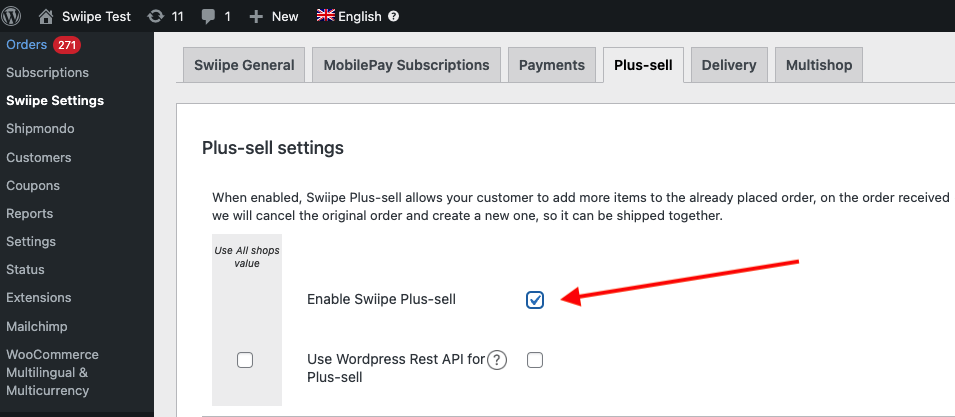
Wenn Sie die integrierten Designs von Swiipe nutzen möchten, wird Plus-sell nun bereits auf der Checkout-Seite angezeigt.
Das Design auswählen #
Das Design von Plus-sell kann auf zwei Arten konfiguriert werden:
Nutzung des integrierten, conversionstarken Designs von Swiipe (empfohlen)
Nutzung von Elements/Designs aus Clerk wie gewohnt
Mit den integrierten Designs von Swiipe #
Dies ist der Standard- und empfohlene Ansatz, da Swiipe Designs entwickelt hat, die äußerst effektiv für die Conversion sind.
Nach der Aktivierung von Plus-sell funktioniert es automatisch, wenn keine weitere Konfiguration vorgenommen wurde.
Die Designs können auf verschiedene Weisen angepasst werden:
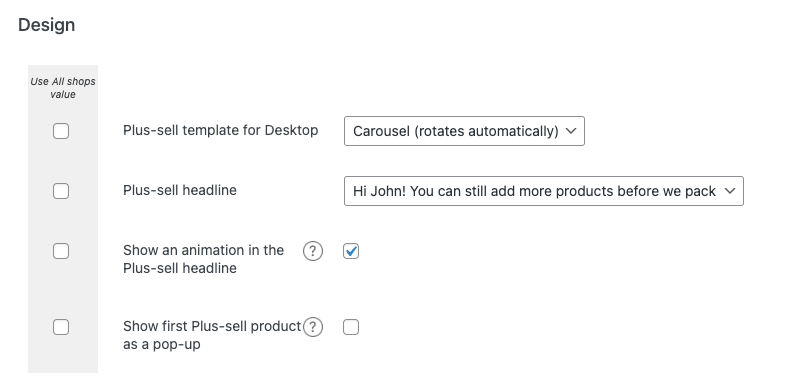
Plus-sell-Vorlage für Desktop
Hier können Sie zwischen Standard-Designs für Recommendations wählen.
Basic (statisch) zeigt einen Slider mit 4 Produkten.
Carousel (dreht sich automatisch) zeigt einen Slider mit 4 Produkten, der sich automatisch dreht.
Special (ein Produkt pro Slide) zeigt jeweils 1 Produkt mit mehr Informationen pro Slide.
Plus-sell-Headline Hier können Sie zwischen 3 Headline-Typen für das Banner wählen.
Animation in der Plus-sell-Headline anzeigen Zeigt ein kleines animiertes Warenkorb-Icon neben der Headline an.
Zeige das erste Plus-Sell-Produkt als Pop-up an Es wird beim Betreten der Checkout-Seite ein Pop-up mit dem ersten empfohlenen Produkt von Clerk angezeigt.
Verwendung von Elementen / Designs von Clerk #
Mit dieser Funktion kannst du den Slider in my.clerk.io anpassen.
Scrolle zur Clerk Überschrift
Wähle Designvorlage von Clerk.io verwenden
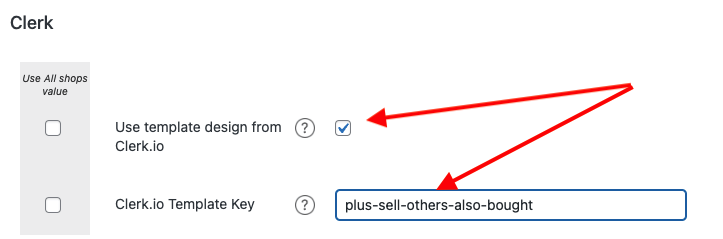
Gib in Clerk.io Template Key die ID des Elements ein, das du verwenden möchtest.
Wir empfehlen, ein neues Element mit der Logik Best Cross-Sell products zu erstellen
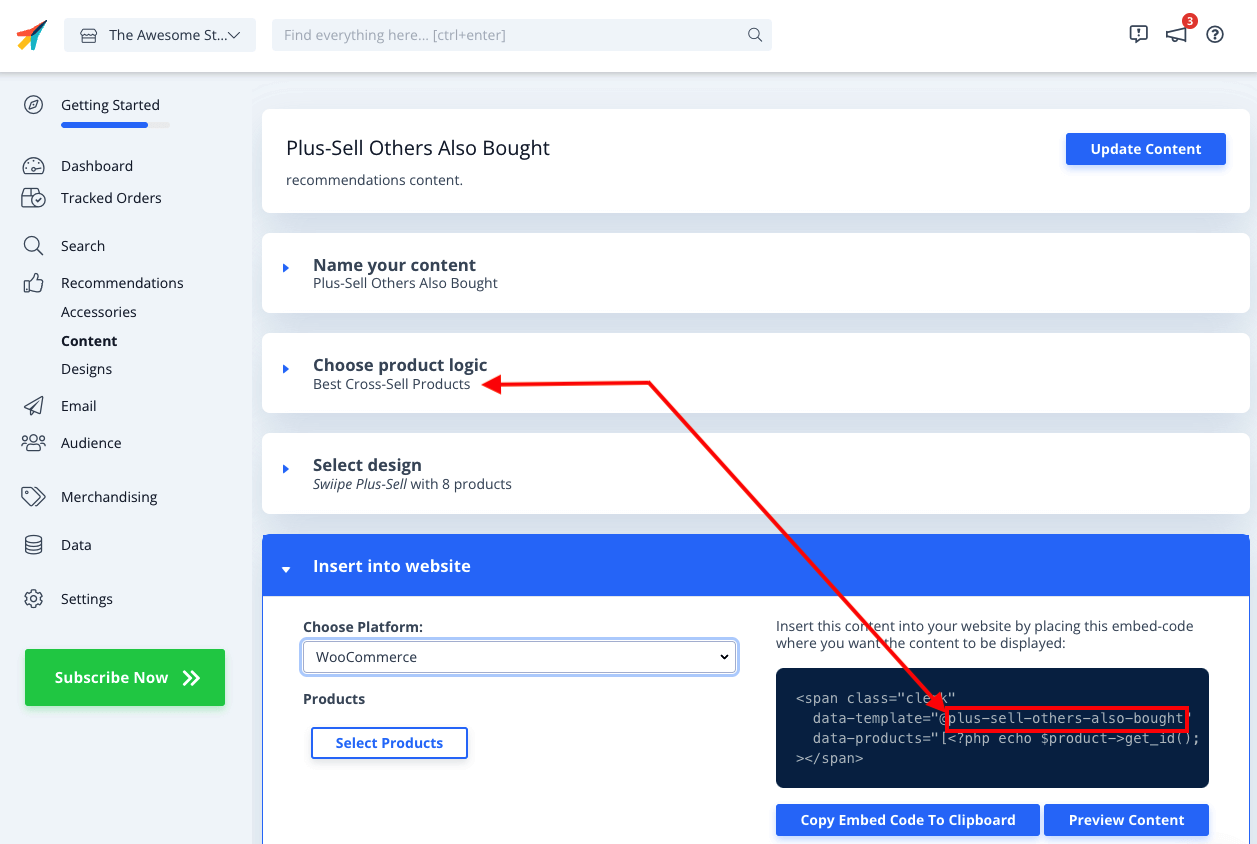
Nun musst du das individuelle Design erstellen, das die Plus-sell-Funktionalität zum direkten Hinzufügen von Produkten zum Warenkorb enthält.
Gehe in my.clerk.io zu Recommendations > Designs > New Design
Wähle Blank > Code und gib dem Design einen Namen
Kopiere die untenstehenden Codeblöcke jeweils in die Bereiche HTML und CSS und klicke auf Update Design
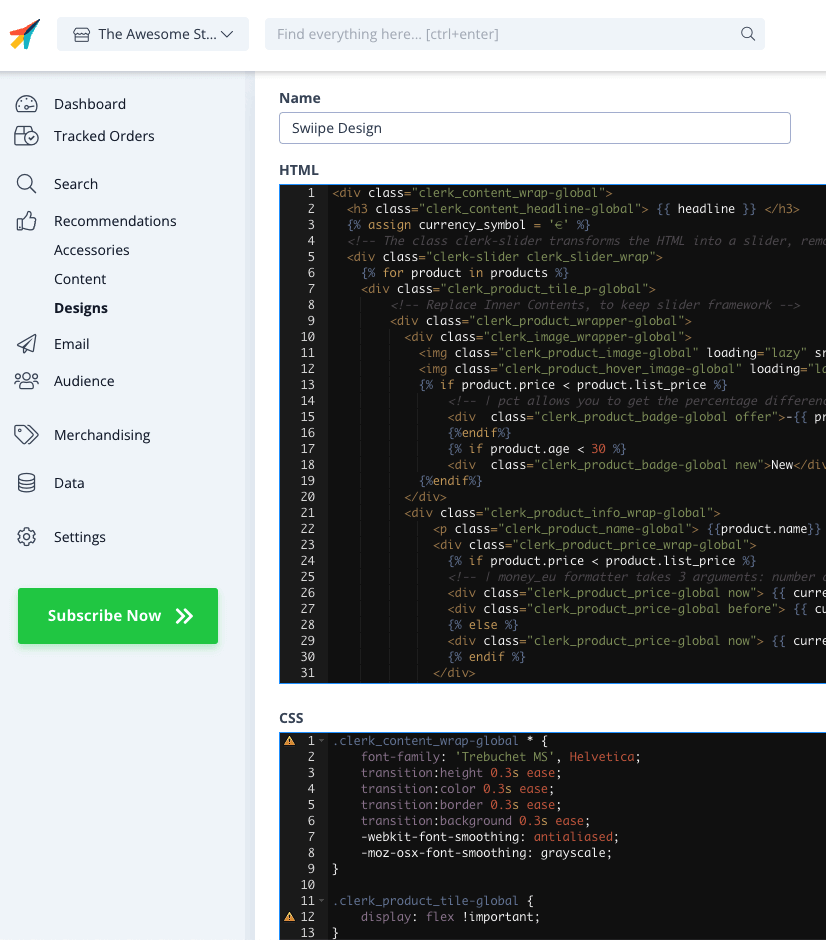
HTML
<div class="clerk_content_wrap-global">
  <h3 class="clerk_content_headline-global"> {{ headline }} </h3>
  {% assign currency_symbol = '€' %}
  <!-- The class clerk-slider transforms the HTML into a slider, removing this class disables Clerk slider framework -->
  <div class="clerk-slider clerk_slider_wrap">
    {% for product in products %}
    <div class="clerk_product_tile_p-global">
        <!-- Replace Inner Contents, to keep slider framework -->
        <div class="clerk_product_wrapper-global">
          <div class="clerk_image_wrapper-global">
            <img class="clerk_product_image-global" loading="lazy" src="{{ product.image }}" />
            <img class="clerk_product_hover_image-global" loading="lazy" src="{{ product.image }}" />
            {% if product.price < product.list_price %}
                <!-- | pct allows you to get the percentage difference between any 2 numerical values -->
                <div  class="clerk_product_badge-global offer">-{{ product.price | pct product.list_price }}%</div>
                {%endif%}
                {% if product.age < 30 %}
                <div  class="clerk_product_badge-global new">New</div>
            {%endif%}
          </div>
          <div class="clerk_product_info_wrap-global">
              <p class="clerk_product_name-global"> {{product.name}} </p>
              <div class="clerk_product_price_wrap-global">
                {% if product.price < product.list_price %}
                <!-- | money_eu formatter takes 3 arguments: number of decimals, thousand separator, decimal separator. Can also be used with no arguments, will default to 2 decimal places. -->
                <div class="clerk_product_price-global now"> {{ currency_symbol }}{{ product.price | money_eu 2 "." ","  }} </div>
                <div class="clerk_product_price-global before"> {{ currency_symbol }}{{ product.list_price | money_eu 2 "." "," }} </div>
                {% else %}
                <div class="clerk_product_price-global now"> {{ currency_symbol }}{{ product.price | money_eu 2 "." "," }} </div>
                {% endif %}
              </div>
              <div class="clerk_sizes_wrap">
                {% if product.sizes %}
                  {%for str in product.sizes %}
                    <span class="clerk_sizes">{{str}}</span>
                  {%endfor%}
                {% endif %}
              </div>
           </div>
           <div class="clerk_product_cta-global" onclick="clerk_simple_swiipe_buy_now(this, {{product.id}});">Buy now</div>
         </div>
        <!-- Replace Inner Contents, to keep slider framework -->
    </div>
    {% endfor %}
  </div>
</div>
<script>
    function clerk_simple_swiipe_buy_now(el, product_id) {
        var buy_now = el.innerHTML;
        el.innerHTML = "Adding...";
        el.classList.toggle('button--loading');
        _SwiipeApi.plusSell.addProducts([{ id:product_id, qty:1 }]).then((result) => {
            el.classList.toggle('button--loading');
            el.innerHTML = buy_now;
        });
    }
</script>
CSS
.clerk_content_wrap-global * {
    font-family: 'Trebuchet MS', Helvetica;
    transition:height 0.3s ease;
    transition:color 0.3s ease;
    transition:border 0.3s ease;
    transition:background 0.3s ease;
    -webkit-font-smoothing: antialiased;
    -moz-osx-font-smoothing: grayscale;
}

.clerk_product_tile-global {
    display: flex !important;
}
.clerk-slider-nav {
    z-index: 1 !important;
    background-image: none !important;
    box-shadow: none !important;
}
.clerk_slider_wrap {
    display: inline-flex;
    align-items: stretch;
    max-width: 100vw;
    width:inherit;
}

@keyframes arrowPop {
    0% {
        width:20%;
    }
    50% {
        width:0%;
    }
    100% {
        width: 20%;
    }
}

.clerk-slider-nav {
    background: #333;
    border-radius:50%;
    display:flex;
    justify-content:center;
    align-items:center;
    font-size:0;
    opacity:0.8;
    filter: drop-shadow(0 0 5px #333);
    transition:0.3s ease;
}

.clerk-slider-nav:hover {
    opacity:1;
    transition:0.3s ease;
}
.clerk-slider-nav:hover:before {
    animation:arrowPop 0.3s ease;
}
.clerk-slider-nav-next {
    flex-direction:row-reverse;
}

.clerk-slider-nav:after {
    content:"";
    display:block;
    height:40%;
    width:40%;
    transform: rotate(45deg);
    border: solid white;
}
.clerk-slider-nav-prev:after {
    border-width: 0px 0px 2px 2px;
}

.clerk-slider-nav-next:after {
    border-width: 2px 2px 0px 0px;
}

.clerk-slider-nav:before {
    content:"";
    width:20%;
}

.clerk_container-global {
    display:block;
    width:100%;
}

.clerk_product_info_wrap-global {

    padding: 5px;
    border-radius:1px;
    display: flex;
    flex-direction: column;
    justify-content: stretch;
    align-items: stretch;
    min-height: 0;
    height: -webkit-fill-available;
    height: -moz-available;
    height: fill-available;
        height: 100%;
        height: auto;
}

.clerk_product_info_wrap-global .clerk_link-global {
    transition:0.3s ease;
    min-height:0;
    height: -webkit-fill-available;
    height: -moz-available;
    height: fill-available;
        height: 100%;
        height: auto;
}

.clerk_product_info_wrap-global > * {
    padding: 0 5px;
}
.clerk_link-global {
    border-bottom:none;
    display:inherit;
    width:100%;
    text-decoration:none;
    color:inherit;
    padding:0;
}

.clerk_link-global:hover {
    filter: contrast(105%);
}

.clerk_content_headline-global{
    max-width: 100%;
    width: 100%;
    font-size: 26px;
    text-align:center;
    color:inherit;
}

.clerk_product_tile_p-global{
    flex-direction: column;
    justify-content: space-between;
    border-radius:0px;
    padding:15px;
    margin:5px;
    box-sizing:border-box;
    min-width:calc(25% - 10px);
    max-width:calc(25% - 10px);
    position:relative;
    overflow:hidden;
    border:1px solid #eee;
    background-color:white;
    text-align:center;
}

.clerk_product_wrapper-global {
    height: 100%;
    display: flex;
    flex-direction: column;
}

.clerk_product_badge-global.offer{
    display:block;
    position:absolute;
    top:0;
    right:0;
    width: 4em;
    height: 4em;
    border-radius:999rem; /* Needed to ensure it never rounds corners more than 50% */
    background: #f9f9f9;
    color:#333;
    font-weight:bold;
    line-height:3.5em;
    border:4px solid #333;
    user-select:none;
    pointer-events:none;
}

.clerk_product_badge-global.new{
    display: block;
    position: absolute;
    top: 0;
    left: 0;
    width: 4em;
    height: 4em;
    border-radius: 999rem;
    background: #f9f9f9;
    color: #333;
    font-weight: bold;
    line-height: 3.5em;
    border: 4px solid #333;
    user-select: none;
    pointer-events: none;
}

.clerk_image_wrapper-global {
    display:block;
    position:relative;
    width:100%;
    height:auto;
}

.clerk_image_wrapper-global:hover .clerk_product_hover_image-global {
    opacity:1;
    transition: 0.3s ease-in;
}

.clerk_image_wrapper-global:hover .clerk_product_image-global {
    opacity:0;
    transition: 0.3s ease-out;
    transition-delay:0.2s;
}

.clerk_image_wrapper-global .clerk_product_hover_image-global {
    position:absolute;
    top:0;
    left:0;
    min-height:auto;
}

.clerk_product_hover_image-global{
    background-size:contain;
    background-position:center center;
    background-repeat:no-repeat;
    object-fit: contain;
    /*Change the max height value below to 100% if the client has consistent image sizes */
    max-height:400px;
    width:100%;
    max-width:100%;
    height: auto;
    opacity:0;
}

.clerk_product_image-global{
    background-size:contain;
    background-position:center center;
    background-repeat:no-repeat;
    object-fit: contain;
    /*Change the max height value below to 100% if the client has consistent image sizes */
    max-height:400px;
    width:100%;
    max-width:100%;
    height: auto;
}

.clerk_product_stock-global {
    display:flex;
    text-align:left;
    justify-content:left;
    align-items:center;
    font-size:80%;
    text-transform: capitalize;
    padding:5px;
    user-select:none;
}

.clerk_product_stock-global:before {
    content:"";
    height: 8px;
    width: 8px;
    margin:0 5px 0 0;
    border-radius:50%;
}

.clerk_product_stock-global.in:before {
    background:#78b904;
}
/*
.clerk_product_stock.low:before {
    background:#eea71e;
}
*/
.clerk_product_stock-global.out:before {
    background:#ee1e31;
}
.clerk_product_name-global{
    overflow:hidden;
    height:auto;
    min-height: 36px;
    margin-bottom:1rem;
    color:inherit;
    text-align:left;
    max-width: 100%;
    padding:0 5px;
    display: -webkit-box;
    -webkit-line-clamp: 3;
    -webkit-box-orient: vertical;
}

.clerk_product_price_wrap-global{
    font-size: 1em;
    min-height: auto;
    flex-direction:row;
    display:flex;
    max-width: 100%;
    justify-content: flex-start;
}

.clerk_product_price-global {
    padding: 0px 5px 0px 0px;
}

.clerk_product_price-global.before{
    opacity: .8;
    flex:1;
    font-weight:normal;
    color:black;
    text-decoration:line-through;
    font-size:inherit;
    text-align:center;
    max-width: fit-content;
    max-width: -moz-fit-content;
}

.clerk_product_price-global.now{
    flex:1;
    font-weight:bold;
    font-size:inherit;
    text-align:center;
    color:inherit;
    max-width: fit-content;
    max-width: -moz-fit-content;
}

.clerk_product_cta-global{
    border-radius:2px;
    cursor:pointer;
    color:#fff;
    padding:5px;
    margin:0;
    display:block;
    white-space:nowrap;
    font-weight:normal;
    border:none;
    background-color:#333;
    border:1px solid #333;
    text-align:center;
    max-width: 100%;
    text-decoration: none;
}

.clerk_product_cta-global:hover {
    color:#333;
    background-color:#fff;
}

.clerk_content_wrap-global{
    box-sizing: border-box;
    margin: 1rem auto;
    width: 100%;
}

@media screen and (max-width: 400px) {
.clerk_content_headline-global{

}

.clerk_product_tile_p-global{
    min-width:calc(100%);
    max-width:calc(100%);
}

.clerk_product_badge-global{

}
.clerk_product_price_wrap-global {

}
}
@media screen and (min-width: 401px) and (max-width: 620px) {
.clerk_content_headline-global{

}
.clerk_product_tile_p-global{
    min-width:calc(50% - 10px);
    max-width:calc(50% - 10px);
}
.clerk_product_badge-global{

}
}
@media screen and (min-width: 621px) and (max-width: 940px) {
.clerk_content_headline-global{

}
.clerk_product_tile_p-global{
    min-width:calc(33.333336% - 10px);
    max-width:calc(33.333336% - 10px);
}
.clerk_product_badge-global{

}
}
@media screen and (min-width: 941px) and (max-width: 1160px) {
.clerk_content_headline-global{

}
.clerk_product_tile_p-global{
    min-width:calc(25% - 10px);
    max-width:calc(25% - 10px);
}
.clerk_product_badge-global{

}
}

.clerk_sizes_wrap{
    display:flex;
    flex-direction:row;
    width:100%;
}
.clerk_sizes{
    padding:5px;
    margin:5px;
    border:1px solid #eee;
    width:50px;
}
- Gehe abschließend zum erstellten Element und wähle dieses Design unter Select Design aus. Klicke dann auf Update Element
- Swiipe Plus-sell läuft nun mit dem Clerk Design im Checkout.
Diese Seite wurde von einer hilfreichen KI übersetzt, daher kann es zu Sprachfehlern kommen. Vielen Dank für Ihr Verständnis.