Search
General #
Agrega una funcionalidad de búsqueda potente a tu tienda BigCommerce. Clerk.io ofrece tres soluciones de búsqueda complementarias:
- Un desplegable de Instant Search.
- Una Search Page con filtros facetados.
- Una superposición de Omnisearch que combina ambas.
Instant Search #
Instant Search proporciona resultados en tiempo real mientras los clientes escriben, mostrados en un desplegable debajo del campo de búsqueda.
Crear Design #
Utiliza el Design Editor o code designs.
Design Editor #
- Ve a Search > Designs y haz clic en New Design.
- Elige Other designs > Instant Search.
- Selecciona una plantilla para empezar.
- Ponle un nombre y haz clic en Create design.
- Ajusta el diseño según tus necesidades.
Code Design #
- Ve a Search > Designs y haz clic en New Design.
- Elige Other designs > Blank > With code.
- Ponle un nombre y haz clic en Save.
- Crea un diseño por código usando Liquid.
Crear Element #
Esto contiene la configuración para mostrar el desplegable de Instant Search y hacerlo embebible.
- Ve a Search > Elements.
- Haz clic en New Element.
- Nómbralo “Live Search”.
- En Element type, selecciona Live-search.
- En Design, selecciona el diseño que creaste.
- Haz clic en Save.
Añadir al Sitio Web #
- En BigCommerce ve a Storefront > My Themes > Advanced > Edit Theme Files.
- Abre Templates > Layout > base.html.
- Inserta el código de integración justo antes de la etiqueta de cierre
</body>. Reemplaza@YOUR_ELEMENT_IDcon tu Element ID si es necesario, y actualiza el selector endata-instant-searchpara que coincida con el input de búsqueda de tu sitio.
<span
  class="clerk"
  data-template="@YOUR_ELEMENT_ID"
  data-instant-search="input[name*='search']"
  data-instant-search-positioning="left"
  data-instant-search-categories="6"
  data-instant-search-pages="6"
  data-instant-search-suggestions="6">
</span>
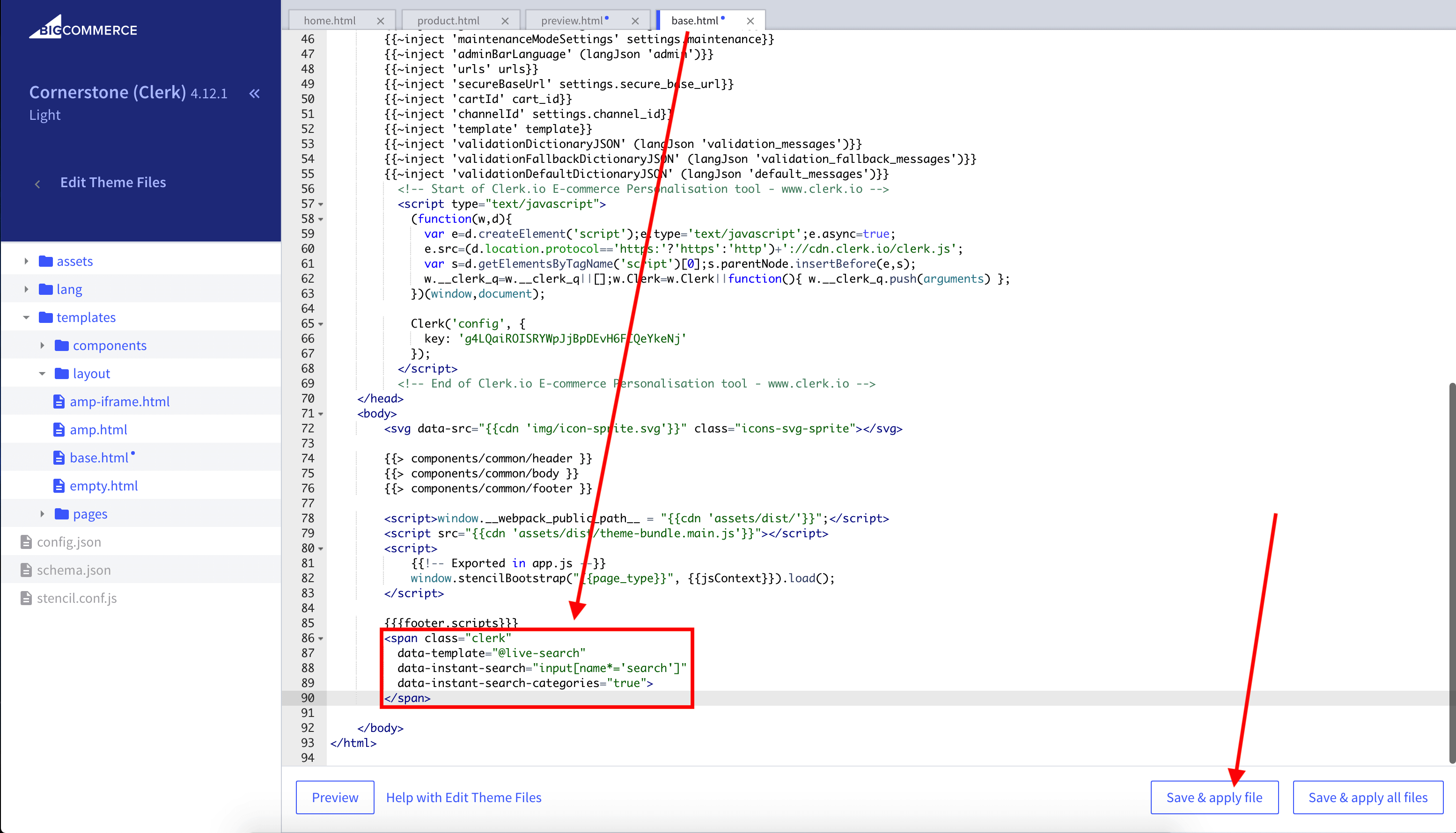
Consejo: Si tu tema utiliza un input distinto en móvil, añade una segunda integración con el selector móvil.
Como alternativa, puedes usar la injection.
Search Page #
La Search Page brinda una experiencia de búsqueda a página completa con filtrado avanzado.
Crear Design #
Utiliza el Design Editor o code designs.
Design Editor #
- Ve a Search > Designs y haz clic en New Design.
- Elige Other designs > Search Page.
- Selecciona una plantilla para empezar.
- Ponle un nombre y haz clic en Create design.
- Ajusta el diseño según tus necesidades.
Code Design #
- Ve a Search > Designs y haz clic en New Design.
- Elige Other designs > Blank > With code.
- Ponle un nombre y haz clic en Save.
- Crea un diseño por código usando Liquid.
Crear Element #
Esto contiene la configuración para renderizar la Search Page e incrustarla en tu tema.
- Ve a Search > Elements.
- Haz clic en New Element.
- Nómbralo “Search Page”.
- En Element type, selecciona Search page.
- En Design, selecciona el diseño que creaste.
- Haz clic en Save.
Añadir al Sitio Web #
- En BigCommerce ve a Storefront > My Themes > Advanced > Edit Theme Files.
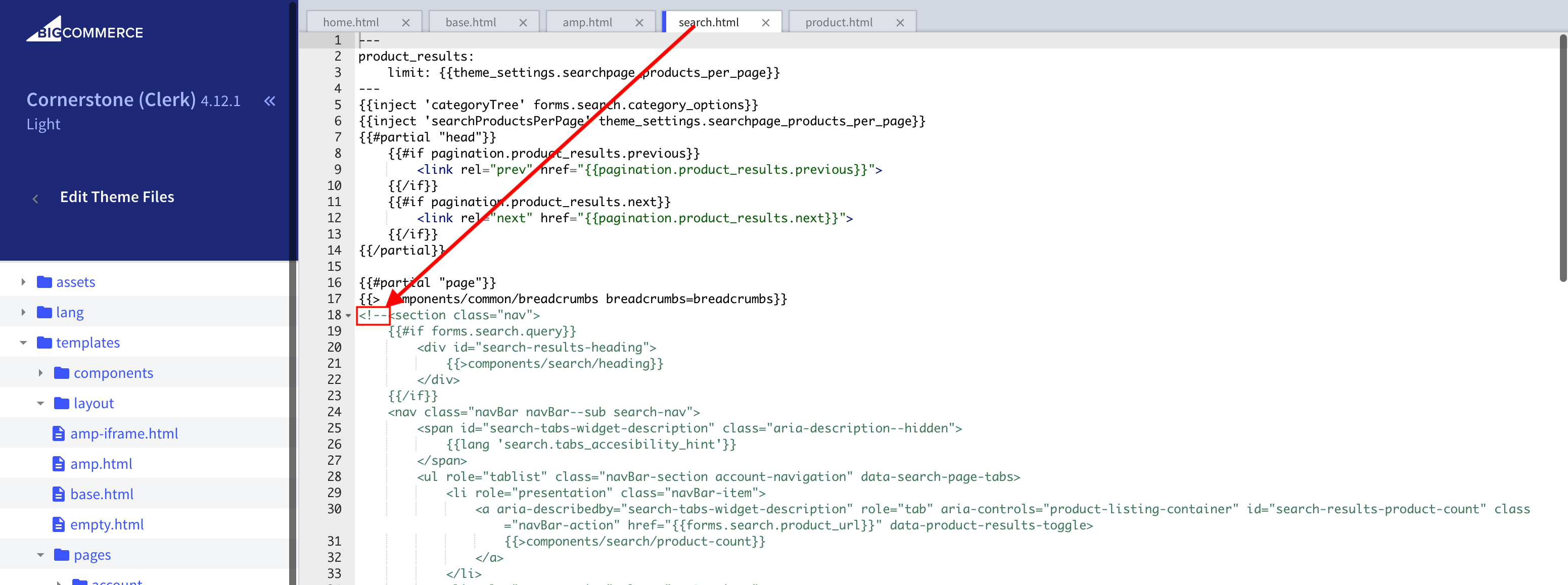
- Abre Templates > Pages > search.html.
- Comenta el HTML de búsqueda existente agregando
<!--al inicio del marcado de la página.
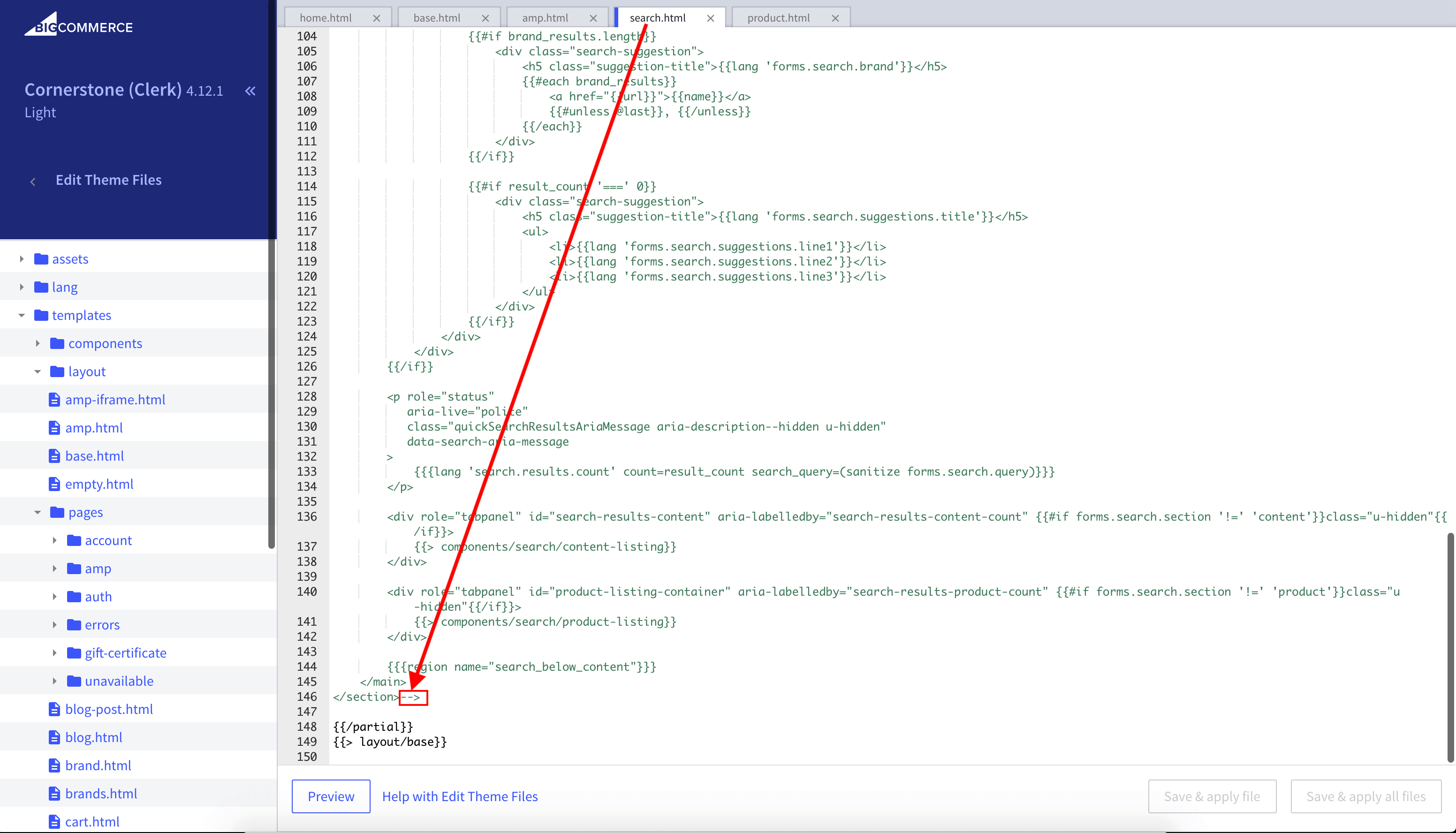
- Desplázate hasta el final de la página y añade
-->después del final del HTML.
- Inserta el código de integración justo después del HTML existente. Reemplaza
data-querycon tu consulta de página si tu tema es diferente.
<div class="page-width clerk-page-width">
  <span
    id="clerk-search"
    class="clerk"
    data-template="@YOUR_ELEMENT_ID"
    data-target="#clerk-search-results"
    data-query="{{ '{' + '{ forms.search.query }' + '}'}}"
    data-facets-attributes='["price","categories"]'
    data-facets-titles='{"price":"Price","categories":"Categories"}'
    data-facets-target="#clerk-search-filters"
    data-facets-price-prepend="€"
    data-facets-in-url="false"
    data-facets-view-more-text="View More"
    data-facets-searchbox-text="Search for ">
  </span>

  <div id="clerk-show-facets" onclick="toggleFacets()">Filtros</div>

  <div class="clerk_flex_wrap">
    <div id="clerk-facets-container">
      <div id="clerk-search-filters"></div>
    </div>
    <div id="clerk-search-results"></div>
  </div>
</div>

<script>
  function toggleFacets(){
    var el = document.getElementById('clerk-facets-container');
    el.classList.toggle('active');
  }
</script>
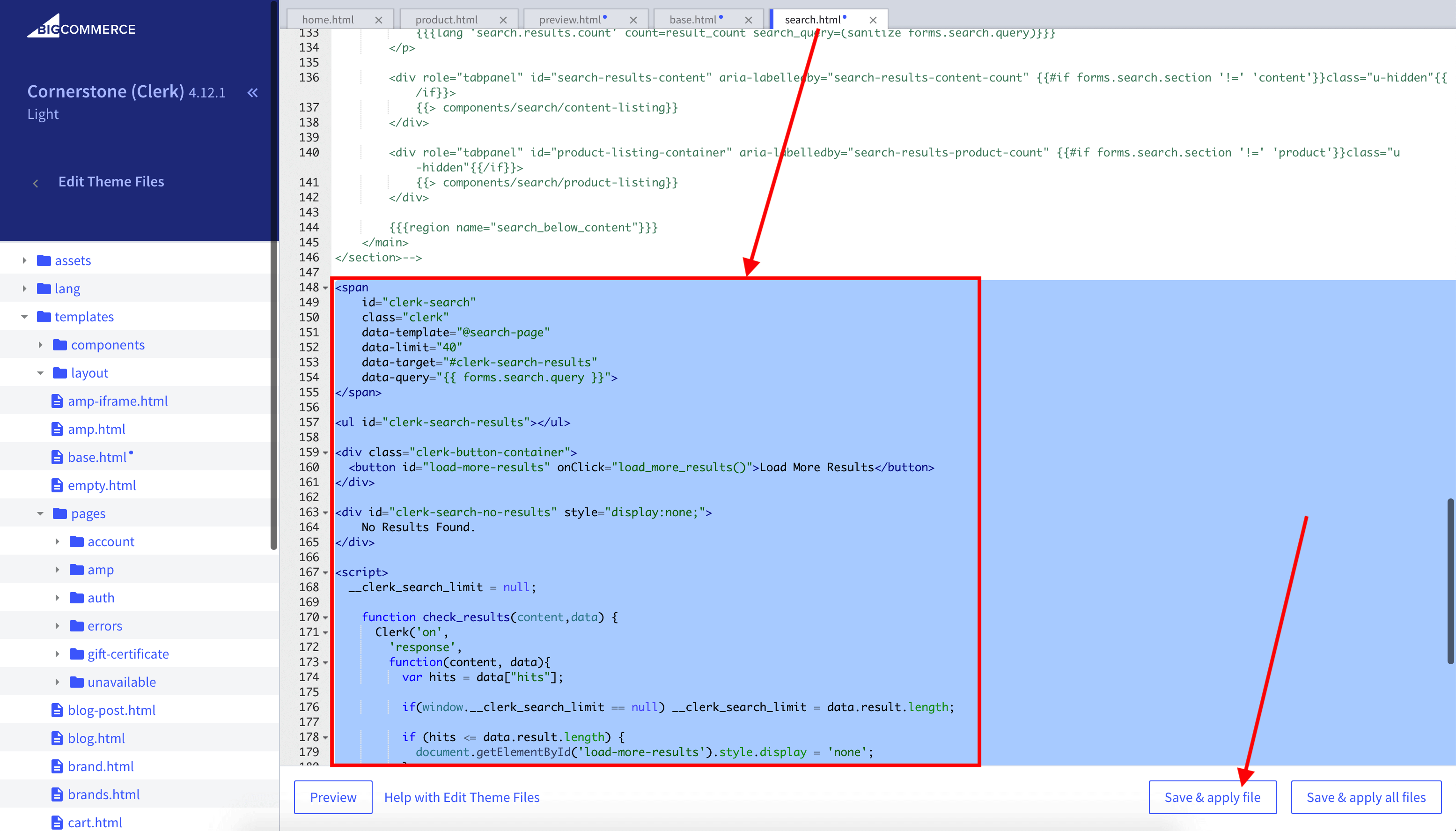
- Haz clic en Save & apply file.
Facets #
Clerk.js incluye Faceted Search integrado para la Search Page. Cualquier atributo de producto enviado a Clerk.io puede usarse como filtro.
Para habilitar facets, añade los atributos de facets a tu código de integración (como en el ejemplo anterior). Puedes darles estilo a los facets usando CSS en el mismo archivo.
Para una visión completa, consulta la guía de Facets.
Omnisearch #
Omnisearch combina Instant Search y Search Page en una sola superposición que aparece cuando el usuario enfoca el campo de búsqueda.
Crear Design #
Omnisearch utiliza code designs.
- Ve a Search > Designs y haz clic en New Design.
- Elige Omni-search.
- Selecciona una plantilla, ponle un nombre y haz clic en Save.
- Ajústalo según sea necesario. Consulta la guía de Omnisearch.
Crear Element #
- Ve a Search > Elements.
- Haz clic en New Element.
- Nómbralo “Omni-Search” y añade una etiqueta de seguimiento, por ejemplo, “Omni-Search”.
- En Element type, selecciona Omni-search.
- En Design, selecciona el diseño que creaste.
- Haz clic en Save.
Añadir al Sitio Web #
- Desde la configuración del Element, abre Insert into website.
- Escoge entre injection o embedded code.
- Si usas embedded code, configura
data-trigger-elementcon el selector de tu campo de búsqueda.
Ejemplo:
<span class="clerk"
  data-template="@omni-search"
  data-api="search/omni"
  data-trigger-element="#search"
></span>
Starting Templates #
Si deseas usar code designs, estas plantillas pueden ayudarte a empezar. Contienen los elementos básicos de la interfaz para Instant Search y Search Page, que luego puedes modificar según tus necesidades.
Código para Instant Search #
Esto contiene las partes de HTML y CSS para mostrar un desplegable de Instant Search. Añádelas a un code design en my.clerk.io.
HTML #
<div class="clerk-instant-search">
    {% if hits.length == 0 %}
        <div class="clerk-instant-search-no-results">
            Nothing matched: <b>{{ query }}</b>... try a simpler search!
        </div>
    {% endif %}

    {% if content.query != response.query %}
        <div class="clerk-instant-search-alternate-query">
            <i class="fas fa-search clerk-icon" aria-hidden="true"></i> Showing results for: <b>{{ query }}</b>
        </div>
    {% endif %}

    <div class="clerk-instant-search-grid">
        {% if products.length > 0 %}
            <div class="clerk-instant-search-col clerk-col-1">
                <div class="clerk-instant-search-products">
                    <div class="clerk-instant-search-title">Products</div>
                    {% for product in products %}
                        <a href="{{ product.url }}">
                            <div class="clerk-instant-search-product clerk-instant-search-key-selectable">
                                <div class="clerk-instant-search-product-image" style="background-image: url('{{ product.image }}');"></div>

                                <div>
                                    <div class="clerk-instant-search-product-name">{{ product.name | highlight query }}</div>

                                    {% if product.price < product.list_price %}
                                        <div class="clerk-instant-search-product-list-price">{{ product.list_price | money }}</div>
                                    {% endif %}
                                    <div class="clerk-instant-search-product-price">{{ product.price | money }}</div>
                                </div>

                                <div>
                                    <div class="clerk-instant-search-product-button">Buy Now</div>
                                </div>
                            </div>
                        </a>
                    {% endfor %}

                    {% if hits > products.length %}
                        <div class="clerk-desktop-button clerk-instant-search-more-results clerk-instant-search-key-selectable">
                            <a class="clerk-view-more-results-button" href="/search?q={{ query }}">
                                <u>See <b>{{ hits }}</b> more results for "<i>{{ query }}</i>"</u>
                            </a>
                        </div>
                    {% endif %}
                </div>
            </div>
        {% endif %}

        {% if (suggestions.length + categories.length + pages.length) > 0 %}
            <div class="clerk-instant-search-col clerk-col-2">
                {% if suggestions.length > 1 %}
                    <div class="clerk-instant-search-suggestions">
                        <div class="clerk-instant-search-title">Search Suggestions</div>
                        {% for suggestion in suggestions %}
                            {% if suggestion != query %}
                                <div class="clerk-instant-search-suggestion clerk-instant-search-key-selectable">
                                    <a href="/search?q={{ suggestion highlight query 'bold' true }}">
                                    <i class="fas fa-search clerk-icon" aria-hidden="true"></i>{{ suggestion }}
                                    </a>
                                </div>
                            {% endif %}
                        {% endfor %}
                    </div>
                {% endif %}

                {% if categories.length > 0 %}
                    <div class="clerk-instant-search-categories">
                        <div class="clerk-instant-search-title">Categories</div>
                        {% for category in categories %}
                            <div class="clerk-instant-search-category clerk-instant-search-key-selectable">
                                <a href="{{ category.url }}">
                                    {{ category.name | highlight query }}
                                </a>
                            </div>
                        {% endfor %}
                    </div>
                {% endif %}

                {% if pages.length > 0 %}
                    <div class="clerk-instant-search-pages">
                        <div class="clerk-instant-search-title">Related Content</div>
                        {% for page in pages %}
                            <div class="clerk-instant-search-category clerk-instant-search-key-selectable">
                                <a href="{{ page.url }}">
                                    <div class="name">{{ page.title | highlight query 'bold' true }}</div>
                                </a>
                            </div>
                        {% endfor %}
                    </div>
                {% endif %}
            </div>
        {% endif %}
         {% if hits > products.length %}
            <div class="clerk-mobile-button clerk-instant-search-more-results clerk-instant-search-key-selectable">
                <a href="/search?q={{ query }}">
                    See <b>{{ hits }}</b> more results for "<i>{{ query }}</i>"
                </a>
            </div>
        {% endif %}
    </div>
</div>
CSS #
.clerk-instant-search { padding: 20px; }
.clerk-instant-search-container a { color: black !important; text-decoration: none !important; }
.clerk-instant-search-container a:hover { color: #b6c254 !important; }
.clerk-instant-search { overflow: hidden; width: 100%; min-width: 650px; max-width: 1000px; margin: .2em auto; background-color: white; border: 1px solid #eee; border-top: 0px; border-radius: 5px 5px 10px 10px; box-shadow: 0 1em 2em 1em rgba(0,0,0,.2); }
.clerk-instant-search-no-results { padding: 1em; font-style: italic; text-align: center; }
.clerk-instant-search-alternate-query { margin: 0 0 5px 0; }
.clerk-instant-search-more-results { padding: 1em; font-size: 1.2em; text-align: center; }
.clerk-instant-search-title { color: #b6c254; margin: 20px 0 5px; padding: 0 0 10px; text-transform: uppercase; font-size: 1em; border-bottom: 1px solid #000; }
.clerk-instant-search-products { padding-right: 2em; }
.clerk-instant-search-product { display: flex; padding: .2em; color: gray; }
.clerk-instant-search-product:hover { background-color: rgba(46, 204, 113, .1); }
.clerk-instant-search-product:hover .clerk-instant-search-product-button { transform: scale(1.05); }
.clerk-instant-search-product > * { flex: 1 1 auto; }
.clerk-instant-search-product > *:first-child, .clerk-instant-search-product > *:last-child { flex: 0 0 auto; }
.clerk-instant-search-product-image { display: inline-block; width: 3em; height: 3em; margin-right: 1em; background-position: center center; background-repeat: no-repeat; background-size: contain; }
.clerk-instant-search-product-name { overflow: hidden; height: 1.2em; margin-bottom: .2em; }
.clerk-instant-search-product-list-price { display: inline-block; margin-right: .5em; opacity: .8; font-weight: normal; text-decoration: line-through; color: gray; }
.clerk-instant-search-product-price { display: inline-block; font-weight: bold; }
.clerk-icon { color: lightgray; margin-right: .5em; }
.clerk-instant-search-suggestions { margin-bottom: 1em; }
.clerk-instant-search-suggestion { padding: .1em; }
.clerk-instant-search-categories { margin-bottom: 1em; }
.clerk-instant-search-category { padding: 5px; margin: 5px; width: auto; display: inline-block; border: 1px solid black; border-radius: 2px; }
.clerk-instant-search-pages { margin-bottom: 1em; }
.clerk-instant-search-page { padding: .1em; }
@media screen and (min-width: 1200px) { .clerk-instant-search-container { width: 50%; } .clerk-instant-search-grid { display: flex; } .clerk-col-1 { flex: 2; } .clerk-col-2 { flex: 1; } .clerk-mobile-button { display: none; } }
@media screen and (min-width: 768px) and (max-width: 1200px){ .clerk-instant-search-container { right: 0 !important; left: 0 !important; } .clerk-mobile-button { display: none; } }
@media screen and (max-width: 767px) { .clerk-instant-search-container { right: 0 !important; } .clerk-desktop-button { display: none; } }
@media screen and (min-width: 376px) and (max-width: 800px) { .clerk-instant-search { min-width: 0 !important; } }
@media screen and (max-width: 375px) { .clerk-instant-search { min-width: 200px !important; } .clerk-instant-search-col { margin: 0 0 20px 0; } .clerk-instant-search-product-name { height: 3em !important; } }
Código para Search Page #
Esto contiene las partes de HTML y CSS para mostrar una Search Page. Añádelas a un code design en my.clerk.io.
HTML #
<div class="clerk-search-result">
<div class="clerk-search-result-headline">{{ headline }}</div>
<div class="clerk-grid">
{% for product in products %}
<div class="clerk-grid-item">
<div class="clerk-grid-product">
<a href="{{ product.url }}">
{% if product.price < product.list_price %}
<div class="clerk-grid-badge">On Sale</div>
{% endif %}
<div class="clerk-grid-image" style="background-image: url('{{ product.image }}');"></div>
<div class="clerk-grid-brand">{{ product.brand }}</div>
<div class="clerk-grid-name">{{ product.name }}</div>
<div class="clerk-grid-pricing">
{% if product.price < product.retail_price %}
<div class="clerk-grid-list-price">£{{ product.retail_price | money }}</div>
{% endif %}
<div class="clerk-grid-price">£{{ product.price | money }}</div>
</div>
</a>
{% if product.stock == 1 %}
<a class="clerk-not-in-stock" href="{{ product.url }}" data-event-type="product-click">
<div class="clerk-grid-button-not-in-stock">Out of Stock</div>
</a>
{% else %}
<a class="clerk-add-to-cart" href="/cart.php?action=add&product_id={{ product.id }}" data-event-type="product-click">
<div class="clerk-grid-button">Add to Cart</div>
</a>
{% endif %}
</div>
</div>
{% endfor %}
</div>
{% if count > products.length %}
<div class="clerk-load-more-button" onclick="Clerk('content', '#{{ content.id }}', 'more', 40);">Show More Results</div>
{% endif %}
</div>
CSS #
#clerk-search-results { margin: 0; }
.clerk-search-result { margin: 1em 0; }
.clerk-search-result-headline { font-weight: bold; font-size: 2em; text-align: center; }
.clerk-grid { display: flex; flex-flow: row wrap; }
.clerk-grid-item { margin: auto; }
.clerk-grid-product { position: relative; overflow: hidden; margin: 1em; padding: 1em; background-color: white; border: 1px solid #eee; border-radius: 1em; box-shadow: 0 .1em .2em 0 rgba(0,0,0,.08); text-align: center; }
.clerk-grid-badge { position: absolute; top: 5px; right: -35px; display: inline-block; width: 120px; margin: 10px auto; padding: 5px 0; border-radius: 3px; background-color: #fbc531; font-size: 10px; color: white; text-align: center; letter-spacing: 1px; transform: rotate(45deg); }
.clerk-grid-tags { position: absolute; top: .8em; left: .8em; }
.clerk-grid-tag { display: inline-block; padding: .2em .8em; border-radius: .3em; background-color: gray; font-size: 10px; color: white; letter-spacing: 1px; }
.clerk-grid-image { width: 100%; height: 8em; margin-bottom: 1em; background-position: center center; background-repeat: no-repeat; background-size: contain; }
.clerk-grid-brand { font-size: 0.9em; color: #757575; }
.clerk-grid-name { height: 3em; overflow: hidden; color: #4a3b40; font-weight:bold; font-size: 15px; margin-bottom: 1em; }
.clerk-grid-pricing { display: flex; margin-bottom: 1em; }
.clerk-grid-price { flex: 1; color: #757575; font-weight: bold; }
.clerk-grid-list-price { flex: 1; opacity: .8; font-weight: normal; text-decoration: line-through; color: gray; }
.clerk-add-to-cart, .clerk-add-to-cart:hover { color: white; }
.clerk-not-in-stock, .clerk-not-in-stock:hover { color: #4a3b40; }
.clerk-grid-button-not-in-stock { display: block; margin: 0 auto; padding: .6em 2em; border: none; border-radius: .5em; background-color: white; color: #4a3b40; text-transform: uppercase; text-align: center; white-space: nowrap; font-weight: bold; cursor: pointer; }
.clerk-grid-button { display: block; margin: 0 auto; padding: .6em 2em; border: none; border-radius: .5em; background-color: #b6c254; color: white; text-transform: uppercase; text-align: center; white-space: nowrap; font-weight: bold; cursor: pointer; }
.clerk-load-more-button { display: block; width: 20em; margin: 1em auto; padding: .6em 2em; border: none; border-radius: .5em; background-color: #b6c254; color: white; text-transform: uppercase; text-align: center; white-space: nowrap; font-weight: bold; font-size: 1.2em; cursor: pointer; }
@media screen and (min-width: 1025px) { .clerk-grid-item { flex: 0 0 25%; margin: auto; } }
@media screen and (min-width: 500px) and (max-width: 1024px) { .clerk-grid-item { flex: 0 0 33%; margin: auto; } }
@media screen and (max-width: 499px) { .clerk-grid-item { flex: 0 0 100%; margin: auto; } }
Esta página ha sido traducida por una IA útil, por lo que puede contener errores de idioma. Muchas gracias por su comprensión.