Get Started
Integra las recomendaciones de Clerk con Swiipe Plus-sell para mostrar recomendaciones de productos en las páginas de éxito de pedido. Plus-sell permite a los clientes añadir productos extra directamente al mismo pedido.
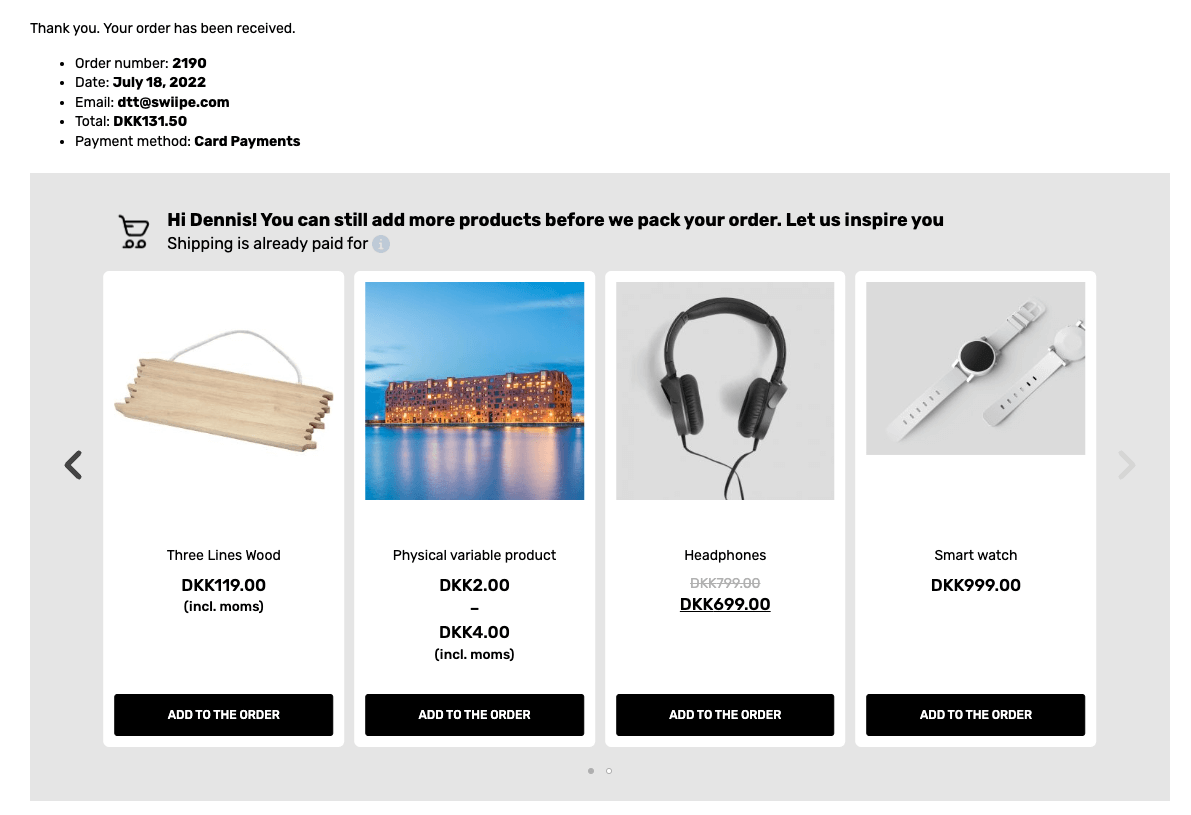
Esta guía muestra cómo activar y configurar las recomendaciones de Clerk.io para que funcionen con Plus-Sell.
Magento 2 #
Activando Plus-sell #
Cuando el plugin de Clerk.io está instalado, Swiipe puede obtener automáticamente la configuración de la clave API, para saber qué tienda la está usando.
En el backend de Magento2, ve a Stores > Configuration > Swiipe
Haz clic en la pestaña Plus-sell.
Plus-sell se activa a nivel de tienda individual, así que asegúrate de elegir una tienda específica desde la sección Scope en la esquina superior izquierda de la página.
Selecciona Enable Swiipe Plus-sell
Haz clic en Save Config en la parte superior derecha
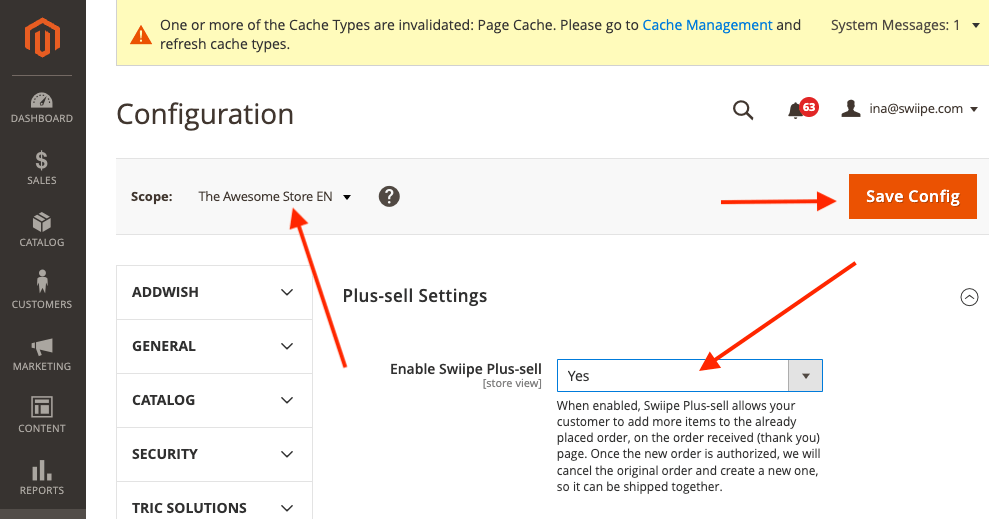
Si deseas utilizar los diseños integrados de Swiipe, ahora ya se mostrarán en la página de pago.
Eligiendo el diseño #
El diseño de Plus-sell se puede configurar de dos formas:
Utilizando el diseño integrado de conversión de Swiipe (Recomendado)
Utilizando Elements / Designs de Clerk como es habitual
Usando los diseños integrados de Swiipe #
Este es el enfoque estándar y recomendado, ya que Swiipe ha creado diseños altamente efectivos para convertir.
Funcionará automáticamente después de activar Plus-sell si no se realiza ninguna otra configuración.
Los diseños se pueden configurar de varias maneras:
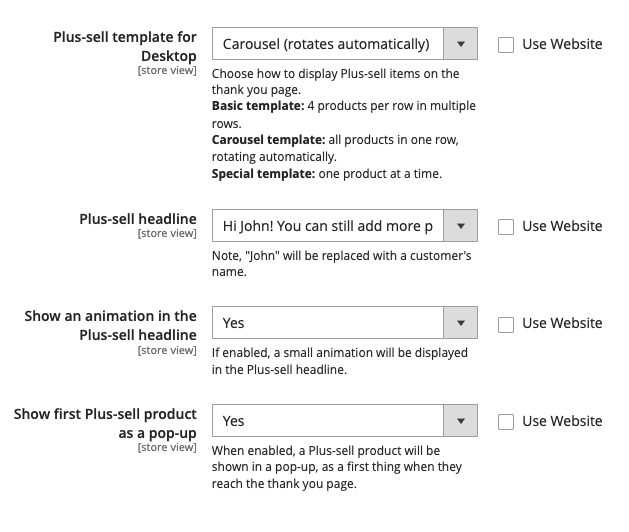
Plus-sell template for Desktop
Te permite elegir entre tipos estándar de diseños de Recommendations.
Basic (estático) muestra un slider de 4 productos.
Carousel (rota automáticamente) muestra un slider de 4 productos que rota.
Special (un producto a la vez) muestra 1 producto con más información por diapositiva.
Plus-sell headline Te permite elegir entre 3 tipos de titulares para mostrar sobre el banner.
Show an animation in the Plus-sell headline Mostrará un pequeño icono de carrito animado al lado del titular.
Show first plus-sell product as a pop-up Mostrará un popup al entrar en la página de pago, con el primer producto recomendado por Clerk.
Usando Elements / Designs de Clerk #
Con esta característica, puedes personalizar el slider en my.clerk.io.
Desplázate hacia el titular Clerk
Selecciona Use template design from Clerk.io
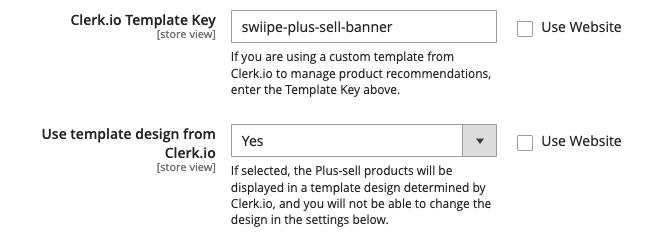
En Clerk.io Template Key, escribe el ID del Element que deseas usar.
Recomendamos crear un nuevo Element con la lógica Best Cross-Sell products
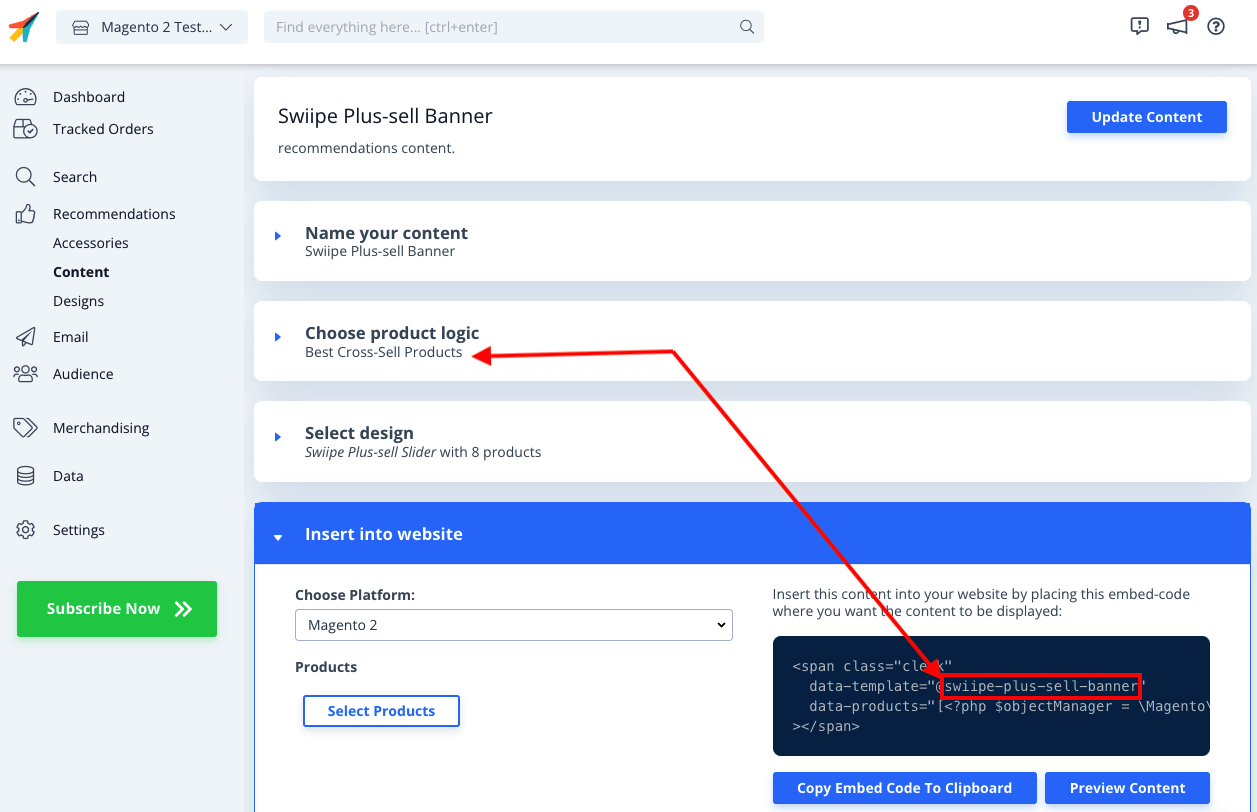
Ahora necesitas crear el diseño personalizado, que incluya la funcionalidad de Plus-sell para añadir productos directamente a la cesta.
En my.clerk.io, ve a Recommendations > Designs > New Design
Elige Blank > Code y asígnale un nombre
Copia los siguientes bloques de código en las secciones HTML y CSS respectivamente y haz clic en Update Design
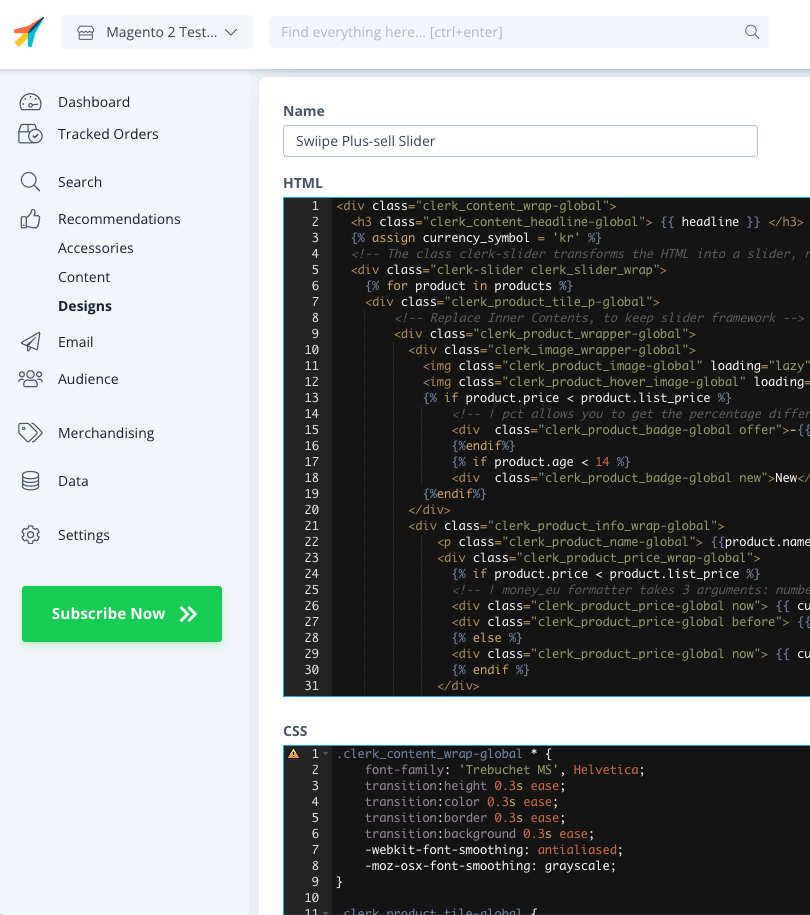
HTML
{% raw %}
<div class="clerk_content_wrap-global">
  <h3 class="clerk_content_headline-global"> {{ headline }} </h3>
  {% assign currency_symbol = '€' %}
  <!-- The class clerk-slider transforms the HTML into a slider, removing this class disables Clerk slider framework -->
  <div class="clerk-slider clerk_slider_wrap">
    {% for product in products %}
    <div class="clerk_product_tile_p-global">
        <!-- Replace Inner Contents, to keep slider framework -->
        <div class="clerk_product_wrapper-global">
          <div class="clerk_image_wrapper-global">
            <img class="clerk_product_image-global" loading="lazy" src="{{ product.image }}" />
            <img class="clerk_product_hover_image-global" loading="lazy" src="{{ product.image }}" />
            {% if product.price < product.list_price %}
                <!-- | pct allows you to get the percentage difference between any 2 numerical values -->
                <div  class="clerk_product_badge-global offer">-{{ product.price | pct product.list_price }}%</div>
                {%endif%}
                {% if product.age < 30 %}
                <div  class="clerk_product_badge-global new">New</div>
            {%endif%}
          </div>
          <div class="clerk_product_info_wrap-global">
              <p class="clerk_product_name-global"> {{product.name}} </p>
              <div class="clerk_product_price_wrap-global">
                {% if product.price < product.list_price %}
                <!-- | money_eu formatter takes 3 arguments: number of decimals, thousand separator, decimal separator. Can also be used with no arguments, will default to 2 decimal places. -->
                <div class="clerk_product_price-global now"> {{ currency_symbol }}{{ product.price | money_eu 2 "." ","  }} </div>
                <div class="clerk_product_price-global before"> {{ currency_symbol }}{{ product.list_price | money_eu 2 "." "," }} </div>
                {% else %}
                <div class="clerk_product_price-global now"> {{ currency_symbol }}{{ product.price | money_eu 2 "." "," }} </div>
                {% endif %}
              </div>
              <div class="clerk_sizes_wrap">
                {% if product.sizes %}
                  {%for str in product.sizes %}
                    <span class="clerk_sizes">{{str}}</span>
                  {%endfor%}
                {% endif %}
              </div>
           </div>
           <div class="clerk_product_cta-global" onclick="clerk_simple_swiipe_buy_now(this, {{product.id}});">Buy now</div>
         </div>
        <!-- Replace Inner Contents, to keep slider framework -->
    </div>
    {% endfor %}
  </div>
</div>
<script>
    function clerk_simple_swiipe_buy_now(el, product_id) {
        var buy_now = el.innerHTML;
        el.innerHTML = "Adding...";
        el.classList.toggle('button--loading');
        _SwiipeApi.plusSell.addProducts([{ id:product_id, qty:1 }]).then((result) => {
            el.classList.toggle('button--loading');
            el.innerHTML = buy_now;
        });
    }
</script>
{% endraw %}
CSS
.clerk_content_wrap-global * {
    font-family: 'Trebuchet MS', Helvetica;
    transition:height 0.3s ease;
    transition:color 0.3s ease;
    transition:border 0.3s ease;
    transition:background 0.3s ease;
    -webkit-font-smoothing: antialiased;
    -moz-osx-font-smoothing: grayscale;
}

.clerk_product_tile-global {
    display: flex !important;
}
.clerk-slider-nav {
    z-index: 1 !important;
    background-image: none !important;
    box-shadow: none !important;
}
.clerk_slider_wrap {
    display: inline-flex;
    align-items: stretch;
    max-width: 100vw;
    width:inherit;
}

@keyframes arrowPop {
    0% {
        width:20%;
    }
    50% {
        width:0%;
    }
    100% {
        width: 20%;
    }
}

.clerk-slider-nav {
    background: #333;
    border-radius:50%;
    display:flex;
    justify-content:center;
    align-items:center;
    font-size:0;
    opacity:0.8;
    filter: drop-shadow(0 0 5px #333);
    transition:0.3s ease;
}

.clerk-slider-nav:hover {
    opacity:1;
    transition:0.3s ease;
}
.clerk-slider-nav:hover:before {
    animation:arrowPop 0.3s ease;
}
.clerk-slider-nav-next {
    flex-direction:row-reverse;
}

.clerk-slider-nav:after {
    content:"";
    display:block;
    height:40%;
    width:40%;
    transform: rotate(45deg);
    border: solid white;
}
.clerk-slider-nav-prev:after {
    border-width: 0px 0px 2px 2px;
}

.clerk-slider-nav-next:after {
    border-width: 2px 2px 0px 0px;
}

.clerk-slider-nav:before {
    content:"";
    width:20%;
}

.clerk_container-global {
    display:block;
    width:100%;
}

.clerk_product_info_wrap-global {

    padding: 5px;
    border-radius:1px;
    display: flex;
    flex-direction: column;
    justify-content: stretch;
    align-items: stretch;
    min-height: 0;
    height: -webkit-fill-available;
    height: -moz-available;
    height: fill-available;
        height: 100%;
        height: auto;
}

.clerk_product_info_wrap-global .clerk_link-global {
    transition:0.3s ease;
    min-height:0;
    height: -webkit-fill-available;
    height: -moz-available;
    height: fill-available;
        height: 100%;
        height: auto;
}

.clerk_product_info_wrap-global > * {
    padding: 0 5px;
}
.clerk_link-global {
    border-bottom:none;
    display:inherit;
    width:100%;
    text-decoration:none;
    color:inherit;
    padding:0;
}

.clerk_link-global:hover {
    filter: contrast(105%);
}

.clerk_content_headline-global{
    max-width: 100%;
    width: 100%;
    font-size: 26px;
    text-align:center;
    color:inherit;
}

.clerk_product_tile_p-global{
    flex-direction: column;
    justify-content: space-between;
    border-radius:0px;
    padding:15px;
    margin:5px;
    box-sizing:border-box;
    min-width:calc(25% - 10px);
    max-width:calc(25% - 10px);
    position:relative;
    overflow:hidden;
    border:1px solid #eee;
    background-color:white;
    text-align:center;
}

.clerk_product_wrapper-global {
    height: 100%;
    display: flex;
    flex-direction: column;
}

.clerk_product_badge-global.offer{
    display:block;
    position:absolute;
    top:0;
    right:0;
    width: 4em;
    height: 4em;
    border-radius:999rem; /* Needed to ensure it never rounds corners more than 50% */
    background: #f9f9f9;
    color:#333;
    font-weight:bold;
    line-height:3.5em;
    border:4px solid #333;
    user-select:none;
    pointer-events:none;
}

.clerk_product_badge-global.new{
    display: block;
    position: absolute;
    top: 0;
    left: 0;
    width: 4em;
    height: 4em;
    border-radius: 999rem;
    background: #f9f9f9;
    color: #333;
    font-weight: bold;
    line-height: 3.5em;
    border: 4px solid #333;
    user-select: none;
    pointer-events: none;
}

.clerk_image_wrapper-global {
    display:block;
    position:relative;
    width:100%;
    height:auto;
}

.clerk_image_wrapper-global:hover .clerk_product_hover_image-global {
    opacity:1;
    transition: 0.3s ease-in;
}

.clerk_image_wrapper-global:hover .clerk_product_image-global {
    opacity:0;
    transition: 0.3s ease-out;
    transition-delay:0.2s;
}

.clerk_image_wrapper-global .clerk_product_hover_image-global {
    position:absolute;
    top:0;
    left:0;
    min-height:auto;
}

.clerk_product_hover_image-global{
    background-size:contain;
    background-position:center center;
    background-repeat:no-repeat;
    object-fit: contain;
    /*Change the max height value below to 100% if the client has consistent image sizes */
    max-height:400px;
    width:100%;
    max-width:100%;
    height: auto;
    opacity:0;
}

.clerk_product_image-global{
    background-size:contain;
    background-position:center center;
    background-repeat:no-repeat;
    object-fit: contain;
    /*Change the max height value below to 100% if the client has consistent image sizes */
    max-height:400px;
    width:100%;
    max-width:100%;
    height: auto;
}

.clerk_product_stock-global {
    display:flex;
    text-align:left;
    justify-content:left;
    align-items:center;
    font-size:80%;
    text-transform: capitalize;
    padding:5px;
    user-select:none;
}

.clerk_product_stock-global:before {
    content:"";
    height: 8px;
    width: 8px;
    margin:0 5px 0 0;
    border-radius:50%;
}

.clerk_product_stock-global.in:before {
    background:#78b904;
}
/*
.clerk_product_stock.low:before {
    background:#eea71e;
}
*/
.clerk_product_stock-global.out:before {
    background:#ee1e31;
}
.clerk_product_name-global{
    overflow:hidden;
    height:auto;
    min-height: 36px;
    margin-bottom:1rem;
    color:inherit;
    text-align:left;
    max-width: 100%;
    padding:0 5px;
    display: -webkit-box;
    -webkit-line-clamp: 3;
    -webkit-box-orient: vertical;
}

.clerk_product_price_wrap-global{
    font-size: 1em;
    min-height: auto;
    flex-direction:row;
    display:flex;
    max-width: 100%;
    justify-content: flex-start;
}

.clerk_product_price-global {
    padding: 0px 5px 0px 0px;
}

.clerk_product_price-global.before{
    opacity: .8;
    flex:1;
    font-weight:normal;
    color:black;
    text-decoration:line-through;
    font-size:inherit;
    text-align:center;
    max-width: fit-content;
    max-width: -moz-fit-content;
}

.clerk_product_price-global.now{
    flex:1;
    font-weight:bold;
    font-size:inherit;
    text-align:center;
    color:inherit;
    max-width: fit-content;
    max-width: -moz-fit-content;
}

.clerk_product_cta-global{
    border-radius:2px;
    cursor:pointer;
    color:#fff;
    padding:5px;
    margin:0;
    display:block;
    white-space:nowrap;
    font-weight:normal;
    border:none;
    background-color:#333;
    border:1px solid #333;
    text-align:center;
    max-width: 100%;
    text-decoration: none;
}

.clerk_product_cta-global:hover {
    color:#333;
    background-color:#fff;
}

.clerk_content_wrap-global{
    box-sizing: border-box;
    margin: 1rem auto;
    width: 100%;
}

@media screen and (max-width: 400px) {
.clerk_content_headline-global{

}

.clerk_product_tile_p-global{
    min-width:calc(100%);
    max-width:calc(100%);
}

.clerk_product_badge-global{

}
.clerk_product_price_wrap-global {

}
}
@media screen and (min-width: 401px) and (max-width: 620px) {
.clerk_content_headline-global{

}
.clerk_product_tile_p-global{
    min-width:calc(50% - 10px);
    max-width:calc(50% - 10px);
}
.clerk_product_badge-global{

}
}
@media screen and (min-width: 621px) and (max-width: 940px) {
.clerk_content_headline-global{

}
.clerk_product_tile_p-global{
    min-width:calc(33.333336% - 10px);
    max-width:calc(33.333336% - 10px);
}
.clerk_product_badge-global{

}
}
@media screen and (min-width: 941px) and (max-width: 1160px) {
.clerk_content_headline-global{

}
.clerk_product_tile_p-global{
    min-width:calc(25% - 10px);
    max-width:calc(25% - 10px);
}
.clerk_product_badge-global{

}
}

.clerk_sizes_wrap{
    display:flex;
    flex-direction:row;
    width:100%;
}
.clerk_sizes{
    padding:5px;
    margin:5px;
    border:1px solid #eee;
    width:50px;
}
- Por último, ve al Element que creaste y selecciona este diseño en Select Design. Luego haz clic en Update Element
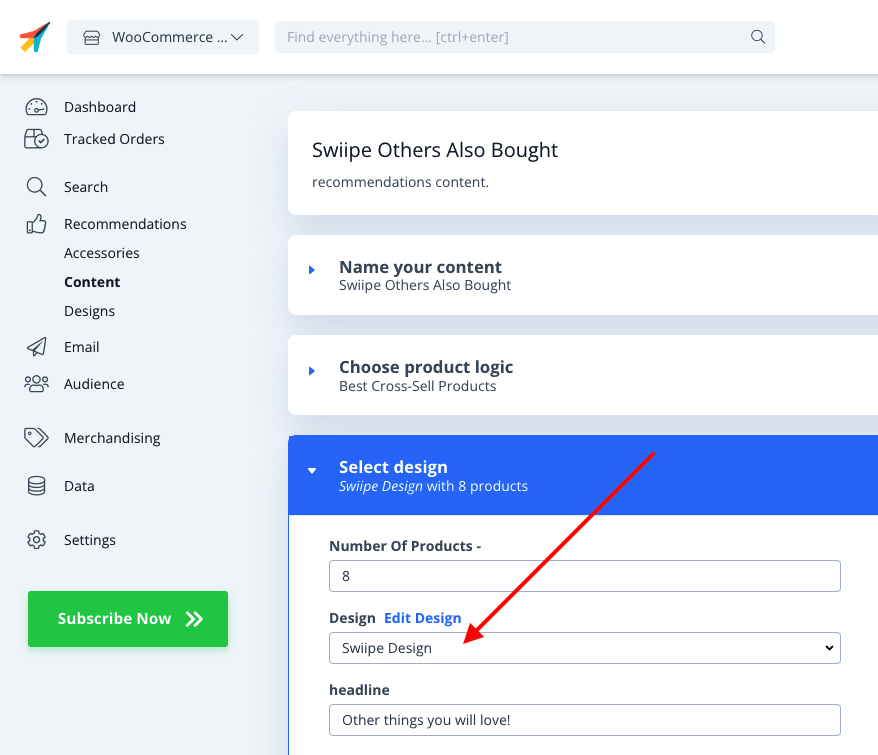
- Swiipe Plus-sell ahora funcionará con el diseño Clerk en el checkout.
Magento 1 #
Activando Plus-sell #
Cuando el plugin de Clerk.io está instalado, Swiipe puede obtener automáticamente la configuración de la clave API, para saber qué tienda la está usando.
En el backend de Magento, ve a System > Configuration > Swiipe
Bajo Swiipe en el menú lateral, haz clic en la pestaña Payment Settings.
Plus-sell se activa a nivel de tienda individual, así que asegúrate de elegir una tienda específica desde la sección Scope en la esquina superior izquierda de la página.
Selecciona Enable Swiipe Plus-sell
Haz clic en Save Config en la parte superior derecha
Eligiendo el diseño #
Usando Elements / Designs de Clerk #
Con esta característica, puedes personalizar el slider en my.clerk.io.
Desplázate hacia el titular Clerk
Selecciona Use template design from Clerk.io
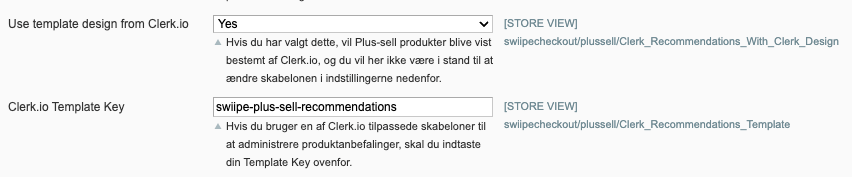
En Clerk.io Template Key, escribe el ID del Element que deseas usar.
Recomendamos crear un nuevo Element con la lógica Best Cross-Sell products
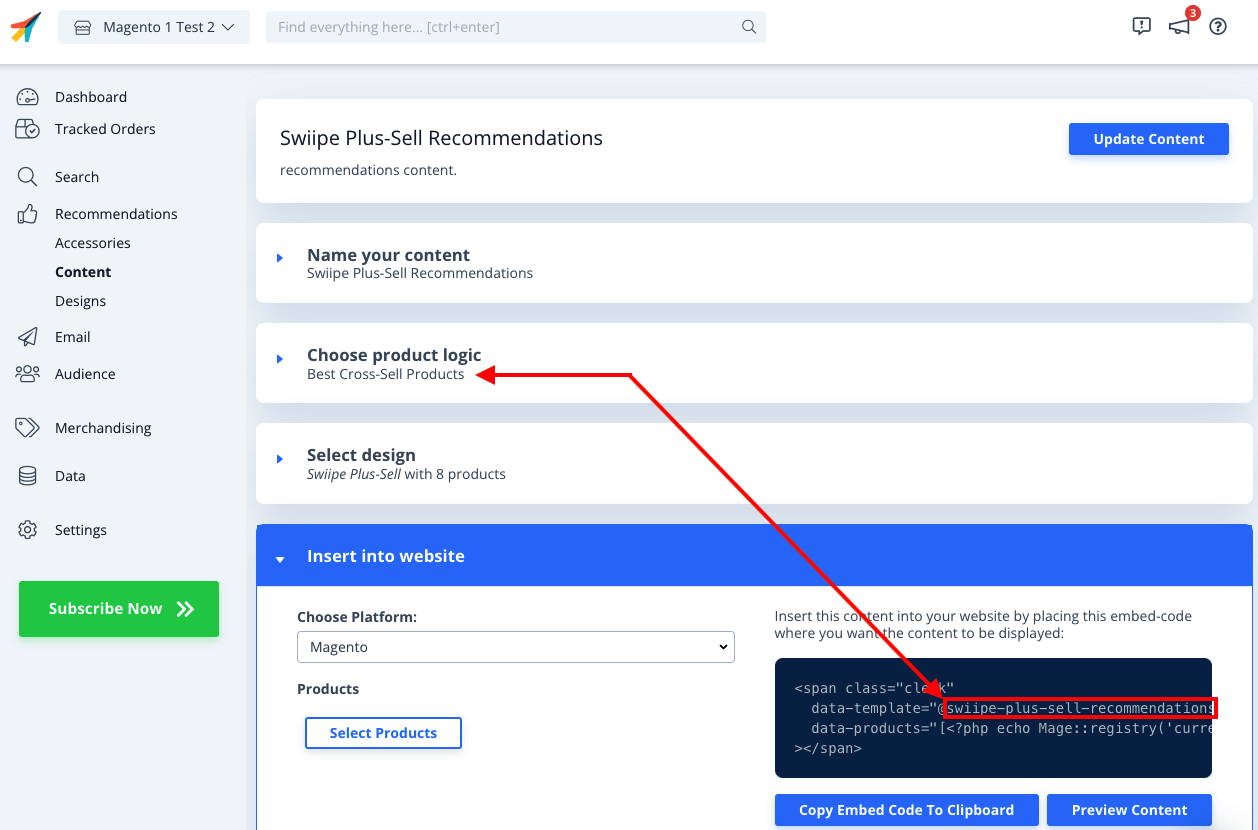
Ahora necesitas crear el diseño personalizado, que incluya la funcionalidad de Plus-sell para añadir productos directamente a la cesta.
En my.clerk.io, ve a Recommendations > Designs > New Design
Elige Blank > Code y asígnale un nombre
Copia los siguientes bloques de código en las secciones HTML y CSS respectivamente y haz clic en Update Design
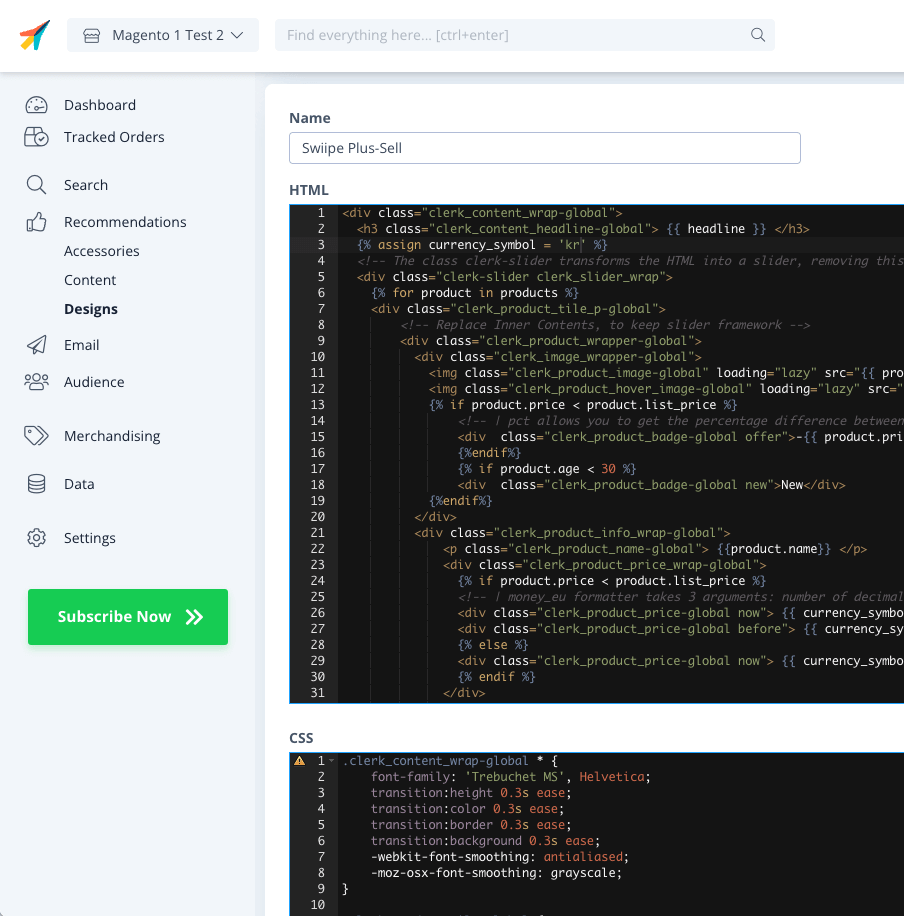
HTML
{% raw %}
<div class="clerk_content_wrap-global">
  <h3 class="clerk_content_headline-global"> {{ headline }} </h3>
  {% assign currency_symbol = '€' %}
  <!-- The class clerk-slider transforms the HTML into a slider, removing this class disables Clerk slider framework -->
  <div class="clerk-slider clerk_slider_wrap">
    {% for product in products %}
    <div class="clerk_product_tile_p-global">
        <!-- Replace Inner Contents, to keep slider framework -->
        <div class="clerk_product_wrapper-global">
          <div class="clerk_image_wrapper-global">
            <img class="clerk_product_image-global" loading="lazy" src="{{ product.image }}" />
            <img class="clerk_product_hover_image-global" loading="lazy" src="{{ product.image }}" />
            {% if product.price < product.list_price %}
                <!-- | pct allows you to get the percentage difference between any 2 numerical values -->
                <div  class="clerk_product_badge-global offer">-{{ product.price | pct product.list_price }}%</div>
                {%endif%}
                {% if product.age < 30 %}
                <div  class="clerk_product_badge-global new">New</div>
            {%endif%}
          </div>
          <div class="clerk_product_info_wrap-global">
              <p class="clerk_product_name-global"> {{product.name}} </p>
              <div class="clerk_product_price_wrap-global">
                {% if product.price < product.list_price %}
                <!-- | money_eu formatter takes 3 arguments: number of decimals, thousand separator, decimal separator. Can also be used with no arguments, will default to 2 decimal places. -->
                <div class="clerk_product_price-global now"> {{ currency_symbol }}{{ product.price | money_eu 2 "." ","  }} </div>
                <div class="clerk_product_price-global before"> {{ currency_symbol }}{{ product.list_price | money_eu 2 "." "," }} </div>
                {% else %}
                <div class="clerk_product_price-global now"> {{ currency_symbol }}{{ product.price | money_eu 2 "." "," }} </div>
                {% endif %}
              </div>
              <div class="clerk_sizes_wrap">
                {% if product.sizes %}
                  {%for str in product.sizes %}
                    <span class="clerk_sizes">{{str}}</span>
                  {%endfor%}
                {% endif %}
              </div>
           </div>
           <div class="clerk_product_cta-global" onclick="clerk_simple_swiipe_buy_now(this, {{product.id}});">Buy now</div>
         </div>
        <!-- Replace Inner Contents, to keep slider framework -->
    </div>
    {% endfor %}
  </div>
</div>
<script>
    function clerk_simple_swiipe_buy_now(el, product_id) {
        var buy_now = el.innerHTML;
        el.innerHTML = "Adding...";
        el.classList.toggle('button--loading');
        _SwiipeApi.plusSell.addProducts([{ id:product_id, qty:1 }]).then((result) => {
            el.classList.toggle('button--loading');
            el.innerHTML = buy_now;
        });
    }
</script>
{% endraw %}
CSS
.clerk_content_wrap-global * {
    font-family: 'Trebuchet MS', Helvetica;
    transition:height 0.3s ease;
    transition:color 0.3s ease;
    transition:border 0.3s ease;
    transition:background 0.3s ease;
    -webkit-font-smoothing: antialiased;
    -moz-osx-font-smoothing: grayscale;
}

.clerk_product_tile-global {
    display: flex !important;
}
.clerk-slider-nav {
    z-index: 1 !important;
    background-image: none !important;
    box-shadow: none !important;
}
.clerk_slider_wrap {
    display: inline-flex;
    align-items: stretch;
    max-width: 100vw;
    width:inherit;
}

@keyframes arrowPop {
    0% {
        width:20%;
    }
    50% {
        width:0%;
    }
    100% {
        width: 20%;
    }
}

.clerk-slider-nav {
    background: #333;
    border-radius:50%;
    display:flex;
    justify-content:center;
    align-items:center;
    font-size:0;
    opacity:0.8;
    filter: drop-shadow(0 0 5px #333);
    transition:0.3s ease;
}

.clerk-slider-nav:hover {
    opacity:1;
    transition:0.3s ease;
}
.clerk-slider-nav:hover:before {
    animation:arrowPop 0.3s ease;
}
.clerk-slider-nav-next {
    flex-direction:row-reverse;
}

.clerk-slider-nav:after {
    content:"";
    display:block;
    height:40%;
    width:40%;
    transform: rotate(45deg);
    border: solid white;
}
.clerk-slider-nav-prev:after {
    border-width: 0px 0px 2px 2px;
}

.clerk-slider-nav-next:after {
    border-width: 2px 2px 0px 0px;
}

.clerk-slider-nav:before {
    content:"";
    width:20%;
}

.clerk_container-global {
    display:block;
    width:100%;
}

.clerk_product_info_wrap-global {

    padding: 5px;
    border-radius:1px;
    display: flex;
    flex-direction: column;
    justify-content: stretch;
    align-items: stretch;
    min-height: 0;
    height: -webkit-fill-available;
    height: -moz-available;
    height: fill-available;
        height: 100%;
        height: auto;
}

.clerk_product_info_wrap-global .clerk_link-global {
    transition:0.3s ease;
    min-height:0;
    height: -webkit-fill-available;
    height: -moz-available;
    height: fill-available;
        height: 100%;
        height: auto;
}

.clerk_product_info_wrap-global > * {
    padding: 0 5px;
}
.clerk_link-global {
    border-bottom:none;
    display:inherit;
    width:100%;
    text-decoration:none;
    color:inherit;
    padding:0;
}

.clerk_link-global:hover {
    filter: contrast(105%);
}

.clerk_content_headline-global{
    max-width: 100%;
    width: 100%;
    font-size: 26px;
    text-align:center;
    color:inherit;
}

.clerk_product_tile_p-global{
    flex-direction: column;
    justify-content: space-between;
    border-radius:0px;
    padding:15px;
    margin:5px;
    box-sizing:border-box;
    min-width:calc(25% - 10px);
    max-width:calc(25% - 10px);
    position:relative;
    overflow:hidden;
    border:1px solid #eee;
    background-color:white;
    text-align:center;
}

.clerk_product_wrapper-global {
    height: 100%;
    display: flex;
    flex-direction: column;
}

.clerk_product_badge-global.offer{
    display:block;
    position:absolute;
    top:0;
    right:0;
    width: 4em;
    height: 4em;
    border-radius:999rem; /* Needed to ensure it never rounds corners more than 50% */
    background: #f9f9f9;
    color:#333;
    font-weight:bold;
    line-height:3.5em;
    border:4px solid #333;
    user-select:none;
    pointer-events:none;
}

.clerk_product_badge-global.new{
    display: block;
    position: absolute;
    top: 0;
    left: 0;
    width: 4em;
    height: 4em;
    border-radius: 999rem;
    background: #f9f9f9;
    color: #333;
    font-weight: bold;
    line-height: 3.5em;
    border: 4px solid #333;
    user-select: none;
    pointer-events: none;
}

.clerk_image_wrapper-global {
    display:block;
    position:relative;
    width:100%;
    height:auto;
}

.clerk_image_wrapper-global:hover .clerk_product_hover_image-global {
    opacity:1;
    transition: 0.3s ease-in;
}

.clerk_image_wrapper-global:hover .clerk_product_image-global {
    opacity:0;
    transition: 0.3s ease-out;
    transition-delay:0.2s;
}

.clerk_image_wrapper-global .clerk_product_hover_image-global {
    position:absolute;
    top:0;
    left:0;
    min-height:auto;
}

.clerk_product_hover_image-global{
    background-size:contain;
    background-position:center center;
    background-repeat:no-repeat;
    object-fit: contain;
    /*Change the max height value below to 100% if the client has consistent image sizes */
    max-height:400px;
    width:100%;
    max-width:100%;
    height: auto;
    opacity:0;
}

.clerk_product_image-global{
    background-size:contain;
    background-position:center center;
    background-repeat:no-repeat;
    object-fit: contain;
    /*Change the max height value below to 100% if the client has consistent image sizes */
    max-height:400px;
    width:100%;
    max-width:100%;
    height: auto;
}

.clerk_product_stock-global {
    display:flex;
    text-align:left;
    justify-content:left;
    align-items:center;
    font-size:80%;
    text-transform: capitalize;
    padding:5px;
    user-select:none;
}

.clerk_product_stock-global:before {
    content:"";
    height: 8px;
    width: 8px;
    margin:0 5px 0 0;
    border-radius:50%;
}

.clerk_product_stock-global.in:before {
    background:#78b904;
}
/*
.clerk_product_stock.low:before {
    background:#eea71e;
}
*/
.clerk_product_stock-global.out:before {
    background:#ee1e31;
}
.clerk_product_name-global{
    overflow:hidden;
    height:auto;
    min-height: 36px;
    margin-bottom:1rem;
    color:inherit;
    text-align:left;
    max-width: 100%;
    padding:0 5px;
    display: -webkit-box;
    -webkit-line-clamp: 3;
    -webkit-box-orient: vertical;
}

.clerk_product_price_wrap-global{
    font-size: 1em;
    min-height: auto;
    flex-direction:row;
    display:flex;
    max-width: 100%;
    justify-content: flex-start;
}

.clerk_product_price-global {
    padding: 0px 5px 0px 0px;
}

.clerk_product_price-global.before{
    opacity: .8;
    flex:1;
    font-weight:normal;
    color:black;
    text-decoration:line-through;
    font-size:inherit;
    text-align:center;
    max-width: fit-content;
    max-width: -moz-fit-content;
}

.clerk_product_price-global.now{
    flex:1;
    font-weight:bold;
    font-size:inherit;
    text-align:center;
    color:inherit;
    max-width: fit-content;
    max-width: -moz-fit-content;
}

.clerk_product_cta-global{
    border-radius:2px;
    cursor:pointer;
    color:#fff;
    padding:5px;
    margin:0;
    display:block;
    white-space:nowrap;
    font-weight:normal;
    border:none;
    background-color:#333;
    border:1px solid #333;
    text-align:center;
    max-width: 100%;
    text-decoration: none;
}

.clerk_product_cta-global:hover {
    color:#333;
    background-color:#fff;
}

.clerk_content_wrap-global{
    box-sizing: border-box;
    margin: 1rem auto;
    width: 100%;
}

@media screen and (max-width: 400px) {
.clerk_content_headline-global{

}

.clerk_product_tile_p-global{
    min-width:calc(100%);
    max-width:calc(100%);
}

.clerk_product_badge-global{

}
.clerk_product_price_wrap-global {

}
}
@media screen and (min-width: 401px) and (max-width: 620px) {
.clerk_content_headline-global{

}
.clerk_product_tile_p-global{
    min-width:calc(50% - 10px);
    max-width:calc(50% - 10px);
}
.clerk_product_badge-global{

}
}
@media screen and (min-width: 621px) and (max-width: 940px) {
.clerk_content_headline-global{

}
.clerk_product_tile_p-global{
    min-width:calc(33.333336% - 10px);
    max-width:calc(33.333336% - 10px);
}
.clerk_product_badge-global{

}
}
@media screen and (min-width: 941px) and (max-width: 1160px) {
.clerk_content_headline-global{

}
.clerk_product_tile_p-global{
    min-width:calc(25% - 10px);
    max-width:calc(25% - 10px);
}
.clerk_product_badge-global{

}
}

.clerk_sizes_wrap{
    display:flex;
    flex-direction:row;
    width:100%;
}
.clerk_sizes{
    padding:5px;
    margin:5px;
    border:1px solid #eee;
    width:50px;
}
- Por último, ve al Element que creaste y selecciona este diseño en Select Design. Luego haz clic en Update Element
- Swiipe Plus-sell ahora funcionará con el diseño Clerk en el checkout.
WooCommerce #
Activando Plus-sell #
Cuando el plugin de Clerk.io está instalado, Swiipe puede obtener automáticamente la configuración de la clave API, para saber qué tienda la está usando.
En el backend de WooCommerce, ve a Plugins > Installed Plugins > Swiipe > Swiipe Settings.
Haz clic en la pestaña Plus-sell.
Selecciona Enable Swiipe Plus-sell
Haz clic en Save changes en la parte inferior de la página
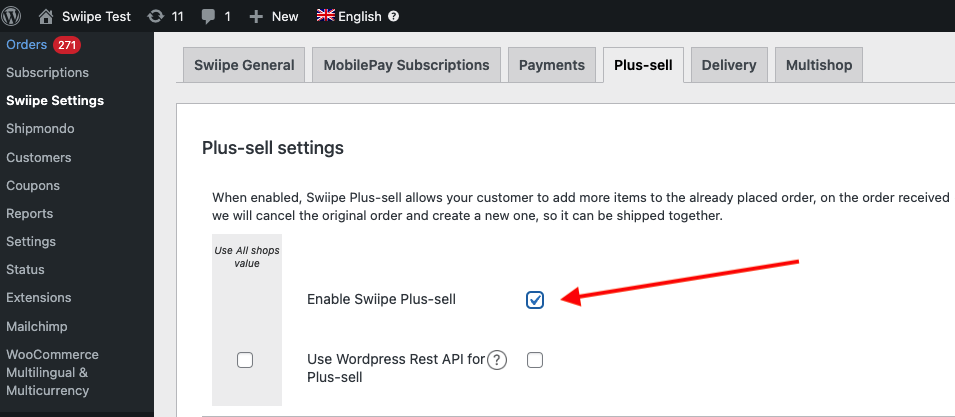
Si deseas utilizar los diseños integrados de Swiipe, ahora ya se mostrarán en la página de pago.
Eligiendo el diseño #
El diseño de Plus-sell se puede configurar de dos formas:
Utilizando el diseño integrado de conversión de Swiipe (Recomendado)
Utilizando Elements / Designs de Clerk como es habitual
Usando los diseños integrados de Swiipe #
Este es el enfoque estándar y recomendado, ya que Swiipe ha creado diseños altamente efectivos para convertir.
Funcionará automáticamente después de activar Plus-sell si no se realiza ninguna otra configuración.
Los diseños se pueden configurar de varias maneras:
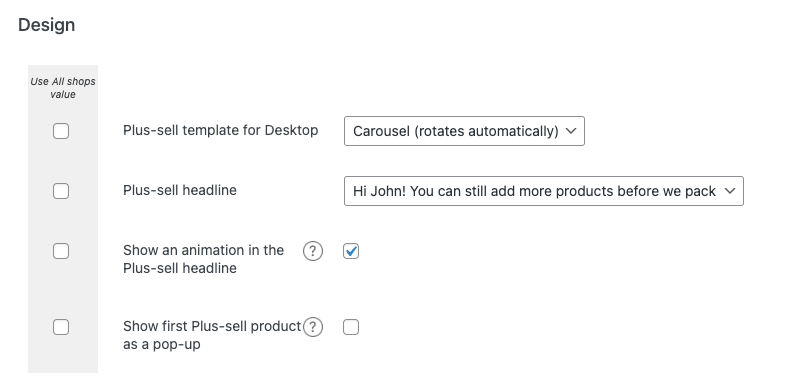
Plus-sell template for Desktop
Te permite elegir entre tipos estándar de diseños de Recommendations.
Basic (estático) muestra un slider de 4 productos.
Carousel (rota automáticamente) muestra un slider de 4 productos que rota.
Special (un producto a la vez) muestra 1 producto con más información por diapositiva.
Plus-sell headline Te permite elegir entre 3 tipos de titulares para mostrar sobre el banner
Show an animation in the Plus-sell headline Mostrará un pequeño icono de carrito animado al lado del titular
Mostrar el primer producto de ventas adicionales como una ventana emergente Mostrará una ventana emergente al entrar en la página de pago, con el primer producto recomendado por Clerk.
Usar elementos / diseños de Clerk #
Con esta función, puedes personalizar el slider en my.clerk.io.
Desplázate hasta el encabezado Clerk
Selecciona Usar diseño de plantilla de Clerk.io
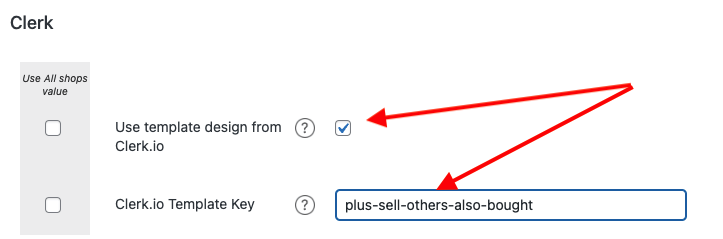
En Clerk.io Template Key, escribe el ID del Elemento que deseas usar.
Recomendamos crear un nuevo Elemento con la lógica Best Cross-Sell products
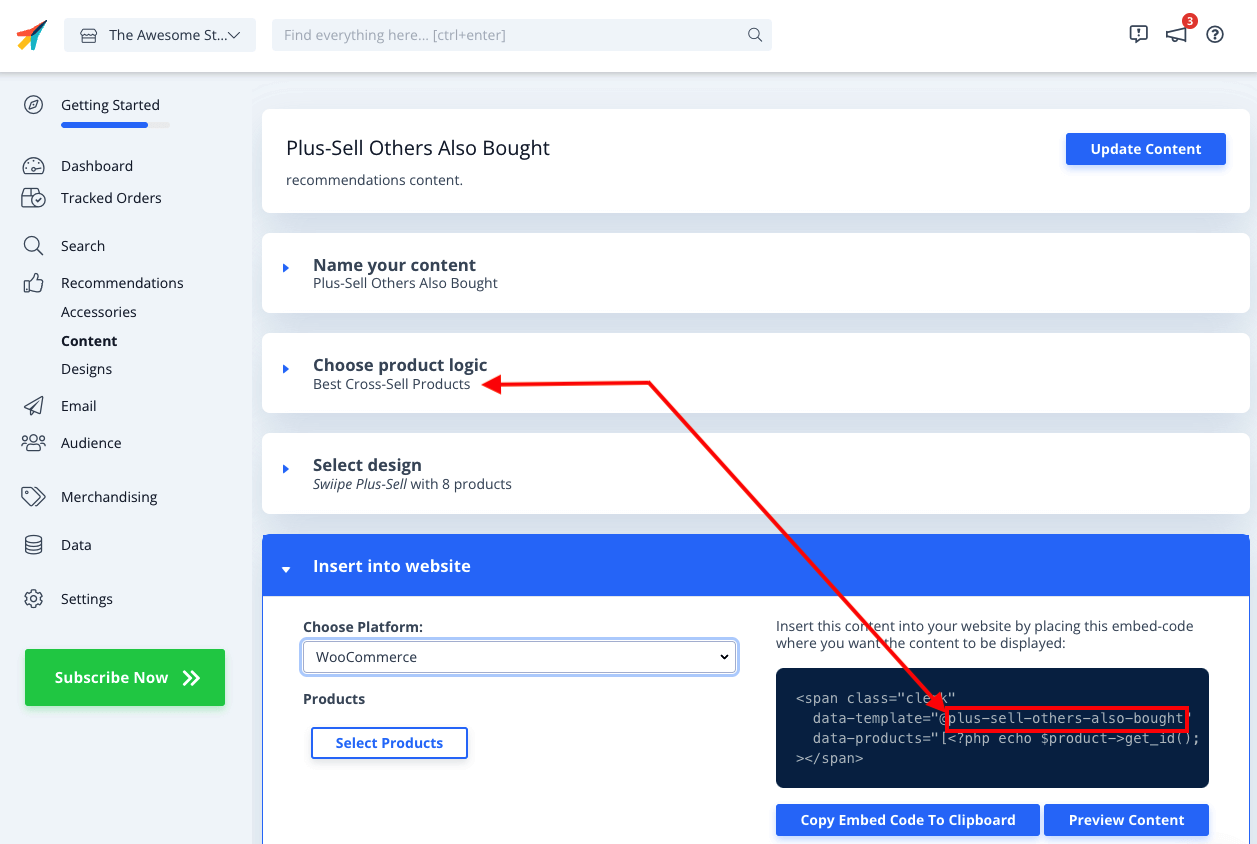
Ahora necesitas crear el diseño personalizado, que incluya la funcionalidad de ventas adicionales para añadir productos directamente a la cesta.
En my.clerk.io, ve a Recommendations > Designs > New Design
Elige Blank > Code y asígnale un nombre.
Copia los siguientes bloques de código en las secciones HTML y CSS respectivamente, y haz clic en Update Design
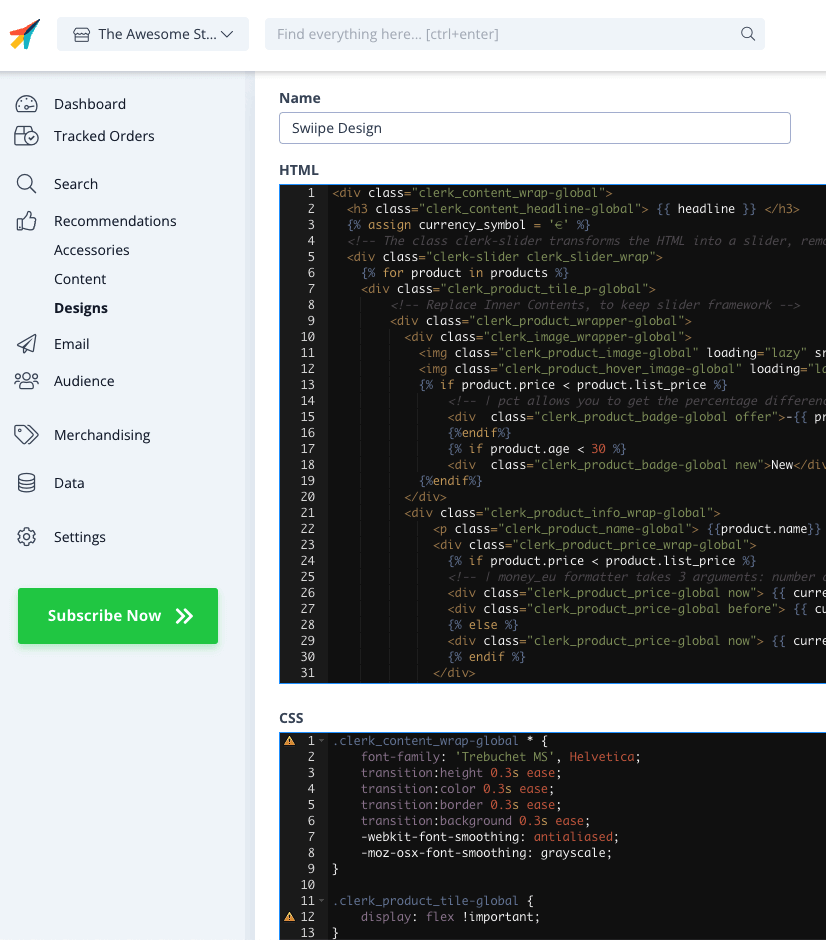
HTML
<div class="clerk_content_wrap-global">
  <h3 class="clerk_content_headline-global"> {{ headline }} </h3>
  {% assign currency_symbol = '€' %}
  <!-- The class clerk-slider transforms the HTML into a slider, removing this class disables Clerk slider framework -->
  <div class="clerk-slider clerk_slider_wrap">
    {% for product in products %}
    <div class="clerk_product_tile_p-global">
        <!-- Replace Inner Contents, to keep slider framework -->
        <div class="clerk_product_wrapper-global">
          <div class="clerk_image_wrapper-global">
            <img class="clerk_product_image-global" loading="lazy" src="{{ product.image }}" />
            <img class="clerk_product_hover_image-global" loading="lazy" src="{{ product.image }}" />
            {% if product.price < product.list_price %}
                <!-- | pct allows you to get the percentage difference between any 2 numerical values -->
                <div  class="clerk_product_badge-global offer">-{{ product.price | pct product.list_price }}%</div>
                {%endif%}
                {% if product.age < 30 %}
                <div  class="clerk_product_badge-global new">New</div>
            {%endif%}
          </div>
          <div class="clerk_product_info_wrap-global">
              <p class="clerk_product_name-global"> {{product.name}} </p>
              <div class="clerk_product_price_wrap-global">
                {% if product.price < product.list_price %}
                <!-- | money_eu formatter takes 3 arguments: number of decimals, thousand separator, decimal separator. Can also be used with no arguments, will default to 2 decimal places. -->
                <div class="clerk_product_price-global now"> {{ currency_symbol }}{{ product.price | money_eu 2 "." ","  }} </div>
                <div class="clerk_product_price-global before"> {{ currency_symbol }}{{ product.list_price | money_eu 2 "." "," }} </div>
                {% else %}
                <div class="clerk_product_price-global now"> {{ currency_symbol }}{{ product.price | money_eu 2 "." "," }} </div>
                {% endif %}
              </div>
              <div class="clerk_sizes_wrap">
                {% if product.sizes %}
                  {%for str in product.sizes %}
                    <span class="clerk_sizes">{{str}}</span>
                  {%endfor%}
                {% endif %}
              </div>
           </div>
           <div class="clerk_product_cta-global" onclick="clerk_simple_swiipe_buy_now(this, {{product.id}});">Buy now</div>
         </div>
        <!-- Replace Inner Contents, to keep slider framework -->
    </div>
    {% endfor %}
  </div>
</div>
<script>
    function clerk_simple_swiipe_buy_now(el, product_id) {
        var buy_now = el.innerHTML;
        el.innerHTML = "Adding...";
        el.classList.toggle('button--loading');
        _SwiipeApi.plusSell.addProducts([{ id:product_id, qty:1 }]).then((result) => {
            el.classList.toggle('button--loading');
            el.innerHTML = buy_now;
        });
    }
</script>
CSS
.clerk_content_wrap-global * {
    font-family: 'Trebuchet MS', Helvetica;
    transition:height 0.3s ease;
    transition:color 0.3s ease;
    transition:border 0.3s ease;
    transition:background 0.3s ease;
    -webkit-font-smoothing: antialiased;
    -moz-osx-font-smoothing: grayscale;
}

.clerk_product_tile-global {
    display: flex !important;
}
.clerk-slider-nav {
    z-index: 1 !important;
    background-image: none !important;
    box-shadow: none !important;
}
.clerk_slider_wrap {
    display: inline-flex;
    align-items: stretch;
    max-width: 100vw;
    width:inherit;
}

@keyframes arrowPop {
    0% {
        width:20%;
    }
    50% {
        width:0%;
    }
    100% {
        width: 20%;
    }
}

.clerk-slider-nav {
    background: #333;
    border-radius:50%;
    display:flex;
    justify-content:center;
    align-items:center;
    font-size:0;
    opacity:0.8;
    filter: drop-shadow(0 0 5px #333);
    transition:0.3s ease;
}

.clerk-slider-nav:hover {
    opacity:1;
    transition:0.3s ease;
}
.clerk-slider-nav:hover:before {
    animation:arrowPop 0.3s ease;
}
.clerk-slider-nav-next {
    flex-direction:row-reverse;
}

.clerk-slider-nav:after {
    content:"";
    display:block;
    height:40%;
    width:40%;
    transform: rotate(45deg);
    border: solid white;
}
.clerk-slider-nav-prev:after {
    border-width: 0px 0px 2px 2px;
}

.clerk-slider-nav-next:after {
    border-width: 2px 2px 0px 0px;
}

.clerk-slider-nav:before {
    content:"";
    width:20%;
}

.clerk_container-global {
    display:block;
    width:100%;
}

.clerk_product_info_wrap-global {

    padding: 5px;
    border-radius:1px;
    display: flex;
    flex-direction: column;
    justify-content: stretch;
    align-items: stretch;
    min-height: 0;
    height: -webkit-fill-available;
    height: -moz-available;
    height: fill-available;
        height: 100%;
        height: auto;
}

.clerk_product_info_wrap-global .clerk_link-global {
    transition:0.3s ease;
    min-height:0;
    height: -webkit-fill-available;
    height: -moz-available;
    height: fill-available;
        height: 100%;
        height: auto;
}

.clerk_product_info_wrap-global > * {
    padding: 0 5px;
}
.clerk_link-global {
    border-bottom:none;
    display:inherit;
    width:100%;
    text-decoration:none;
    color:inherit;
    padding:0;
}

.clerk_link-global:hover {
    filter: contrast(105%);
}

.clerk_content_headline-global{
    max-width: 100%;
    width: 100%;
    font-size: 26px;
    text-align:center;
    color:inherit;
}

.clerk_product_tile_p-global{
    flex-direction: column;
    justify-content: space-between;
    border-radius:0px;
    padding:15px;
    margin:5px;
    box-sizing:border-box;
    min-width:calc(25% - 10px);
    max-width:calc(25% - 10px);
    posicion:relativo;
    overflow:hidden;
    border:1px solid #eee;
    background-color:white;
    text-align:center;
}

.clerk_product_wrapper-global {
    height: 100%;
    display: flex;
    flex-direction: column;
}

.clerk_product_badge-global.offer{
    display:block;
    position:absolute;
    top:0;
    right:0;
    width: 4em;
    height: 4em;
    border-radius:999rem; /* Needed to ensure it never rounds corners more than 50% */
    background: #f9f9f9;
    color:#333;
    font-weight:bold;
    line-height:3.5em;
    border:4px solid #333;
    user-select:none;
    pointer-events:none;
}

.clerk_product_badge-global.new{
    display: block;
    position: absolute;
    top: 0;
    left: 0;
    width: 4em;
    height: 4em;
    border-radius: 999rem;
    background: #f9f9f9;
    color: #333;
    font-weight: bold;
    line-height: 3.5em;
    border: 4px solid #333;
    user-select: none;
    pointer-events: none;
}

.clerk_image_wrapper-global {
    display:block;
    position:relative;
    width:100%;
    height:auto;
}

.clerk_image_wrapper-global:hover .clerk_product_hover_image-global {
    opacity:1;
    transition: 0.3s ease-in;
}

.clerk_image_wrapper-global:hover .clerk_product_image-global {
    opacity:0;
    transition: 0.3s ease-out;
    transition-delay:0.2s;
}

.clerk_image_wrapper-global .clerk_product_hover_image-global {
    position:absolute;
    top:0;
    left:0;
    min-height:auto;
}

.clerk_product_hover_image-global{
    background-size:contain;
    background-position:center center;
    background-repeat:no-repeat;
    object-fit: contain;
    /*Change the max height value below to 100% if the client has consistent image sizes */
    max-height:400px;
    width:100%;
    max-width:100%;
    height: auto;
    opacity:0;
}

.clerk_product_image-global{
    background-size:contain;
    background-position:center center;
    background-repeat:no-repeat;
    object-fit: contain;
    /*Change the max height value below to 100% if the client has consistent image sizes */
    max-height:400px;
    width:100%;
    max-width:100%;
    height: auto;
}

.clerk_product_stock-global {
    display:flex;
    text-align:left;
    justify-content:left;
    align-items:center;
    font-size:80%;
    text-transform: capitalize;
    padding:5px;
    user-select:none;
}

.clerk_product_stock-global:before {
    content:"";
    height: 8px;
    width: 8px;
    margin:0 5px 0 0;
    border-radius:50%;
}

.clerk_product_stock-global.in:before {
    background:#78b904;
}
/*
.clerk_product_stock.low:before {
    background:#eea71e;
}
*/
.clerk_product_stock-global.out:before {
    background:#ee1e31;
}
.clerk_product_name-global{
    overflow:hidden;
    height:auto;
    min-height: 36px;
    margin-bottom:1rem;
    color:inherit;
    text-align:left;
    max-width: 100%;
    padding:0 5px;
    display: -webkit-box;
    -webkit-line-clamp: 3;
    -webkit-box-orient: vertical;
}

.clerk_product_price_wrap-global{
    font-size: 1em;
    min-height: auto;
    flex-direction:row;
    display:flex;
    max-width: 100%;
    justify-content: flex-start;
}

.clerk_product_price-global {
    padding: 0px 5px 0px 0px;
}

.clerk_product_price-global.before{
    opacity: .8;
    flex:1;
    font-weight:normal;
    color:black;
    text-decoration:line-through;
    font-size:inherit;
    text-align:center;
    max-width: fit-content;
    max-width: -moz-fit-content;
}

.clerk_product_price-global.now{
    flex:1;
    font-weight:bold;
    font-size:inherit;
    text-align:center;
    color:inherit;
    max-width: fit-content;
    max-width: -moz-fit-content;
}

.clerk_product_cta-global{
    border-radius:2px;
    cursor:pointer;
    color:#fff;
    padding:5px;
    margin:0;
    display:block;
    white-space:nowrap;
    font-weight:normal;
    border:none;
    background-color:#333;
    border:1px solid #333;
    text-align:center;
    max-width: 100%;
    text-decoration: none;
}

.clerk_product_cta-global:hover {
    color:#333;
    background-color:#fff;
}

.clerk_content_wrap-global{
    box-sizing: border-box;
    margin: 1rem auto;
    width: 100%;
}

@media screen and (max-width: 400px) {
.clerk_content_headline-global{

}

.clerk_product_tile_p-global{
    min-width:calc(100%);
    max-width:calc(100%);
}

.clerk_product_badge-global{

}
.clerk_product_price_wrap-global {

}
}
@media screen and (min-width: 401px) and (max-width: 620px) {
.clerk_content_headline-global{

}
.clerk_product_tile_p-global{
    min-width:calc(50% - 10px);
    max-width:calc(50% - 10px);
}
.clerk_product_badge-global{

}
}
@media screen and (min-width: 621px) and (max-width: 940px) {
.clerk_content_headline-global{

}
.clerk_product_tile_p-global{
    min-width:calc(33.333336% - 10px);
    max-width:calc(33.333336% - 10px);
}
.clerk_product_badge-global{

}
}
@media screen and (min-width: 941px) and (max-width: 1160px) {
.clerk_content_headline-global{

}
.clerk_product_tile_p-global{
    min-width:calc(25% - 10px);
    max-width:calc(25% - 10px);
}
.clerk_product_badge-global{

}
}

.clerk_sizes_wrap{
    display:flex;
    flex-direction:row;
    width:100%;
}
.clerk_sizes{
    padding:5px;
    margin:5px;
    border:1px solid #eee;
    width:50px;
}
- Finalmente, ve al Elemento que creaste y elige este diseño en Select Design. Luego haz clic en Update Element
- Swiipe Plus-sell ahora funcionará con el diseño de Clerk en el checkout.
Esta página ha sido traducida por una IA útil, por lo que puede contener errores de idioma. Muchas gracias por su comprensión.