Sync Data
Sincronizza i tuoi prodotti e dati degli ordini SmartWeb Classic su Clerk. Questa guida copre la configurazione di un feed dati, l’invio dei dati degli ordini e la scelta dei prodotti da importare.
Configura la sincronizzazione #
Per sincronizzare i dati del tuo negozio SmartWeb Classic con Clerk, devi creare un Prisindeks (indice prezzi) in SmartWeb Classic e configurarlo su Clerk.
In SmartWeb Classic, crea un Prisindeks: clicca su Opret Eget Prisindeks e chiamalo “Clerk”.
Apri l’indice prezzi sotto Egne e inserisci i blocchi di codice nei modelli rilevanti.

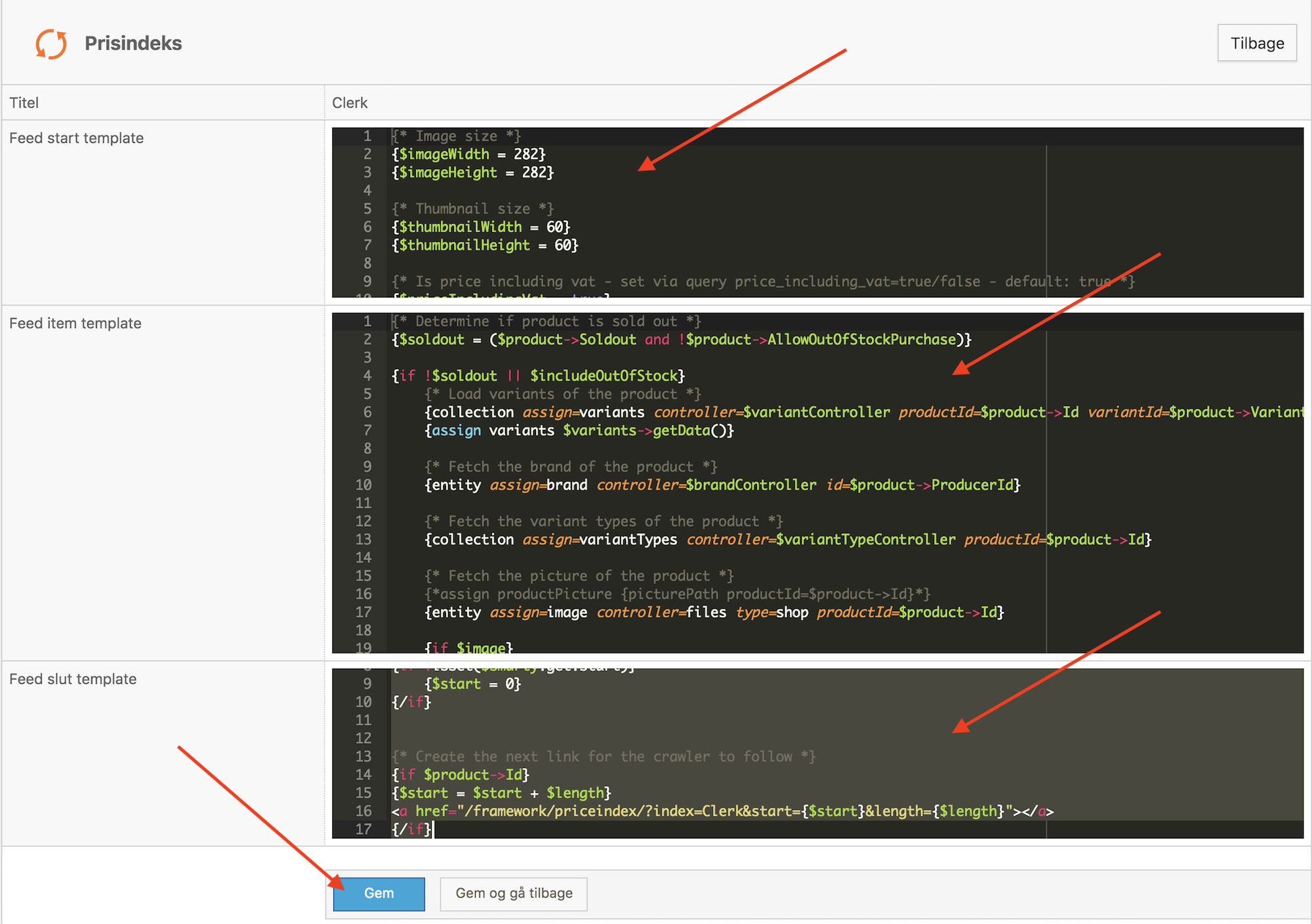
- Clicca su Gem og gå tilbake e copia l’URL del Prisindeks.

- Vai su my.clerk.io > Data > Configuration e incolla l’URL del Prisindeks. Se necessario seleziona la lingua e clicca su Start Sync.
Configurazione di un feed dati #
Nell’amministrazione di SmartWeb Classic, vai su Kontrolpanel->Prisindeks
Crea un nuovo Prisindex cliccando su Opret Eget Prisindeks in alto a destra.
Dagli il nome Clerk.
Usa il seguente codice per creare il Data Feed. Questo genererà un link col feed dei prodotti, che potrà essere usato nel caricatore HTML Annotations su my.clerk.io.
Inserisci nel Feed Start Template #
{* Image size *}
{$imageWidth = 293}
{$imageHeight = 293}

{* Thumbnail size *}
{$thumbnailWidth = 60}
{$thumbnailHeight = 60}

{* Is price including vat - set via query price_including_vat=true/false - default: true *}
{$priceIncludingVat = true}

{if isset($smarty.get.price_including_vat)}
    {$priceIncludingVat = ($smarty.get.price_including_vat eq "true")}
{/if}

{* Include out of stock products - set via query include_out_of_stock=true/false - default: false *}
{$includeOutOfStock = (isset($smarty.get.include_out_of_stock) && $smarty.get.include_out_of_stock eq "true")}

{* Instantiate controllers *}
{controller assign=productController type=product}
{controller assign=brandController type=user}
{controller assign=variantController type=productVariant}
{controller assign=priceController type=productPrice}
{controller assign=cartController type=cart}

{$productPageLink = PageController::link($page.productPageId)}

{* Set date variable (now + 1 month in Y-m-d format) *}
{assign date {date('Y-m-d', strtotime("+1 months", strtotime("NOW")))}}

{collection controller=productCategory assign=categories}

{$productLink = {page id=$page.productPageId print=Link}}

{function name=renderCategories}
    {foreach $items->getData() as $item}
        {collection controller=productCategory assign=subCategories parentId=$item->Id}

        <span class="clerk-category-info"
            data-id="{$item->Id}"
            data-name="{$item->Title|unescape:"html"|clearText}"
            data-url="/{$productLink}/{$item->Handle}/"
            data-subcategories="[{if $subCategories}{foreach $subCategories->getData() as $category}{$category->Id}{if not $category@last}, {/if}{/foreach}{/if}]">
        </span>

        {call name=renderCategories items=$subCategories}
    {/foreach}
{/function}

{call renderCategories items=$categories}

{* Pages *}
{controller type=page assign=pagecontroller primary=true}
{collection assign=subPagess controller=page parentId=$page.id  showInMenuCheck=false visibleCheck=false primary=true }

{function name=renderPages}
    {foreach $items->getData() as $Page}
        {collection assign=subPagess2 controller=page parentId=$Page->Id  showInMenuCheck=false visibleCheck=false primary=true }

        {$pageTitle     =     trim($Page->Title)}
        {$link         =     trim($pagecontroller->link($Page->Id))}
        {if $Page->Type == "text" && $Page->Visible == 0 && $Page->ShowInMenu == 0}
        <span class="clerk-pages-info"
            data-id="{$Page->Id}"
            data-type="cms"
            data-url="{$Page->Id}"
            data-title="{$Page->Title|unescape:"html"|clearText}"
            data-text="{$pagecontroller->getText($Page->Id)|unescape:"html"|clearText}">
        </span>
        <br>
        {/if}
        {call name=renderPages items=$subPagess2}
    {/foreach}
{/function}
{call renderPages items=$subPagess}
Inserisci nel Feed Item Template #
{* Determine if product is sold out *}
{$soldout = ($product->Soldout and !$product->AllowOutOfStockPurchase)}
{if !$soldout || $includeOutOfStock}
{* Load variants of the product *}
{collection assign=variants controller=$variantController productId=$product->Id variantId=$product->VariantIds}
{assign variants $variants->getData()}
{if $product->Soldout}
{assign stockhtml $productController->getDeliveryTime($product->DeliveryTimeId, false)|escape:'htmlall'}
{else}
{assign stockhtml $productController->getDeliveryTime($product->DeliveryTimeId, true)|escape:'htmlall'}
{/if}
{* Fetch the brand of the product *}
{entity assign=brand controller=$brandController id=$product->ProducerId}
{* Fetch the variant types of the product *}
{collection assign=variantTypes controller=$variantTypeController productId=$product->Id}
{* Fetch the picture of the product *}
{*assign productPicture {picturePath productId=$product->Id}*}
{entity assign=image controller=files type=shop productId=$product->Id}
{if $image}
{$crop = "fill"}
{if !empty($template.settings.DESIGN_IMAGE_BACKGROUND_COLOR)}
{$crop = $template.settings.DESIGN_IMAGE_BACKGROUND_COLOR}
{/if}
{$thumbnailPath = $image->thumbnail($thumbnailWidth, $thumbnailHeight, $crop)}
{$imagePath = $image->thumbnail($imageWidth, $imageHeight, $crop)}
{else}
{placeholdImage assign=placeholder width=$thumbnailWidth height=$thumbnailHeight background=$template.settings.DESIGN_IMAGE_BACKGROUND_COLOR color=$template.settings.FONT_COLOR_PRIMARY text=$text.IMAGE_PLACEHOLDER_TEXT}
{$thumbnailPath = $placeholder->getRelativeFile()}
{placeholdImage assign=placeholder width=$imageWidth height=$imageHeight background=$template.settings.DESIGN_IMAGE_BACKGROUND_COLOR color=$template.settings.FONT_COLOR_PRIMARY text=$text.IMAGE_PLACEHOLDER_TEXT}
{$imagePath = $placeholder->getRelativeFile()}
{/if}
{* Fetch the short description of the product *}
{*{assign productDescription $productController->getDescriptionShort($product->Id)}*}
{* If blank, fetch the list description of the product *}
{* {if empty($productDescription)}
{assign productDescription $productController->getDescriptionList($product->Id)}
{/if}
{* If blank, fetch the long description of the product *}
{*{if empty($productDescription)}
{assign productDescription $productController->getDescription($product->Id)}
{/if}*}
{assign productDescription $productController->getDescription($product->Id)}
{* Trim the description to a max length of 5000 characters *}
{$productDescription = $productDescription|strip_tags|unescape:"html"|trimTo:5000}
{* Trim the description to a max length of 200 characters *}
{$productEmailDescription = $productDescription|strip_tags|unescape:"html"|trimTo:200}
{* Fetch the category path of the product *}
{assign categoryPathTitle {categoryTitlePath product=$product separator=" > "}}
{* Convert product age from seconds to days *}
{$ageInDays = ($product->Age / 60 / 60 / 24)|string_format:"%.1f"}
<span class="clerk-product-info"
{* Title *}
data-name="{$product->Title|escape:'html'|clearText}"
{* Link URI *}
data-url="{itemLink product=$product}"
{* Link URL without domain*}
{assign productSurl {itemLink product=$product}}
data-urls="{$productSurl|replace:'https://www.grejfreak.dk/':'/'}"
{* Product id *}
data-id="{$product->Id}"
{* Description *}
data-description="{$productDescription|clearText}"
{* Description *}
data-shortdescription="{$productEmailDescription|clearText}"
{* Use SEO keywords for extra searchable keywords *}
{*
{assign var="keywords" value="$productController->getTranslation($product->Id, 'seo_keywords')|lower|escape:"htmlall"|clearText"}
{assign var="keyword_list" value=","|explode:$keywords}
data-keywords2 = "{$keyword_list}"*}
data-keywords="{$productController->getTranslation($product->Id, 'seo_keywords')|lower|escape:"htmlall"|clearText}"
{* Image *}
data-image="{$imagePath|solutionPath}"
{* Thumbnail *}
data-thumbnail="{$thumbnailPath|solutionPath}"
{* Item number *}
data-sku="{$product->ItemNumber|toUTF8}"
{collection assign=productCustomDatas controller=productCustomData productId=$product->Id typeId=14}
{if $productCustomDatas gt 0}
{foreach $productCustomDatas->getData() as $productCustomData}
data-prislabel="{$productCustomData->Title}"
{/foreach}
{/if}
{collection assign=productCustomDatas controller=productCustomData productId=$product->Id typeId=15}
{if $productCustomDatas gt 0}
{foreach $productCustomDatas->getData() as $productCustomData}
data-profitlabel="{$productCustomData->Title}"
{/foreach}
{/if}
{collection assign=productCustomDatas controller=productCustomData productId=$product->Id typeId=12}
{if $productCustomDatas gt 0}
{foreach $productCustomDatas->getData() as $productCustomData}
data-customlabel="{$productCustomData->Title|toUTF8}"
{/foreach}
{/if}
{if !empty($product->Ean)}
{* Ean number *}
data-ean="{$product->Ean|toUTF8}"
{/if}
{* Fetch the price line of the product *}
{entity assign=priceLine controller=$priceController productId=$product->Id}
{* Fetch the stock status text of the product *}
{$stockStatusText = {stockStatusText product=$product inStockText='in stock' notInStockText='out of stock'}}
{* checek product is Normal or variant *}
{if $product->Type == "normal"}
{if $product->Soldout}
{$type="normaloutstockstatus"}
{* {$deliveryText = "<span><strong>IKKE PÅ LAGER</strong><br>Levering 3-14 dage</span>"}*}
{$deliveryText = $stockhtml}
{else}
{$type="normalinstockstatus"}
{*$deliveryText = "<span><strong>PÅ LAGER</strong></span> "*}
{$deliveryText = $stockhtml}
{/if}
{/if}
{if $product->Type == "variant"}
{if $product->Soldout}
{$type="variantoutstockstatus"}
{*$deliveryText = "<span><strong>IKKE PÅ LAGER</strong><br>Levering 3-14 dage</span>"*}
{$deliveryText = $stockhtml}
{else}
{$type="variantinstockstatus"}
{*$deliveryText = "<p><strong>LAGERSTATUS</strong>VÆLG VARIANT</p>"*}
{$deliveryText = "<p><strong>{$text.VARIATION_STOCK_BOLD_MESSAGE}</strong>{$text.VARIATION_STOCK_NORMAL_MESSAGE}</p>"}
{/if}
{/if}
data-stock-type ="{$type}"
data-deliveryText ="{$deliveryText}"
{* Prices *}
{assign price $priceLine->PriceMinWithVat}
{if !$priceIncludingVat}
{assign price $priceLine->PriceMinWithoutVat}
{/if}
{* Selling price *}
data-price="{$price}"
{* Selling price - Formatted with language specific currency iso *}
data-pformatted="{$price|formatPrice}"
{if $priceLine->PriceMin !== $priceLine->PriceMax}
data-pricefrom="true"
{/if}
{$onSale = ($priceLine->PriceMinWithVat < $priceLine->FullPriceMinWithVat)}
{* If the product is discounted we set the normal price as list price *}
{if $onSale}
{assign listPrice $priceLine->FullPriceMinWithVat}
{if !$priceIncludingVat}
{assign listPrice $priceLine->FullPriceMinWithoutVat}
{/if}
{* Normal price *}
data-list-price="{$listPrice}"
{* Normal price - Formatted with language specific currency iso *}
data-lpformatted="{$listPrice|formatPrice}"
{*Add text with tilbud *}
data-sale-text="tilbud"
{* Add Procent if on sale *}
{$priceMin = $priceLine->PriceMin}
{$priceFull = $priceLine->FullPriceMin}
{$diffprice = $priceLine-$priceMin}
{$percentChange = (1 - $priceMin / $priceFull) * 100 }
{$percentChange = (int)$percentChange}
data-price-procent="{$percentChange}"
data-price-procent_int="{$percentChange|formatPrice}"
{/if}
data-on-sale="{if $onSale}true{else}false{/if}"
data-in-stock="{if !$soldout}true{else}false{/if}"
data-stock-av="{if $product->Soldout}false{else}true{/if}"
{* Product age *}
data-age="{$ageInDays}"
{* If the product is newer than 30 days, we consider it as new *}
{if $ageInDays lt 90}
data-new="true"
{/if}
{* Brand *}
{if !empty($brand->Title)}
{$brandLink = "{$productPageLink}?brand={$brand->Id}-{$brand->Title|formatLink}"}
data-brand="{$brand->Title|escape:"html"|clearText}"
data-brand-url="{$brandLink}"
data-brand-id="{$brand->Id}"
{/if}
{* If the product has variants *}
{if $variants}
{*data-variants-sku="[
{foreach $variants as $variant}
{if !empty($variant->ItemNumber)}
'{$variant->ItemNumber}'{if !$variant@last},{/if}
{/if}
{/foreach}
]"*}
{*
data-variants-name="[
{foreach $variants as $variant}
'{assign variantTitle {variantTitle productId=$product->Id variantId=$variant->Id}}{$variantTitle|escape:"htmlall"|clearText}'{if !$variant@last},{/if}
{/foreach}
]"*}
data-variants-ean="[
{foreach $variants as $variant}
'{assign variantTitle {variantTitle productId=$product->Id variantId=$variant->Id}}{if !empty($variant->Ean)}{$variant->Ean|escape:"htmlall"}{/if}'{if !$variant@last},{/if}
{/foreach}
]"
{/if}
{collection assign=productCustomDatas controller=productCustomData productId=$product->Id typeId=11}
{if $productCustomDatas gt 0}
{foreach $productCustomDatas->getData() as $productCustomData}
data-splash="{$productCustomData->Title}"
{/foreach}
{/if}
{* Splash array *}
{if $productCustomDatas gt 0}
data-splasharray='[
{foreach $productCustomDatas->getData() as $productCustomData}
"{$productCustomData->Title}"{if !$productCustomData@last},{/if}
{/foreach}
]'
{/if}
{* Splash array uden fil type *}
{if $productCustomDatas gt 0}
data-splasharray-simple='[
{foreach $productCustomDatas->getData() as $productCustomData}
{assign splashSimple {$productCustomData->Title|toUTF8|replace:'.svg':''}}
"{$splashSimple}"{if !$productCustomData@last},{/if}
{/foreach}
]'
{/if}
{* Categories *}
data-categories="[
{$product->CategoryId}
{if $product->SecondaryCategoryIds}
{foreach $product->SecondaryCategoryIds as $productCategory}
, {$productCategory}
{/foreach}
{/if}
]">
</span>
{/if}
Inserisci nel Feed Slut Template #
{*Add pagination*}
{if !isset($smarty.get.length)}
    {$length = 50}
{else}
    {$length = $smarty.get.length}
{/if}

{if isset($smarty.get.start)}
    {$start = $smarty.get.start + $length}
{else}
    {$start = 0}
{/if}

{* Check if out-of-stock products should be added*}
{if isset($smarty.get.include_out_of_stock)}
    {$stock = $smarty.get.include_out_of_stock}
{else}
    {$stock = "false"}
{/if}

{* Create the next link for the crawler to follow *}
{if $product->Id}
<a href="/framework/priceindex/?index=clerk&start={$start}&length={$length}&include_out_of_stock={$stock}"></a>
{/if}
Salva il Prisindex.
A questo punto avrai un link simile al seguente, disponibile:
https://www.mysmartwebshop.com/framework/priceindex/index=Clerk&include_out_of_stock=false
Vai su my.clerk.io -> Data.
Sotto Sync Method, scegli HTML annotations, e inserisci il tuo link.
Poi imposta Max Requests/Sec a 1 e scegli la lingua.

Infine, clicca su Update Settings e poi su Start Sync.
Invio dei dati degli ordini #
Poiché purtroppo il Prisindeks di SmartWeb Classic non consente di includere le vendite da SmartWeb Classic, la cronologia degli ordini deve essere esportata come file CSV che potrà quindi essere convertito e caricato su Clerk.
Per scaricare questo file CSV, inizia accedendo al backend di SmartWeb Classic.
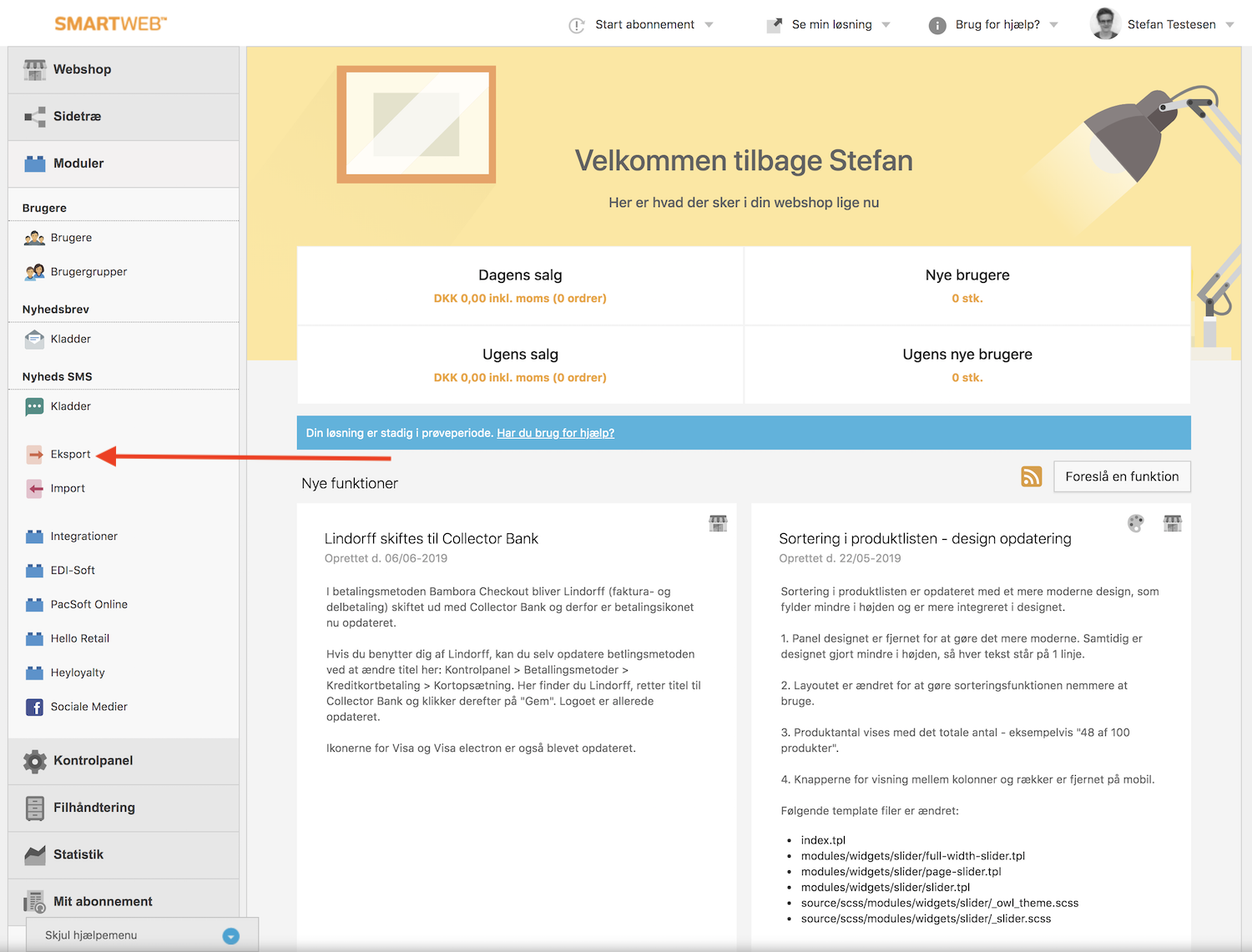
Poi vai su Eksport:
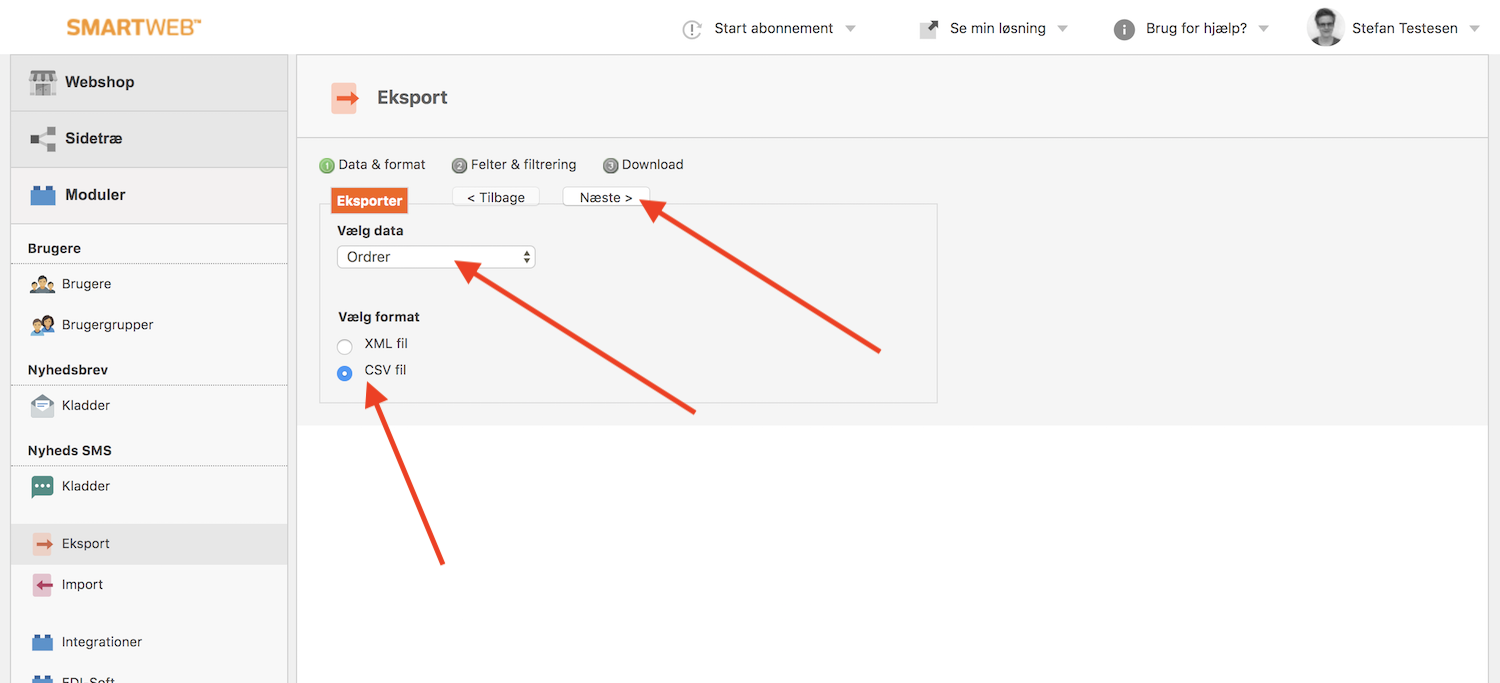
Nella pagina successiva, scegli Ordrer sotto Vælg Data e seleziona CSV fil sotto Vælg Format, poi clicca su Næste.
Ora dovrai scegliere quali dati includere nel file CSV.
Clerk necessita dei seguenti dati dagli ordini:
Ordre ID (predefinito)
Dato
Produkt ID
Kunde e-mail
Bruger ID
Tutti questi possono essere selezionati nei menu a tendina:
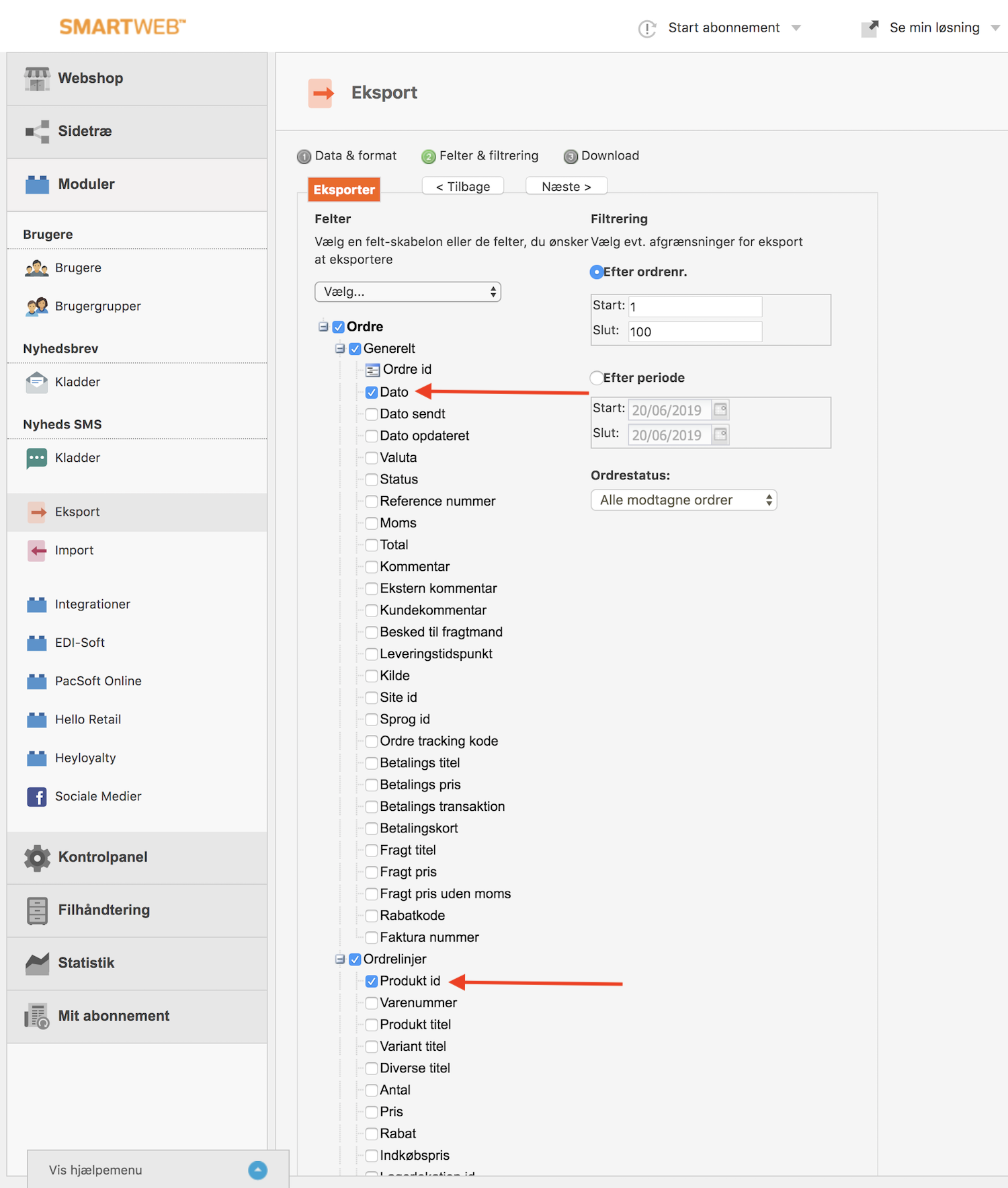
Dopo aver selezionato i campi, usa il selettore di intervallo data Efter Periode, per includere i dati delle vendite da quando hai ricevuto il tuo primo ordine, e clicca su Næste:

Infine, clicca su Download per scaricare il tuo file CSV:
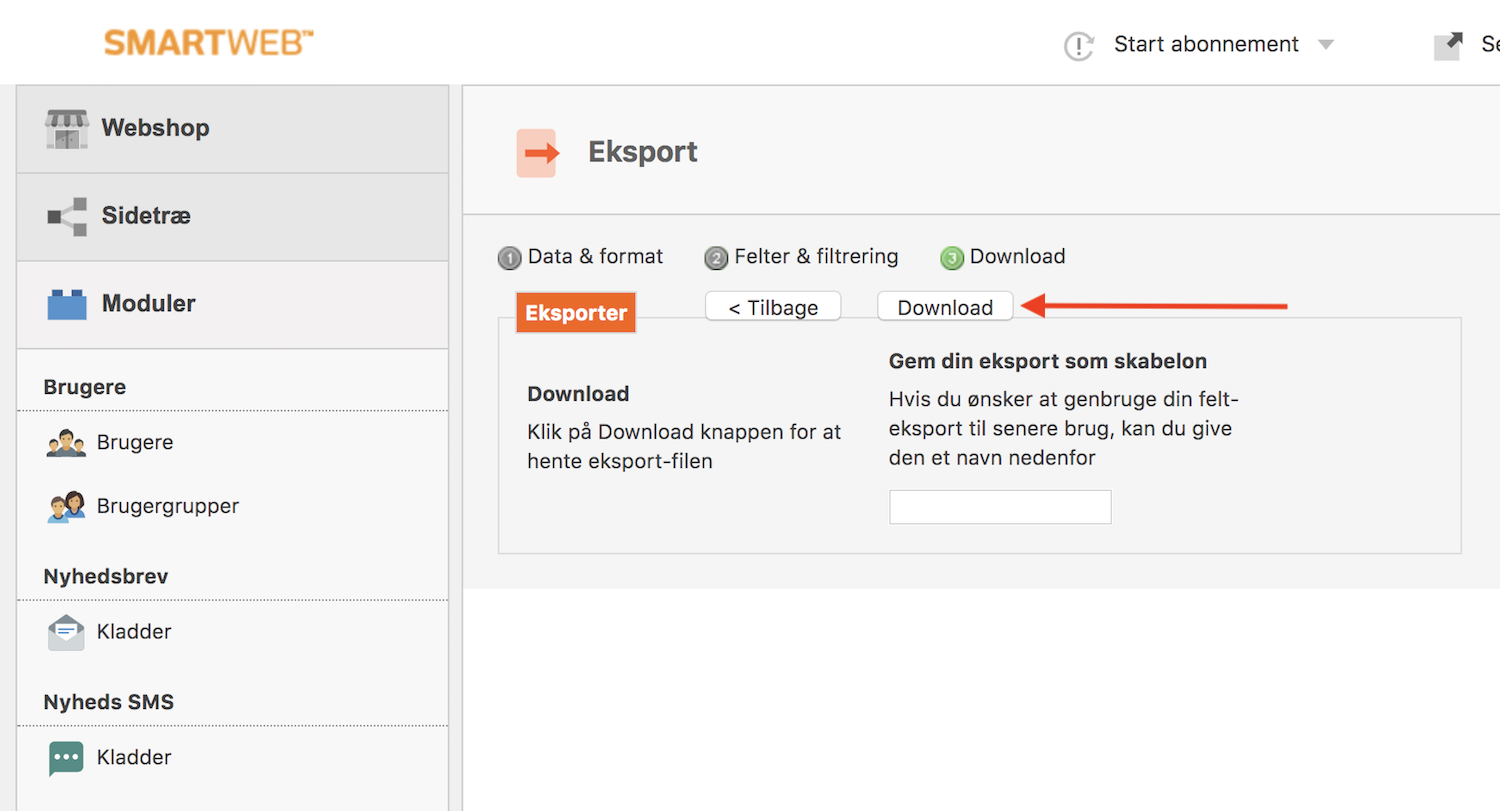
Fatto! Ora hai i tuoi dati di vendita SmartWeb Classic come file CSV.
Adesso devi solo contattare Clerk’s Support, per trovare il modo migliore e più sicuro di caricare il file sul tuo account.
Scelta dei prodotti da importare #
Il feed SmartWeb Classic / Hostedshop ti permette di filtrare o includere facilmente i prodotti esauriti, modificando una semplice parte dell’URL del feed.
Su my.clerk.io, vai su Data Sync.
Assicurati che l’URL termini con &include_out_of_stock=true

Poi clicca su Update Settings e Start Sync per caricare tutti i tuoi prodotti su Clerk.
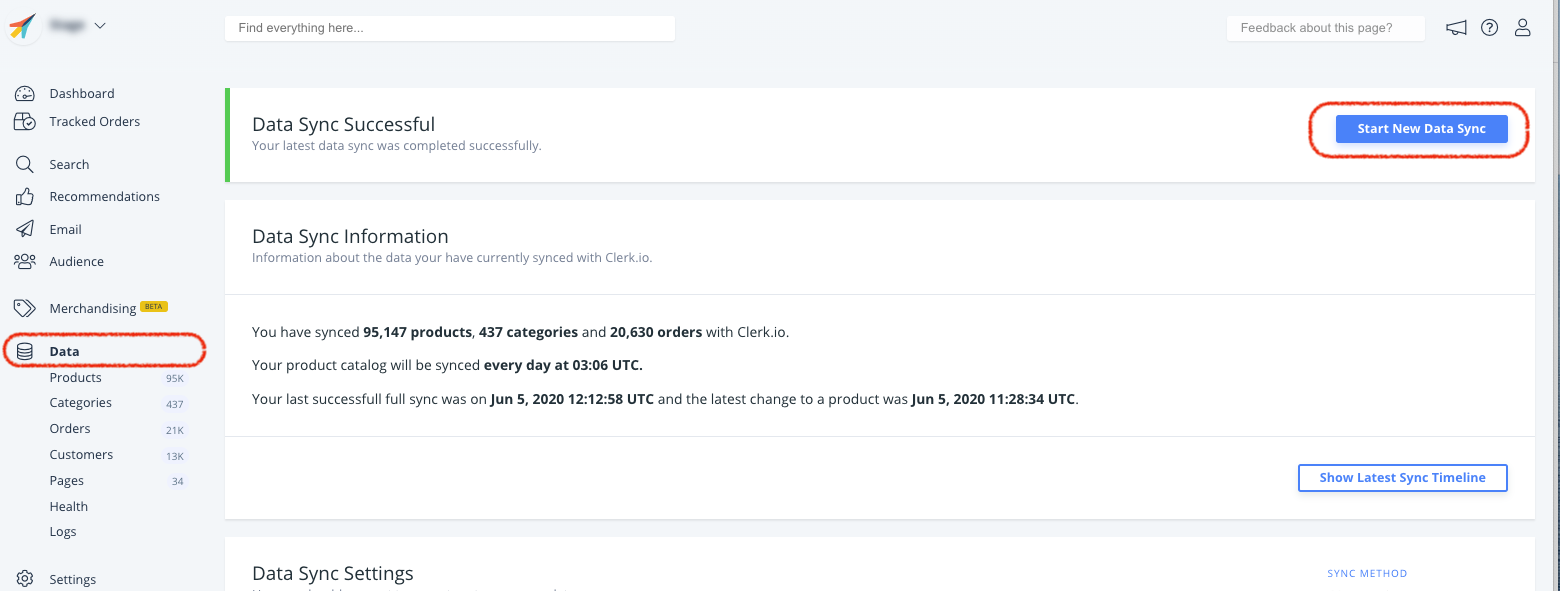
Quando importi tutti i prodotti, compresi quelli esauriti, otterrai l’attributo in_stock disponibile per tutti i prodotti, così potrai filtrare alcuni elementi Clerk per non mostrarli.
Questa pagina è stata tradotta da un'utile intelligenza artificiale, quindi potrebbero esserci errori linguistici. Grazie per la comprensione.