Get Started
Integra le raccomandazioni Clerk con Swiipe Plus-sell per mostrare raccomandazioni di prodotti sulle pagine di conferma ordine. Plus-sell consente ai clienti di aggiungere prodotti extra direttamente allo stesso ordine.
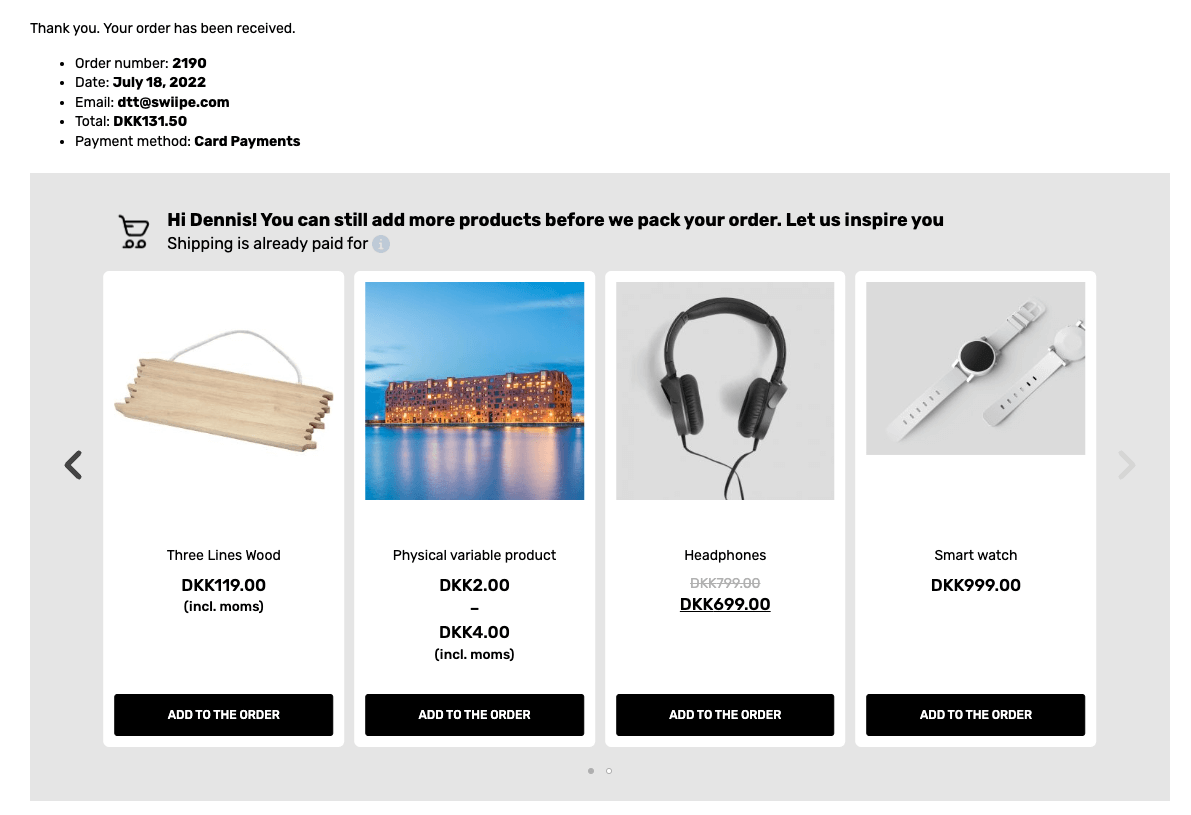
Questa guida mostra come attivare e configurare le raccomandazioni di Clerk.io per lavorare con Plus-Sell.
Magento 2 #
Attivare Plus-sell #
Quando il Plugin Clerk.io è installato, Swiipe può recuperare automaticamente la configurazione della chiave API, così può identificare quale negozio la sta utilizzando.
Nel backend di Magento2, vai su Stores > Configuration > Swiipe
Clicca sulla scheda Plus-sell.
Plus-sell è attivato a livello di singolo Store, quindi assicurati di scegliere uno Store specifico dalla sezione Scope in alto a sinistra nella pagina.
Seleziona Enable Swiipe Plus-sell
Clicca Save Config in alto a destra
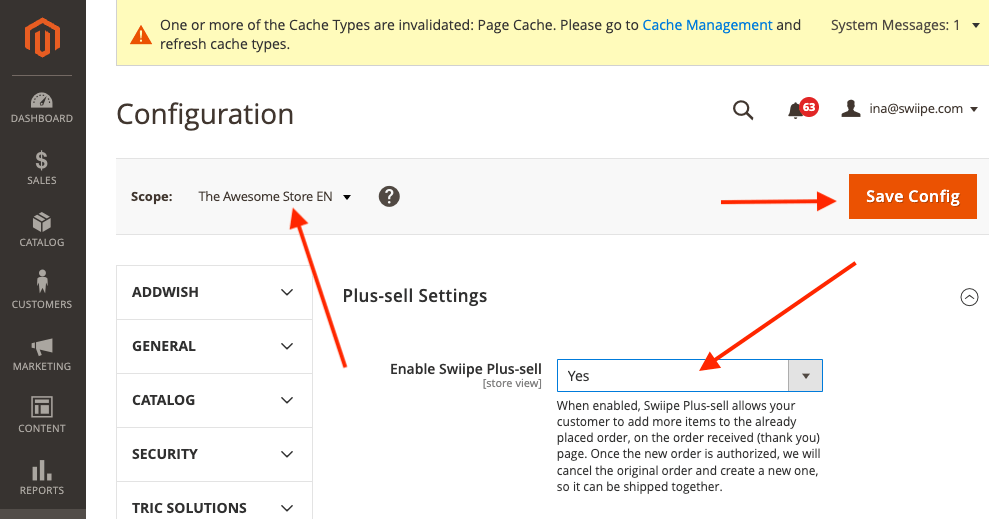
Se desideri utilizzare i design integrati di Swiipe, ora saranno già visibili nella pagina di checkout.
Scegliere il design #
Il design di Plus-sell può essere configurato in due modi:
Utilizzare il design integrato di Swiipe ottimizzato per la conversione (Consigliato)
Utilizzare Elementi/Designs da Clerk come di consueto
Utilizzare i design integrati di Swiipe #
Questo è il metodo standard e consigliato, poiché Swiipe ha sviluppato design altamente efficaci per la conversione.
Funzionerà automaticamente dopo aver attivato Plus-sell se non viene effettuata nessun’altra configurazione.
I design possono essere configurati in diversi modi:
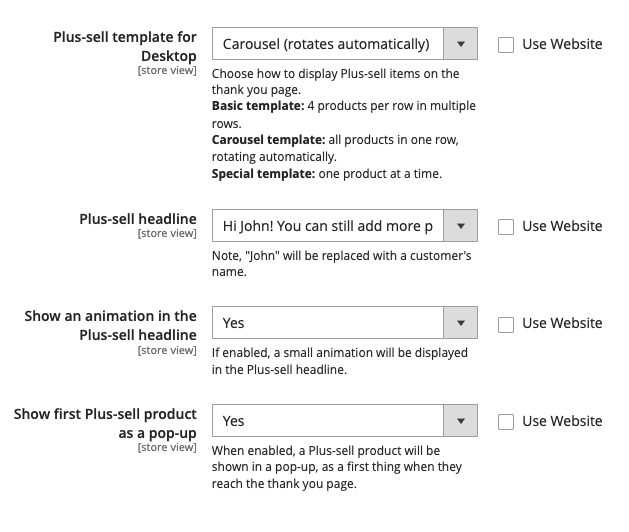
Plus-sell template for Desktop
Consente di scegliere tra diversi tipi standard di design Recommendations.
Basic (statico) mostra uno slider di 4 prodotti.
Carousel (gira automaticamente) mostra uno slider di 4 prodotti che ruotano.
Special (un prodotto alla volta) mostra 1 prodotto con più informazioni per slide.
Plus-sell headline Ti permette di scegliere tra 3 tipi di headline da mostrare sopra il banner
Show an animation in the Plus-sell headline Mostrerà una piccola icona del carrello animata accanto all’headline
Show first plus-sell product as a pop-up Mostrerà un popup entrando nella pagina di checkout con il primo prodotto raccomandato da Clerk.
Utilizzare Elements/Designs da Clerk #
Con questa funzionalità, puoi personalizzare lo slider in my.clerk.io.
Scorri fino all’intestazione Clerk
Seleziona Use template design from Clerk.io
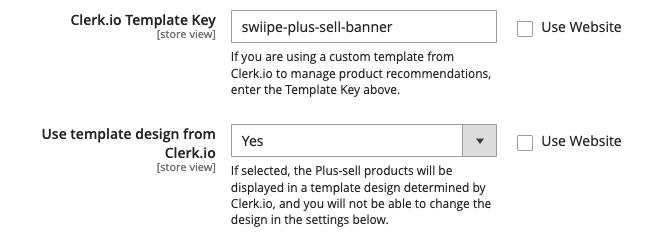
Nel campo Clerk.io Template Key, inserisci l’ID dell’Element che vuoi utilizzare.
Si consiglia di creare un nuovo Element con la logica Best Cross-Sell products
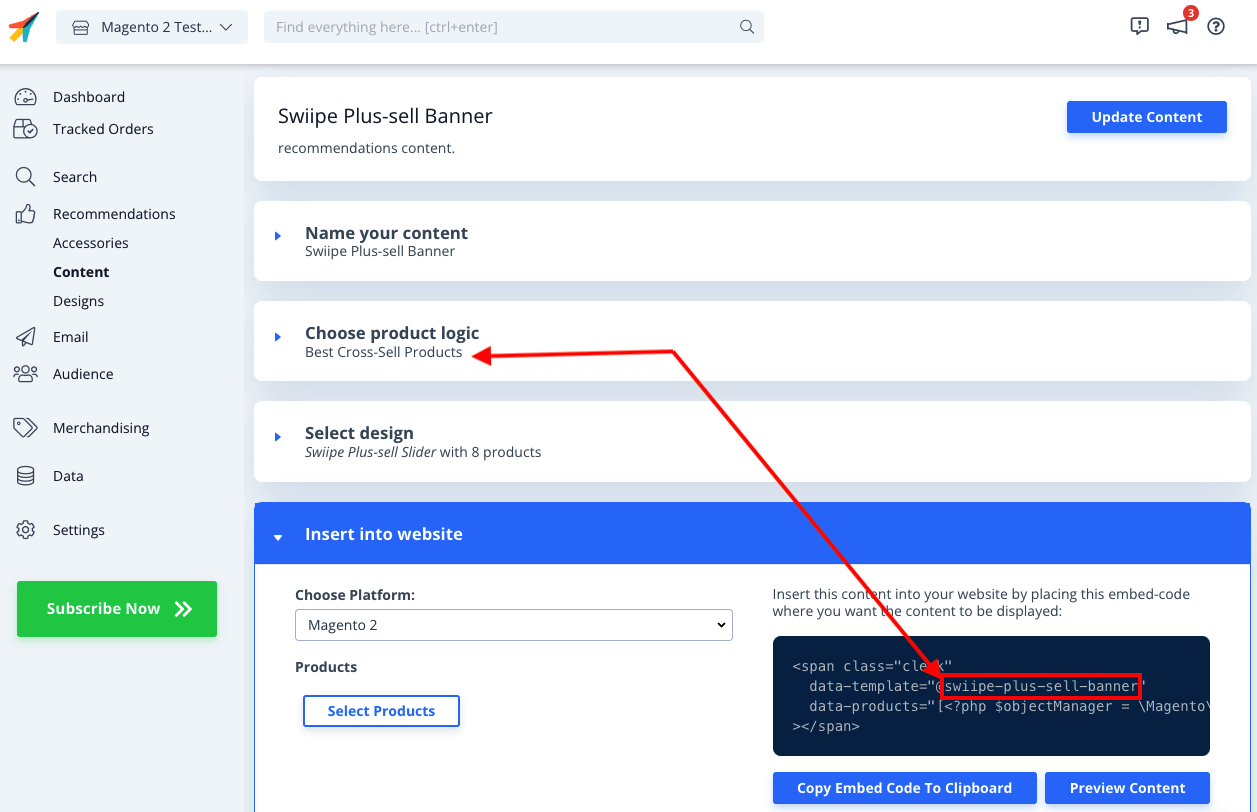
Ora devi creare il Design personalizzato, che includa la funzionalità di Plus-sell per aggiungere prodotti direttamente al carrello.
In my.clerk.io, vai su Recommendations > Designs > New Design
Scegli Blank > Code e assegnagli un nome
Copia i blocchi di codice seguenti rispettivamente nelle sezioni HTML e CSS e clicca Update Design
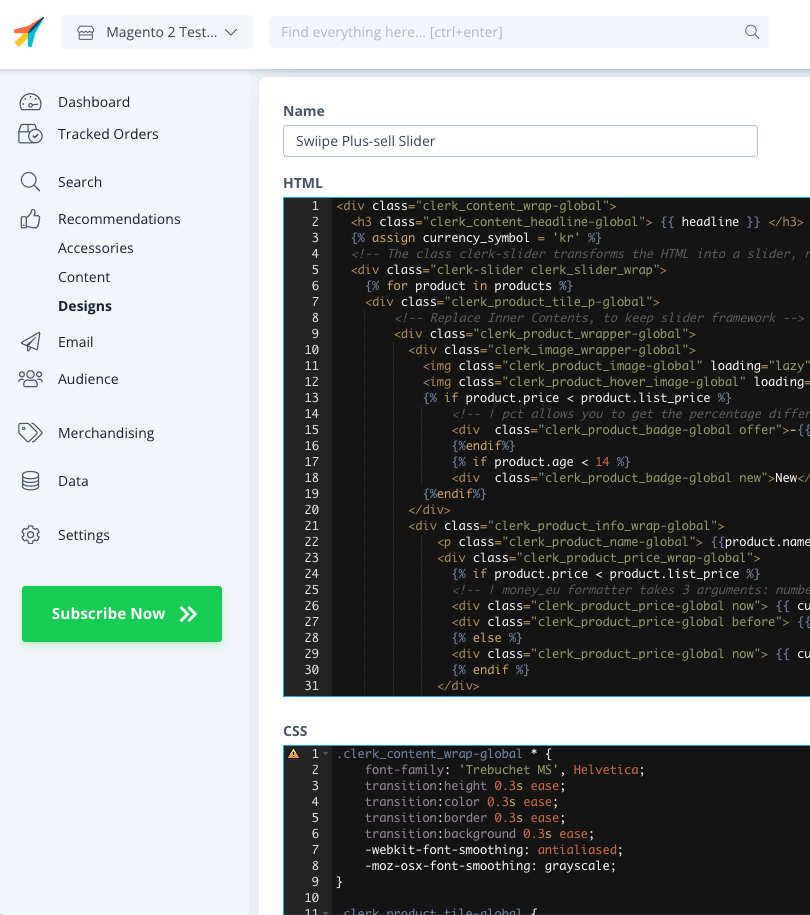
HTML
{% raw %}
<div class="clerk_content_wrap-global">
  <h3 class="clerk_content_headline-global"> {{ headline }} </h3>
  {% assign currency_symbol = '€' %}
  <!-- The class clerk-slider transforms the HTML into a slider, removing this class disables Clerk slider framework -->
  <div class="clerk-slider clerk_slider_wrap">
    {% for product in products %}
    <div class="clerk_product_tile_p-global">
        <!-- Replace Inner Contents, to keep slider framework -->
        <div class="clerk_product_wrapper-global">
          <div class="clerk_image_wrapper-global">
            <img class="clerk_product_image-global" loading="lazy" src="{{ product.image }}" />
            <img class="clerk_product_hover_image-global" loading="lazy" src="{{ product.image }}" />
            {% if product.price < product.list_price %}
                <!-- | pct allows you to get the percentage difference between any 2 numerical values -->
                <div  class="clerk_product_badge-global offer">-{{ product.price | pct product.list_price }}%</div>
                {%endif%}
                {% if product.age < 30 %}
                <div  class="clerk_product_badge-global new">New</div>
            {%endif%}
          </div>
          <div class="clerk_product_info_wrap-global">
              <p class="clerk_product_name-global"> {{product.name}} </p>
              <div class="clerk_product_price_wrap-global">
                {% if product.price < product.list_price %}
                <!-- | money_eu formatter takes 3 arguments: number of decimals, thousand separator, decimal separator. Can also be used with no arguments, will default to 2 decimal places. -->
                <div class="clerk_product_price-global now"> {{ currency_symbol }}{{ product.price | money_eu 2 "." ","  }} </div>
                <div class="clerk_product_price-global before"> {{ currency_symbol }}{{ product.list_price | money_eu 2 "." "," }} </div>
                {% else %}
                <div class="clerk_product_price-global now"> {{ currency_symbol }}{{ product.price | money_eu 2 "." "," }} </div>
                {% endif %}
              </div>
              <div class="clerk_sizes_wrap">
                {% if product.sizes %}
                  {%for str in product.sizes %}
                    <span class="clerk_sizes">{{str}}</span>
                  {%endfor%}
                {% endif %}
              </div>
           </div>
           <div class="clerk_product_cta-global" onclick="clerk_simple_swiipe_buy_now(this, {{product.id}});">Buy now</div>
         </div>
        <!-- Replace Inner Contents, to keep slider framework -->
    </div>
    {% endfor %}
  </div>
</div>
<script>
    function clerk_simple_swiipe_buy_now(el, product_id) {
        var buy_now = el.innerHTML;
        el.innerHTML = "Adding...";
        el.classList.toggle('button--loading');
        _SwiipeApi.plusSell.addProducts([{ id:product_id, qty:1 }]).then((result) => {
            el.classList.toggle('button--loading');
            el.innerHTML = buy_now;
        });
    }
</script>
{% endraw %}
CSS
.clerk_content_wrap-global * {
    font-family: 'Trebuchet MS', Helvetica;
    transition:height 0.3s ease;
    transition:color 0.3s ease;
    transition:border 0.3s ease;
    transition:background 0.3s ease;
    -webkit-font-smoothing: antialiased;
    -moz-osx-font-smoothing: grayscale;
}

.clerk_product_tile-global {
    display: flex !important;
}
.clerk-slider-nav {
    z-index: 1 !important;
    background-image: none !important;
    box-shadow: none !important;
}
.clerk_slider_wrap {
    display: inline-flex;
    align-items: stretch;
    max-width: 100vw;
    width:inherit;
}

@keyframes arrowPop {
    0% {
        width:20%;
    }
    50% {
        width:0%;
    }
    100% {
        width: 20%;
    }
}

.clerk-slider-nav {
    background: #333;
    border-radius:50%;
    display:flex;
    justify-content:center;
    align-items:center;
    font-size:0;
    opacity:0.8;
    filter: drop-shadow(0 0 5px #333);
    transition:0.3s ease;
}

.clerk-slider-nav:hover {
    opacity:1;
    transition:0.3s ease;
}
.clerk-slider-nav:hover:before {
    animation:arrowPop 0.3s ease;
}
.clerk-slider-nav-next {
    flex-direction:row-reverse;
}

.clerk-slider-nav:after {
    content:"";
    display:block;
    height:40%;
    width:40%;
    transform: rotate(45deg);
    border: solid white;
}
.clerk-slider-nav-prev:after {
    border-width: 0px 0px 2px 2px;
}

.clerk-slider-nav-next:after {
    border-width: 2px 2px 0px 0px;
}

.clerk-slider-nav:before {
    content:"";
    width:20%;
}

.clerk_container-global {
    display:block;
    width:100%;
}

.clerk_product_info_wrap-global {

    padding: 5px;
    border-radius:1px;
    display: flex;
    flex-direction: column;
    justify-content: stretch;
    align-items: stretch;
    min-height: 0;
    height: -webkit-fill-available;
    height: -moz-available;
    height: fill-available;
        height: 100%;
        height: auto;
}

.clerk_product_info_wrap-global .clerk_link-global {
    transition:0.3s ease;
    min-height:0;
    height: -webkit-fill-available;
    height: -moz-available;
    height: fill-available;
        height: 100%;
        height: auto;
}

.clerk_product_info_wrap-global > * {
    padding: 0 5px;
}
.clerk_link-global {
    border-bottom:none;
    display:inherit;
    width:100%;
    text-decoration:none;
    color:inherit;
    padding:0;
}

.clerk_link-global:hover {
    filter: contrast(105%);
}

.clerk_content_headline-global{
    max-width: 100%;
    width: 100%;
    font-size: 26px;
    text-align:center;
    color:inherit;
}

.clerk_product_tile_p-global{
    flex-direction: column;
    justify-content: space-between;
    border-radius:0px;
    padding:15px;
    margin:5px;
    box-sizing:border-box;
    min-width:calc(25% - 10px);
    max-width:calc(25% - 10px);
    position:relative;
    overflow:hidden;
    border:1px solid #eee;
    background-color:white;
    text-align:center;
}

.clerk_product_wrapper-global {
    height: 100%;
    display: flex;
    flex-direction: column;
}

.clerk_product_badge-global.offer{
    display:block;
    position:absolute;
    top:0;
    right:0;
    width: 4em;
    height: 4em;
    border-radius:999rem; /* Needed to ensure it never rounds corners more than 50% */
    background: #f9f9f9;
    color:#333;
    font-weight:bold;
    line-height:3.5em;
    border:4px solid #333;
    user-select:none;
    pointer-events:none;
}

.clerk_product_badge-global.new{
    display: block;
    position: absolute;
    top: 0;
    left: 0;
    width: 4em;
    height: 4em;
    border-radius: 999rem;
    background: #f9f9f9;
    color: #333;
    font-weight: bold;
    line-height: 3.5em;
    border: 4px solid #333;
    user-select: none;
    pointer-events: none;
}

.clerk_image_wrapper-global {
    display:block;
    position:relative;
    width:100%;
    height:auto;
}

.clerk_image_wrapper-global:hover .clerk_product_hover_image-global {
    opacity:1;
    transition: 0.3s ease-in;
}

.clerk_image_wrapper-global:hover .clerk_product_image-global {
    opacity:0;
    transition: 0.3s ease-out;
    transition-delay:0.2s;
}

.clerk_image_wrapper-global .clerk_product_hover_image-global {
    position:absolute;
    top:0;
    left:0;
    min-height:auto;
}

.clerk_product_hover_image-global{
    background-size:contain;
    background-position:center center;
    background-repeat:no-repeat;
    object-fit: contain;
    /*Change the max height value below to 100% if the client has consistent image sizes */
    max-height:400px;
    width:100%;
    max-width:100%;
    height: auto;
    opacity:0;
}

.clerk_product_image-global{
    background-size:contain;
    background-position:center center;
    background-repeat:no-repeat;
    object-fit: contain;
    /*Change the max height value below to 100% if the client has consistent image sizes */
    max-height:400px;
    width:100%;
    max-width:100%;
    height: auto;
}

.clerk_product_stock-global {
    display:flex;
    text-align:left;
    justify-content:left;
    align-items:center;
    font-size:80%;
    text-transform: capitalize;
    padding:5px;
    user-select:none;
}

.clerk_product_stock-global:before {
    content:"";
    height: 8px;
    width: 8px;
    margin:0 5px 0 0;
    border-radius:50%;
}

.clerk_product_stock-global.in:before {
    background:#78b904;
}
/*
.clerk_product_stock.low:before {
    background:#eea71e;
}
*/
.clerk_product_stock-global.out:before {
    background:#ee1e31;
}
.clerk_product_name-global{
    overflow:hidden;
    height:auto;
    min-height: 36px;
    margin-bottom:1rem;
    color:inherit;
    text-align:left;
    max-width: 100%;
    padding:0 5px;
    display: -webkit-box;
    -webkit-line-clamp: 3;
    -webkit-box-orient: vertical;
}

.clerk_product_price_wrap-global{
    font-size: 1em;
    min-height: auto;
    flex-direction:row;
    display:flex;
    max-width: 100%;
    justify-content: flex-start;
}

.clerk_product_price-global {
    padding: 0px 5px 0px 0px;
}

.clerk_product_price-global.before{
    opacity: .8;
    flex:1;
    font-weight:normal;
    color:black;
    text-decoration:line-through;
    font-size:inherit;
    text-align:center;
    max-width: fit-content;
    max-width: -moz-fit-content;
}

.clerk_product_price-global.now{
    flex:1;
    font-weight:bold;
    font-size:inherit;
    text-align:center;
    color:inherit;
    max-width: fit-content;
    max-width: -moz-fit-content;
}

.clerk_product_cta-global{
    border-radius:2px;
    cursor:pointer;
    color:#fff;
    padding:5px;
    margin:0;
    display:block;
    white-space:nowrap;
    font-weight:normal;
    border:none;
    background-color:#333;
    border:1px solid #333;
    text-align:center;
    max-width: 100%;
    text-decoration: none;
}

.clerk_product_cta-global:hover {
    color:#333;
    background-color:#fff;
}

.clerk_content_wrap-global{
    box-sizing: border-box;
    margin: 1rem auto;
    width: 100%;
}

@media screen and (max-width: 400px) {
.clerk_content_headline-global{

}

.clerk_product_tile_p-global{
    min-width:calc(100%);
    max-width:calc(100%);
}

.clerk_product_badge-global{

}
.clerk_product_price_wrap-global {

}
}
@media screen and (min-width: 401px) and (max-width: 620px) {
.clerk_content_headline-global{

}
.clerk_product_tile_p-global{
    min-width:calc(50% - 10px);
    max-width:calc(50% - 10px);
}
.clerk_product_badge-global{

}
}
@media screen and (min-width: 621px) and (max-width: 940px) {
.clerk_content_headline-global{

}
.clerk_product_tile_p-global{
    min-width:calc(33.333336% - 10px);
    max-width:calc(33.333336% - 10px);
}
.clerk_product_badge-global{

}
}
@media screen and (min-width: 941px) and (max-width: 1160px) {
.clerk_content_headline-global{

}
.clerk_product_tile_p-global{
    min-width:calc(25% - 10px);
    max-width:calc(25% - 10px);
}
.clerk_product_badge-global{

}
}

.clerk_sizes_wrap{
    display:flex;
    flex-direction:row;
    width:100%;
}
.clerk_sizes{
    padding:5px;
    margin:5px;
    border:1px solid #eee;
    width:50px;
}
- Infine vai sull’Element che hai creato, e scegli questo design sotto Select Design. Poi clicca Update Element
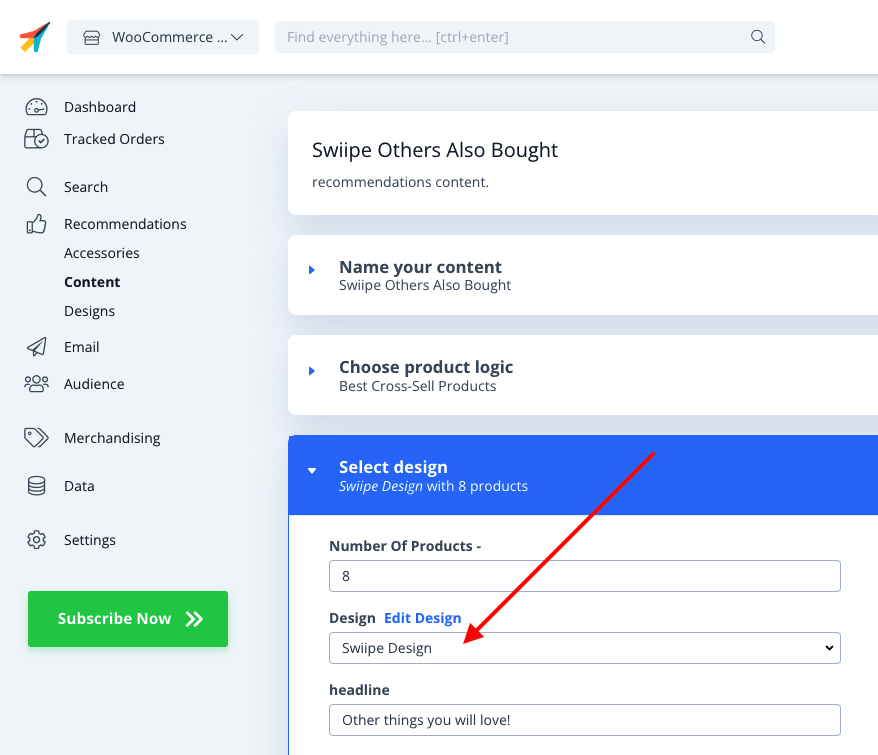
- Swiipe Plus-sell ora sarà attivo con il design Clerk nella pagina checkout.
Magento 1 #
Attivare Plus-sell #
Quando il Plugin Clerk.io è installato, Swiipe può recuperare automaticamente la configurazione della chiave API, così può identificare quale negozio la sta utilizzando.
Nel backend di Magento, vai su System > Configuration > Swiipe
Nel menu laterale sotto Swiipe, clicca sulla scheda Payment Settings.
Plus-sell è attivato a livello di singolo Store, quindi assicurati di scegliere uno Store specifico dalla sezione Scope in alto a sinistra nella pagina.
Seleziona Enable Swiipe Plus-sell
Clicca Save Config in alto a destra
Scegliere il design #
Utilizzare Elements/Designs da Clerk #
Con questa funzionalità, puoi personalizzare lo slider in my.clerk.io.
Scorri fino all’intestazione Clerk
Seleziona Use template design from Clerk.io
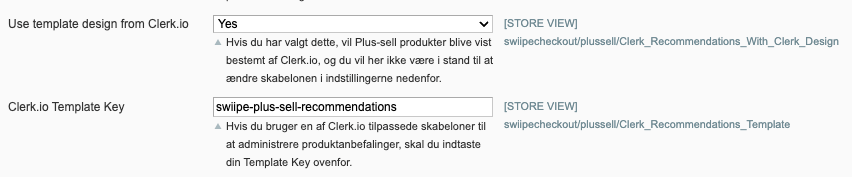
Nel campo Clerk.io Template Key, inserisci l’ID dell’Element che vuoi utilizzare.
Si consiglia di creare un nuovo Element con la logica Best Cross-Sell products
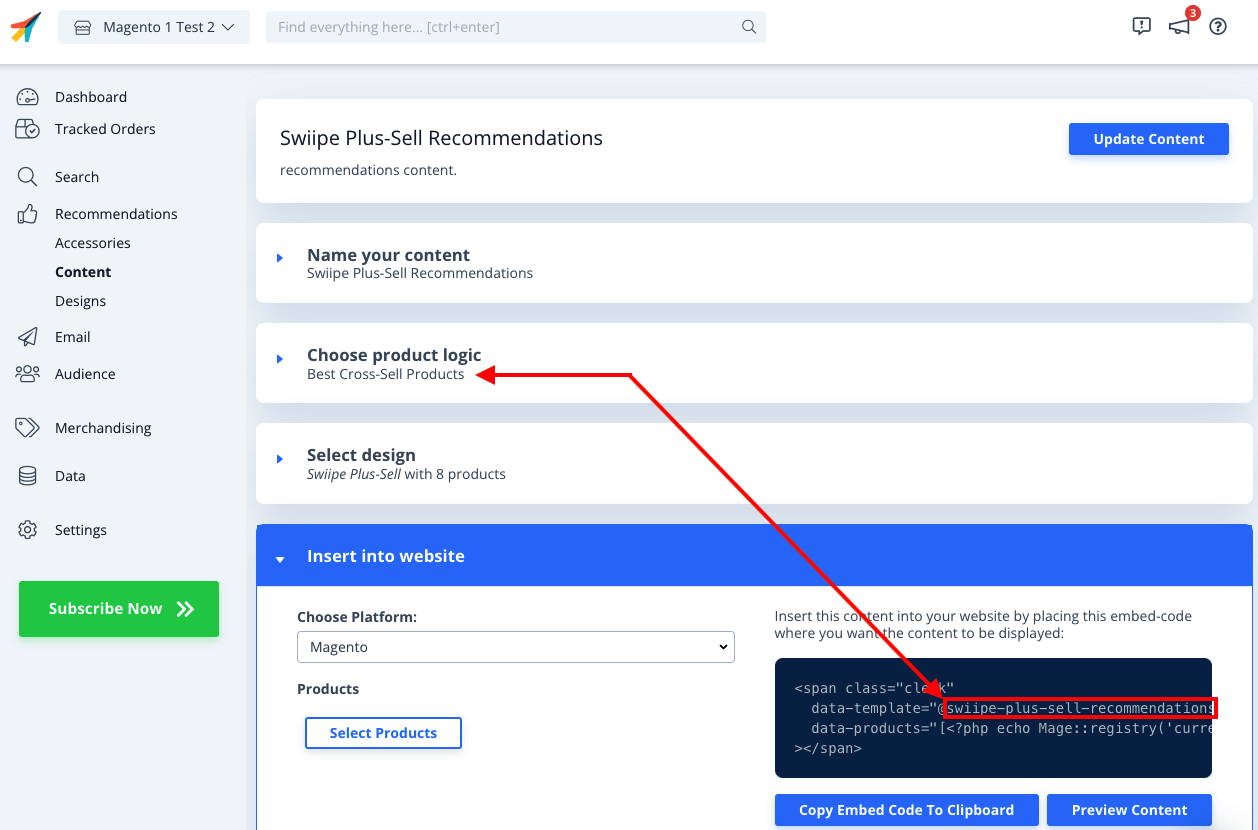
Ora devi creare il Design personalizzato che includa la funzionalità Plus-sell di aggiungere prodotti direttamente al carrello.
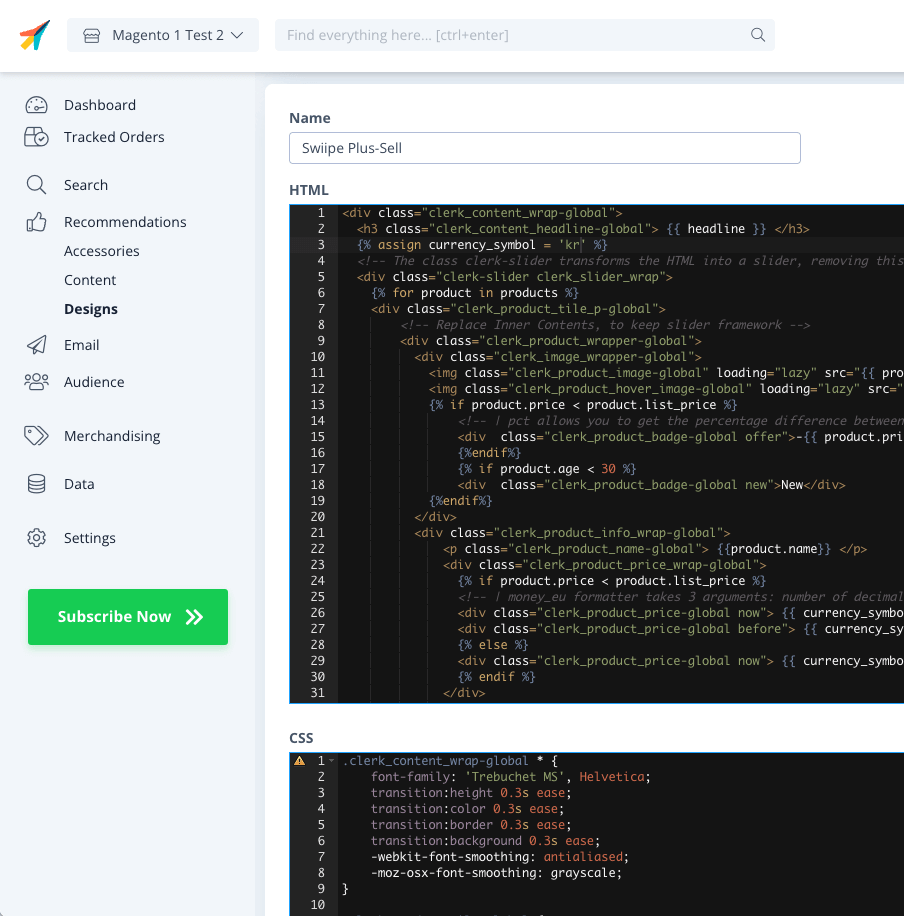
In my.clerk.io, vai su Recommendations > Designs > New Design
Scegli Blank > Code e assegnagli un nome
Copia i blocchi di codice seguenti rispettivamente nelle sezioni HTML e CSS e clicca Update Design
HTML
{% raw %}
<div class="clerk_content_wrap-global">
  <h3 class="clerk_content_headline-global"> {{ headline }} </h3>
  {% assign currency_symbol = '€' %}
  <!-- The class clerk-slider transforms the HTML into a slider, removing this class disables Clerk slider framework -->
  <div class="clerk-slider clerk_slider_wrap">
    {% for product in products %}
    <div class="clerk_product_tile_p-global">
        <!-- Replace Inner Contents, to keep slider framework -->
        <div class="clerk_product_wrapper-global">
          <div class="clerk_image_wrapper-global">
            <img class="clerk_product_image-global" loading="lazy" src="{{ product.image }}" />
            <img class="clerk_product_hover_image-global" loading="lazy" src="{{ product.image }}" />
            {% if product.price < product.list_price %}
                <!-- | pct allows you to get the percentage difference between any 2 numerical values -->
                <div  class="clerk_product_badge-global offer">-{{ product.price | pct product.list_price }}%</div>
                {%endif%}
                {% if product.age < 30 %}
                <div  class="clerk_product_badge-global new">New</div>
            {%endif%}
          </div>
          <div class="clerk_product_info_wrap-global">
              <p class="clerk_product_name-global"> {{product.name}} </p>
              <div class="clerk_product_price_wrap-global">
                {% if product.price < product.list_price %}
                <!-- | money_eu formatter takes 3 arguments: number of decimals, thousand separator, decimal separator. Can also be used with no arguments, will default to 2 decimal places. -->
                <div class="clerk_product_price-global now"> {{ currency_symbol }}{{ product.price | money_eu 2 "." ","  }} </div>
                <div class="clerk_product_price-global before"> {{ currency_symbol }}{{ product.list_price | money_eu 2 "." "," }} </div>
                {% else %}
                <div class="clerk_product_price-global now"> {{ currency_symbol }}{{ product.price | money_eu 2 "." "," }} </div>
                {% endif %}
              </div>
              <div class="clerk_sizes_wrap">
                {% if product.sizes %}
                  {%for str in product.sizes %}
                    <span class="clerk_sizes">{{str}}</span>
                  {%endfor%}
                {% endif %}
              </div>
           </div>
           <div class="clerk_product_cta-global" onclick="clerk_simple_swiipe_buy_now(this, {{product.id}});">Buy now</div>
         </div>
        <!-- Replace Inner Contents, to keep slider framework -->
    </div>
    {% endfor %}
  </div>
</div>
<script>
    function clerk_simple_swiipe_buy_now(el, product_id) {
        var buy_now = el.innerHTML;
        el.innerHTML = "Adding...";
        el.classList.toggle('button--loading');
        _SwiipeApi.plusSell.addProducts([{ id:product_id, qty:1 }]).then((result) => {
            el.classList.toggle('button--loading');
            el.innerHTML = buy_now;
        });
    }
</script>
{% endraw %}
CSS
.clerk_content_wrap-global * {
    font-family: 'Trebuchet MS', Helvetica;
    transition:height 0.3s ease;
    transition:color 0.3s ease;
    transition:border 0.3s ease;
    transition:background 0.3s ease;
    -webkit-font-smoothing: antialiased;
    -moz-osx-font-smoothing: grayscale;
}

.clerk_product_tile-global {
    display: flex !important;
}
.clerk-slider-nav {
    z-index: 1 !important;
    background-image: none !important;
    box-shadow: none !important;
}
.clerk_slider_wrap {
    display: inline-flex;
    align-items: stretch;
    max-width: 100vw;
    width:inherit;
}

@keyframes arrowPop {
    0% {
        width:20%;
    }
    50% {
        width:0%;
    }
    100% {
        width: 20%;
    }
}

.clerk-slider-nav {
    background: #333;
    border-radius:50%;
    display:flex;
    justify-content:center;
    align-items:center;
    font-size:0;
    opacity:0.8;
    filter: drop-shadow(0 0 5px #333);
    transition:0.3s ease;
}

.clerk-slider-nav:hover {
    opacity:1;
    transition:0.3s ease;
}
.clerk-slider-nav:hover:before {
    animation:arrowPop 0.3s ease;
}
.clerk-slider-nav-next {
    flex-direction:row-reverse;
}

.clerk-slider-nav:after {
    content:"";
    display:block;
    height:40%;
    width:40%;
    transform: rotate(45deg);
    border: solid white;
}
.clerk-slider-nav-prev:after {
    border-width: 0px 0px 2px 2px;
}

.clerk-slider-nav-next:after {
    border-width: 2px 2px 0px 0px;
}

.clerk-slider-nav:before {
    content:"";
    width:20%;
}

.clerk_container-global {
    display:block;
    width:100%;
}

.clerk_product_info_wrap-global {

    padding: 5px;
    border-radius:1px;
    display: flex;
    flex-direction: column;
    justify-content: stretch;
    align-items: stretch;
    min-height: 0;
    height: -webkit-fill-available;
    height: -moz-available;
    height: fill-available;
        height: 100%;
        height: auto;
}

.clerk_product_info_wrap-global .clerk_link-global {
    transition:0.3s ease;
    min-height:0;
    height: -webkit-fill-available;
    height: -moz-available;
    height: fill-available;
        height: 100%;
        height: auto;
}

.clerk_product_info_wrap-global > * {
    padding: 0 5px;
}
.clerk_link-global {
    border-bottom:none;
    display:inherit;
    width:100%;
    text-decoration:none;
    color:inherit;
    padding:0;
}

.clerk_link-global:hover {
    filter: contrast(105%);
}

.clerk_content_headline-global{
    max-width: 100%;
    width: 100%;
    font-size: 26px;
    text-align:center;
    color:inherit;
}

.clerk_product_tile_p-global{
    flex-direction: column;
    justify-content: space-between;
    border-radius:0px;
    padding:15px;
    margin:5px;
    box-sizing:border-box;
    min-width:calc(25% - 10px);
    max-width:calc(25% - 10px);
    position:relative;
    overflow:hidden;
    border:1px solid #eee;
    background-color:white;
    text-align:center;
}

.clerk_product_wrapper-global {
    height: 100%;
    display: flex;
    flex-direction: column;
}

.clerk_product_badge-global.offer{
    display:block;
    position:absolute;
    top:0;
    right:0;
    width: 4em;
    height: 4em;
    border-radius:999rem; /* Needed to ensure it never rounds corners more than 50% */
    background: #f9f9f9;
    color:#333;
    font-weight:bold;
    line-height:3.5em;
    border:4px solid #333;
    user-select:none;
    pointer-events:none;
}

.clerk_product_badge-global.new{
    display: block;
    position: absolute;
    top: 0;
    left: 0;
    width: 4em;
    height: 4em;
    border-radius: 999rem;
    background: #f9f9f9;
    color: #333;
    font-weight: bold;
    line-height: 3.5em;
    border: 4px solid #333;
    user-select: none;
    pointer-events: none;
}

.clerk_image_wrapper-global {
    display:block;
    position:relative;
    width:100%;
    height:auto;
}

.clerk_image_wrapper-global:hover .clerk_product_hover_image-global {
    opacity:1;
    transition: 0.3s ease-in;
}

.clerk_image_wrapper-global:hover .clerk_product_image-global {
    opacity:0;
    transition: 0.3s ease-out;
    transition-delay:0.2s;
}

.clerk_image_wrapper-global .clerk_product_hover_image-global {
    position:absolute;
    top:0;
    left:0;
    min-height:auto;
}

.clerk_product_hover_image-global{
    background-size:contain;
    background-position:center center;
    background-repeat:no-repeat;
    object-fit: contain;
    /*Change the max height value below to 100% if the client has consistent image sizes */
    max-height:400px;
    width:100%;
    max-width:100%;
    height: auto;
    opacity:0;
}

.clerk_product_image-global{
    background-size:contain;
    background-position:center center;
    background-repeat:no-repeat;
    object-fit: contain;
    /*Change the max height value below to 100% if the client has consistent image sizes */
    max-height:400px;
    width:100%;
    max-width:100%;
    height: auto;
}

.clerk_product_stock-global {
    display:flex;
    text-align:left;
    justify-content:left;
    align-items:center;
    font-size:80%;
    text-transform: capitalize;
    padding:5px;
    user-select:none;
}

.clerk_product_stock-global:before {
    content:"";
    height: 8px;
    width: 8px;
    margin:0 5px 0 0;
    border-radius:50%;
}

.clerk_product_stock-global.in:before {
    background:#78b904;
}
/*
.clerk_product_stock.low:before {
    background:#eea71e;
}
*/
.clerk_product_stock-global.out:before {
    background:#ee1e31;
}
.clerk_product_name-global{
    overflow:hidden;
    height:auto;
    min-height: 36px;
    margin-bottom:1rem;
    color:inherit;
    text-align:left;
    max-width: 100%;
    padding:0 5px;
    display: -webkit-box;
    -webkit-line-clamp: 3;
    -webkit-box-orient: vertical;
}

.clerk_product_price_wrap-global{
    font-size: 1em;
    min-height: auto;
    flex-direction:row;
    display:flex;
    max-width: 100%;
    justify-content: flex-start;
}

.clerk_product_price-global {
    padding: 0px 5px 0px 0px;
}

.clerk_product_price-global.before{
    opacity: .8;
    flex:1;
    font-weight:normal;
    color:black;
    text-decoration:line-through;
    font-size:inherit;
    text-align:center;
    max-width: fit-content;
    max-width: -moz-fit-content;
}

.clerk_product_price-global.now{
    flex:1;
    font-weight:bold;
    font-size:inherit;
    text-align:center;
    color:inherit;
    max-width: fit-content;
    max-width: -moz-fit-content;
}

.clerk_product_cta-global{
    border-radius:2px;
    cursor:pointer;
    color:#fff;
    padding:5px;
    margin:0;
    display:block;
    white-space:nowrap;
    font-weight:normal;
    border:none;
    background-color:#333;
    border:1px solid #333;
    text-align:center;
    max-width: 100%;
    text-decoration: none;
}

.clerk_product_cta-global:hover {
    color:#333;
    background-color:#fff;
}

.clerk_content_wrap-global{
    box-sizing: border-box;
    margin: 1rem auto;
    width: 100%;
}

@media screen and (max-width: 400px) {
.clerk_content_headline-global{

}

.clerk_product_tile_p-global{
    min-width:calc(100%);
    max-width:calc(100%);
}

.clerk_product_badge-global{

}
.clerk_product_price_wrap-global {

}
}
@media screen and (min-width: 401px) and (max-width: 620px) {
.clerk_content_headline-global{

}
.clerk_product_tile_p-global{
    min-width:calc(50% - 10px);
    max-width:calc(50% - 10px);
}
.clerk_product_badge-global{

}
}
@media screen and (min-width: 621px) and (max-width: 940px) {
.clerk_content_headline-global{

}
.clerk_product_tile_p-global{
    min-width:calc(33.333336% - 10px);
    max-width:calc(33.333336% - 10px);
}
.clerk_product_badge-global{

}
}
@media screen and (min-width: 941px) and (max-width: 1160px) {
.clerk_content_headline-global{

}
.clerk_product_tile_p-global{
    min-width:calc(25% - 10px);
    max-width:calc(25% - 10px);
}
.clerk_product_badge-global{

}
}

.clerk_sizes_wrap{
    display:flex;
    flex-direction:row;
    width:100%;
}
.clerk_sizes{
    padding:5px;
    margin:5px;
    border:1px solid #eee;
    width:50px;
}
- Infine vai sull’Element che hai creato, e scegli questo design sotto Select Design. Poi clicca Update Element
- Swiipe Plus-sell ora sarà attivo con il design Clerk nella pagina checkout.
WooCommerce #
Attivare Plus-sell #
Quando il Plugin Clerk.io è installato, Swiipe può recuperare automaticamente la configurazione della chiave API, così può identificare quale negozio la sta utilizzando.
Nel backend di WooCommerce, vai su Plugins > Installed Plugins > Swiipe > Swiipe Settings.
Clicca sulla scheda Plus-sell.
Seleziona Enable Swiipe Plus-sell
Clicca Save changes in fondo alla pagina
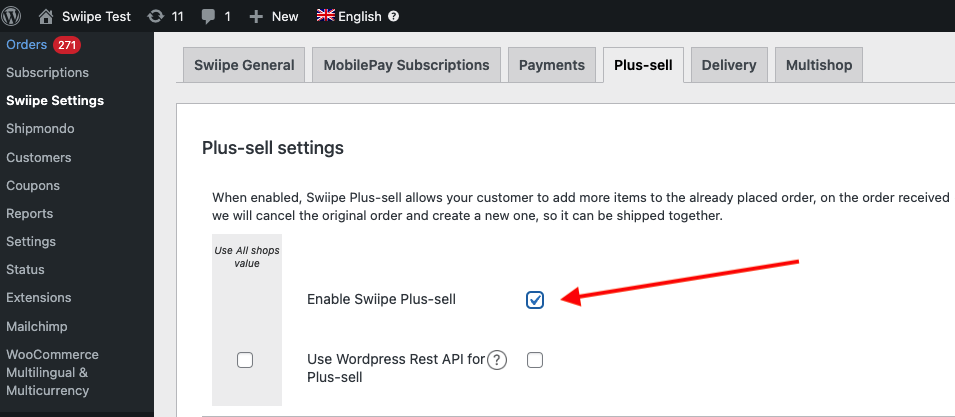
Se desideri utilizzare i design integrati di Swiipe, ora saranno già visibili nella pagina di checkout.
Scegliere il design #
Il design di Plus-sell può essere configurato in due modi:
Utilizzare il design integrato di Swiipe ottimizzato per la conversione (Consigliato)
Utilizzare Elements/Designs da Clerk come di consueto
Utilizzare i design integrati di Swiipe #
Questo è il metodo standard e consigliato, poiché Swiipe ha sviluppato design altamente efficaci per la conversione.
Funzionerà automaticamente dopo aver attivato Plus-sell se non viene effettuata nessun’altra configurazione.
I design possono essere configurati in diversi modi:
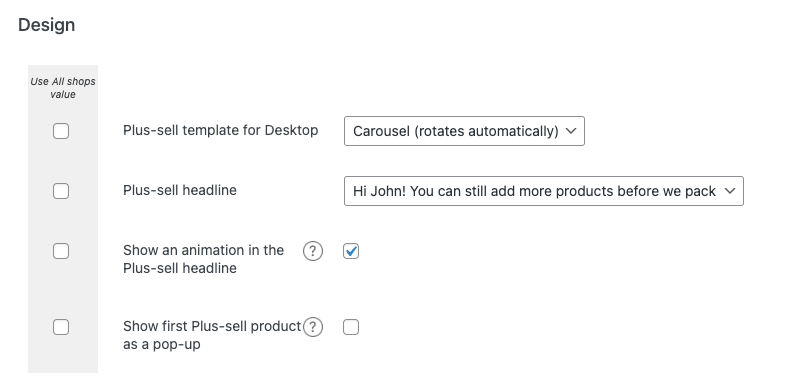
Plus-sell template for Desktop
Consente di scegliere tra diversi tipi standard di design Recommendations.
Basic (statico) mostra uno slider di 4 prodotti.
Carousel (gira automaticamente) mostra uno slider di 4 prodotti che ruotano.
Special (un prodotto alla volta) mostra 1 prodotto con più informazioni per slide
Plus-sell headline Ti permette di scegliere tra 3 tipi di headline da mostrare sopra il banner
Show an animation in the Plus-sell headline Mostrerà una piccola icona del carrello animata accanto all’headline
Mostra il primo prodotto plus-sell come pop-up Mostrerà un popup al momento dell’ingresso nella pagina di checkout, con il primo prodotto raccomandato da Clerk.
Utilizzo di elementi / design da Clerk #
Con questa funzione, puoi personalizzare lo slider in my.clerk.io.
Scorri fino all’intestazione Clerk
Seleziona Usa il design del template da Clerk.io
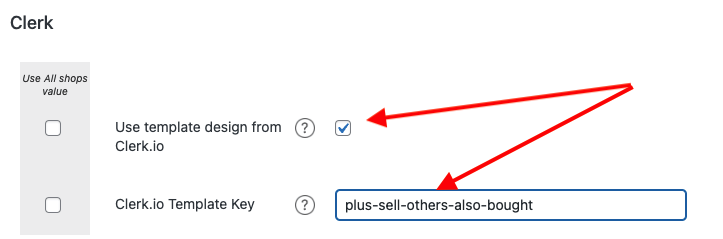
Nella chiave Template Clerk.io, scrivi l’ID dell’Elemento che vuoi utilizzare.
Raccomandiamo di creare un nuovo Element con la logica Best Cross-Sell products
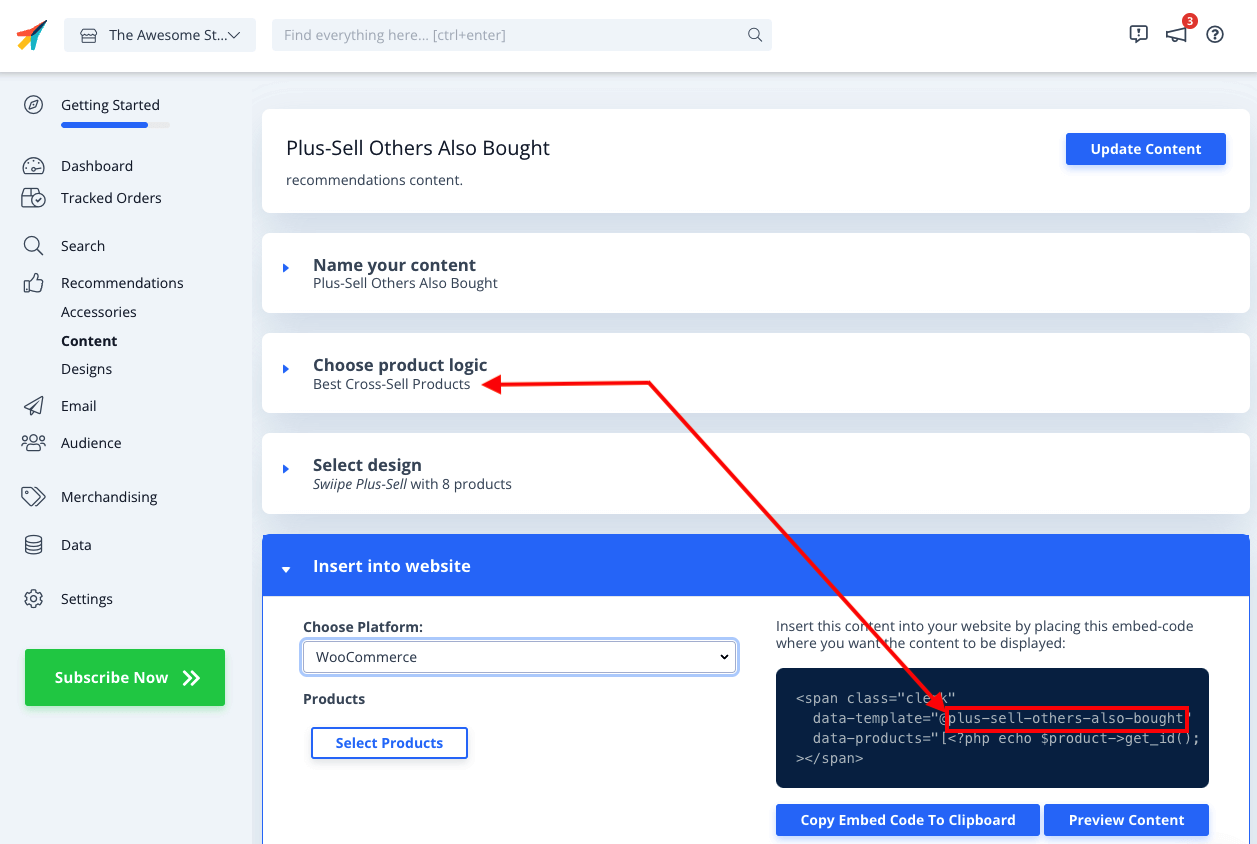
Ora devi creare il Design personalizzato, che include la funzionalità Plus-sells di aggiunta prodotti direttamente al carrello.
In my.clerk.io, vai su Recommendations > Designs > New Design
Scegli Blank > Code e assegnagli un nome
Copia i blocchi di codice sottostanti nelle rispettive sezioni HTML e CSS e clicca su Update Design
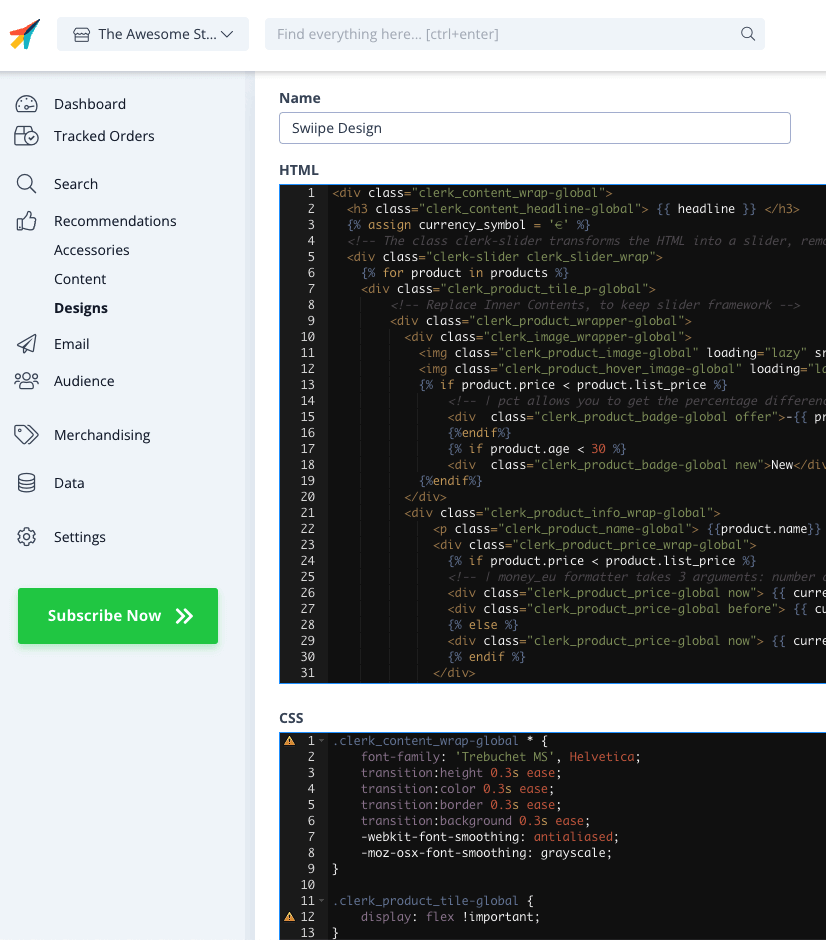
HTML
<div class="clerk_content_wrap-global">
  <h3 class="clerk_content_headline-global"> {{ headline }} </h3>
  {% assign currency_symbol = '€' %}
  <!-- The class clerk-slider transforms the HTML into a slider, removing this class disables Clerk slider framework -->
  <div class="clerk-slider clerk_slider_wrap">
    {% for product in products %}
    <div class="clerk_product_tile_p-global">
        <!-- Replace Inner Contents, to keep slider framework -->
        <div class="clerk_product_wrapper-global">
          <div class="clerk_image_wrapper-global">
            <img class="clerk_product_image-global" loading="lazy" src="{{ product.image }}" />
            <img class="clerk_product_hover_image-global" loading="lazy" src="{{ product.image }}" />
            {% if product.price < product.list_price %}
                <!-- | pct allows you to get the percentage difference between any 2 numerical values -->
                <div  class="clerk_product_badge-global offer">-{{ product.price | pct product.list_price }}%</div>
                {%endif%}
                {% if product.age < 30 %}
                <div  class="clerk_product_badge-global new">New</div>
            {%endif%}
          </div>
          <div class="clerk_product_info_wrap-global">
              <p class="clerk_product_name-global"> {{product.name}} </p>
              <div class="clerk_product_price_wrap-global">
                {% if product.price < product.list_price %}
                <!-- | money_eu formatter takes 3 arguments: number of decimals, thousand separator, decimal separator. Can also be used with no arguments, will default to 2 decimal places. -->
                <div class="clerk_product_price-global now"> {{ currency_symbol }}{{ product.price | money_eu 2 "." ","  }} </div>
                <div class="clerk_product_price-global before"> {{ currency_symbol }}{{ product.list_price | money_eu 2 "." "," }} </div>
                {% else %}
                <div class="clerk_product_price-global now"> {{ currency_symbol }}{{ product.price | money_eu 2 "." "," }} </div>
                {% endif %}
              </div>
              <div class="clerk_sizes_wrap">
                {% if product.sizes %}
                  {%for str in product.sizes %}
                    <span class="clerk_sizes">{{str}}</span>
                  {%endfor%}
                {% endif %}
              </div>
           </div>
           <div class="clerk_product_cta-global" onclick="clerk_simple_swiipe_buy_now(this, {{product.id}});">Buy now</div>
         </div>
        <!-- Replace Inner Contents, to keep slider framework -->
    </div>
    {% endfor %}
  </div>
</div>
<script>
    function clerk_simple_swiipe_buy_now(el, product_id) {
        var buy_now = el.innerHTML;
        el.innerHTML = "Adding...";
        el.classList.toggle('button--loading');
        _SwiipeApi.plusSell.addProducts([{ id:product_id, qty:1 }]).then((result) => {
            el.classList.toggle('button--loading');
            el.innerHTML = buy_now;
        });
    }
</script>
CSS
.clerk_content_wrap-global * {
    font-family: 'Trebuchet MS', Helvetica;
    transition:height 0.3s ease;
    transition:color 0.3s ease;
    transition:border 0.3s ease;
    transition:background 0.3s ease;
    -webkit-font-smoothing: antialiased;
    -moz-osx-font-smoothing: grayscale;
}

.clerk_product_tile-global {
    display: flex !important;
}
.clerk-slider-nav {
    z-index: 1 !important;
    background-image: none !important;
    box-shadow: none !important;
}
.clerk_slider_wrap {
    display: inline-flex;
    align-items: stretch;
    max-width: 100vw;
    width:inherit;
}

@keyframes arrowPop {
    0% {
        width:20%;
    }
    50% {
        width:0%;
    }
    100% {
        width: 20%;
    }
}

.clerk-slider-nav {
    background: #333;
    border-radius:50%;
    display:flex;
    justify-content:center;
    align-items:center;
    font-size:0;
    opacity:0.8;
    filter: drop-shadow(0 0 5px #333);
    transition:0.3s ease;
}

.clerk-slider-nav:hover {
    opacity:1;
    transition:0.3s ease;
}
.clerk-slider-nav:hover:before {
    animation:arrowPop 0.3s ease;
}
.clerk-slider-nav-next {
    flex-direction:row-reverse;
}

.clerk-slider-nav:after {
    content:"";
    display:block;
    height:40%;
    width:40%;
    transform: rotate(45deg);
    border: solid white;
}
.clerk-slider-nav-prev:after {
    border-width: 0px 0px 2px 2px;
}

.clerk-slider-nav-next:after {
    border-width: 2px 2px 0px 0px;
}

.clerk-slider-nav:before {
    content:"";
    width:20%;
}

.clerk_container-global {
    display:block;
    width:100%;
}

.clerk_product_info_wrap-global {

    padding: 5px;
    border-radius:1px;
    display: flex;
    flex-direction: column;
    justify-content: stretch;
    align-items: stretch;
    min-height: 0;
    height: -webkit-fill-available;
    height: -moz-available;
    height: fill-available;
        height: 100%;
        height: auto;
}

.clerk_product_info_wrap-global .clerk_link-global {
    transition:0.3s ease;
    min-height:0;
    height: -webkit-fill-available;
    height: -moz-available;
    height: fill-available;
        height: 100%;
        height: auto;
}

.clerk_product_info_wrap-global > * {
    padding: 0 5px;
}
.clerk_link-global {
    border-bottom:none;
    display:inherit;
    width:100%;
    text-decoration:none;
    color:inherit;
    padding:0;
}

.clerk_link-global:hover {
    filter: contrast(105%);
}

.clerk_content_headline-global{
    max-width: 100%;
    width: 100%;
    font-size: 26px;
    text-align:center;
    color:inherit;
}

.clerk_product_tile_p-global{
    flex-direction: column;
    justify-content: space-between;
    border-radius:0px;
    padding:15px;
    margin:5px;
    box-sizing:border-box;
    min-width:calc(25% - 10px);
    max-width:calc(25% - 10px);
    position:relative;
    overflow:hidden;
    border:1px solid #eee;
    background-color:white;
    text-align:center;
}

.clerk_product_wrapper-global {
    height: 100%;
    display: flex;
    flex-direction: column;
}

.clerk_product_badge-global.offer{
    display:block;
    position:absolute;
    top:0;
    right:0;
    width: 4em;
    height: 4em;
    border-radius:999rem; /* Needed to ensure it never rounds corners more than 50% */
    background: #f9f9f9;
    color:#333;
    font-weight:bold;
    line-height:3.5em;
    border:4px solid #333;
    user-select:none;
    pointer-events:none;
}

.clerk_product_badge-global.new{
    display: block;
    position: absolute;
    top: 0;
    left: 0;
    width: 4em;
    height: 4em;
    border-radius: 999rem;
    background: #f9f9f9;
    color: #333;
    font-weight: bold;
    line-height: 3.5em;
    border: 4px solid #333;
    user-select: none;
    pointer-events: none;
}

.clerk_image_wrapper-global {
    display:block;
    position:relative;
    width:100%;
    height:auto;
}

.clerk_image_wrapper-global:hover .clerk_product_hover_image-global {
    opacity:1;
    transition: 0.3s ease-in;
}

.clerk_image_wrapper-global:hover .clerk_product_image-global {
    opacity:0;
    transition: 0.3s ease-out;
    transition-delay:0.2s;
}

.clerk_image_wrapper-global .clerk_product_hover_image-global {
    position:absolute;
    top:0;
    left:0;
    min-height:auto;
}

.clerk_product_hover_image-global{
    background-size:contain;
    background-position:center center;
    background-repeat:no-repeat;
    object-fit: contain;
    /*Change the max height value below to 100% if the client has consistent image sizes */
    max-height:400px;
    width:100%;
    max-width:100%;
    height: auto;
    opacity:0;
}

.clerk_product_image-global{
    background-size:contain;
    background-position:center center;
    background-repeat:no-repeat;
    object-fit: contain;
    /*Change the max height value below to 100% if the client has consistent image sizes */
    max-height:400px;
    width:100%;
    max-width:100%;
    height: auto;
}

.clerk_product_stock-global {
    display:flex;
    text-align:left;
    justify-content:left;
    align-items:center;
    font-size:80%;
    text-transform: capitalize;
    padding:5px;
    user-select:none;
}

.clerk_product_stock-global:before {
    content:"";
    height: 8px;
    width: 8px;
    margin:0 5px 0 0;
    border-radius:50%;
}

.clerk_product_stock-global.in:before {
    background:#78b904;
}
/*
.clerk_product_stock.low:before {
    background:#eea71e;
}
*/
.clerk_product_stock-global.out:before {
    background:#ee1e31;
}
.clerk_product_name-global{
    overflow:hidden;
    height:auto;
    min-height: 36px;
    margin-bottom:1rem;
    color:inherit;
    text-align:left;
    max-width: 100%;
    padding:0 5px;
    display: -webkit-box;
    -webkit-line-clamp: 3;
    -webkit-box-orient: vertical;
}

.clerk_product_price_wrap-global{
    font-size: 1em;
    min-height: auto;
    flex-direction:row;
    display:flex;
    max-width: 100%;
    justify-content: flex-start;
}

.clerk_product_price-global {
    padding: 0px 5px 0px 0px;
}

.clerk_product_price-global.before{
    opacity: .8;
    flex:1;
    font-weight:normal;
    color:black;
    text-decoration:line-through;
    font-size:inherit;
    text-align:center;
    max-width: fit-content;
    max-width: -moz-fit-content;
}

.clerk_product_price-global.now{
    flex:1;
    font-weight:bold;
    font-size:inherit;
    text-align:center;
    color:inherit;
    max-width: fit-content;
    max-width: -moz-fit-content;
}

.clerk_product_cta-global{
    border-radius:2px;
    cursor:pointer;
    color:#fff;
    padding:5px;
    margin:0;
    display:block;
    white-space:nowrap;
    font-weight:normal;
    border:none;
    background-color:#333;
    border:1px solid #333;
    text-align:center;
    max-width: 100%;
    text-decoration: none;
}

.clerk_product_cta-global:hover {
    color:#333;
    background-color:#fff;
}

.clerk_content_wrap-global{
    box-sizing: border-box;
    margin: 1rem auto;
    width: 100%;
}

@media screen and (max-width: 400px) {
.clerk_content_headline-global{

}

.clerk_product_tile_p-global{
    min-width:calc(100%);
    max-width:calc(100%);
}

.clerk_product_badge-global{

}
.clerk_product_price_wrap-global {

}
}
@media screen and (min-width: 401px) and (max-width: 620px) {
.clerk_content_headline-global{

}
.clerk_product_tile_p-global{
    min-width:calc(50% - 10px);
    max-width:calc(50% - 10px);
}
.clerk_product_badge-global{

}
}
@media screen and (min-width: 621px) and (max-width: 940px) {
.clerk_content_headline-global{

}
.clerk_product_tile_p-global{
    min-width:calc(33.333336% - 10px);
    max-width:calc(33.333336% - 10px);
}
.clerk_product_badge-global{

}
}
@media screen and (min-width: 941px) and (max-width: 1160px) {
.clerk_content_headline-global{

}
.clerk_product_tile_p-global{
    min-width:calc(25% - 10px);
    max-width:calc(25% - 10px);
}
.clerk_product_badge-global{

}
}

.clerk_sizes_wrap{
    display:flex;
    flex-direction:row;
    width:100%;
}
.clerk_sizes{
    padding:5px;
    margin:5px;
    border:1px solid #eee;
    width:50px;
}
- Infine vai sull’Element che hai creato e scegli questo design sotto Select Design. Poi clicca su Update Element
- Swiipe Plus-sell ora sarà attivo con il design Clerk nel checkout.
Questa pagina è stata tradotta da un'utile intelligenza artificiale, quindi potrebbero esserci errori linguistici. Grazie per la comprensione.