ClerkCore
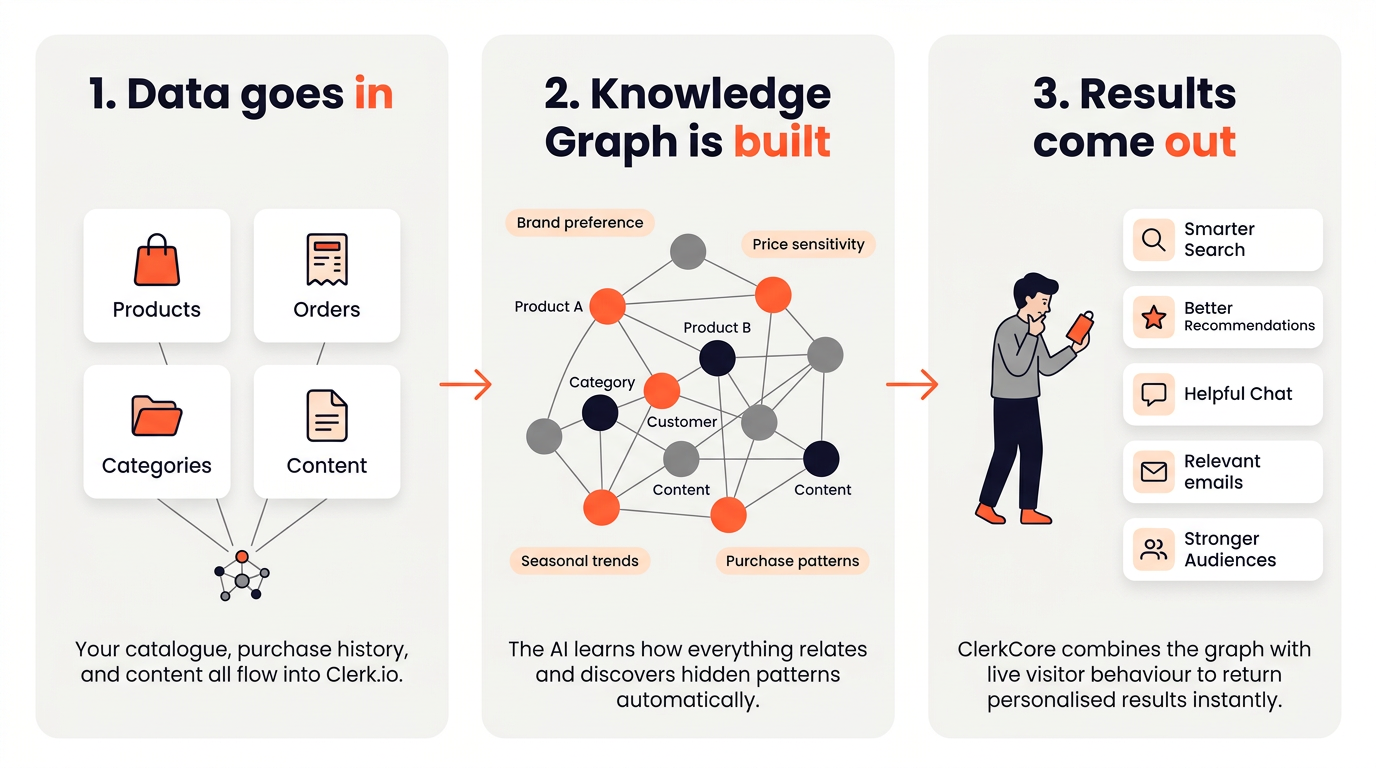
Clerk.io takes your store’s product catalogue and order history, runs it through a predictive AI engine, and makes the results available through an API that powers Search, Recommendations, Email, and Audience.
This article explains what happens under the hood — useful context for anyone setting up an integration, debugging unexpected results, or just curious about where the intelligence comes from.
Everything Clerk.io does comes down to three steps:
- Sync — your product catalogue and order history are imported into Clerk.io.
- Analyse — ClerkCore, Clerk.io’s AI engine, processes the data and pre-computes customer intent models.
- Serve — the Prediction API answers real-time queries by combining pre-computed insights with live visitor behaviour.
When a visitor views a product, the API is asked something like: “This visitor is looking at product X — what are they most likely to buy next?” ClerkCore already has the answer pre-computed, so the response is near-instant.
The Knowledge Graph #
The core of ClerkCore is a technology called the Knowledge Graph — an interconnected network that links every product, category, customer, and piece of content in your store.
Each connection in the graph has two properties: length and strength. The shorter the connection between two things, the more closely they are related. The stronger the connection, the more confident the AI is about that relationship.
In addition to explicit data points like products and categories, the Knowledge Graph also builds what you could call virtual notes — abstract patterns that capture things like brand affinity, price sensitivity, and seasonal trends. These are not fields you send to Clerk.io; they emerge automatically from the patterns in your order and browse data.
When a visitor lands on a product page, ClerkCore traverses the graph in real time to find the closest neighbours — the products, categories, and content most relevant to that specific visitor at that specific moment — and combines multiple behaviour models to produce a personalised result.
Three Subsystems #
Clerk.io is built around three subsystems, all operating around a central Data Store.
Data Sync #
The Data Sync Infrastructure keeps Clerk.io’s Data Store up to date with your catalogue and orders at all times.
It works in two layers. A platform-specific importer reads data from your webshop in its native format and passes it to a Core Importer, which validates and stores it in a consistent internal format. This lets Clerk.io support many different platforms without requiring each one to match a rigid data schema.
Syncs run on a schedule — Clerk.io adjusts the frequency based on how fast your catalogue changes and how long the sync takes to complete. You can also start a sync manually or push individual updates in real time via the CRUD API.
If you see a sudden drop in result quality, incorrect data in the sync is the most common cause. The Data Health dashboard is the first place to check.
ClerkCore #
ClerkCore is Clerk.io’s AI engine. It periodically analyses the data in the store and pre-computes customer intent models — learning which products are bought together, what customers with similar histories tend to do next, and what the overall purchase patterns in the catalogue look like.
Each customer behaviour pattern becomes its own model. ClerkCore builds many models in parallel and combines them dynamically at request time based on what the individual visitor is doing right now.
Unlike older approaches such as collaborative filtering or neural networks, ClerkCore has no cold-start problem for new products. A brand new product can appear in results as soon as it is synced, because the graph uses its category, price, and attributes to place it in context — even before it has any order history of its own.
Results also adapt automatically to trends and seasons, as the graph continuously reweights connections based on recent behaviour rather than relying on static training runs.
These models are updated automatically whenever meaningful changes occur in the data. When a store is first populated, the initial analysis can take a few minutes before results appear through the API. After that, updates happen continuously in the background.
Prediction API #
The Prediction API at api.clerk.io is what the rest of Clerk.io is built on top of. When a visitor triggers a search or loads a recommendations slider, the API combines ClerkCore’s pre-computed models with the visitor’s real-time session behaviour to return a ranked list of products.
Some example queries the API answers:
- “This visitor is viewing product Y — what are good alternatives?” →
recommendations/substituting - “This visitor just added product Y to their cart — what are they likely to buy with it?” →
recommendations/complementary - “Which customers are most likely to be interested in product X?” → used by Audience
Search, Recommendations, Email, and Audience are all built as layers on top of these core API capabilities.
Required Input Data #
ClerkCore requires two things to produce results:
- Products — the current catalogue, with at least id, name, price, image, url, categories, and created_at.
- Orders — purchase history, with at least id, products, and time.
Everything else — categories, customers, and pages — is technically optional, but sending it significantly improves the quality of results. Categories help the AI understand your catalogue structure, customers unlock Audience segmentation based on customer attributes, and pages enable content recommendations and richer search results. We strongly recommend sending all of it.
The more order history available, the better the predictions. A store that has been running for years with thousands of orders will see noticeably stronger results than one that just went live. That said, Clerk.io starts producing useful results as soon as enough orders exist to identify patterns — typically a few hundred orders is enough to get started.
For more on data objects and their required fields, see Data Foundation.