ideal.shop
Get Started
Connect your webshop and enable automatic tracking.
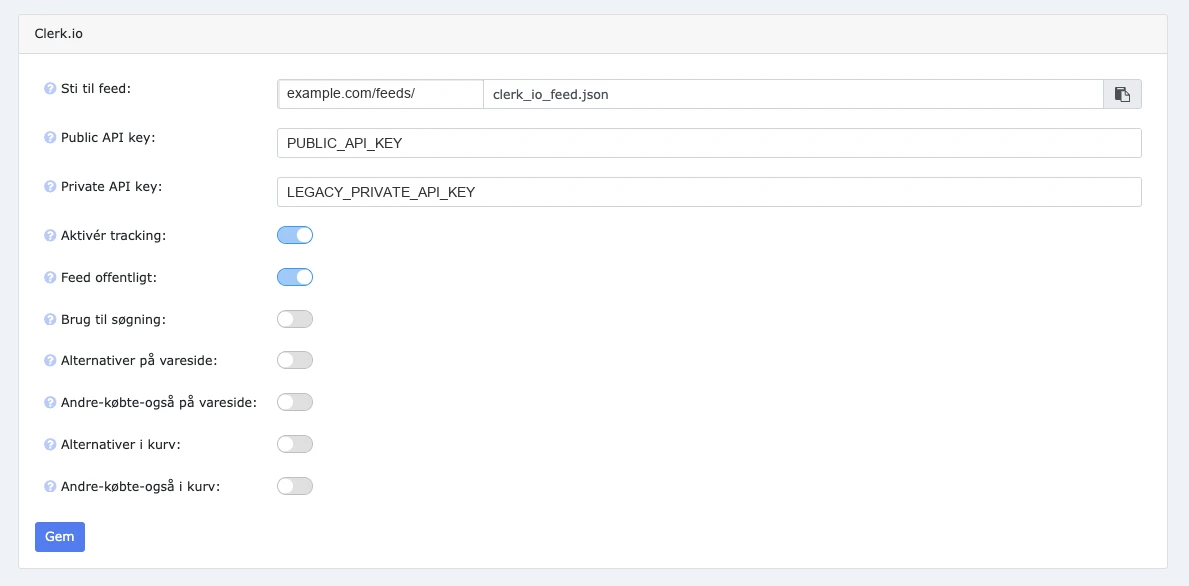
Connect ideal.shop to Clerk.io through its built-in integration. Enabling tracking installs both Clerk.js and sales tracking, so you can measure the impact of Search and Recommendations.
Enable Integration #
Add your Clerk.io API keys to the ideal.shop integration to connect your Store.
- In ideal.shop, go to Indstillinger > Integrationer and open Clerk.io.
- In my.clerk.io, open the Store you want to connect and go to Developers > API Keys.
- Copy your public API key into Public API key in ideal.shop.
- Copy your legacy private API key into Private API key in ideal.shop.
- Enable Aktivér tracking to install Clerk.js and sales tracking automatically.
- Enable Feed offentligt so Clerk.io can read the data feed.
- Click Gem.
You do not need to add Clerk.js or a sales tracking snippet manually when Aktivér tracking is enabled.
Sync Data #
Import your webshop data before configuring Search and Recommendations. Follow the Sync Data guide to set the feed limits and run the first import.
Next Steps #
Once your integration and data sync are configured, set up Recommendations and Search.