Introduction
Clerk.io is an AI agent built into my.clerk.io. You may also see it referred to as Ask Clerk.io in some parts of the dashboard — they are the same thing.
Think of it as a growth expert who has already read every dashboard, knows your full product catalogue, has studied how your visitors behave — and can actually implement the changes it recommends.
You just ask questions in plain language and get specific, data-driven answers about your store.
What it has access to #
Ask Clerk.io works with a live view of everything in your store. This includes:
Your performance — revenue, orders, conversion rates, and how Clerk.io contributes to each. It can compare this week against last month, spot trends over time, and tell you how you’re performing relative to other Clerk.io customers.
Your products and catalogue — every product, category, price, and attribute you’ve synced to Clerk.io. It can find specific products, compare them, check data quality, and identify gaps.
Your visitors — how individual customers browse and buy, which sessions were influenced by Clerk.io, and what the journey looked like from first click to order.
Your full setup — every active element, Merchandising campaign, search rule, synonym, email trigger, audience segment, design template, and chat configuration. It knows what’s enabled and what isn’t, and can read the configuration in detail.
Your data health — sync status, recent errors, import logs, and any debug messages — so it can help you investigate when something isn’t working as expected.
Multiple stores #
If you manage more than one store under the same company account, Ask Clerk.io can pull data and run analysis across all of them. You can ask questions that compare stores or apply a change to a specific one.
You can also reuse a setup from another store in the same company. Ask Clerk.io shows a plan before copying anything, creates copies switched off, and asks separately before turning them on. Read more about copying between stores.
The store switcher highlights stores with a new reply, a question waiting for your input, or a failed task. This makes it easier to see which stores need your attention first.
How to use it #
Select Ask Clerk.io in the main navigation to open the Ask sidebar and focus its message field. Type your request in plain language and send it.
Ask receives the page URL when you send each message. You can ask about the page or design you are viewing. After you move to another page, earlier messages keep the page context they had when they were sent.
Type your question in plain language — there is no special syntax required. The more context you give, the more precise the answer. Some examples:
- “What should I do to outperform my top 3 competitors?”
- “Why did my revenue drop last week compared to the week before?”
- “What are my top zero-result search queries, and what should I do about them?”
- “Show me which email triggers are currently disabled.”
- “How does my conversion rate compare to other Clerk.io stores in my industry?”
When Clerk.io recommends a change it can implement, it will offer to do it directly. You always review and confirm before anything is changed.
Progress and status #
Ask Clerk.io shows what it is doing while it works. It can tell you when it is building a design, waiting for a sync queue, asking for credentials, or waiting for your approval.
When it needs a decision, you can approve the proposed change, adjust it, or decline it directly in the conversation. Existing designs, emails, and data feeds stay unchanged until you approve an action.
Inline charts #
When Ask Clerk.io presents data — whether that’s revenue trends, conversion rates, or product comparisons — charts appear inline in the conversation, right where the data is being discussed.
This means you get a visual summary of the numbers without having to navigate away or open a separate report. The chart appears as part of the answer, so context and visualisation are always in the same place.
Setup links #
Ask Clerk.io can include direct links to relevant backend pages and resources in its replies. Follow a link to open that page or item. It can also link to the documentation it uses and to the selected store’s demo when you ask to preview your setup.
Getting help #
Open Help at the bottom of the navigation and choose how you want help:
- Open Ask Clerk.io for questions, planning and work in Clerk.io.
- Chat with support for human support. The messenger loads when you request it. After the first use in the same tab session, its floating chat icon remains available.
- Book a meeting under Meet face to face to choose a team member and an available appointment. Use this for a problem that is easier to show or for a strategy discussion.
If an inactive or expired-trial product shows an activation prompt, its action opens Help for the selected store.
Saved chats #
Your chats are saved per company and remain available when you reload the page or close the browser tab. Switching stores within the same company keeps the same chat open.
Reopen a chat #
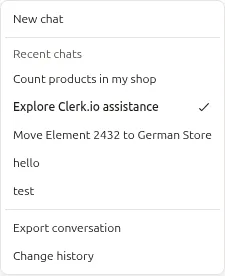
Open the ... menu in Ask Clerk.io to see your 10 most recent chats under Recent chats. Each chat has a short title, and the open chat is marked with a checkmark. Select a title to return to that conversation.
Ask Clerk.io remembers what it did earlier in that chat. You can reopen a conversation and ask it to undo a change, for example: “Undo the change you made to the search synonyms.”
Start a chat #
Select ... > New chat to start a separate conversation. Your previous chats stay in the recent chats list. This replaces Clear conversation.
Chats are deleted after 90 days without activity.
Safety #
Before applying any change, Ask Clerk.io shows you a summary of exactly what will be modified and asks for confirmation.
Destructive actions — deleting campaigns, removing rules, clearing data — include an extra confirmation step to reduce the risk of accidental changes.
If you want to understand what a change will do before committing to it, ask Ask Clerk.io to explain it first. It will describe the effect in plain language before asking for approval.
Read more about what it can analyse and implement in Capabilities.