Best Practices
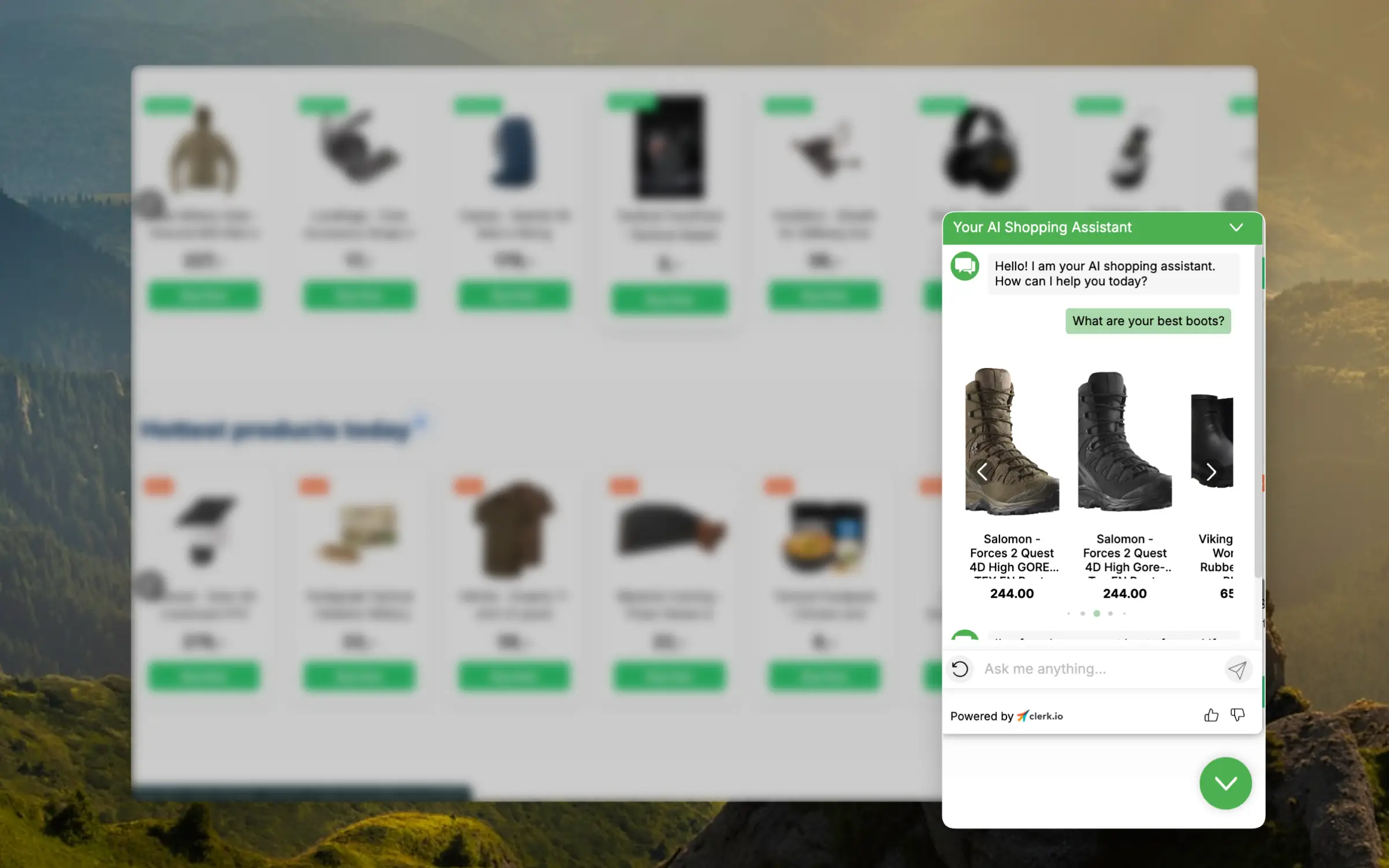
Chat is your personal customer service assistant that understands your business inside and out, and is available online 24/7. It can answer the vast majority of your customers’ queries in real-time, even if they reach out at 9:30 PM on Christmas Eve.
This article outlines the best way to get started with Chat and get the most out of it.
Why It Matters #
Before diving into configuration, it helps to understand the scale of the problem Chat solves.
Approximately 65% of all online shopping happens outside traditional business hours — evenings, weekends, and holidays. That means the majority of your customers are shopping precisely when your support team is offline.
The stakes are high once a visitor does have a question. Customers expect a live chat response in under 45 seconds. After one to two minutes of waiting, satisfaction drops sharply.
Think of it like a leaky bucket: every second someone waits, water drains out, and after a minute or two the bucket is empty. These are pre-purchase visitors — the least patient of all.
57% of shoppers will abandon a purchase if their questions are not answered quickly. That is more than half of everyone who had a genuine intention to buy, gone because no one was available to help them.
The long-term cost is even higher. 89% of customers will switch brands entirely after a poor support experience — not just abandon one purchase, but move to a competitor, potentially permanently.
Meanwhile, 53% of consumers say that fast response time is the single most important factor in customer support — above politeness, above expertise, above everything else.
The market has responded quickly. AI chatbot usage in customer support grew from 5% to over 80% in roughly five years. Stores using AI chat see 3 to 4 times higher conversion among visitors who engage with it.
It is also worth noting that not all chat is created equal. Traditional rule-based chatbots — the kind that say “Please select from the following options” — are a dead end with extra steps.
The visitor types their actual question and gets: “I’m sorry, I didn’t understand that. Please choose from these options.” That is not help.
When human agents are offline, traditional live chat just shows “leave a message” or “we are currently unavailable” — meaning the 65% of visitors shopping in the evening and on weekends simply get nothing.
AI chat is what closes the gap.
Configuration #
To ensure that Chat becomes an integrated part of your eCommerce store, you should configure it to understand and match your business. You can do this in Chat > Configuration.
Store Description #
Describe your store for Chat, as if you’re giving an elevator pitch about your webshop to a friend. Write in the language that you want Chat to communicate with your customers in.
The description gives Chat a clear sense of direction — what kind of store it is, who the customers are, and what it should focus on.
A supplement store that mentions being “the leading advisor for senior supplements in the Nordics” will have Chat naturally lean toward products suited to that audience, rather than defaulting to generic bestsellers. A fashion store that emphasises premium brands will have Chat reflect that positioning in every conversation.
A strong example of a description could be:
“Our store, Awesome Store, specializes in supplements, vitamins, protein powder, and other essential health products. We aim to be the leading advisor for senior supplements in the Nordics. Our catalog is extensive, and we offer very competitive prices.”
Initial Suggestions #
You likely already have a good idea of the questions customers ask most frequently. To help Chat respond quickly and inspire customers with other types of questions, include at least 5-10 initial suggestions to get them started.
Initial suggestions also shape the tone of the entire conversation. A supplement store that includes “I want to start taking creatine — where should I begin?” will see Chat respond with beginner-friendly, accessible options.
The same Chat will automatically shift tone when a visitor types “show me all the best premium creatine options” — prioritising higher-end products without any additional configuration.
A visitor who then follows up with “What other kinds of supplements would help me when I’m just getting into fitness?” gets a personalised overview — protein powder, omega-3s, a basic multivitamin — based on their stated goal.
Chat also decides how to present results intelligently. Sometimes a direct answer with product names and prices is right. Sometimes a browsable product slider is better. Sometimes a recommendation with reasoning is what the question calls for.
That adaptability is built in, but it is best demonstrated when your initial suggestions reflect the real questions your customers actually ask.
Here are some good examples:
- Do you sell Nike sneakers?
- Are there any fridges currently on sale?
- What are your best jeans under 30 euros?
- How long is your delivery time?
- Can I buy multiple sizes and return the ones that don’t fit?
Branding #
Chat can be customized to align with your brand’s style, so it looks like a seamless part of your website.
A well-branded Chat that matches the site’s colours, font, and general aesthetic feels like a natural part of the experience rather than a third-party widget bolted on as an afterthought.
Visitors are noticeably more likely to engage with something that looks like it belongs — and less likely to dismiss it as a generic pop-up.
The most important settings to adjust include:
- Primary color
- Font sizes
- Font family
- Currency
Support Contact #
Customers can ask Chat to forward their conversation to your Customer Service team if they need to speak with a human.
Add your contact email address, and Chat will forward a summary when prompted, letting you continue the conversation with the customer.
Consider a visitor who reports a damaged delivery through Chat. Chat recognises this needs a human and forwards the full conversation summary — including what was ordered, what was damaged, and what the customer has already described — to the support email.
The support agent has full context before they even reply. There is no “please explain your issue again.” The customer is not starting from scratch. That handover is smooth and professional, and it saves time for everyone involved.
A traditional FAQ page could never handle that kind of escalation — you would need a support team on standby around the clock.
Data #
Chat can access your products, categories, and pages. The more relevant data you provide, the better it can address customer queries.
Pages #
Pages like “About Us”, “Shipping Information”, “Opening Hours” and blog posts describing your products are excellent for answering questions. Make sure to sync these so Chat can access them.
Syncing your content pages is one of the lowest-effort, highest-impact things you can do to improve Chat quality. It turns static information that used to require a visitor to go hunting into something Chat can surface directly in conversation.
Here are three examples of page types that make a significant difference.
Return and shipping policies — A visitor on the fence about a purchase often has one specific concern that will tip them either way. “Can I return this if it does not fit?” or “Do you ship to Germany?” are questions that, if left unanswered, lead to abandonment.
If the returns and shipping pages are synced, Chat answers immediately and accurately. If they are not, Chat either guesses or deflects — and an uncertain answer about returns is often worse than no answer at all.
Buying guides and blog posts — A sports store that has written a guide on “how to choose the right running shoe” has already done the hard work of explaining the difference between road, trail, and track shoes, and what to look for based on gait and training goals.
With that page synced, a visitor asking “which running shoes are best for beginners?” gets a genuinely informed answer — not just a list of products, but context that helps them make the right choice. That kind of expertise builds trust in a way that pure product search cannot.
Sizing guides are another example with a direct impact on revenue. For clothing stores, a significant share of returns happen because customers order two or three sizes of the same item to try at home and send back the ones that do not fit.
If a sizing guide is synced, Chat can help a customer find their correct size before they order — answering questions like “I am usually a medium in Nike but a large in Adidas, which size should I get for this jacket?” A customer who orders the right size the first time does not return it.
Fewer returns means lower logistics costs, less handling, and more margin — which makes syncing a sizing guide one of the most commercially valuable pages a clothing store can add.
Practical information pages — Opening hours, physical store locations, loyalty programme terms, gift card policies — these are questions customers ask regularly, especially before making a larger purchase.
A visitor planning to visit a showroom who asks “are you open on Saturdays?” gets an instant answer rather than a support ticket. Syncing these pages ensures Chat handles the full range of what customers actually want to know, not just the product-related questions.
Products #
Chat can only discuss the product data you explicitly make available to it. This is controlled through Public Attributes in Chat > Configuration, where you define which data points Chat is allowed to use in conversations. As a baseline, Chat should have access to:
- Name
- Price
- Description
- URL
- Categories
Any attributes that matter to your customers should be added on top of that — colours, sizes, materials, technical specifications, delivery times, stock status, and anything else your products carry.
The richer the data, the better Chat can answer. A visitor asking “does this jacket come in size L?” gets a direct yes or no if sizes are synced.
Without that data, Chat has to respond with something like “please check the product page” — which is exactly the kind of non-answer that sends visitors elsewhere.
A visitor asking about the dimensions of a refrigerator, the energy rating of a washing machine, or the stock status of a specific item will get a precise answer rather than a vague one — which is often the difference between a sale and a bounce.
Every attribute you add is another question Chat can answer with confidence.
Support Workflow #
When you integrate Chat, you’re moving toward a new way to serve your customers. This enables you to work more efficiently while delivering faster, better responses than before.
With some adjustments to your workflow, you can save even more time on the queries that still require your attention.
Auto Reply #
When customers contact you outside business hours, include a note about your new always-online Chat assistant that can help them on your website.
Remember that 65% of shopping happens outside business hours — evenings, weekends, holidays. These are not edge cases, they are the majority.
An auto-reply that points customers to Chat means that this majority can self-serve instantly, rather than waiting 24–48 hours for a human response.
By the time your team arrives in the morning, a significant portion of the previous evening’s queries will already be resolved.
Asynchronous Replies #
Since the majority of customers will receive real-time assistance, you can begin working asynchronously for the remaining queries instead of needing to respond in real time.
We recommend responding to emails once or twice daily, going through all new requests each time.
The rest of your day can then be dedicated to strategic tasks, like writing or enhancing articles about frequently asked questions or analyzing customer requests to improve your inventory.
A support team that used to spend three hours a day answering the same twelve questions — delivery times, return windows, sizing guides — now spends those hours doing something that compounds.
They write content that improves Chat’s answers, which reduces the number of questions that need a human the following week, which frees up even more time.
It is not a replacement for human support. It is a shift in where human effort goes: away from repetition and toward the work that actually improves the store.
Monitor Performance #
Keep track of how Chat is helping your customers by reviewing various insights in my.clerk.io.
Testing #
It’s natural to be curious about your customers’ experiences with Chat, so we encourage you to have conversations with it yourself!
To avoid impacting your usage statistics, you can test conversations in your Demo Store at no charge. In my.clerk.io, go to Settings > General > Explore Demo Store to access the demo environment.
Testing with common edge-case questions is especially useful: unusual product queries, policy questions, complaints, and questions about out-of-stock items. These reveal gaps in your store description or public attributes before customers hit them.
A five-minute test session before going live will often surface one or two adjustments that make a meaningful difference to the quality of responses customers actually experience.
Analytics #
Check the dashboard to find out how many visitors are engaging with Chat, how much revenue they’re spending after these conversations, and how much time your Customer Service team has saved.
The revenue figure is worth paying attention to specifically. It shows how much was spent by visitors who interacted with Chat during their session — which gives you a direct read on whether Chat is contributing to sales or mostly fielding questions without converting.
If the number is growing alongside engagement, Chat is doing its job. If engagement is high but revenue attribution is low, it may be worth reviewing the quality of product recommendations or the range of initial suggestions.
Analytics also surfaces patterns that are easy to miss in individual conversations. A store that notices 30% of Chat conversations asking about delivery to a specific country has discovered something important — either their shipping page needs updating, or they are sitting on an untapped market they did not know existed.
Neither insight would show up in a standard sales report.
Similarly, if a large share of conversations are ending with a handover to customer service, that is a signal worth investigating. It might mean a specific question type is not being handled well — and adding one synced page or adjusting the store description could resolve it entirely, reducing the support load without any additional staffing.
These signals represent what real customers actually want to know — not what you assumed they would ask. That gap is often where the most valuable improvements are hiding.
Conversations #
Review recent conversations to see the exact messages exchanged between visitors and Chat. This gives you a ground-level view of the experience customers are actually having — which is often quite different from what you expect.
Reading through conversations regularly is one of the most effective ways to improve Chat over time. Patterns emerge quickly. If multiple visitors are asking the same question about assembly instructions for a flat-pack furniture product, that is a clear signal — add the assembly guide as a synced page, and Chat handles it automatically from that point on.
The same applies to questions Chat is answering poorly or not at all. If visitors are repeatedly asking about a specific product feature that Chat cannot address confidently — a fabric composition, a compatibility specification, a warranty detail — that tells you exactly which attribute is missing from your product data.
Add it, and those conversations go from uncertain to precise overnight.
It is also worth reading the conversations where customers escalated to a human. These reveal the situations Chat finds genuinely difficult — complex complaints, unusual edge cases, emotionally charged messages.
Some of those can be improved through better configuration. Others are legitimately human situations, and understanding which is which helps you set realistic expectations for what Chat should handle and what your support team should own.
Every repeated question that Chat learns to answer confidently is one fewer support ticket and one fewer frustrated customer. The feedback loop between Conversations and your configuration is where the long-term quality improvements come from.