Best Practices
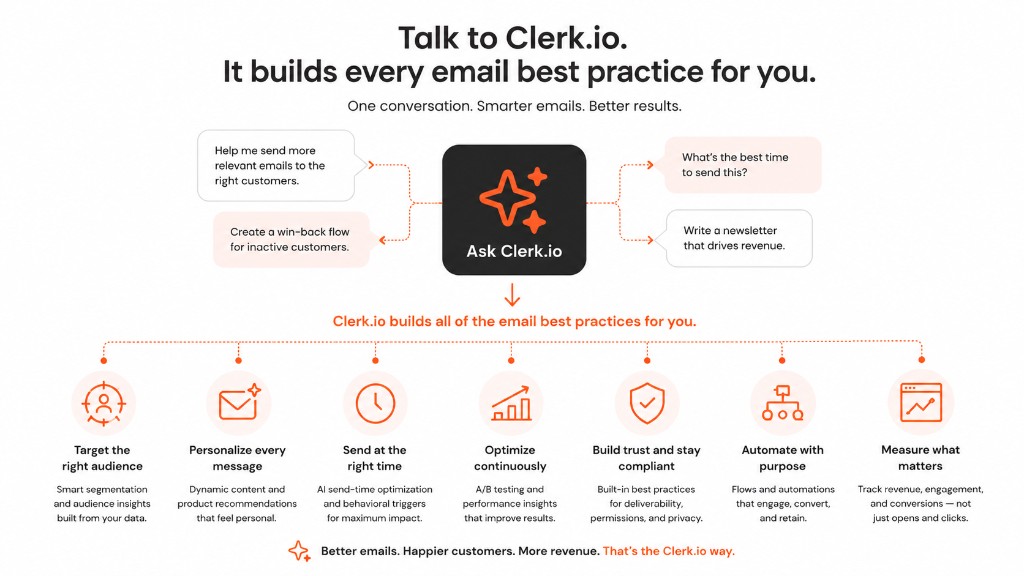
Clerk.io’s Email tools give you two ways to reach your subscribers: AI Newsletters for one-time sends, and Flows for automated sequences.
This guide covers the best ways to make the most of both, including Embeds for adding recommendations to emails sent through external platforms.
The fastest way to get started is to open Ask Clerk.io once a month, describe what you want to achieve, and let it plan and build your entire email calendar. It will analyse your store, your audience segments, and email marketing best practices — then propose a plan covering which newsletters to send, which flows to activate, and what designs to use. You review and approve everything before it goes live, and the whole process typically takes under an hour.
Everything Ask Clerk.io creates can also be built manually if you prefer. The strategy and recommendations below apply regardless of how you build it.
Email marketing is far from dead — there is plenty of profit to be made from contacting customers directly. The key is relevance.
Amazon often sends three to six emails a day to active customers, sometimes immediately after one another. That is not spam — it works because each email reflects something the customer was genuinely browsing.
PS5 games they were looking at yesterday, headphones they viewed for their partner, a book they almost bought.
Most of us have multiple interests, and receiving emails that cater to each of them separately is not a problem.
The subscribers who unsubscribe when you increase your email frequency are almost certainly people who would never have bought from you anyway. Getting your list cleaned up is a feature, not a problem.
It means your remaining budget and effort go entirely toward the customers who actually have purchase intent.
Among all eCommerce marketing channels, email is one of the most profitable and one of the most underused. Most stores pour the majority of their budget into paid ads on Google and Facebook, but there is a fundamental difference worth understanding.
Paid ads are a rented channel. The moment you stop paying, you disappear. Your email list, on the other hand, is an owned channel. You built it, you control it, and you decide how and when to use it.
The numbers back this up. Email marketing returns an average of €33–€39 for every €1 spent in eCommerce — compared to roughly €1.85 for Google Ads and €1.60 for Facebook Ads. That is roughly 18 times the return of paid social, from a channel you own outright.
That distinction matters enormously for ROI. As your email list grows, so does its value — independent of ad platform pricing, algorithm changes, or privacy restrictions. Every subscriber you add is an asset you keep.
That said, list growth alone is not the goal. The key metric to watch is revenue per subscriber.
If your list doubles but revenue per subscriber stays flat or falls, the growth is not translating into profit. The aim is to grow both — more subscribers and more revenue from each of them.
Relevance is what drives that. The more personalised and timely your emails are, the more each subscriber is worth.
That is exactly where Clerk.io comes in — by making sure that every email puts the right product in front of the right person, based on their specific interests and purchase behaviour, so that engagement stays high and revenue per subscriber keeps growing as your list does.
The impact of getting this right is significant. Personalised emails generate 5.7 times more revenue than generic campaigns, and personalised subject lines alone produce 26% higher open rates. Relevance is not a nice-to-have — it is the primary driver of email performance.
Email Recommendations #
Clerk.io’s email tools are designed to work alongside your existing email client — not replace it. Tools like Mailchimp, Klaviyo, and similar platforms are great for content creation, editorial newsletters, and managing your subscriber list.
Clerk.io’s strength is specifically product-centric sends: figuring out what to show, to whom, and when, so that every product-focused email you send is relevant to the person receiving it.
You can easily integrate Clerk.io’s AI-based recommendations through embeddable snippets into your existing email templates.
With these, your own email client sends the emails, but Clerk.io decides which products to show to each recipient.
With 20+ smart logics you can automate and personalise products in any email you send.
One important feature worth understanding from the start: Clerk.io does not decide what to show until the exact moment a recipient opens the email.
If an email is sent today and someone opens it a week later while they are on holiday, the recommendations are generated fresh at that moment. Any product that went out of stock in the meantime is automatically replaced with something available today.
Marketers never have to worry about showing sold-out items.
This concept is called open time recommendations — the products are chosen at the moment the email is opened, not when it is sent.
We recommend getting started by including Email Recommendations in the below types of emails.
Personal Newsletter #
This is one of the most effective emails you can send, and one of the simplest to set up. Once a month — ideally at the start of the month — send a short, to-the-point email to your entire subscriber list.
Keep the copy minimal: a brief line like “Here is your selection for this month” or “Thank you for being a great customer” is enough. The email’s job is not to say much — it is to show the right products.
Use Recommendations Based on Orders to populate the email with a personalised grid of products for each recipient. For customers who have placed at least one order, every product shown is tailored to their specific purchase history.
For new subscribers with no orders yet, Clerk.io falls back to the best-selling products right now — so the email is always relevant regardless of who receives it.
Because you know this email is personalised, you can tailor the subject line to match. Something like “Your monthly selection” or “Picked for you this month” signals that the email is worth opening — and it is.
This can be set up in your existing email client using the embeddable snippet, or sent as a fully automated scheduled email directly through Clerk.io. The latter is covered further down in the Scheduled Emails section.
To illustrate just how different this email can look from one inbox to the next, consider a sports store with three subscribers receiving the same send:
- A customer who has been buying cycling gear — a helmet, padded shorts, a saddle bag — sees a grid of cycling jerseys, a new handlebar computer that fits their price range, and a tyre repair kit.
- A customer who mostly buys yoga equipment — a mat, resistance bands, a foam roller — sees a new cork yoga block, a sweat-wicking top, and a guided stretching programme.
- A new subscriber with no orders yet sees the store’s current best sellers — a popular running shoe that has been flying off the shelves, a best-selling protein shaker, and a training glove that most customers tend to buy early on.
Three recipients, three completely different emails, all sent from the same template in a single send.
Impact: On average, webshops see an increase of 22% in avg. basket size and 2% in avg. order value for orders impacted by this email type.
Themed Newsletters #
You likely already send newsletters with specific themes, like your current Nike selection or Star Wars themed Lego sets.
For these, use Recommendations Based on Keywords, to show the best items for any theme, by simply writing a few keywords before copying this logic to your email.
Maybe you are writing about the latest dietary trends — because we never seem to run out of ways to lose weight — simply write the brand or ingredient name and the right products are pulled in automatically. No manual curation, no guessing which items to feature.
This can be re-used for any themed newsletters, and it will always show up-to-date items at the moment each recipient opens your emails.
Impact: On average, webshops see an increase of 34% in avg. basket size and 80% in avg. order value for orders impacted by this email type.
Category Newsletters #
These work very much like themed newsletters, except they revolve around specific categories from your site. E.g. showcasing all your American Football helmets or your latest inventory of funny sweatshirts.
There are two logics worth considering here, and the right choice depends on the type of store you run:
Best Sellers in Category shows the products that have sold well consistently over time. This works especially well for stores where the top products stay relevant across seasons — a supplement store sending a protein powder newsletter, for example, where the best-selling whey proteins from last month are still the right ones to feature this month.
It uses social proof: these are the products your customers keep choosing.
Hot Products in Category surfaces products that are starting to sell well right now. This is a better fit for fashion stores and trend-driven categories, where what is selling this week may look very different from what was selling last month.
A fashion store sending a “Knitwear” newsletter in October wants to show what customers are reaching for right now — not what was popular in spring.
Consider a clothing store that sends a “Denim” newsletter every season. Without dynamic recommendations, someone has to pick which jeans to feature — and there is a real risk they pick last season’s slow movers out of habit.
With either logic, the email automatically surfaces what is actually relevant at the time of send. No manual curation, no outdated picks, and no embarrassing moment where a customer clicks through to find the featured product is out of stock.
Impact: On average, webshops see an increase of 34% in avg. basket size and 80% in avg. order value for orders impacted by this email type.
Welcome Email #
These are meant to give new recipients a smooth overview of your webshop and email marketing, when they first sign up.
Use Visitor Recommendations to show them a personalised selection of items that each recipient will be likely to buy.
For large catalogues, this makes an enormous difference. A visitor who signed up after browsing plant-based protein products should not receive the same welcome email as one who was looking at skincare.
Most recipients who sign up have already browsed one or two products or categories — that is enough for Clerk.io to understand what they are interested in and personalise the email accordingly.
This requires you to track email addresses when visitors sign up, allowing Clerk.io to see the products they have browsed.
This can be set up in your existing email client using the embeddable snippet, or sent as an automated flow directly through Clerk.io. The latter is covered further down in the Flows section.
Impact: On average, webshops see an increase of 12% in avg. basket size and 6% in avg. order value for orders impacted by this email type.
Flows #
We recommend activating all of the below flows together, as they react to the many different ways that visitors approach your site.
Abandoned Session #
Fires when a visitor browses the webshop without placing an order.
As they will most likely have browsed a few products before leaving, the best logic to use is Visitor Recommendations. This will show a unique personalised selection of items that are likely to bring them back to the site.
Imagine a visitor who spent 20 minutes browsing running shoes, tried on three different product pages, and then disappeared — no cart, no purchase, no goodbye. An hour later, an email lands in their inbox with the exact shoe styles they were circling.
That email does not feel like a generic newsletter. It feels like someone noticed. And that recognition is often exactly the nudge that brings them back to complete the purchase.
Impact: On average, webshops see an increase of 37% in avg. basket size and 24% in avg. order value for orders impacted by this email type.
Abandoned Search #
Fires when a visitor has made at least 1 search before leaving the session without buying.
The email shows the matches for the latest search made by a visitor, before they left the session.
Visitors leave without buying for all kinds of reasons — the dog made a mess on the floor, the postman actually rang the bell for once, something came up. The intent was real.
Someone who searched for a Demon Slayer rice bowl and left five minutes later without buying was almost certainly interrupted, not disinterested.
An email arriving shortly after showing exactly what they searched for is one of the most effective ways to bring them back.
No other platform outside of Amazon can trigger specifically on search intent like this — it requires you to also use Search on your site.
Impact: On average, webshops see an increase of 33% in avg. basket size and 25% in avg. order value for orders impacted by this email type.
Abandoned Cart #
Fires when a visitor adds at least 1 product to the cart but leaves the session without buying.
Around 73% of all shopping carts are abandoned before checkout — meaning the vast majority of people who add something to their cart never complete the purchase. This is one of the most-used triggers for a reason. Customers tend to leave a webshop because life gets in the way, but they are likely to complete their purchase when they are reminded of items in their cart.
The email automatically shows the items that a visitor added to the cart, but it can also be configured to show other related items.
This is a great way to get them back, by clearly showing other items they might be interested in.
Picture a customer who added a camera body and a prime lens to their cart, got pulled into a meeting, and never came back. The cart email reminds them of exactly what they left behind — and alongside the cart items, it surfaces a camera bag they had not considered.
They come back to finish the purchase and leave with three items instead of two. That cross-sell would never have happened without the cart email bringing them back.
This flow requires cart tracking to be set up in Clerk.js.
Impact: On average, webshops see an increase of 11% in avg. basket size and 83% in avg. order value for orders impacted by this email type.
Made an Order #
Fires when a customer places an order.
This is a simple order-followup email that shows other items that might be interesting to the customer, based on their purchase.
The best logic to use is Recommendations Based on Orders as this will be uniquely personalised based on what the recipient has bought most recently.
This works especially well if you have the functionality to add extra products to their existing order, without having to place a new one, as customers can then add additional items without paying for extra shipping.
A customer who just bought a yoga mat is almost certainly open to a foam roller and a set of resistance bands. They are in fitness mode — the order email, arriving shortly after purchase, catches them at exactly the right moment.
If the order is still in fulfilment, there may even be an opportunity for them to add items to the same shipment, saving on shipping costs and increasing the order value in one step.
Impact: On average, webshops see an increase of 33% in avg. basket size and 25% in avg. order value for orders impacted by this email type.
Welcome Email #
Fires when a user becomes a subscriber.
This is similar to the Welcome Email in Email Recommendations, but as an automated flow it fires immediately the moment someone subscribes — without waiting for a scheduled send.
As they will most likely have browsed a few products before subscribing, the best logic to use is Visitor Recommendations. This will show a unique personalised selection of items that are likely to bring them back to the site.
A visitor who just signed up after spending ten minutes in the sports nutrition category does not need a generic “Welcome to our store” email. They need to see the protein powders and pre-workouts they were already looking at.
Sending them exactly that — automatically, within minutes of signing up — is the fastest way to turn a new subscriber into a first-time buyer.
Scheduled Emails #
The case for scheduling emails rather than sending manually every time comes down to consistency and effort. A marketer who sends emails manually has to remember to do it, find time to do it, and resist the temptation to skip a month when things get busy.
The months you skip are rarely the ones where nothing would have converted.
Recurring emails remove that friction entirely. Once set up using a Recurring / Scheduled Flow, they go out reliably every month — beginning, middle, and end — without anyone having to think about it.
The products are always fresh because Clerk.io generates them at send time based on what is actually selling and what each recipient has actually bought.
Consider a store that ran a manual monthly newsletter for two years, sometimes on time, sometimes three weeks late, sometimes not at all. After switching to scheduled flows, the same store went from an average of eight sends a year to twelve — simply because the sends no longer depended on someone having a free afternoon.
That consistency alone drove a measurable lift in monthly revenue from email, without changing the template or the logic once.
The below 4 emails give you a great monthly rhythm that will keep visitors coming back. They should be sent to all your subscribers.
Personal Newsletter #
This email should use Recommendations Based on Orders to show a unique selection to every single recipient each month.
Send this in the beginning of each month, where most people just received their salaries and are actively looking for something to spend it on. The timing is not arbitrary — it matches a real shift in purchasing intent that happens reliably every month for most of your recipients.
Impact: On average, webshops see an increase of 22% in avg. basket size and 2% in avg. order value for orders impacted by this email type.
Latest Trends #
This email should use Hot Products to show what is currently trending in your catalogue, based on what customers are buying right now.
This is especially useful for webshops that update their catalogue regularly, like fashion and sports stores.
Send this email in the second week of the month to avoid clashing with the personal newsletter.
A fashion store’s Hot Products email in early spring might surface a lightweight bomber jacket that started selling fast as temperatures climbed — without anyone having to notice the trend manually or update the email template.
The products are decided by what customers are actually buying at the moment of send. By the time the email lands in inboxes, the trend is already real — and the email is capitalising on it automatically.
Impact: On average, webshops see an increase of 16% in avg. basket size and 45% in avg. order value for orders impacted by this email type.
New Items #
This email should use Newest Products to show that your catalogue is evolving. If you regularly get new products in stock, it is a great way to get customers back to browse the new selection.
Send this email in the third week of the month.
A photography accessories store receives new lenses, filters, and accessories regularly — but most loyal customers only discover them if they happen to visit the site at the right moment.
The New Items email closes that gap. It surfaces what has just arrived and delivers it directly to the inboxes of customers who would genuinely want to know. For certain types of buyers — sneaker enthusiasts, hobbyists, collectors — being first to see something new is itself a reason to click.
Impact: On average, webshops see an increase of 23% in avg. basket size and 50% in avg. order value for orders impacted by this email type.
Personal Offers #
This email should use Recommendations Based on Orders with a filter for only showing products on sale. It’s meant to show a personal selection of items that are also discounted, so each recipient gets a unique incentive to come back.
Send this email during the last week of the month, where most consumers are looking for bargains due to low balances. Budgets run thin by the end of the month, but people still need things — a new shirt, a replacement charger, something that has been on the list for a while.
They are not going to wait until next month. They are going to find the best deal available right now.
Some purchases do not require inspiration — they just require the right price at the right moment. A phone charger that has been fraying for three months and held together mostly by optimism. A pair of running shoes that are clearly done but not quite bad enough to justify full price.
The moment a good deal appears on something like that, it is an immediate buy.
A personalised sale email, landing at exactly this moment, converts precisely because the timing matches real purchasing behaviour.
Impact: On average, webshops see an increase of 13% in avg. basket size and 24% in avg. order value for orders impacted by this email type.
Streamline Designs #
Email Recommendations and Campaigns should fit snugly into your existing webshop design, and it should be easy for visitors to notice and interact with them.
Subject Lines #
Spend time on your subject lines — they are the single biggest driver of open rates, and a great email with a weak subject line is a wasted send.
When using Clerk.io’s logics, you already know what type of products will appear in each email, so you can write subject lines that match precisely.
Consider a jewellery store that sells Swarovski products — rings, necklaces, and earrings alongside Swarovski Star Wars crystal figurines. Two very different audiences, same store.
The segment interested in Star Wars figurines should not receive a subject line about elegant jewellery, and the segment browsing engagement rings should not receive one about collectibles from a galaxy far, far away.
Each audience gets a subject line written specifically for what they are about to see — and the products match accordingly.
Tailoring the subject line to the specific audience and logic you are using dramatically increases open rates and conversions.
It also helps to add one or two lines of flavour text to each email — a brief intro that tells recipients what they are looking at. Most people will only read the subject line and possibly a headline, but flavour text gives the email a more cohesive and professional feel.
It sets up the product selection that follows and makes the email feel intentional rather than just a grid of products with no context.
Branding #
Email Recommendations and Campaigns should follow your brand style to become an integrated part of your emails. Default designs can be tailored using either our Design Editor, or with code designs.
In most cases, it is possible to make Clerk.io’s product cards look exactly like the product cards on the rest of your webshop and in your existing email templates.
As long as you sync the attributes your cards rely on — colours, sizes, badges, labels, or anything else displayed on the card — the design can be matched precisely.
The remaining work is mostly about ensuring that fonts, spacing, and button styles align with your existing email design.
You do not need to do this manually. There are two AI-assisted ways to get help:
- Ask Clerk.io is a dedicated AI assistant that can handle virtually anything on your store — including replicating your existing design and pushing it directly into your Clerk.io setup.
- The AI Design Editor is built into the code design editor in my.clerk.io. It lets you describe the changes you want in plain language and applies them to the code in real time, making it easy to iterate visually without leaving the editor.
Both options remove the need to write code yourself — Ask Clerk.io is the broader tool, while the AI Design Editor is purpose-built for design work and lets you see changes as they happen.
The most important elements to streamline are:
- Font family
- Font size
- Font color
- Button color
In addition, Campaign designs should also include these:
- The 4 most relevant categories in your header.
- Links to various social platforms.
- The global unsubscribe link in the bottom of emails.
Analytics #
This dashboard helps you identify emails you can actively improve if they are not providing you with enough return on investment.
The dashboard shows you open rates, click rates, conversion rates, and revenue generated for each email type — giving you a clear picture of what is working and what is not.
The most valuable use of it is not just checking the numbers, but asking why they look the way they do and then making a change.
A few examples of what that looks like in practice:
Your New Items email is generating almost no revenue. When you look into it, you realise you have not added any new products in over a month — so the email is surfacing the same items it showed last time, and recipients who opened it before are already familiar with them.
You switch it to a Latest Trends email temporarily, and engagement picks back up immediately.
Your Abandoned Cart emails have a high open rate but conversion is lower than expected. The data shows that the cart items are expensive and there are no cross-sell products included — recipients open it, see a high-priced item they were already unsure about, and leave again.
Adding a cross-sell logic with more accessible products gives them something easier to say yes to, and the conversion rate improves from the next send.
Your Welcome Email has a noticeably lower open rate than your other emails. You check the subject line and find it reads “Welcome to our store!” — a perfectly polite nothing that gives recipients no reason to open it.
You update it to something that hints at what is inside, like “Your picks are waiting” or a reference to the category they were browsing when they signed up. Open rates lift on the next batch of sends.
None of these fixes are complicated. They all start from noticing a number that does not look right and following it to the cause.
Reviewing this dashboard regularly allows you to find the best places to spend your time when you want to improve your Clerk.io performance.
Merchandising #
When you have specific marketing goals, like promoting your own whitelabel products or clearing your inventory of low-stock items, use Merchandising to quickly influence all Clerk.io-enhanced emails.
Use customer values in a rule’s product filter to match products to each recipient’s country, gender or customer group. This works in Email Embeds, AI Newsletters and Flows.
The chosen attribute must be available on the recipient’s customer record in Clerk.io. If it is missing, the customer-based rule is skipped.
A common example is margin optimisation. A sports store sells both branded protein powders from major manufacturers and its own whitelabel version at a significantly higher margin. Clerk.io’s AI will naturally surface the products most likely to convert — which often means the well-known brands.
A simple boost campaign shifts the balance, nudging the whitelabel option into more prominent positions across all product-focused emails. Customers still see relevant suggestions. The store just earns more from each order.
Another common use is clearing overstock. A store sitting on too many units of a specific backpack can create a short boost campaign that increases the backpack’s visibility across all scheduled emails for the next three weeks — without running a sale or manually editing every template.
By the time the campaign ends, stock is back in balance.
Seasonal campaigns work the same way. A store preparing for winter can boost coats, boots, and scarves across all emails in October, before the rush begins.
Those products appear prominently at exactly the moment customers are starting to think about them — not a week after everyone has already bought from a competitor.
It takes less than 5 minutes to set up rules that tell Clerk.io to focus on the products that matter most to you right now.